AI Engineers Who Can’t Debug Are Getting Fired (Here’s How I Debug with Claude Code)
“AI is creating a generation of developers who can’t debug their own code.”
AI Engineers Who Can’t Debug Are Getting Fired (Here’s How I Debug with Claude Code)

“AI is creating a generation of developers who can’t debug their own code.”
That headline made rounds across every developer forum this month.
And the reaction was split…half the comments agreed, the other half called it fear-mongering.
Here’s my take after shipping production code with AI agents for five months: the headline is half right!
AI agents can make you a worse debugger…if you use them wrong. They can make you a significantly better debugger if you use them the way I’m about to show you.
I broke a working app on purpose.
Five bugs.
Then I fixed all five using Claude Code.
Here’s the exact workflow.
The Setup
I took the **poll app I created in my previous article**(React, Vite, TypeScript, Tailwind, Supabase) and introduced five real bugs.

Introducing five real bugs
The kind that show up in production.
Not syntax errors…but logic bugs, cross-file bugs, and state bugs that are hard to catch by reading code.
Then I opened Claude Code and debugged each one using Opus 4.7.

Opus 4.7
Bug 1: Votes Don’t Persist After Page Refresh

Votes Don’t Persist After Page Refresh
The symptom:
- You vote on a poll.
- Results show up.
- You refresh the page.
- Your vote count resets to zero.
What I told Claude Code:
When I vote on a poll, the results display correctly. But when
I refresh the page, all vote counts reset to zero. The votes
are not being saved to Supabase. Debug this.
What Claude Code did: It read the voting component, found the onClick handler, and identified the problem immediately…the vote was updating local React state but never calling supabase.from('options').update(). The state change made it look like the vote worked, but nothing hit the database.

Claude code fixing bug #1
Claude Code fixed the handler to write to Supabase first, then update local state from the response.
One prompt.
Fixed.
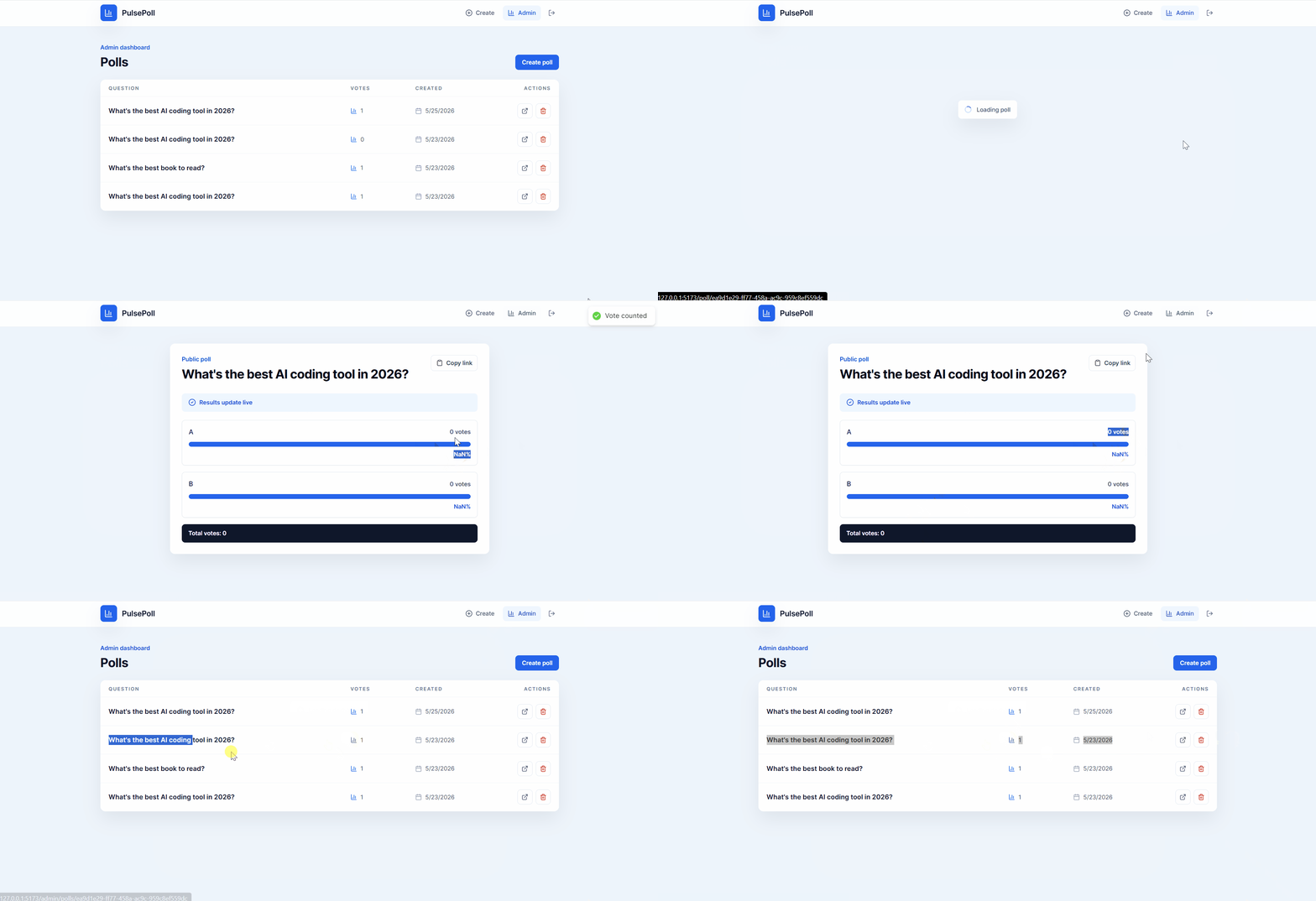
Bug #1 — Fixed
The debugging lesson: AI agents are excellent at tracing data flow across files. “Where does this value go after the user clicks?” is a question Claude Code answers faster than any console.log chain.
Bug 2: Real-Time Updates Fire Twice

Real-Time Updates Fire Twice
The symptom:
- When someone votes, the results bar chart jumps — the vote count increments by 2 instead of 1.
What I told Claude Code:
Vote results are doubling. When someone votes once, the count
goes up by 2 instead of 1. Check the realtime subscription
for duplicate event handling.
What Claude Code did: It found two Supabase realtime subscriptions on the same channel — one in a useEffect and another in a custom hook. Both fired on the same event.

Claude code fixing bug #2
It removed the duplicate and consolidated into one subscription with proper cleanup.
One prompt.
Fixed.

Bug #2— Fixed
The debugging lesson: duplicate subscriptions and event listeners are invisible when you’re reading code file by file.
Claude Code reads across files and spots the overlap instantly.
Bug 3: NaN% on Zero-Vote Polls

NaN% on Zero-Vote Polls
The symptom:
- A newly created poll shows “NaN%” for all options instead of “0%.”
What I told Claude Code:
New polls with zero votes show NaN% in the results bar chart
instead of 0%. Fix the percentage calculation.
What Claude Code did: Found the division: (option.votes / totalVotes) * 100. When totalVotes is 0, JavaScript returns NaN.

Claude code fixing bug #3
It added a guard: if total votes is 0, return 0 for all percentages.
One prompt.
Fixed.

Bug #3 — Fixed
The debugging lesson: edge case bugs like division by zero are the ones that slip through manual testing. Describing the symptom to Claude Code gets you a fix faster than searching “NaN JavaScript division” and reading Stack Overflow threads.
Bug 4: Users Can Vote Multiple Times

Users Can Vote Multiple Times
The symptom:
- The localStorage check for duplicate voting isn’t working. Users can vote as many times as they want.
What I told Claude Code:
Users can vote unlimited times on the same poll. The duplicate
vote prevention using localStorage is not working. The poll ID
should be stored after voting and checked before allowing
another vote.
What Claude Code did: It found the localStorage logic. The key was being set as voted_${pollId} but the check was looking for poll_voted_${pollId} — a key mismatch.

Claude code fixing bug #4
Both were in different files. It standardized the key format across both files.
One prompt.
Fixed.

Bug #4 — Fixed
The debugging lesson: cross-file inconsistencies are the hardest bugs to spot manually. The key was set in one file and read in another. Claude Code’s ability to hold both files in context and spot the mismatch is the entire value proposition.
Bug 5: Admin Dashboard Shows Deleted Polls

Admin Dashboard Shows Deleted Polls
The symptom:
- After deleting a poll from the admin dashboard, it disappears. But when you refresh the page, it comes back.
What I told Claude Code:
When I delete a poll from the admin dashboard, it disappears
from the UI. But refreshing the page brings it back. The
delete is not removing the row from Supabase. Debug
the delete function.
What Claude Code did: Found the delete handler. It was removing the poll from local React state (using a filter) but the actual supabase.from('polls').delete().eq('id', pollId) call was missing the await keyword. The function returned before the database operation completed, and the component's error handling silently caught the unresolved promise.

Claude code fixing bug #5
Added await, added proper error handling, confirmed the cascade delete removed associated options too.
One prompt.
Fixed.

Bug #5 — Fixed
The debugging lesson: missing await on database calls is one of the most common production bugs in modern JavaScript.
The app appears to work — local state updates immediately — but nothing persists.
Claude Code catches this pattern consistently.
Why This Makes Me a Better Debugger, Not a Worse One
Every bug I showed you follows the same workflow:
- Describe the symptom (what happened vs what I expected)
- Claude Code reads the relevant files
- It traces the data flow or event chain
- It identifies the root cause
- It fixes the code
I didn’t ask Claude Code to “fix my app.” I described a specific bug with specific symptoms. That distinction matters.
The developers who can’t debug with AI agents are the ones typing “my app is broken, fix it.”
That’s not debugging.
The developers who debug well with AI agents know how to isolate a symptom, describe it precisely, and point the agent at the right scope.
That skill — symptom isolation — is the same skill that makes you a good debugger without AI.
The agent just makes you faster at it.
Final Thoughts
The headline isn’t wrong about one thing: developers who never learned to describe bugs precisely are struggling.
Not with AI…with the fundamental skill of debugging.
AI agents expose a gap that already existed. If you can’t describe what’s wrong, you can’t fix it…with or without Claude Code.
The agent just makes the gap more visible and more expensive.
The developers getting promoted right now aren’t the ones who memorize error codes.
They’re the ones who can describe a symptom in one sentence, point an agent at the right files, and ship a fix in 90 seconds.
That’s not “can’t debug.” That’s debugging at a higher level.
I’m an AI software engineer and tools curator. I test, break, and review AI-powered tools so you don’t waste time on the hype. Reach out to me at felixkebaya@gmail.com.
***Follow me for more authentic breakdowns like this one.***
***Connect with me on LinkedIn.***
메타데이터
- post_id
- 2a138c3acdbe
- slug
- ai-engineers-who-cant-debug-are-getting-fired-here-s-how-i-debug-with-claude-code-2a138c3acdbe
- url
- https://medium.com/@felixkebaya/ai-engineers-who-cant-debug-are-getting-fired-here-s-how-i-debug-with-claude-code-2a138c3acdbe
- canonical_url
- https://medium.com/@felixkebaya/ai-engineers-who-cant-debug-are-getting-fired-here-s-how-i-debug-with-claude-code-2a138c3acdbe
- author_url
- https://medium.com/@felixkebaya
- status
- ok
- fetched_at
- 2026-06-09 14:34:10