My Number One Answer to Sysadmins Who Ask Me How to Get Started with Infrastructure as Code
When I first started moving from managing racks of on-premises servers to thinking about AWS, the advice I always received was, “Learn…
My Number One Answer to Sysadmins Who Ask Me How to Get Started with Infrastructure as Code
When I first started moving from managing racks of on-premises servers to thinking about AWS, the advice I always received was, “Learn Python.” This is a common hurdle for many when getting started with Infrastructure as Code. I dove in, but trying to script server deployments with the boto3 SDK felt like building a skyscraper with a screwdriver.
I was immediately bogged down with procedural complexities: writing endless lines of code for error handling, parsing API call responses, and explicitly checking if a resource already existed to avoid duplicate creations. This imperative approach required me to manage the infrastructure state in my head, or worse, in a clunky script. For Infrastructure as Code for sysadmins, this felt like a step backward.
Before I could even define what I wanted my infrastructure to look like, I was trapped in a cycle of low-level logic. My scripts were becoming fragile, difficult to read, and impossible to maintain. This approach to learning Infrastructure as Code without programming experience was proving to be a massive roadblock.
It felt like I was back to writing convoluted shell scripts, but with more complex syntax and an overwhelming initial learning curve. I spent weeks trying to perfect a script to launch a simple EC2 instance with a security group, repeatedly battling issues like non-idempotent API calls or unexpected permission failures, and I realized this was not sustainable.
I was a sysadmin, not a full-time software developer. My goal was to manage infrastructure, not to build and maintain complex applications to do so. This experience highlighted a fundamental misunderstanding of IaC for someone with a systems background: the goal is not to become a programmer, but to effectively describe your systems using declarative Infrastructure as Code tools.
The contrast between this complex, imperative scripting and a cleaner, declarative approach is stark.
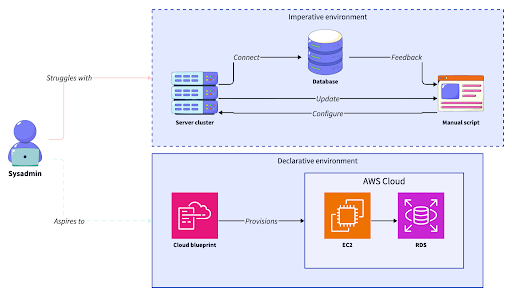
This shift from procedural code to architectural blueprints was the key insight that unlocked the cloud for me. The next step was understanding declarative vs. imperative Infrastructure as Code and why this difference is so critical.
Declarative vs. imperative Infrastructure as Code: Why the difference matters
Having spent years manually configuring systems or writing sequential shell scripts, I understood the “how-to” instruction perfectly. You apt-get install a package, then you systemctl start the service. This involves step one, then step two. But in the cloud, this approach is a direct path to chaos. I quickly learned that an imperative approach, where I tell the system exactly what steps to take, leads to configuration drift and unmanageable, inconsistent systems. It creates snowflake servers, each one slightly different due to manual patches or failed script runs.
What I needed was a declarative configuration: a simple statement of the desired end state for my VPCs or S3 buckets. Instead of writing the procedure, I needed to define the outcome.
This is like moving from a cooking recipe that says “chop onions, add to pan, sauté for 5 minutes” to one that simply specifies the final dish: “prepare delicious risotto.” The chef (the tool) handles the intricate steps, adding ingredients if they are missing or leaving them alone if they are already present. My job shifts from micromanaging the process to defining the final product.
Watch out: Configuration drift silently undermines consistency. It happens when manual changes in the AWS console make the live environment different from what your scripts or documentation expect, leading to unpredictable behavior and failed deployments.
This declarative model is the foundation of modern cloud management because it focuses on the “what,” not the “how.” The tool is responsible for reconciling the current state with the desired state, which eliminates the need for me to write complex logic for creating, updating, or deleting resources. To make this distinction clearer, let us compare these two approaches side by side.
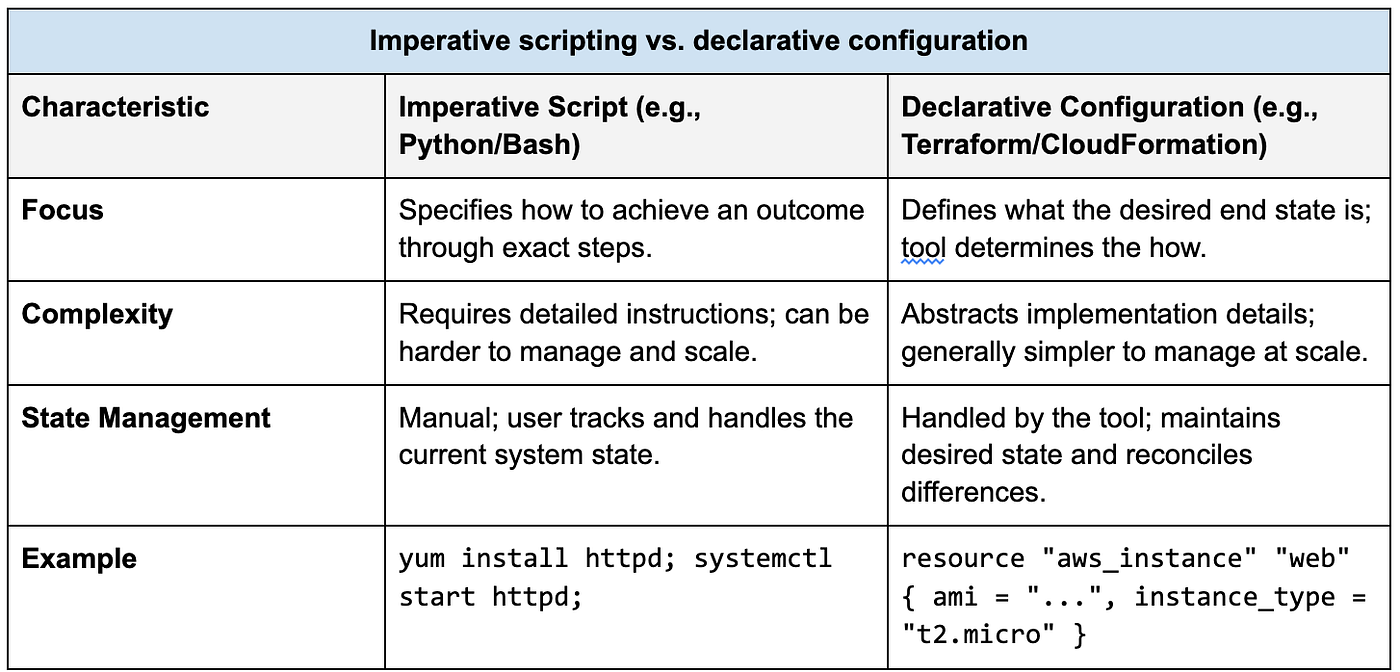
The table makes it obvious that declarative Infrastructure as Code tools for beginners abstract away the procedural complexity, letting me focus on architecture.
How declarative IaC tools define and manage state
That is why tools like HashiCorp Terraform and AWS CloudFormation became my go-to. They are built on the declarative model that sysadmins like me need. When doing an Infrastructure as Code tools comparison, it is clear these two are leading choices for cloud environments. Instead of directly managing AWS SDKs, I could define my entire desired state (say, a multi-subnet VPC or an EC2 instance with specific IAM policies) in a simple configuration file. The tool then provisions and manages those resources, ensuring the actual state always matches my desired state without me having to write a single line of procedural logic. This is all managed through a state file, which acts as a canonical record of my infrastructure.
Note: The Terraform state file is a crucial component. It maps the resources defined in your configuration files to the real-world resources in your cloud account, tracks metadata, and improves performance for large infrastructures.
This state management is what prevents drift. Before making any changes, the tool runs a check against the state file and the live environment to generate an execution plan. I can see exactly what will be created, modified, or destroyed before I approve it. It is like having a central orchestrator for my AWS resources, which saved me from manual, error-prone clicks in the console and ensures a consistent VPC layout every time. This approach is fundamental for anyone looking to build a solid foundation in cloud computing fundamentals.
This workflow simplifies the entire process, abstracting away the complex API interactions.

The benefits of this model extend far beyond simplifying deployment; it transforms how my team and I manage infrastructure.
Infrastructure as Code best practices: Treat your config as a document
One of the most significant benefits of using declarative Infrastructure as Code tools is turning my infrastructure into a version-controlled asset. Storing these declarative configuration files in a Git repository means that every change is part of an immutable, auditable history. My team and I can review proposed changes to our Terraform modules for security groups or S3 bucket policies via pull requests, preventing configuration drift and undocumented modifications. This brings a software development life cycle to infrastructure management, a core tenet of Infrastructure as Code best practices.
This auditable CI/CD pipeline approach gave me the peace of mind I never had with manual changes. For example, when a developer needs a new IAM role, they can submit a pull request with the proposed policy changes. We can review it, ensure it follows the principle of least privilege, and merge it, triggering an automated deployment. This is significantly more secure and scalable than logging into the AWS console and making manual changes. Following these best Infrastructure as Code practices for system administrators is crucial for security and stability.
Practical tip: Use a tool like Terragrunt or Terraform Workspaces to manage different environments (dev, staging, prod) from the same codebase. This helps maintain consistency and reduces code duplication.
It makes collaboration intuitive and error reduction tangible, especially when dealing with critical IAM policies or ensuring cost optimization on provisioned resources. My entire architecture becomes a living document that reflects the exact state of my cloud environment. This is how to document Infrastructure as Code processes effectively:
# Create a sample Terraform configuration file for an S3 bucket
cat <<EOF > main.tf
resource "aws_s3_bucket" "my_bucket" {
  bucket = "my-unique-application-bucket-12345" # Specify a unique bucket name
  acl    = "private"                             # Set access control list

  tags = {
    Environment = "Dev"
    Project     = "MyWebApp"
  }

  # Enable versioning for the bucket
  versioning {
    enabled = true
  }
}

output "s3_bucket_id" {
  description = "The ID of the S3 bucket"
  value       = aws_s3_bucket.my_bucket.id
}
EOF

# Simulate a Git repository setup (optional, for local testing)
# mkdir my-tf-repo && cd my-tf-repo
# git init
# touch .gitignore # Create a dummy .gitignore if needed
# git add .gitignore
# git commit -m "Initial commit"

# --- Git Workflow ---
# Replace <repo> with your actual repository URL
echo "--- Starting Git Workflow ---"
git clone https://github.com/your-org/your-repo.git # Clone the repository
cd your-repo                                         # Navigate into the cloned repository
mv ../main.tf .                                      # Move the created main.tf into the repo directory
git checkout -b feature/new-bucket                   # Create and switch to a new feature branch
git add main.tf                                      # Stage the new Terraform file
git commit -m 'Add S3 bucket configuration'          # Commit the changes with a descriptive message
git push origin feature/new-bucket                   # Push the new branch and its commits to the remote
echo "--- Git Workflow Completed ---"
With this foundation, getting started is straightforward and does not require a programming background.
An Infrastructure as Code step-by-step guide for your first project
This beginner’s guide to declarative Infrastructure as Code does not require overcoming numerous obstacles. When I first started, I chose Terraform because its human-readable syntax felt more intuitive than CloudFormation’s JSON/YAML. The initial Infrastructure as Code workflow is something any sysadmin can grasp in a relatively short time. First, install the tool on your local machine and configure your AWS credentials, similar to setting up the aws cli. Next, create a simple .tf file to define a single, low-impact resource like an S3 bucket or a basic security group. This is where you declare your desired state.
The next step is to run the commands. Running terraform init prepares your working directory, and terraform plan gives you a dry run of the changes. This step is critical; it shows you exactly what Terraform will do without actually touching your infrastructure. It provides a crucial safety mechanism. Once you are confident with the plan, you run terraform apply to provision the resources. It is a tangible and immediate result that builds confidence. You can see your declaration translate into real AWS infrastructure in minutes.
My primary recommendation for anyone starting Infrastructure as Code with Terraform is this: start small, confirm its functionality, and then expand. This approach provides a clear path to understanding complex VPC layouts and advanced IAM policies without the initial frustration. By embracing this declarative mindset, you are not only deploying infrastructure; you are building a scalable, resilient, and human-readable foundation for your cloud environment.
Frequently asked questions about IaC for sysadmins
Can I learn Infrastructure as Code without prior programming knowledge?
Yes, this is the central point of this guide. While imperative IaC (like scripting with Python’s boto3) requires programming skills, declarative tools like Terraform and AWS CloudFormation are designed for defining outcomes, not procedures. Your job is to describe what you want, not how to build it, making this the ideal path for Infrastructure as Code for non-programmers.
How does declarative Infrastructure as Code differ from imperative?
Declarative IaC focuses on the desired end state. You define what your infrastructure should look like, and the tool figures out how to make it happen. Imperative IaC focuses on the process. You write a sequence of commands (a script) to be executed to create the infrastructure. The declarative approach is generally more robust, less error-prone, and better at preventing configuration drift.
How do Terraform and AWS CloudFormation compare for Infrastructure as Code?
Both are excellent declarative tools. The main difference is that AWS CloudFormation is a native AWS service, offering deep integration but limited to the AWS ecosystem. Terraform is cloud-agnostic, meaning you can use it to manage resources across multiple providers (AWS, Azure, Google Cloud, etc.) with a single language. Many find Terraform’s syntax (HCL) more human-readable than CloudFormation’s JSON/YAML, making it a popular choice for beginners.
What are common mistakes in Infrastructure as Code and how to avoid them?
Some common mistakes in Infrastructure as Code include: 1) Committing state files (like terraform.tfstate) to version control, which exposes secrets. Use a remote backend instead. 2) Not using version control (like Git) from the outset, which makes tracking changes and collaboration impossible. 3) Making manual changes in the cloud console, which causes configuration drift and defeats the purpose of IaC. Always make changes through your code.
메타데이터
- post_id
- 2a255322e3e7
- slug
- my-number-one-answer-to-sysadmins-who-ask-me-how-to-get-started-with-infrastructure-as-code-2a255322e3e7
- url
- https://medium.com/@repobaby/my-number-one-answer-to-sysadmins-who-ask-me-how-to-get-started-with-infrastructure-as-code-2a255322e3e7
- canonical_url
- https://medium.com/@repobaby/my-number-one-answer-to-sysadmins-who-ask-me-how-to-get-started-with-infrastructure-as-code-2a255322e3e7
- author_url
- https://medium.com/@repobaby
- status
- ok
- fetched_at
- 2026-06-26 21:52:29