Inconsistent Session Logout After Enabling 2FA on Epic Games — A High-Impact Flaw Explained
Author: Gourav Kumar (@spider_gk) Platform: EpicGames.com Severity: High (CVSS 7.5) Category: Insufficient Session Expiration Status…
Inconsistent Session Logout After Enabling 2FA on Epic Games — A High-Impact Flaw Explained
Author: Gourav Kumar (@spider_gk) Platform: EpicGames.com Severity: High (CVSS 7.5) Category: Insufficient Session Expiration Status: Marked as Duplicate
Vulnerability Summary
While exploring Epic Games’ account security mechanism, I discovered a critical flaw in how active sessions are managed across devices after enabling Two-Factor Authentication (2FA).
After enabling 2FA on one device, existing sessions on other devices remain active — allowing an attacker to perform sensitive actions such as changing the password without being prompted for 2FA.
This flaw undermines the core purpose of multi-factor authentication: to prevent unauthorized access even if the credentials are compromised.

Proof of Concept (PoC)
Steps to Reproduce:
- Log in to your Epic Games account on two different devices (Device A and Device B).
- On Device A, enable 2FA using SMS or email verification.
- On Device B, refresh the page.
- Notice that the session remains active.
- Now go to “Password & Security” on Device B and change the account password successfully.
🔁Expected Behavior:
All other active sessions should be invalidated once 2FA is enabled, and any future sensitive operations must require a 2FA challenge.
❌Actual Behavior:
The old session continues without interruption, and critical actions like password changes are allowed without any 2FA verification.
Real-World Impact
An attacker who gains session access (via phishing, session hijacking, or on a shared machine) could:
- Stay logged in even after the account owner secures it by enabling 2FA.
- Change the password to lock out the real user.
- Disable 2FA entirely without additional verification (based on another flaw I discovered — more below).
🔄 Related Finding: 2FA Can Be Disabled Without Prompt
In a follow-up test, I noticed another issue:
When disabling 2FA, the system doesn’t prompt for a 2FA code or any secondary authentication method.
This allows attackers to completely remove 2FA protection if they already have session access — essentially turning off the lock while still inside the house.
🔁 Vendor Response
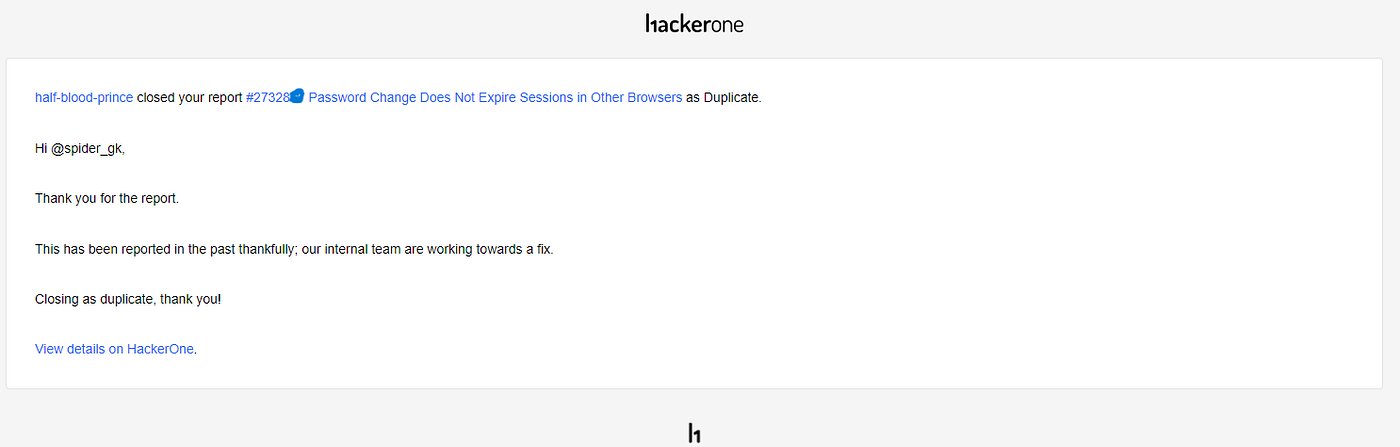
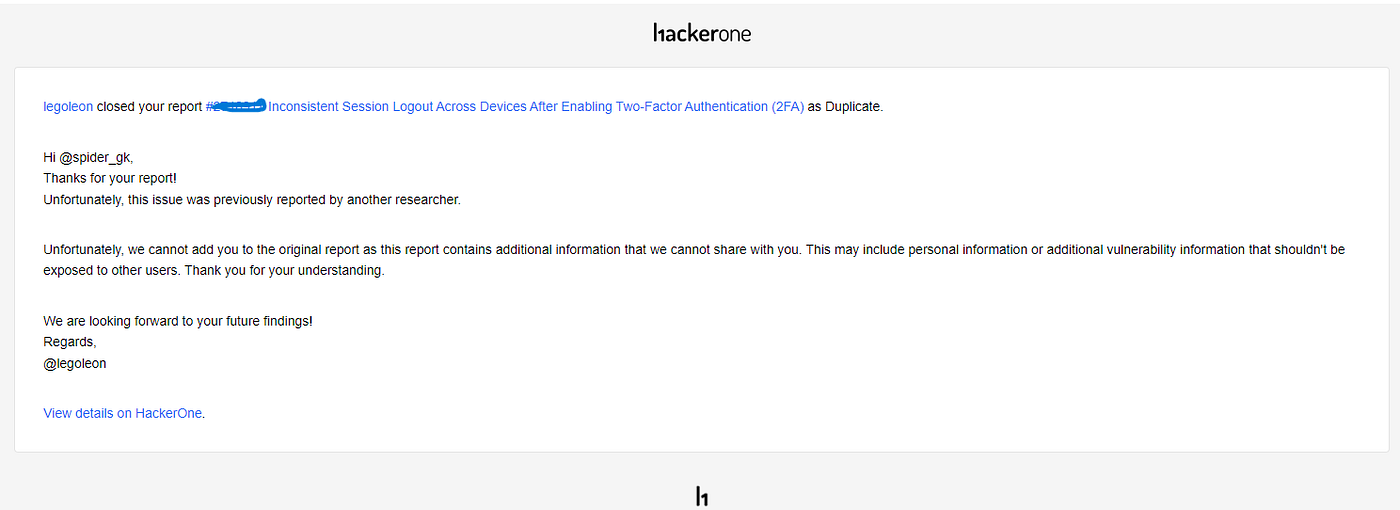
Although both issues were acknowledged as valid, they were unfortunately marked as duplicates of previously reported bugs by other researchers.
Still, I take pride in finding these flaws independently — because each report hones my skillset and boosts my awareness of session management vulnerabilities.

📚 Tips for Beginner Bug Hunters — What I Did Right (That You Can Too!)
Here are a few mistakes beginners often make, and how to avoid them:
- Ignoring Session Behavior
Always test login/logout flows on multiple devices. Session management issues are often overlooked.
What I did: I logged in on two devices — which revealed the session inconsistency.
- Skipping “Post-Feature” Testing
After enabling or disabling a security feature (like 2FA), test what changes across devices and sessions.
What I did: Enabled 2FA and then tested whether it had real-world effect on all active sessions.
- Not Testing the Removal of Security Features
Test how easily features like 2FA can be disabled — sometimes systems skip verification checks.
What I found: 2FA could be turned off without any prompt. That’s a huge red flag.
- Reporting Duplicate Bugs Without Realizing
Before submitting, search if similar bugs have already been reported on platforms like HackerOne or Bugcrowd.
Final Thoughts
Even though this report was marked as a duplicate, it helped me:
- Understand the importance of session invalidation
- Learn the power of multi-device testing
- Build confidence in my bug bounty journey
If you’re a beginner in bug hunting, I hope this breakdown helps you spot the hidden doors many overlook.
💬 Got Questions?
Let’s talk on Twitter (@spider_gk) or LinkedIn (Gourav Kumar). Stay curious. Stay ethical. Stay hunting.
Thank you for reading! Stay connected: LinkedIn: linkedin.com Portfolio: portfolio.com YouTube: SpiderGK
메타데이터
- post_id
- 2a2ff36c3a3b
- slug
- inconsistent-session-logout-after-enabling-2fa-on-epic-games-a-high-impact-flaw-explained-2a2ff36c3a3b
- url
- https://medium.com/@spidergk/inconsistent-session-logout-after-enabling-2fa-on-epic-games-a-high-impact-flaw-explained-2a2ff36c3a3b
- canonical_url
- https://medium.com/@spidergk/inconsistent-session-logout-after-enabling-2fa-on-epic-games-a-high-impact-flaw-explained-2a2ff36c3a3b
- author_url
- https://medium.com/@spidergk
- status
- ok
- fetched_at
- 2026-07-19 00:05:24