Understanding SQL Locks
In SQL, a lock is a mechanism used by the database management system (DBMS) to control concurrent access to data. The primary purpose of…
Understanding SQL Locks
In SQL, a lock is a mechanism used by the database management system (DBMS) to control concurrent access to data. The primary purpose of locks is to ensure data consistency and integrity when multiple users or processes access or modify data simultaneously.
The Locks are Internal, which means DBMS will manage the Locks whenever we perform certain operations. We don’t need to apply locks manually in each Query. There is a way we can apply locks explicitly we will see them first.
To lock a specific row in SQL Server, you can use the
UPDATEstatement with aWHEREclause and combine it with theBEGIN TRANSACTIONandCOMMITstatements. This ensures that the row is locked in the duration of the transaction.
BEGIN TRANSACTION; — Update the specific row to lock it UPDATE Article SET TITLE = ‘title’ WHERE Article_ID = 1; WAITFOR DELAY ‘00:01’; // Do your Stuff — Commit the transaction COMMIT;
- This method ensures that the row is locked, and no other transaction can read or modify it until the current transaction is committed.
Using Lock Hints We can use Lock Hints if you don’t want to use Transaction, but it is not a recommended Approach. Use transactions when working with locks to ensure that the locks are properly managed and released.
The UPDLOCK hint can be used to place an update lock on the rows being read.
SELECT FROM Orders WITH (UPDLOCK) WHERE OrderID = 1;*
The HOLDLOCK hint can be used to hold the lock until the end of the statement (or transaction if one exists).
SELECT FROM Orders WITH (HOLDLOCK) WHERE OrderID = 1;*
The TABLOCK hint can be used to lock an entire table.
SELECT FROM Orders WITH (TABLOCK) WHERE OrderID = 1;*
Now Internal Locks:
Exclusive lock (X) — The exclusive lock will be imposed by the transaction when it wants to modify the page or row data, which is in the case of DML statements DELETE, INSERT and UPDATE.
Exclusive Lock prevents other transactions from reading or modifying the locked resource.
When an exclusive lock is held on a resource (such as a row, page, or table), no other transactions can acquire a lock on that resource, except for intent locks.
Exercise: I have a table (Article) with 3 rows in it.
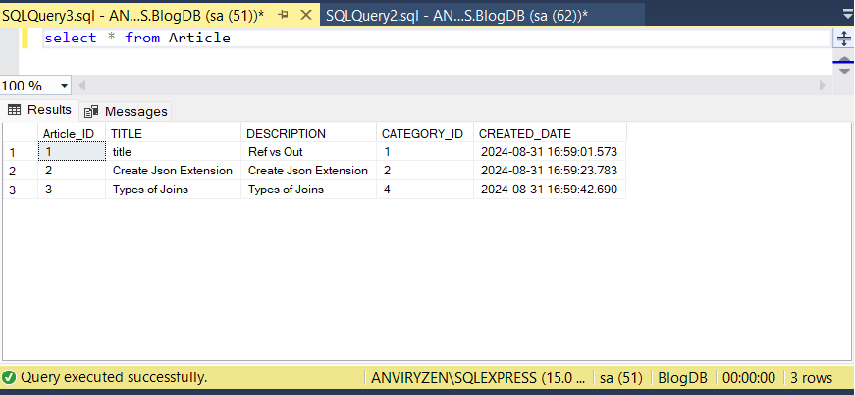
I have run an Update query on one row within the Transaction and waiting for 1 minute, meanwhile I tried to access the same row. The Second Transaction (Select) is kept on hold until the Update is Completed.

Shared lock (S) — Shared Lock is a type of lock in SQL Server that allows multiple transactions to read the same resource concurrently but prevents any transaction from modifying the resource while the shared lock is held.
However, a shared lock can be imposed by several transactions at the same time over the same page or row and in that way several transactions can share the ability for data reading since the reading process itself will not affect anyhow the actual page or row data.
Shared does not block reads. Shared lock blocks update. By default, a select (read) takes a shared lock. Shared (S) locks allow concurrent transactions to read (SELECT) a resource. A shared lock as no effect on other selects (1 or a 1000). No other transactions can modify the data while shared (S) locks exist on the resource.
Update Lock (U): Used when a transaction intends to update a resource. It prevents deadlocks by ensuring that only one transaction can obtain an update lock on a resource, but it allows shared locks.
It acts as an intermediate lock, allowing a transaction to read a resource with the intention to update it later. If the update is needed, the update lock is then converted to an exclusive lock.
Used in scenarios where a resource needs to be read and possibly updated, such as checking a value before updating it.
Consider a banking application where you need to check an account balance before allowing a withdrawal:
BEGIN TRANSACTION; — Acquire an update lock on the account row SELECT FROM Accounts WITH (UPDLOCK) WHERE AccountID = 123; — Check the balance and update if necessary IF (SELECT Balance FROM Accounts WHERE AccountID = 123) >= 100 BEGIN UPDATE Accounts SET Balance = Balance — 100 WHERE AccountID = 123; END — Commit the transaction COMMIT;*
Intent locks (I) — This lock is a means used by a transaction to inform another transaction about its intention to acquire a lock. The purpose of such lock is to ensure data modification to be executed properly by preventing another transaction to acquire a lock on the next in hierarchy object.
In practice, when a transaction wants to acquire a lock on the row, it will acquire an intent lock on a table, which is a higher hierarchy object. By acquiring the intent lock, the transaction will not allow other transactions to acquire the exclusive lock on that table (otherwise, exclusive lock imposed by some other transaction would cancel the row lock).
Locking hierarchy
The hierarchy of a database from the highest level to the lowest level is the following: Database -> Table -> Page -> Row. Row-level lock: It locks a specific row in a table, allowing other rows to be accessed concurrently. Page-level lock: It locks a specific page (a fixed-size block of data) in the database. Table-level lock: It locks an entire table. This is simple to implement but can reduce concurrency significantly. Database-level lock: It locks the entire database. It’s used mainly on maintenance operations.
Hoping you enjoyed reading this Article.
Thank you for reading. you can follow me on LinkedIn and Medium
메타데이터
- post_id
- 2a3287cc45c3
- slug
- understanding-sql-locks-2a3287cc45c3
- url
- https://medium.com/silenttech/understanding-sql-locks-2a3287cc45c3
- canonical_url
- https://medium.com/silenttech/understanding-sql-locks-2a3287cc45c3
- author_url
- https://medium.com/@anveshgouds
- status
- ok
- fetched_at
- 2026-07-29 21:15:00




