Build a Local AI-Powered Code Scanner with Llama.cpp, DeepSeek & n8n — No Cloud, No Limits
Tired of sending your source code to the cloud just to get a security scan? What if you could run powerful AI code analysis 100% offline…
Build a Local AI-Powered Code Scanner with Llama.cpp, DeepSeek & n8n — No Cloud, No Limits
Tired of sending your source code to the cloud just to get a security scan? What if you could run powerful AI code analysis 100% offline, straight from your own machine — no API keys, no token limits, no data leaks?
In this guide, I’ll show you how to build your own AI-based code reviewer, using open-source models like DeepSeek and Mistral, powered by Llama.cpp, and integrated into an automation workflow via n8n.
All you need is a laptop. Let’s get started.
Not long ago, I shared a step-by-step guide on how to build an automated source code security scanner:
step-by-step-tutorial-deploying-an-automated-android-source-code-security-scan-workflow-using-n8n
This tool is fully customizable to fit your real-world needs:
-
Scan content that might violate government policies, tailored to each market.
-
Analyze various types of source code, no limits on language or platform.
Key Advantages
- High accuracy, powered by AI Agents like OpenAI, Gemini, Claude, etc.
A Few Things to Keep in Mind::
-
You’ll MUST to have an API key from providers like OpenAI or Gemini and you’ll be charged per token.
-
Your data is sent to external servers → potential security risks, especially with internal code
So the question is:
How do we maintain high accuracy while keeping internal data secure?
Local AI Setup Guide — Fully Offline, No Third-Party Dependency
Running a local AI model (using pre-trained weights) is actually much easier than you think. You don’t need a high-end GPU or a powerful machine to get started.
If your device doesn’t have a strong GPU, you can still go with this great option: **Llama.cpp**.
This project lets you run AI models entirely on CPU.
System Requirements:
- MacOS, Linux, or WSL (Windows Subsystem for Linux)
- CMake (>= 3.16), clang or gcc compiler
- Minimum RAM: 8GB (Q4 models) / 16GB+ (Q5 and above)
Note: Model files are quite large, ranging from 4GB to 20GB. Make sure you’ve got enough disk space before starting.
No cloud. No data going outside. Full control, maximum security. Runs on CPU — no powerful GPU needed.
Clone repo llama.cpp
git clone https://github.com/ggerganov/llama.cpp.git
cd llama.cpp
Build REST API (llama-server)
rm -rf build
mkdir build && cd build
cmake .. -DLLAMA_BUILD_SERVER=ON
cmake --build . --config Release
You can optimize for Apple Silicon (M1/M2):
# Optimized build for Mac M1/M2
rm -rf build
mkdir build && cd build

# Select target Metal (GPU) adn NEON (CPU ARM)
cmake .. \
  -DLLAMA_BUILD_SERVER=ON \
  -DLLAMA_METAL=ON \
  -DCMAKE_OSX_ARCHITECTURES=arm64

cmake --build . --config Release
Flag Explanation::
- DLLAMA_BUILD_SERVER=ON: Enables HTTP server mode for llama-server.
- -DLLAMA_METAL=ON: Enables GPU acceleration using Apple Metal (great on M1/M2).
- -DCMAKE_OSX_ARCHITECTURES=arm64: Builds for ARM64 — native for Apple Silicon.
If you’re only using CPU, you can skip the -DLLAMA_METAL=ON flag.
After building, binaries will be available in:
./build/bin/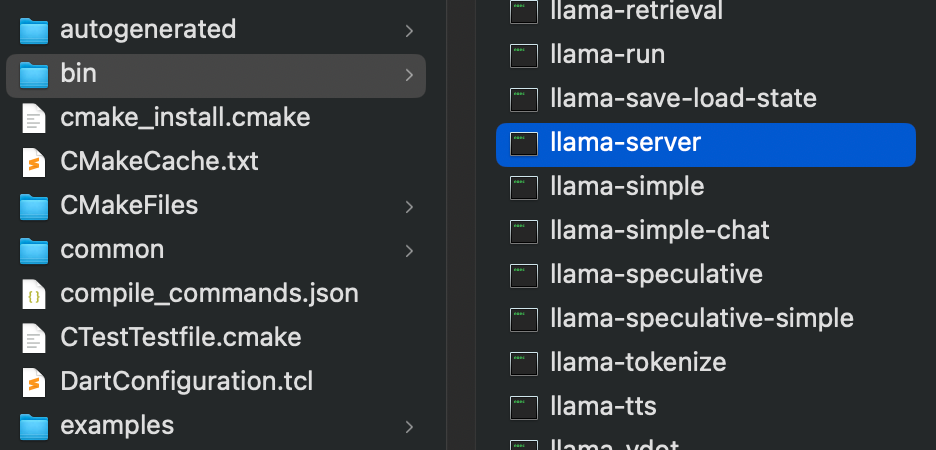
Download a GGUF Model
For code review, I used DeepSeek:
cd models
curl -L "https://huggingface.co/TheBloke/deepseek-coder-6.7B-base-GGUF/resolve/main/deepseek-coder-6.7b-base.Q4_K_M.gguf" -o deepseek.gguf
For general content or article analysis, use Mistral:
cd models
curl -L https://huggingface.co/TheBloke/Mistral-7B-Instruct-v0.1-GGUF/resolve/main/mistral-7b-instruct-v0.1.Q4_K_M.gguf -o mistral.gguf
Or try Qwen by Alibaba — a strong model (requires a beefier machine):
cd models
curl -L https://huggingface.co/TheBloke/Qwen-1.5-7B-Chat-GGUF/resolve/main/Qwen-1.5-7B-Chat.Q4_K_M.gguf -o qwe.gguf
Run the Llama Server with REST API /completion
llama-server --model models/deepseek.gguf --port 8080Or
~/llama.cpp/build/bin/llama-server \
  -m models/deepseek.gguf \
  --port 8080 \
  --host 0.0.0.0 \
  --ctx-size 4096 \
  -t 6 \
  --mlock
Test the Server with a Prompt via curl
curl http://localhost:8080/completion \
  -H "Content-Type: application/json" \
  -d '{
    "prompt": "You are a senior mobile security expert. Analyze the following Kotlin code:\n\nfun login(user: String, password: String) {\n  val adminPassword = \"admin123\"\n  if (password == adminPassword) println(\"Welcome\")\n}",
    "n_predict": 256
  }'
Or just open your browser and visit: http://localhost:8080
Pro Tips
- Use — mlock to prevent the model from being swapped out.
- Got — api invalid error? Rebuild with -DLLAMA_BUILD_SERVER=ON.
- On low RAM (8–16GB), stick with Q4_K_M; with more RAM (32GB+), go for Q5 or Q6.
Heads-up:
If n8n can’t connect to localhost, try switching to 127.0.0.1.
Replace the AI-Agent Node in n8n with an HTTP Request Node
- Method: POST
- URL: http://127.0.0.1:8080/completion
- Payload: JSON
Example JSON payload:
{
    "prompt": "You are a senior mobile security expert. Analyze the following Kotlin code:\n\nfun login(user: String, password: String) {\n  val adminPassword = \"admin123\"\n  if (password == adminPassword) println(\"Welcome\")\n}",
    "n_predict": 256
  }
And here’s what the output might look like:
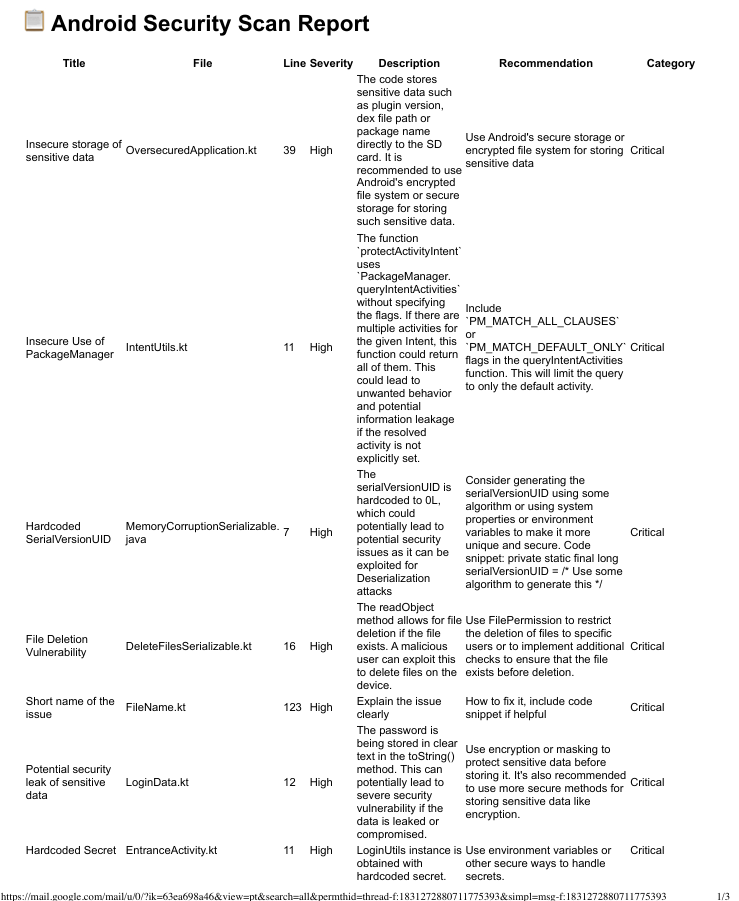
It might not be perfect out of the box like Gemini/OpenAI, but for a local LLM running on your own hardware? Pretty awesome already.
Have fun building! :)
메타데이터
- post_id
- 2aa849112f28
- slug
- build-a-local-ai-powered-code-scanner-with-llama-cpp-deepseek-n8n-no-cloud-no-limits-2aa849112f28
- url
- https://medium.com/@baka3k/build-a-local-ai-powered-code-scanner-with-llama-cpp-deepseek-n8n-no-cloud-no-limits-2aa849112f28
- canonical_url
- https://medium.com/@baka3k/build-a-local-ai-powered-code-scanner-with-llama-cpp-deepseek-n8n-no-cloud-no-limits-2aa849112f28
- author_url
- https://medium.com/@baka3k
- status
- ok
- fetched_at
- 2026-07-19 22:33:09