Creating Organization-Wide Issue & PR Templates Using a .github Repository
Standardizing how contributors report bugs, request features, and submit pull requests is critical for maintaining quality and consistency…
Creating Organization-Wide Issue & PR Templates Using a .github Repository
Standardizing how contributors report bugs, request features, and submit pull requests is critical for maintaining quality and consistency across projects. GitHub provides a powerful mechanism to enforce this at the organization level using a special repository named .github.
In this guide, we’ll walk through how to create reusable Issue Templates and a Pull Request Template, and make them automatically available across all repositories in your organization.
Why Use Organization-Level Templates?
Instead of duplicating templates in every repository, a centralized .github repository allows you to:
- Maintain consistency across all projects
- Reduce duplication of effort
- Enforce structured contributions
- Improve triaging and review efficiency
Once configured, these templates are automatically picked up by all repositories in the organization (unless overridden locally).
🚨 Still applying to jobs manually?
That’s why you’re not getting enough interviews.
Top candidates are using AI to apply to hundreds of jobs daily — automatically.
⚡ 300,000+ companies. Applied in minutes ⚡ No forms. No wasted time ⚡ More applications = more interview chances

Repository Setup
You’ve already done the most important step: creating a repository named:
.githubThis is a special repository name recognized by GitHub for organization-wide defaults.
Folder Structure
Before moving forward, this is going to be the folder structure inside .github and make sure it follows GitHub conventions:
.github/
│
├── ISSUE_TEMPLATE/
│   ├── bug_report.yml
│   ├── feature_request.yml
│   └── config.yml
│
├── PULL_REQUEST_TEMPLATE.md
│
└── README.md
Let’s break down each component.
Issue Templates (ISSUE_TEMPLATE/)
GitHub supports YAML-based issue forms, which provide structured input fields.
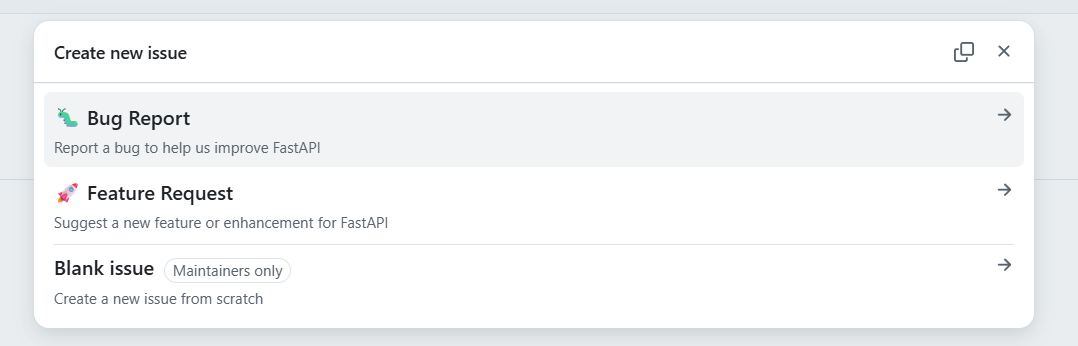
1. bug_report.yml
Used for reporting bugs in a standardized way.
Typical fields include:
- Description of the bug
- Steps to reproduce
- Expected vs actual behavior
- Environment details
Example snippet:
name: 🐛 Bug Report
description: Report a bug to help us improve FastAPI
title: "🐛 [BUG] <short description>"
labels:
- bug
assignees: []
body:
- type: markdown
attributes:
value: |
## 🐛 Bug Report
Thanks for taking the time to fill out this bug report! Please provide as much detail as possible.
> ⚠️ Before submitting, please search [existing issues](../../issues) to avoid duplicates.
- type: dropdown
id: environment
attributes:
label: 🌍 Environment
description: Which environment did you encounter this bug in?
options:
- "🧑💻 DEV — Development"
- "🧪 TEST — Testing"
- "🔎 UAT — User Acceptance Testing"
- "🚀 PRD — Production"
validations:
required: true
- type: textarea
id: bug-description
attributes:
label: 📝 Bug Description
description: A clear and concise description of what the bug is.
placeholder: Describe the bug...
validations:
required: true
- type: textarea
id: steps-to-reproduce
attributes:
label: 🔁 Steps to Reproduce
description: Step-by-step instructions to reproduce the behavior.
placeholder: |
1. Go to '...'
2. Call endpoint '...'
3. Send payload '...'
4. See error
validations:
required: true
- type: textarea
id: expected-behavior
attributes:
label: ✅ Expected Behavior
description: A clear and concise description of what you expected to happen.
placeholder: What should have happened?
validations:
required: true
- type: textarea
id: actual-behavior
attributes:
label: ❌ Actual Behavior
description: A clear and concise description of what actually happened.
placeholder: What actually happened?
validations:
required: true
- type: textarea
id: minimal-example
attributes:
label: 🧩 Minimal Reproducible Example
description: Paste a minimal code snippet that reproduces the issue.
render: python
placeholder: |
# Paste a minimal code snippet that reproduces the issue
- type: input
id: fastapi-version
attributes:
label: ⚡ FastAPI Version
placeholder: "e.g. 0.110.0"
validations:
required: true
- type: input
id: python-version
attributes:
label: 🐍 Python Version
placeholder: "e.g. 3.11.4"
validations:
required: true
- type: input
id: os
attributes:
label: 💻 Operating System
placeholder: "e.g. Ubuntu 22.04 / Windows 11 / macOS 14"
validations:
required: true
- type: input
id: pydantic-version
attributes:
label: 🔷 Pydantic Version
placeholder: "e.g. 2.6.0"
- type: input
id: uvicorn-version
attributes:
label: 🦄 Uvicorn / Starlette Version
placeholder: "e.g. 0.29.0"
- type: textarea
id: traceback
attributes:
label: 🔴 Error Output / Traceback
description: Paste the full traceback or error message here.
render: shell
placeholder: Paste the full traceback or error message here
- type: textarea
id: additional-context
attributes:
label: 💬 Additional Context
description: Add any other context, screenshots, or logs about the problem here.
2. feature_request.yml
Used for collecting structured feature ideas.
Typical fields:
- Problem statement
- Proposed solution
- Alternatives considered
Example:
name: 🚀 Feature Request
description: Suggest a new feature or enhancement for FastAPI
title: "🚀 [FEATURE] <short description>"
labels:
- enhancement
assignees: []
body:
- type: markdown
attributes:
value: |
## 🚀 Feature Request
Thanks for suggesting a new feature! Please fill out the form below.
> 💡 Before submitting, please search [existing issues](../../issues) to see if this has already been requested.
- type: dropdown
id: environment
attributes:
label: 🌍 Target Environment
description: Which environment is this feature intended for?
options:
- "🧑💻 DEV — Development"
- "🧪 TEST — Testing"
- "🔎 UAT — User Acceptance Testing"
- "🚀 PRD — Production"
- "🌐 All Environments"
validations:
required: true
- type: textarea
id: summary
attributes:
label: 📝 Summary
description: A clear and concise description of the feature you are requesting.
placeholder: Describe the feature...
validations:
required: true
- type: textarea
id: motivation
attributes:
label: 💡 Motivation / Use Case
description: Why is this feature needed? What problem does it solve?
placeholder: Explain the problem this feature would solve...
validations:
required: true
- type: textarea
id: proposed-solution
attributes:
label: 🛠️ Proposed Solution
description: Describe the solution you'd like. Include example API usage if relevant.
render: python
placeholder: |
# Example of how the feature might look/work
validations:
required: true
- type: textarea
id: alternatives
attributes:
label: 🔄 Alternatives Considered
description: Describe any alternative solutions or features you've considered, and why you prefer your proposed solution.
placeholder: What alternatives did you consider?
- type: textarea
id: additional-context
attributes:
label: 💬 Additional Context
description: Add any other context, mockups, or screenshots about the feature request here.3. config.yml
3. config.yml
Controls how issue templates behave.
Example:
blank_issues_enabled: false

contact_links:
  - name: 📋 Browse All Issues
    url: ../../issues
    about: Search existing issues before creating a new one to avoid duplicates.
Key uses:
- Disable blank issues
- Add external support links
- Force users to choose templates
Pull Request Template
**PULL_REQUEST_TEMPLATE.md**
This file defines a default template for all pull requests.
Example:
THIS PROJECT IS IN MAINTENANCE MODE. We accept pull requests for Bug Fixes **ONLY**. NO NEW FEATURES ACCEPTED!

<!--- Provide a general summary of your changes in the Title above -->

## Description
<!--- Describe your changes in detail -->

## Related Issue
<!--- This project only accepts pull requests related to open issues -->
<!--- If suggesting a new feature or change, please discuss it in an issue first -->
<!--- If fixing a bug, there should be an issue describing it with steps to reproduce -->
<!--- Please link to the issue here: -->

## Motivation and Context
<!--- Why is this change required? What problem does it solve? -->
<!--- If it fixes an open issue, please link to the issue here. -->

## How Has This Been Tested?
<!--- Please describe in detail how you tested your changes. -->
<!--- Include details of your testing environment, and the tests you ran to -->
<!--- see how your change affects other areas of the code, etc. -->

## Screenshots (if appropriate):
This ensures:
- Reviewers get consistent context
- Contributors follow a checklist
- Issues are properly linked
How It Works Across the Organization
Because your repository is named .github and exists at the organization level:
- All repositories in the organization automatically inherit these templates
- No need to copy templates into each repo
- Individual repos can still override them by defining their own templates
Best Practices
1. Keep Templates Minimal but Structured: Avoid overwhelming contributors — focus on essential fields.
2. Use Labels Automatically: Pre-assign labels like:
bugenhancementdocumentation
3. Enforce Required Fields: Use YAML validations to ensure important data is captured.
4. Regularly Update Templates: As your workflows evolve, refine templates accordingly.
5. Combine with GitHub Actions: You can further enhance workflows by:
- Auto-labeling issues
- Assigning reviewers
Common Pitfalls
- ❌ Incorrect folder name (
ISSUE_TEMPLATEmust be exact) - ❌ Wrong repo name (must be
.github) - ❌ Mixing Markdown and YAML incorrectly
- ❌ Not committing to the default branch
Final Thoughts
By centralizing your issue and PR templates in a .github repository, you’ve implemented a scalable and maintainable system for contribution management across your organization.
This setup significantly improves:
- Developer experience
- Code quality
- Review efficiency
If this setup helped you simplify managing templates across repositories, a quick clap would mean a lot. You can check out the full working setup here and try it in your own organization. I’ll be sharing more content around GitHub, automation, and developer productivity — follow along if you’re interested in building cleaner, more efficient workflows.
Thank you for being a part of the community
Before you go:

👉 Be sure to clap and follow the writer ️👏️️
👉 Follow us: **Linkedin| [Medium](https://medium.com/codetodeploy)**
👉 CodeToDeploy Tech Community is live on Discord — **Join now!**
Disclosure: This post includes affiliate and partnership links.
메타데이터
- post_id
- 2abd693aa9ec
- slug
- creating-organization-wide-issue-pr-templates-using-a-github-repository-2abd693aa9ec
- url
- https://medium.com/codetodeploy/creating-organization-wide-issue-pr-templates-using-a-github-repository-2abd693aa9ec
- canonical_url
- https://medium.com/codetodeploy/creating-organization-wide-issue-pr-templates-using-a-github-repository-2abd693aa9ec
- author_url
- https://medium.com/@agupta97
- status
- ok
- fetched_at
- 2026-06-17 08:20:12