CI/CD for On-Premises SQL Server: The Guide I Wish Existed Part II
Automating SQL Server database deployment with TeamCity Server and Agent.
CI/CD for On-Premises SQL Server: The Guide I Wish Existed Part II
Automating SQL Server database deployment with TeamCity Server and Agent.
Not a Medium member? Read this article for free here.
This is a continuation of the first part of this series. The foundational principle remains the same, but the technology/platform we will be using for CI/CD is different. Welcome to the exciting world of TeamCity.
My first encounter with TeamCity was when I had to work on a project whose entire software engineering CI/CD pipeline was built around TeamCity, and they needed a similar setup for their on-premises SQL Server database projects. To be honest, whilst the underlying principle of CI/CD is the same across all platforms, with TeamCity the learning curve was, in my experience, a little more challenging than with GitHub Actions, although it is a fully fledged CI/CD platform that offers more robust solutions.
To reduce the initial mental overload that may be experienced whilst working with TeamCity for the first time, if you have either gone over the first part of this series or have experience using GitHub Actions, I will present a mapping of GitHub Actions concepts to the corresponding functionalities in TeamCity.

Basic TeamCity Concept

- Build Agent — Software that executes the build process. It is separate from the TeamCity server. It can run the same OS as the server or a different one, and can be on a separate machine or the same machine.
- TeamCity Server — Monitors all the connected build agents, distributes queued builds to the agents based on compatibility requirements and reports the results. All information on the build results is stored in a database.
- VCS root — A collection of version control settings that defines how TeamCity communicates with VCS to detect changes and get sources for a build.
- Build Configuration — A couple of settings defining a build procedure.
- Build Step — A task to be executed within a build configuration.
- Build Trigger—A rule that initiates a new build on certain events.
- Build Artefact—Files produced by a build.
- Build queue — A list of builds that were triggered and are waiting to be started.
- Project — A TeamCity project corresponds to a software project or a specific version. A project is made up of build configurations.
More TeamCity Concepts
The concepts explained below have been streamlined to fit this blog, as they were used in the demo. There are many more concepts and features to explore depending on your project requirements.
Triggers — Add builds to the queue; they could be event-based or interval-based. There are several, but two were used in this blog demo
- VCS Trigger — This trigger adds a build to the queue when a VCS check-in is detected, i.e., when a commit is made to any branch. An example is seen in the Build Dacpac build configuration set up later in this demo.
- Finish Build Trigger — This trigger, when configured for a particular build configuration, waits for a different selected build configuration to be completed before the build configuration for which the Finish Build Trigger was configured can run.
Build Features — These are pieces of functionality that can affect the build process or the reporting of its results. There are also several build features, but the two used in this blog demo will be discussed below:
- Pull Requests — Monitors the VCS for pull requests matching particular rules, and when one is found, in conjunction with the VCS Trigger the build configuration is run against the PR
- Commit status publisher — This notifies the VCS of a build's status. The reported status is then used to proceed with the next action as defined in the VCS branch protection ruleset.
Basic CI workflow in TeamCity
- The TeamCity Server detects a change in the repository
- The server then stores this change in the database
- The relevant changes in the database are detected by the Trigger attached to the build configuration and then initiate a build
- The triggered build appears in the build queue.
- The server assigns the build to a free, compatible build agent.
- The build steps described in the build configuration are executed by the agent, and the progress of the build is reported to the TeamCity server, enabling real-time monitoring of the build process
- After finishing the build, the agent sends the build artifact to the server.

Hopefully, a mental image of how TeamCity operates begins to take shape as we progress.
Requirements
If you plan to follow along hands-on, you will need the following:
- Version-controlled database project: I will be using the database project used in the first part of this series (Clone it from GitHub)
- Set up a personal access token (fine-grained token) with the commit-status permission set to read and write; this will be used to communicate a build's status to GitHub.
- Docker Desktop: To simplify installing TeamCity Server and Agent. Also, a SQL Server image to simplify network communication among the different services.
TeamCity Database Project CI/CD Pipeline Overview.
CI/CD patterns vary across organisations, teams, and even at the project level. The choice of a particular pattern often depends on an established way of working or the peculiarities of a project. For this project, I will be adopting a simple CI/CD pattern explained below
- Three databases, namely DevDB, TestDB, and ProdDB, which would initially have no tables.
- Pull requests must be created from a feature branch and must pass a validation status check before they can be merged to the main branch. This represents the CI layer.
- Upon a successful merge, a trigger on the main branch fires, triggering a build step that produces the dacpac artifact. Once this build succeeds, the next step is to deploy the dacpac to the dev and test DBs.
- An automatic trigger is not placed on the build configuration step targeting the ProdDB as a final safeguard to ensure manual review of the implemented changes in the Dev and Test DBs. Once the expected behaviour is observed in the Dev and Test DBs, the decision can be made to proceed with deployment to the ProdDB.

CI/CD workflow
Deep Dive.
The Dockerfile and docker-compose file are part of the folder structure and can all be found in the GitHub repo created for this blog. Just run the following instructions to start SQL Server, TeamCity Server, and the agent.
docker compose up -d -buildOnce the image downloads are complete, do the following:
- Open http://localhost:8111. This works because of the port mapping in the docker-compose file.
- Follow the wizard instructions on the page and accept the defaults for now; choose the internal (HSQL) database, which is fine for demos; accept the licence; and create your admin account.
- Create the Project and connect to the online repository
- Go to Agents → Unauthorised. Your sql-build-agent, as defined in the docker-compose file, is there. Authorise it.
- Set a project-level environment variable that can be shared across all build configurations.
- Create the first build configuration (Validate_PR) that runs when a pull request is opened and, on a successful build, communicates that status to the GitHub repo.
- Create the second build configuration, called Build DacPac; it runs once a pull request has been successfully validated and merged into the main branch. The Trigger tab is set to monitor the main branch for any commits. It is here that the Dacpac is built and kept in an artifact path for easier access by subsequent build configurations that will have an artifact dependency on Build DacPac.
- Create the third build configuration, called Deploy_To_Dev; set up the dependencies (Snapshot and Artifact); the build step (that publishes the Dacpac artefact to the DevDB); and a trigger that monitors any commit on the main branch, as described in a later section of this blog.
- Repeat the following for two more build configurations

TeamCity Initialisation Page

TeamCity Database Setup Page


Project Creation Page

Project VCS Configuration

TeamCity Agent Authorisation

Parameter Configuration


Build Configuration for Validate_PR

Pull request build feature for Validate_PR
The By target branch specifies the branch that is monitored when a pull request is made to it. Here, the pull request feature is filtered to monitor the main branch when a pull request is made to it. Remember, this does not automatically begin a build; it is just a monitoring tool.

Commit Status build feature for Validate_PR
The most important field here is the access token. Make sure the token used has the right permissions, as shown below:


Build Trigger Configuration for Validate_PR
This is where the build begins; here, it is set to include all branches.

Build Step Configuration for Validate_PR
Using a .NET build, we simply build the DACPAC file from the database project. At this stage, we do not save the artifact to a folder; we just want a successful run. A CI build step proves a specific, limited thing: the code compiles into a valid DACPAC without errors. For a SQL project, this provides assurance because the build process scans for unresolved references and duplicate objects. The build "passing" means the schema is internally consistent and can be turned into a deployable artifact.
To ensure that our check gates are defined, we need to add a Branch Protection rule on the main branch in the GitHub repo.

The first rule ensures that no direct commit can be made to the main branch without a pull request; the second rule requires a status check to pass before merging. How does GitHub know this? The commit status in the build features tab informs GitHub that the Validate_PR build configuration was successful.
Build Configuration — Build Dacpac
Similar to how the Validate_PR build configuration was created, the Build Dacpac configuration is set up using an existing VCS root pointing to the GitHub repo.
Then the following configurations are done:
Build Step
- Configure the Build Steps tab using .NET (dot net is used to run the .sqlproj file). A name is provided, a build command is selected, and the appropriate path to the .sqlproj is selected

- Configure the Trigger tab to monitor the main branch for commits.

Build Configuration — Deploy_To_Dev
Build Steps
- Set up a new build configuration as before; select a Command Line for the execution runner.
- Give it a name and specify the Run to be a custom script, as we will be running the following script:
sqlpackage \
  /Action:Publish \
  /SourceFile:"dacpac/MyDatabaseProjectTC.dacpac" \
  /TargetConnectionString:"Server=%env.SQL_SERVER%;Database=%env.TARGET_DB%;User ID=%env.SQL_USER%;Password=%env.SQL_PASSWORD%;Encrypt=True;TrustServerCertificate=True"
Publish_To_Dev Build Step
Triggers
- Set up a Finish Build Trigger that adds this build to the queue after the Build Dacpac build configuration has completed.

Publish_To_Dev Finish Build Trigger Configuration
Dependencies.
- Add a new snapshot dependency to create a build chain; here, this build snapshot dependency is on the Build Dacpac configuration

- Add an artifact dependency to allow the usage of the DACPAC artifact produced in the Build_Dacpac configuration.

Parameters
Configure a build configuration-level parameter scoped to that build configuration. This differs from a project-level parameter, which can be shared across all build configurations because it cascades from the project level.

Build Configuration — Deploy_To_Test
Build Step
- As with Deploy_To_Dev, the parameter configuration here specifies the database to which the dacpac will be deployed.

Publish_To_Test Build Steps Configuration
Triggers
Set up a Finish Build Trigger to add this build to the queue after the Deploy_To_Dev build configuration completes.

Publish_To_Test Finish Build Trigger Configuration
Dependencies
Similar to the previous build configuration, but now this build configuration snapshot dependency is on the Deploy_To_Dev build configuration completion.
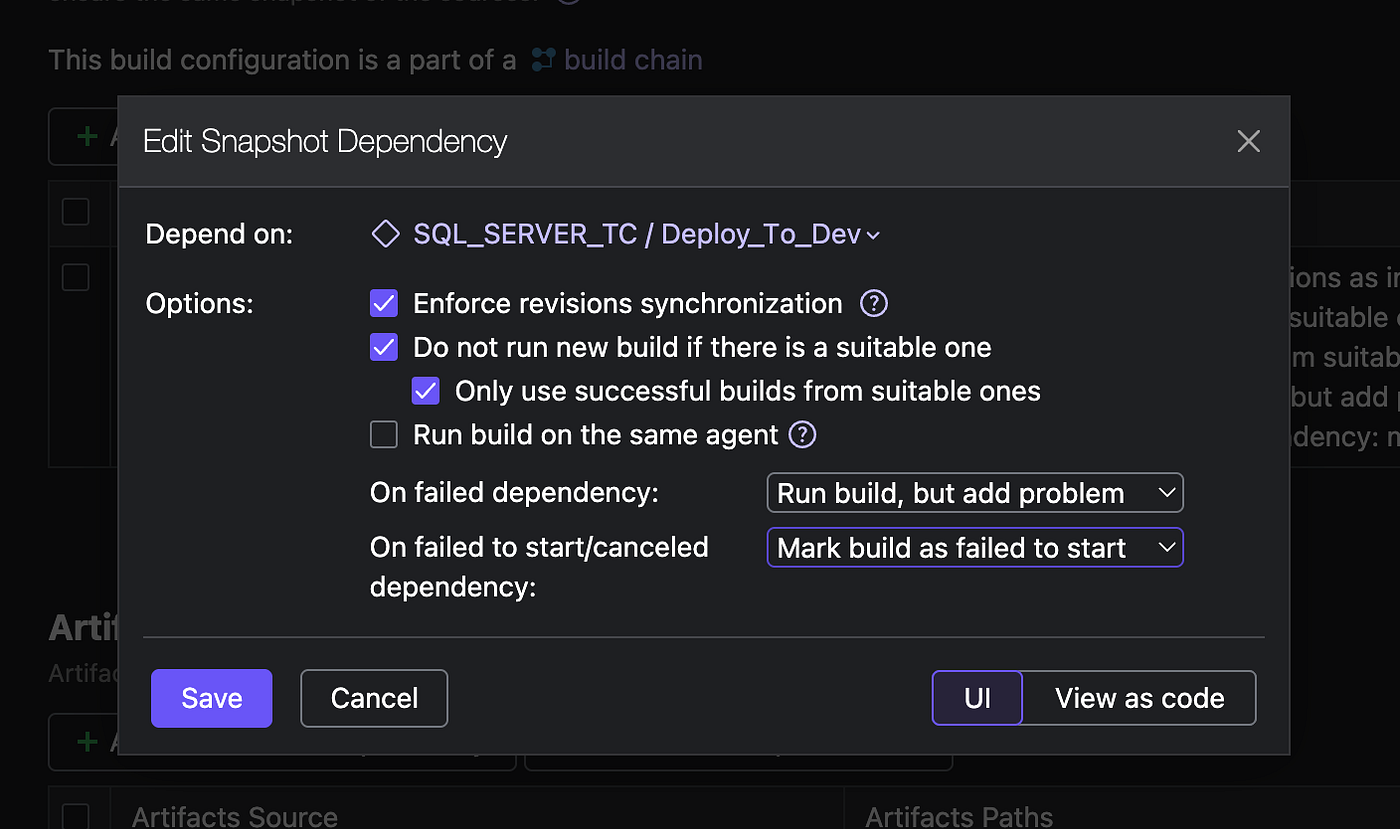
Publish_To_Test Snapshot Configuration
- Artifact dependency is still on the artifact produced from the Build Dacpac build configuration, but the DACPAC now gets deployed to the Test database.

Publish_To_Test Snapshot Artifact Configuration
Parameters
Defined at the build configuration scope to target the TestDB

Build Configuration — Deploy_To_Prod
Build Step
- Similar to that of the Deploy_To_Dev and Deploy_To_Test but with the target database pointing to the ProdDB

Publish_To_Prod Build Steps Configuration
Dependencies
Snapshot Dependency
This build configuration snapshot dependency is on the Deploy_To_Test build configuration.

Publish_To_Prod Snapshot Configuration.
- Artifact dependency is still on artifcat produced from the Build Dacpac build configuration but the dacpac now gets deployed to the prod database.

Publish_To_Test Snapshot Artifact Configuration
Triggers
No Finish Build Trigger is configured for this build configuration. This prevents an automated build from starting once Deploy_To_Test is complete; it ensures a manual review is conducted and approved before the changes are deployed to the prod database.
Parameters
Defined at the build configuration scope to target the ProdDB.

To better appreciate the workflow, the images below show the initial state of the three databases before the CI/CD process is initiated. When connected to the SQL Server Docker instance in VS Code, we can access the three databases: DevDB, TestDB, and ProdDB.

Image showing all three databases with no tables present.
With everything set up in TeamCity, we can then create a feature branch from main in VS Code and add a new column to our Customer Table called phonenumber. We then do the following:
- Push to GitHub; a pull request is then opened.

- Once the Pull Request is created, the Validate_PR build configuration in TeamCity detects it using the Build Feature Pull Request defined earlier, and the configured trigger initiates the build. Once this succeeds, the configured commit status build feature communicates the status back to GitHub.

- Once all checks have passed, the pull request is merged into the main branch, which triggers the Build Dacpac build configuration, whose Trigger is set to monitor any commit to main.


- Upon completion, due to the defined dependencies and the Finish Build trigger, the Deploy_To_Dev build configuration runs automatically.

- Once the Deploy_To_Dev build is successful and the defined dependency and Finish Build Trigger configurations are met, the Deploy_To_Test build resumes.

Successful deployment of Dacpac to Test DB.
At this point, based on our configuration, the Deploy_To_Prod build is not automatically triggered because we need to observe the behaviour of the already-deployed DACPAC artefact in the Dev and Test DBs.

Customer table present in both DevDB and TestDB but not in ProdDB.
After inspection, the expected result is present in both TestDB and DevDB; a manual build is triggered for Deploy_To_Prod and upon successful completion, the customer table is present in ProdDB

Successful Build

Populated build

Simple Select statement
Final Takeaway
The underlying principle and benefits of CI/CD still remain the same irrespective of the platform you use. However, if your VCS system is GitHub, integration with GitHub Actions is easier, and there is a low learning curve when compared with using TeamCity. For a more mature and robust CI/CD system, in my experience, TeamCity offers a better option.
Do let me know what you think from your experience, and if you have any questions, please do ask.
If you found this useful, a clap or two helps other data folks find it. And since the Azure DevOps version of this pipeline is coming next, a follow means you won’t miss it.
References
- https://hub.docker.com/r/jetbrains/teamcity-server/
- https://hub.docker.com/r/jetbrains/teamcity-agent/
- https://www.jetbrains.com/help/teamcity/continuous-integration-with-teamcity.html#Basic+TeamCity+concepts
- https://www.jetbrains.com/help/teamcity/net.html
- https://www.jetbrains.com/help/teamcity/commit-status-publisher.html
- https://www.jetbrains.com/help/teamcity/pull-requests.html
- https://learn.microsoft.com/en-us/sql/linux/install-upgrade/quickstart-install-docker?view=sql-server-ver17&tabs=cli&pivots=cs1-bash
메타데이터
- post_id
- 2b263c9fc0ec
- slug
- ci-cd-for-on-premises-sql-server-the-guide-i-wish-existed-part-ii-2b263c9fc0ec
- url
- https://blog.dataengineerthings.org/ci-cd-for-on-premises-sql-server-the-guide-i-wish-existed-part-ii-2b263c9fc0ec
- canonical_url
- https://blog.dataengineerthings.org/ci-cd-for-on-premises-sql-server-the-guide-i-wish-existed-part-ii-2b263c9fc0ec
- author_url
- https://medium.com/@boluroajayia
- status
- ok
- fetched_at
- 2026-09-17 14:20:45