JAXB
Marshal & Unmarshal
JAXB
Marshal & Unmarshal
What is JAXB ?
JAXB stands for Java Architecture for XML Binding , it is a software or library that allows “Jarkata EE” users to map java objects into xml. It provides API for Marshalling, Unmarshalling and validation.
xml ←→ JAXB ←→ Java Objects
Marshalling : Converts xml to Java Objects (write) . In marshalling object is serialized + codebase is attached.
Unmarshalling : Converts Java Objects to xml (read).
Example:
Creating Country.Class acts as POJO class
Note : Class must have Default constructor in order to achieve Marshalling & Unmarshalling
package com.jaxb.MarshalUnmarshal;

import javax.xml.bind.annotation.XmlElement;
import javax.xml.bind.annotation.XmlRootElement;
import javax.xml.bind.annotation.XmlType;

//Below annotation defines root element of XML file
@XmlRootElement
//You can define order in which elements will be created in XML file
//Optional
@XmlType
public class Country {
 private String countryName;
 private double countryPopulation;
 private int NoOfStates;

// Note : Class must have Default constructor in order to achieve Marshalling & Unmarshalling
 public Country() {

 }
 @XmlElement
 public String getCountryName() {
  return countryName;
 }

 public void setCountryName(String countryName) {
  this.countryName = countryName;
 }
 @XmlElement
 public double getCountryPopulation() {
  return countryPopulation;
 }

 public void setCountryPopulation(double countryPopulation) {
  this.countryPopulation = countryPopulation;
 }
 @XmlElement
 public int getNoOfStates() {
  return NoOfStates;
 }j

 public void setNoOfStates(int noOfStates) {
  NoOfStates = noOfStates;
 }

 public Country(String countryName, double countryPopulation, int noOfStates) {
  super();
  this.countryName = countryName;
  this.countryPopulation = countryPopulation;
  NoOfStates = noOfStates;
 }

 @Override
 public String toString() {
  return "Country [countryName=" + countryName + ", countryPopulation=" + countryPopulation + ", NoOfStates="
    + NoOfStates + "]";
 }


}
Steps for Marshalling ( Converting Country.class to xml file )
package com.jaxb.MarshalUnmarshal;

import java.io.File;

import javax.xml.bind.JAXBContext;
import javax.xml.bind.JAXBException;
import javax.xml.bind.Marshaller;

public class Marshalling {

 public static void main(String[] args) {
  Country country = new Country("India",200000,28);

 try {

  //Step 1: Create JAXB context object
  JAXBContext jaxbContext = JAXBContext.newInstance(Country.class);

  //Step 2: Create Marshaller object using JAXBContext object
  Marshaller jaxbMarshaller = jaxbContext.createMarshaller();

  //Optional : For getting nice formatted output
  jaxbMarshaller.setProperty(Marshaller.JAXB_FORMATTED_OUTPUT, Boolean.TRUE);

  //Step 3: Specify the location and name of xml file to be created
  File XMLfile = new File("Country.xml");

  //Step 4: Call marshal method on created jaxbMarshaller object --> Writing to XML file
  jaxbMarshaller.marshal(country, XMLfile);
  //Step 5: XML file will be created

  // Writing to console
  jaxbMarshaller.marshal(country, System.out);

 } catch (JAXBException e) {
 // some exception occurred
 e.printStackTrace();
 }

 }

}
Output of Marshalling → Country.xml file created with Country class object data.
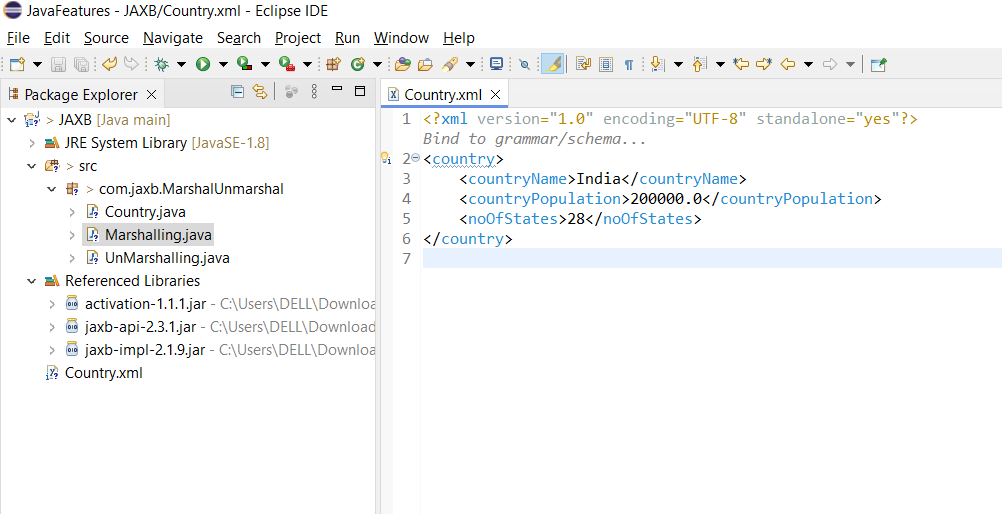
Marshalling output
Steps for Unmarshalling ( Convert xml to Country class java object)
package com.jaxb.MarshalUnmarshal;

import java.io.File;

import javax.xml.bind.JAXBContext;
import javax.xml.bind.JAXBException;
import javax.xml.bind.Unmarshaller;

public class UnMarshalling {

 public static void main(String[] args) {
  try {

   //Step 1: Create JAXB context Object
   JAXBContext jaxbContext = JAXBContext.newInstance(Country.class);
            //Step 2: Create UnMarshaller object using JAXBContext object
   Unmarshaller jaxbUnmarshaller = jaxbContext.createUnmarshaller();

   //Step 3: Specify the location and name of xml file to be read
   File XMLfile = new File("Country.xml");

   //Step 4: This will create Java object – country from the XML file
   Country country = (Country) jaxbUnmarshaller.unmarshal(XMLfile);
            //Step 5: Java Object Retrieved

   System.out.println("Country Name: "+country.getCountryName());
   System.out.println("Country Population: "+country.getCountryPopulation());


   } catch (JAXBException e) {
   // some exception occured
   e.printStackTrace();
   }

 }

}
Output of Unmarshalling ( Country Java Object retrieved)

Unmarshalling output
Where it is needed?
The remote components written in java of web services uses XML (XML is considered light weight option to exchange message on Networks with limited resources) as a mean to exchange messages between each other. In this case the xml request will be converted to Java Object and processed by application and whatever the response is created as Java object will be converted to XML.
Advantage :
- JAXB simplifies access to an XML document from a Java program.
- Simple to use than SAX or DOM
- we no need to aware about the XML parsing techniques.
- Uses memory efficiently: No need to access xml in a tree structure.
Disadvantage :
- JAXB can be inefficient for large datasets because it loads the entire XML document into memory.
- Slower for larger files.
- Not thread safe.
JAXB has been removed from JDK in Java 11 or higher.we need to add it to the project as a separate library via Maven or Gradle.
Can I still use JAXB in Java 11 or higher?
You can still use in your project by adding separate library or dependency via Maven or Gradle.
https://mvnrepository.com/artifact/javax.activation/activation/1.1.1
https://mvnrepository.com/artifact/javax.xml.bind/jaxb-api/2.3.1
https://repo1.maven.org/maven2/com/sun/xml/bind/jaxb-impl/2.1.9/
What are the alternatives to JAXB in Java 11?
Alternatives to JAXB in Java 11 include using other XML binding frameworks such as Jackson or XMLBeans, or manually parsing XML using the built-in XML parsing capabilities of Java.
Example Code Source
Check following GITHUB repository for code source
https://github.com/7LavanyaRavichandran/Java/tree/main/Java%20Features/JAXBFeatures
Resources
https://www.oracle.com/technical-resources/articles/javase/jaxb.html
메타데이터
- post_id
- 2b4f4fd32c4d
- slug
- jaxb-2b4f4fd32c4d
- url
- https://medium.com/@7lavanyaravichandran/jaxb-2b4f4fd32c4d
- canonical_url
- https://medium.com/@7lavanyaravichandran/jaxb-2b4f4fd32c4d
- author_url
- https://medium.com/@7lavanyaravichandran
- status
- ok
- fetched_at
- 2026-07-21 04:33:37



