How I Built an AI-Powered YouTube Sponsor Skipper Without Paying for LLM APIs
“What if SponsorBlock could work even for videos uploaded five minutes ago?”
How I Built an AI-Powered YouTube Sponsor Skipper Without Paying for LLM APIs
“What if SponsorBlock could work even for videos uploaded five minutes ago?”
That single thought eventually turned into an open-source Chrome extension called Skipper AI.
In this article, I’ll walk through the entire journey — from the problem, failed ideas, technical challenges, and the final solution.
The Problem
I watch a lot of YouTube.
Like many people, I already use an ad blocker, so YouTube’s own ads aren’t much of an issue.
But another type of interruption kept bothering me.
The creator would suddenly start promoting:
- VPNs
- Online courses
- Betting apps
- Password managers
- Hosting providers
- Other sponsors
Sometimes the sponsor lasted 30 seconds.
Sometimes nearly two minutes.
Unlike YouTube ads, these segments are part of the video itself, so traditional ad blockers can’t remove them.
Existing Solutions
I started looking for existing solutions.
The obvious one was SponsorBlock.
If you haven’t heard of it, SponsorBlock is an amazing open-source project where users manually submit timestamps for sponsor segments.
When enough people contribute, everyone benefits.
I’ve been using it for years.
But I noticed one limitation.
SponsorBlock depends entirely on the community.
That means:
- Newly uploaded videos usually don’t have timestamps.
- Small channels may never get timestamps.
- Someone has to watch the video first.
The solution is fantastic.
It just isn’t immediate.
My First Thought
We’re living in the AI era.
Surely an LLM can identify sponsor segments.
If you ask ChatGPT or Gemini:
“At what timestamps does this video contain sponsorships?”
They can often answer surprisingly well.
Problem solved?
Not really.
The Cost Problem
The obvious implementation would look like this:
User watches a video
↓
Extract transcript
↓
Send transcript to Gemini or GPT
↓
Receive sponsor timestamps
↓
Skip those sections
Technically…
Very easy.
Financially…
Not so much.
Every request costs money.
Even using a relatively small model, inference costs add up quickly if thousands of users are watching videos every day.
I wanted the extension to be free.
So I needed another idea.
The Discovery
One day I noticed something interesting.
YouTube had started showing “Ask Gemini about this video.”
That immediately made me curious.
If YouTube is already providing Gemini for logged-in users…
Could I use that instead of paying for my own AI infrastructure?
That became the entire project.
Building the Extension
The first implementation idea was pretty naive.
I thought:
“I’ll just open the Gemini panel automatically, type a prompt, click Send, wait for the response, then read the timestamps.”
That technically worked.
But it was awful.
It relied on DOM manipulation.
It depended on UI elements.
Any YouTube UI update could break everything.
The user would also see the entire interaction happening.
Definitely not a good experience.
Looking Under the Hood
So I started exploring how YouTube’s Gemini feature actually works.
I opened DevTools.
Watched the network requests.
Observed what happened when I asked Gemini a question.
Eventually I identified the request responsible for generating the answer.
That completely changed the implementation.
Instead of automating button clicks and text input, the extension could communicate through the same request flow that powers the feature.
The result was significantly cleaner, faster, and much more reliable.
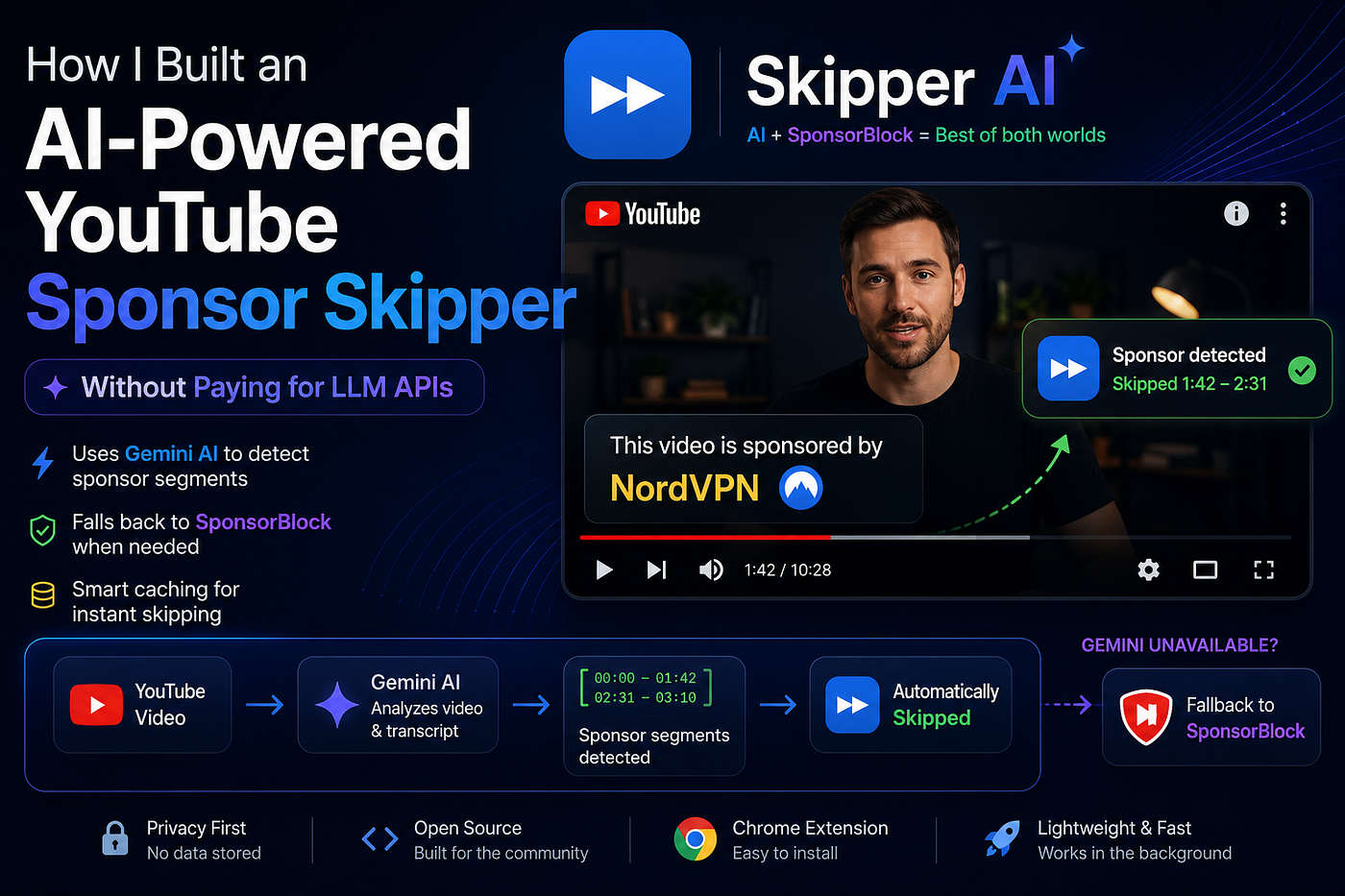
The Workflow
The extension now works like this:
- Detect the current YouTube video.
- Check whether sponsor timestamps are already cached.
- If cached, skip immediately.
- Otherwise:
- Use Gemini (when available) to identify sponsor timestamps.
- Parse the response.
- Cache the timestamps.
- Automatically skip sponsor segments during playback.
This means Gemini is only used once for each unique video.
What About Users Without Gemini?
Not every user has access to Ask Gemini.
Some users aren’t logged in.
Some regions may not support it.
Some browsers might not expose the feature.
I didn’t want those users to lose functionality.
So instead of failing…
The extension automatically falls back to SponsorBlock.
That means users always get the best available experience.
- AI detection when possible.
- Community timestamps otherwise.
I don’t see these approaches as competitors.
They’re complementary.
Caching
One important optimization was caching.
Once timestamps are generated, there’s no reason to ask Gemini again for the same video.
The extension stores results using:
- Video ID
- Video duration
If the same video is opened again, the cached timestamps are used instantly.
No additional AI request is needed.
This makes playback much faster while reducing unnecessary requests.
Why Open Source?
I decided to make the project completely open source.
Browser extensions interact with websites in powerful ways, and I believe transparency matters.
Anyone can inspect:
- the code,
- how requests are made,
- what data is (and isn’t) stored,
- and contribute improvements.
Open-source projects also tend to evolve much faster because the community helps identify bugs, suggest ideas, and improve implementation.
Things I Learned
This project reminded me of something I often forget.
Sometimes the best solution isn’t building something entirely new.
Sometimes it’s discovering that the platform already provides most of what you need.
Instead of running my own AI infrastructure, I was able to build around functionality that already existed for users.
That changed the entire architecture.
Future Ideas
There are still many things I’d like to improve.
Some ideas include:
- Better handling of ambiguous AI responses.
- Smarter caching strategies.
- Support for more browsers.
- Improved detection for non-English videos.
- Community verification of AI-generated timestamps.
I’m sure there are many ideas I haven’t thought of yet.
That’s why I’d love feedback from other developers.
Try It
Chrome Extension
https://chromewebstore.google.com/detail/ncchpipphiigdfbpbjofbhbahcgckaob
Website
https://skipperai.netlify.app/
GitHub
https://github.com/jagdishpal02001/skipper
Thanks for reading.
If you have ideas, criticism, or feature suggestions, I’d genuinely love to hear them.
메타데이터
- post_id
- 2b6f0cd3619e
- slug
- how-i-built-an-ai-powered-youtube-sponsor-skipper-without-paying-for-llm-apis-2b6f0cd3619e
- url
- https://medium.com/@jagdishpal02000/how-i-built-an-ai-powered-youtube-sponsor-skipper-without-paying-for-llm-apis-2b6f0cd3619e
- canonical_url
- https://medium.com/@jagdishpal02000/how-i-built-an-ai-powered-youtube-sponsor-skipper-without-paying-for-llm-apis-2b6f0cd3619e
- author_url
- https://medium.com/@jagdishpal02000
- status
- ok
- fetched_at
- 2026-07-07 04:24:22




