Building My Own Private AI Server on an Old Dell PC — Part 2
hello guys i hope yall doing great …
Building My Own Private AI Server on an Old Dell PC — Part 2
hello guys i hope yall doing great …
In Part 1, we successfully got CasaOS up and running and deployed our Belullama (Ollama + Open WebUI) container. I thought I was ready to cancel my cloud subscriptions and let my local AI take over. I was wrong.
however
What followed was a messy, frustrating, but incredibly educational battle with hidden settings, port collisions, and the harsh physical limits of CPU processing. Here is what you need to look out for when setting up your own local AI server.
Obstacle 1: The “Tool Calling” API Block
My first instinct was to pull the highly recommended phi3 model. I typed my first prompt, hit enter, and immediately got slapped with a hard stop.
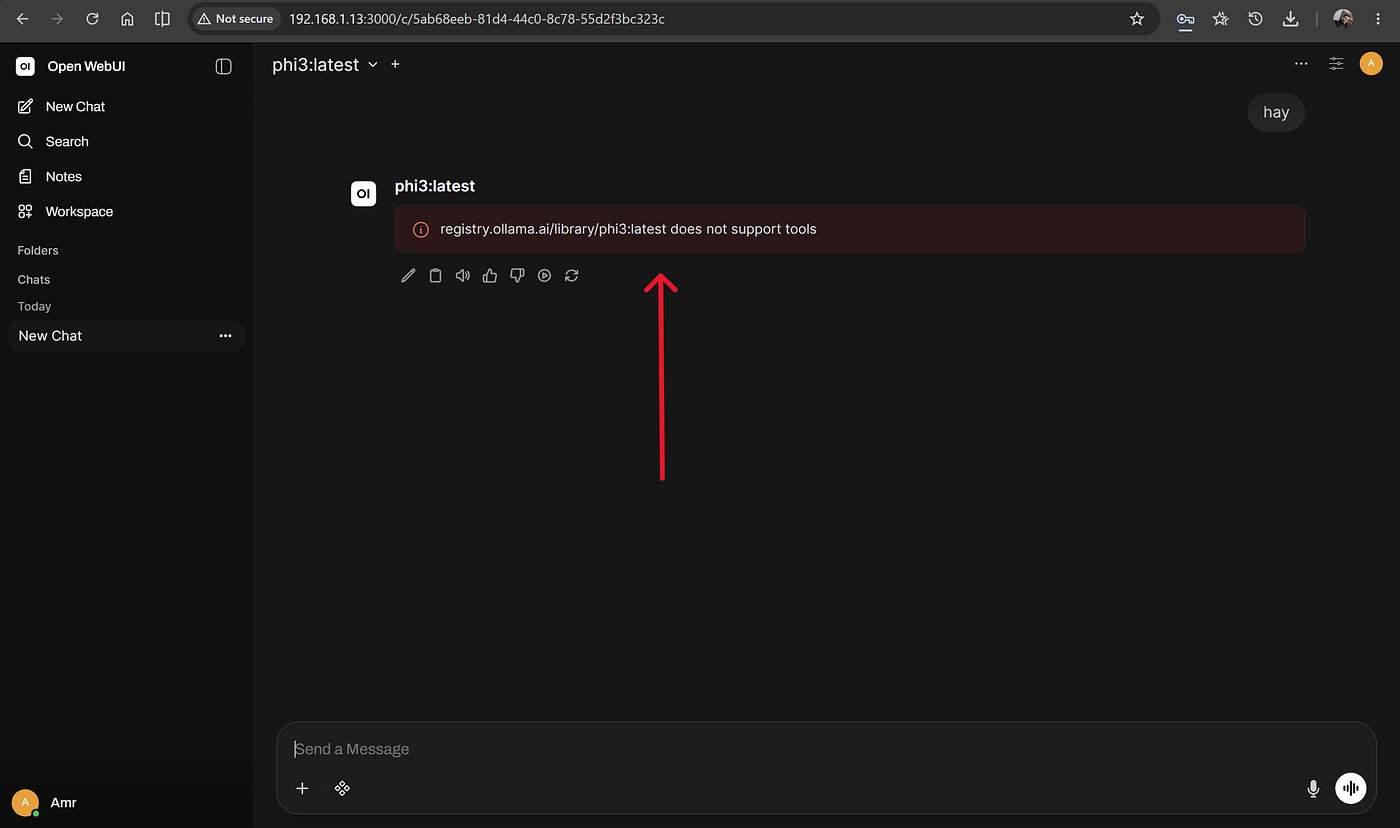
The immediate rejection from Ollama’s backend when trying to run a standard model.
This wasn’t a bug in the interface; it was a strict API rejection from Ollama’s backend engine. Open WebUI automatically attempts to send invisible “tool payloads” (like web searching) to the model. Ollama checks its registry, sees that phi3:latest wasn't trained for function calling, and instantly kills the request to prevent the model from crashing.
Obstacle 2: The Stubborn Form Validation Bug
To stop Open WebUI from sending those background tool payloads, the logical step was to simply turn the “Web Search” master toggle OFF in the settings. But the user interface had other plans.

A deeply flawed HTML validation check holding the settings menu hostage.
Because the Web Search Engine dropdown was defaulted to ollama_cloud, the browser physically blocked the 'Save' button from executing because the API key text box was empty—even though I was trying to turn the whole feature off!
The workaround? The “Fake Link” bypass

Bypassing the form validation by feeding it a fake URL.
I had to switch the engine to SearXNG, type a completely fake web address [http://a.com] into the required field, and click save. The browser finally saw a valid link and allowed me to lock the feature in the OFF position.
Obstacle 3: The Port 8080 Dashboard Collision
With the interface sorted, I confidently clicked the Belullama app icon on my CasaOS dashboard… and it opened my AdGuard Home dashboard instead.

Two powerful containers fighting over the exact same default port.
This is a classic networking collision. Both the Open WebUI container and the AdGuard container default to port 8080 for web traffic. While we changed the Belullama container's host port to 3000 during setup to prevent a crash, the CasaOS dashboard shortcut was still hardcoded to look for the app at 8080. I had to manually edit the app's settings to update the Web UI parameter to 3000.
Obstacle 4: The 13-Minute “Cold Boot” (CPU vs. GPU)
Next, I downloaded llama3.1:latest—a model explicitly built to accept tool requests—and asked it a simple question. And then I waited.

The brutal reality of forcing a server CPU to do an AI Graphics Card’s job.
This is the harsh reality of running Large Language Models without a dedicated graphics card. The RAM easily absorbed the model’s 4.7 GB footprint, but the Ubuntu server’s CPU was completely struggling at 99%. It was agonizingly trying to evaluate 8 billion parameters sequentially just to generate a single sentence.

ubuntu server satus when interacting with the model.
Obstacle 5: The Micro-Model Pivot
Realizing an 8B model was too heavy for my hardware to provide real-time typing, I had to abandon it entirely and drop down to the “featherweight” class.

Swapping to a microscopic model to get it to be usable .
By pulling qwen2.5:0.5b, the physical file size shrank from 5 GB down to under 400 MB. It natively supports tools (so no red errors), and it is tiny enough to load instantly and type out answers at a natural reading pace, even on a struggling processor.
Conclusion: The Real Price of “Free” AI
Self-hosting a Large Language Model on a CPU-only server is not a plug-and-play experience. It is a messy, uncompromising crash course in backend architecture, networking collisions, and hardware bottlenecks. You are trading the seamless convenience for the ultimate prize: absolute control over your infrastructure.
There is an undeniable performance penalty when forcing a standard server CPU to do an AI graphics card’s job, which limits you to much smaller models if you want usable typing speeds. But in return, you gain something invaluable. Running CPU inference on a local, offline device provides the highest tier of data privacy compliance available. Your prompts, your documents, and your network data never leave your homelab which is really a big thing if you would think about it.
You won’t be running flagship, multi-billion-parameter models on a basic CPU without waiting 15 minutes for a single sentence. However, as this build proved, if you pivot to hyper-efficient, tool-capable micro-models like qwen2.5:0.5b, you can achieve a highly responsive, entirely private AI workspace for exactly zero dollars a month. It takes serious patience to untangle the API errors, bypass the UI bugs, and find the hardware sweet spot, but the sheer satisfaction of finally watching that local AI type out its first answer makes every second of troubleshooting worth it.
In the end, I want to say that I really enjoyed the whole process, including the bugs and errors. I actually gained a lot of knowledge going through all of this, and like I always believe: you don’t learn unless you get your hands dirty.
“If you have any questions, please don’t hesitate to reach out”
Thank you so much for your time, and stay tuned for the upcoming projects! ❤️❤️

Cover pic
메타데이터
- post_id
- 2b9735954d08
- slug
- building-my-own-private-ai-server-on-an-old-dell-pc-part-2-2b9735954d08
- url
- https://medium.com/@amr888131/building-my-own-private-ai-server-on-an-old-dell-pc-part-2-2b9735954d08
- canonical_url
- https://medium.com/@amr888131/building-my-own-private-ai-server-on-an-old-dell-pc-part-2-2b9735954d08
- author_url
- https://medium.com/@amr888131
- status
- ok
- fetched_at
- 2026-07-18 10:45:47