winget 出現 InternetOpenUrl() failed:理解來源更新與修復方法
最近使用 winget 安裝一些東西,目前看到許多工具類的東西提供 windows 的安裝都需要透過 winget
winget 出現 InternetOpenUrl() failed:理解來源更新與修復方法
最近使用 winget 安裝一些東西,目前看到許多工具類的東西提供 windows 的安裝都需要透過 winget
我簡單看一下理解,就像是在 Linux 下面的 apt 大概是一樣的概念,最近在安裝 cloudflare tunnel
但是遇到
執行命令時,發生意外的錯誤:
InternetOpenUrl() failed.
0x80072ee2 : unknown error
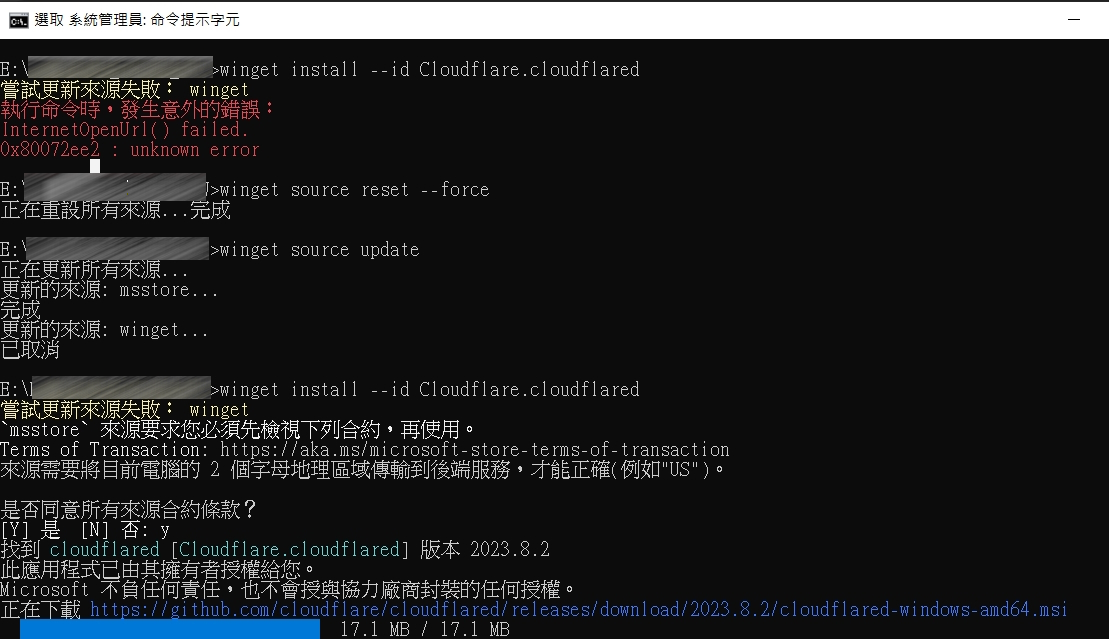
看一下 winget ( Windows Package Manager ) 的原理 ,winget 會先從它註冊的 source 抓取套件清單
這來源實際上是個 GitHub-based repository:https://github.com/microsoft/winget-pkgs
其實就跟 apt 設計原理一樣,會出現這錯誤就是因為太久沒更新清單內容了
就跟我以前在用 apt 沒事就 update , upgrade 一下
[embed]
之後再下
[embed]
範例是我要安裝 cloudflared 所以指令是
[embed]
安裝了,筆記一下,因為一開始安裝的時候卡了很久才出現錯誤,幸好我佛系安裝,不然真的等到天荒地老.
result:
메타데이터
- post_id
- 2b9eada68a12
- slug
- winget-出現-internetopenurl-failed-理解來源更新與修復方法-2b9eada68a12
- url
- https://medium.com/@donmahsu/winget-%E5%87%BA%E7%8F%BE-internetopenurl-failed-%E7%90%86%E8%A7%A3%E4%BE%86%E6%BA%90%E6%9B%B4%E6%96%B0%E8%88%87%E4%BF%AE%E5%BE%A9%E6%96%B9%E6%B3%95-2b9eada68a12
- canonical_url
- https://medium.com/@donmahsu/winget-%E5%87%BA%E7%8F%BE-internetopenurl-failed-%E7%90%86%E8%A7%A3%E4%BE%86%E6%BA%90%E6%9B%B4%E6%96%B0%E8%88%87%E4%BF%AE%E5%BE%A9%E6%96%B9%E6%B3%95-2b9eada68a12
- author_url
- https://medium.com/@donmahsu
- status
- ok
- fetched_at
- 2026-07-16 01:42:17

