A Beginner’s Guide to APIs: What They Are and How to Use Them
If you’ve ever heard the term API thrown around in conversations and wondered what it actually means, you’re not alone. Whether you’re just…
A Beginner’s Guide to APIs: What They Are and How to Use Them
If you’ve ever heard the term API thrown around in conversations and wondered what it actually means, you’re not alone. Whether you’re just starting out in programming or you’re curious about how apps talk to each other, this guide will give you a solid understanding of what APIs are and how you can use them.
🧠 What is an API?
API stands for Application Programming Interface. It’s a way for different software programs to talk to each other. Think of it like a menu in a restaurant. The menu provides a list of dishes you can order, along with a description of each. When you specify what you want, the kitchen does the work and serves you the dish. You don’t need to know how to cook it.
In the same way, an API lets your app request specific information or actions from another service — without needing to know the complex internals of how that service works.
🔗 Real-Life Examples of APIs
- Google Maps API: Want to show a map in your app or website? Instead of building your own maps system, you use Google’s API to embed maps and even get directions.
- Twitter API: Want to display your latest tweets on your blog? The Twitter API lets you fetch that data.
- Weather APIs: You can get real-time weather data for your location through services like OpenWeatherMap.
How APIs Work — A Simple Flow
Let’s say you’re using a weather app that shows the temperature in your city.
- You enter your city name.
- The app sends a request to the Weather API.
- The Weather API fetches data from a weather database.
- The API sends back a response with the temperature.
- The app displays the temperature to you.
This whole process happens behind the scenes, often in just a few seconds.
⚙️ Common API Terms You’ll Encounter
- Endpoint: A specific URL where an API can be accessed. Think of it like a doorway.
- Request: What your app sends to the API to ask for something.
- Response: What the API sends back to your app.
- GET: A type of request that asks for data (like fetching the weather).
- POST: A request to send or update data (like submitting a form).
- JSON: A common format for API data (looks like a clean, readable text format).
🛠️ Using an API: Step-by-Step
For this example, I have chosen the publicly available and free to use [Random Useless Facts](https://uselessfacts.jsph.pl/) API
Step 1: Get an API Key
Most APIs require you to sign up and get a unique key. This key helps track usage and secure the service. However, you would not be need one for this tutorial
Step 2: Read the Documentation
API docs will tell you:
→ What data you can request
→ What endpoints are available
→ How to format your request
→ What the response will look like
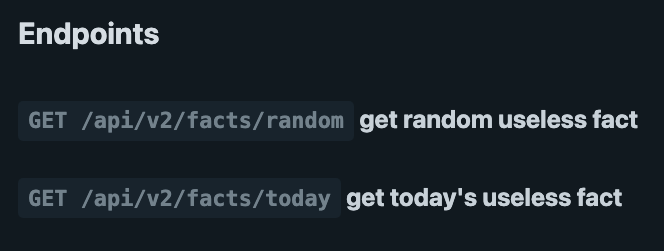
Available Endpoints
Step 3: Make a Request
You can use tools like:
- Postman (a GUI tool for API testing)
- Fetch/Axios (JavaScript)
- Requests (Python)
Example (using Python and the requests library):
import requests

url = "https://uselessfacts.jsph.pl/api/v2/facts/random"

response = requests.get(url)
data = response.json()

print(f"The data received\n {data}")
🧪 Try It Yourself
Here are some beginner-friendly APIs to experiment with:
- OpenWeatherMap — Weather info
- The Cat API — Random cat images
- REST Countries — Info about countries
- NASA APIs — Space data
Final Thoughts
APIs open up a world of possibilities. Instead of building everything from scratch, you can tap into existing services and focus on building your idea. Whether it’s getting real-time data, integrating with social media, or even building your own API — this knowledge is a fundamental skill for developers today.
Start small, explore different APIs, and soon you’ll be confidently plugging powerful features into your own projects.
Thanks for reading! If you liked this post, share it with a friend who’s just starting out with coding or APIs.
메타데이터
- post_id
- 2ba238109750
- slug
- a-beginners-guide-to-apis-what-they-are-and-how-to-use-them-2ba238109750
- url
- https://medium.com/@udayank23/a-beginners-guide-to-apis-what-they-are-and-how-to-use-them-2ba238109750
- canonical_url
- https://medium.com/@udayank23/a-beginners-guide-to-apis-what-they-are-and-how-to-use-them-2ba238109750
- author_url
- https://medium.com/@udayank23
- status
- ok
- fetched_at
- 2026-08-18 18:23:31