Building a Production-Ready Multi-Agent AI System with LangGraph and LangSmith
Lessons from My Development Experience as an AI Engineer
Building a Production-Ready Multi-Agent AI System with LangGraph and LangSmith
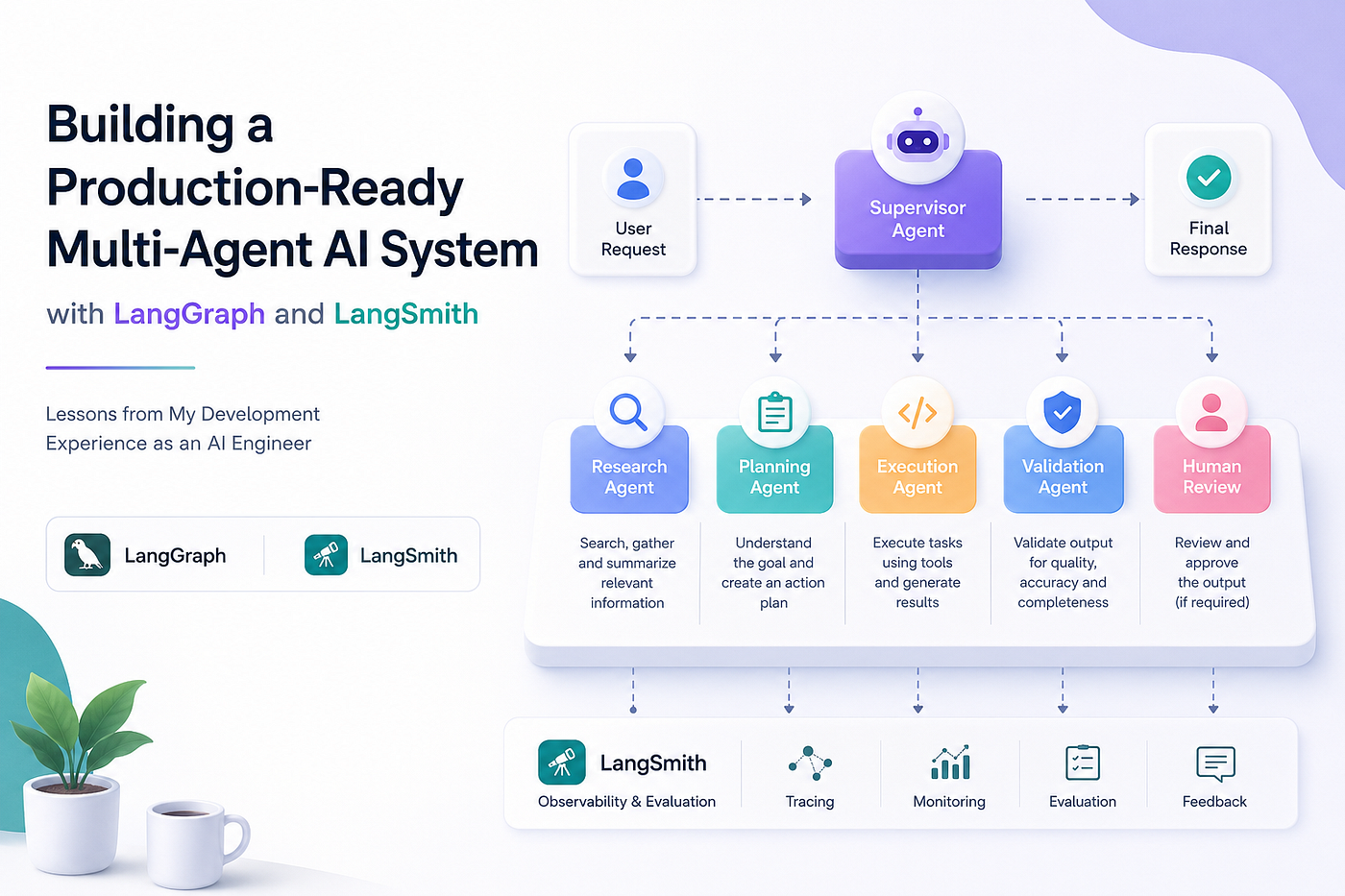
Lessons from My Development Experience as an AI Engineer
Over the last few years, AI engineering has changed very quickly.
At first, most AI applications were simple: a user asked a question, the system sent the prompt to a language model, and the model returned an answer. That approach was useful for demos, prototypes, and small internal tools. However, when I started building real AI products for production environments, I quickly learned that a single prompt and a single model call are not enough.
Real-world AI systems need to reason across multiple steps. They need to use tools, retrieve data, validate outputs, handle failures, ask for human approval when necessary, and maintain context across a workflow. More importantly, they need to be observable, testable, and reliable.
That is where multi-agent AI systems become powerful.
Instead of asking one large agent to do everything, we can design a system where multiple specialized agents collaborate together. Each agent has a clear responsibility, and an orchestration layer decides how the workflow should move from one step to the next.
In this article, I want to share my development experience building a multi-agent AI system using LangGraph and LangSmith. I will explain why I chose this architecture, how I designed the agents, what challenges I faced, and what I learned while making the system more reliable and production-ready.
This is not only a technical walkthrough. It is also a practical reflection from the perspective of an AI Engineer who has worked through the messy details of turning an AI prototype into a system that can actually be trusted.
Why Multi-Agent AI Systems Matter
A single AI agent can be impressive, but it can also become fragile very quickly.
When one agent is responsible for understanding the user request, planning the solution, calling tools, validating the answer, formatting the response, and recovering from errors, the system becomes difficult to control. The prompt becomes too large, the logic becomes unclear, and debugging becomes painful.
In my experience, the most common problems with single-agent systems are:
- The agent tries to do too many things at once.
- The reasoning flow becomes unpredictable.
- Tool usage is inconsistent.
- Hallucinations are harder to detect.
- Debugging requires reading long, unstructured traces.
- Small prompt changes can break unrelated behavior.
- Evaluation becomes difficult because there is no clear separation of responsibilities.
A multi-agent system solves many of these issues by applying a principle that software engineers already understand very well: separation of concerns.
Instead of one agent doing everything, we can create agents with specialized roles.
For example:
- A research agent gathers relevant information.
- A planning agent decides the execution strategy.
- A coding agent generates or modifies code.
- A validation agent reviews the output.
- A supervisor agent coordinates the entire workflow.
- A human approval step handles sensitive or high-risk decisions.
This structure makes the AI system easier to reason about, easier to test, and easier to improve over time.
The key is not simply creating many agents. The key is designing a controlled workflow where each agent has a clear purpose and the overall system remains predictable.
The Core Idea Behind My Architecture
The architecture I built followed a supervisor-based multi-agent pattern.
In this design, the supervisor is not responsible for doing all the work. Instead, the supervisor acts as the orchestrator. It receives the user request, understands the current state, decides which agent should act next, and routes the workflow accordingly.
The specialized agents then perform their individual tasks.
The supervisor answers questions like:
- What is the user trying to achieve?
- Which agent should handle the next step?
- Is the current output good enough?
- Should the workflow continue, stop, retry, or escalate?
- Does this require human review?
- Has the system reached a final answer?
This approach gives the system more structure than a free-form autonomous agent. It also reduces the risk of uncontrolled loops, unnecessary tool calls, and unpredictable behavior.
From a software engineering perspective, I think of the supervisor as the workflow controller, while each sub-agent is a specialized service with a defined responsibility.
Why I Used LangGraph
When building AI agents, one of the biggest challenges is managing state.
A real agentic workflow is not always linear. The system may need to move from research to planning, then back to research, then to validation, then to human approval, and finally to execution. This is difficult to manage cleanly with simple chains.
LangGraph is useful because it allows us to model the workflow as a graph.
Each node in the graph represents a step in the workflow. Each edge defines how the system moves from one step to another. Conditional routing allows the system to make decisions based on the current state.
This is very powerful for multi-agent systems because each agent can become a node in the graph.
For example, a simple graph might look like this:
User Request → Supervisor → Research Agent → Planning Agent → Execution Agent → Validation Agent → Final Response
But in a real system, the flow may be more dynamic:
User Request → Supervisor → Research Agent → Supervisor → Planning Agent → Supervisor → Validation Agent → Retry if needed → Human Review if needed → Final Response
This graph-based approach helped me design the system in a way that was explicit, testable, and easier to maintain.
Instead of hiding the logic inside one giant prompt, I could represent the workflow as a real software architecture.
Why I Used LangSmith
Building the agent workflow is only one part of the problem.
The bigger challenge is understanding what the system is doing.
When an AI agent gives a wrong answer, the issue may come from many places:
- The original prompt may be unclear.
- The wrong agent may have been selected.
- The retrieved context may be irrelevant.
- The model may have misunderstood the task.
- A tool call may have failed.
- The validation step may be too weak.
- The workflow may have taken the wrong path.
- The final response may not match the user’s actual intent.
Without observability, debugging these issues becomes guesswork.
This is where LangSmith became important in my development workflow.
LangSmith helped me trace the execution path of the AI system. I could inspect how the request moved through the graph, which agents were called, what prompts were sent, what responses came back, how long each step took, and where failures happened.
For production-grade AI engineering, this level of observability is not optional. It is essential.
A traditional backend service can be debugged with logs, metrics, and traces. AI systems need the same discipline, but with additional visibility into prompts, model outputs, tool calls, retrieved documents, and evaluation results.
LangSmith helped me move from “the agent gave a bad answer” to “this specific node failed because the retrieved context was weak and the validation step did not catch it.”
That difference is huge.
My Initial Version: Two Simple Sub-Agents
I started with a simple version of the system.
The first version had two sub-agents:
- A Research Agent
- A Response Agent
The Research Agent was responsible for collecting information and preparing useful context. The Response Agent was responsible for generating the final answer based on that context.
This version was simple, but it was useful because it helped me validate the basic idea.
The workflow looked like this:
User Request → Research Agent → Response Agent → Final Answer
At this stage, the system already performed better than a single prompt in some cases because the responsibilities were separated. The Research Agent focused only on gathering and organizing information. The Response Agent focused only on producing a clear final response.
However, I quickly found the limitations.
The system still lacked strong control. It did not always know when the research was sufficient. It did not have a dedicated validation step. It could not decide whether to retry. It did not have a clear way to route different types of requests.
That was the point where I realized I needed a supervisor.
Adding the Supervisor Agent
The supervisor became the central decision-maker.
Instead of directly moving from one agent to another, every major step returned to the supervisor. The supervisor reviewed the current state and decided what should happen next.
The updated workflow looked like this:
User Request → Supervisor → Research Agent → Supervisor → Response Agent → Supervisor → Final Answer
This design gave me much more control.
The supervisor could decide whether the request required research, whether the response was complete, whether another agent needed to be called, or whether the final answer was ready.
In more advanced versions, the supervisor could route tasks to different specialized agents:
- Research Agent
- Code Agent
- Data Analysis Agent
- Planning Agent
- Validation Agent
- Human Review Node
This made the system more flexible and closer to how real software teams work.
In a real engineering team, we do not expect one person to do product analysis, backend development, DevOps, QA, and security review all at once. We divide the work based on expertise. Multi-agent AI systems follow the same principle.
Designing Agent Responsibilities
One of the most important lessons I learned is that agent responsibility must be very clear.
If two agents have overlapping responsibilities, the system becomes confusing. The supervisor may route incorrectly, agents may repeat each other’s work, and the final output may become inconsistent.
For each agent, I defined:
- The agent’s purpose
- The type of input it expects
- The type of output it must produce
- The tools it is allowed to use
- The conditions under which it should stop
- The failure cases it should report
- The format of its response
For example, the Research Agent was not allowed to write the final answer. Its job was only to gather, filter, and summarize relevant information.
The Validation Agent was not allowed to rewrite everything from scratch. Its job was to inspect the output, identify issues, and recommend whether the response should pass, fail, or be improved.
The Supervisor Agent was not supposed to perform deep research directly. Its job was to route the workflow and maintain control.
This separation made the system easier to debug and improve.
When something went wrong, I could identify which agent was responsible and improve that specific part without changing the entire system.
State Management: The Backbone of the System
In multi-agent systems, state management is critical.
The state contains everything the system needs to know at each step of the workflow.
In my case, the state included information such as:
- User request
- Conversation history
- Current task type
- Agent outputs
- Retrieved context
- Tool results
- Validation status
- Error messages
- Retry count
- Final response
A well-designed state structure prevents chaos.
Without proper state management, agents may lose context, repeat work, or make decisions based on incomplete information. With a clear state design, each node in the graph can read what it needs, update the relevant fields, and pass the workflow forward.
I learned that the state should be structured but not overloaded.
If the state is too small, agents do not have enough context. If the state is too large, prompts become expensive and noisy. The balance is important.
A good practice is to store full details where needed, but pass only the most relevant context into each agent’s prompt.
Handling Hallucinations
Hallucination is one of the biggest risks in AI systems.
In a multi-agent workflow, hallucination can happen at different levels:
- The research agent may summarize incorrect information.
- The planning agent may make unsupported assumptions.
- The execution agent may call the wrong tool.
- The response agent may generate confident but inaccurate claims.
- The supervisor may route the workflow incorrectly.
To reduce hallucinations, I applied several strategies.
First, I made agents explicit about uncertainty. If the system did not have enough information, it had to say so instead of inventing details.
Second, I separated retrieval from generation. The agent generating the final answer had to rely on prepared context rather than freely producing unsupported claims.
Third, I added validation. The validation step reviewed whether the answer was grounded, complete, and aligned with the user’s request.
Fourth, I used traces to identify where hallucinations originated. Sometimes the final answer looked wrong, but the real issue started earlier in the workflow when the research step produced weak context.
The main lesson is this: hallucination is not only a model problem. It is often an architecture problem.
Better prompts help, but better workflow design helps even more.
Human-in-the-Loop Design
Not every decision should be automated.
In production AI systems, there are cases where human approval is necessary. This is especially true when the system performs sensitive actions, modifies important data, sends messages to customers, executes financial operations, or makes recommendations that affect real people.
I designed the workflow so that the supervisor could route certain cases to a human review step.
For example, if the validation agent detected low confidence, missing information, or a potentially risky action, the workflow could stop and request human approval.
This human-in-the-loop design made the system safer and more practical.
A good AI system should not pretend to be fully autonomous when the risk is high. Instead, it should know when to act, when to ask, and when to escalate.
This is one of the key differences between a demo agent and a production-ready AI system.
Evaluation: Moving Beyond “It Looks Good”
In the early stages of AI development, it is tempting to test the system manually.
You run a few prompts, inspect the answers, and decide whether the system feels good enough.
That approach does not scale.
As the system grows, manual testing becomes unreliable. A change that improves one scenario may break another. A new prompt may reduce hallucination but increase latency. A different model may improve reasoning but raise cost.
This is why evaluation is important.
For my multi-agent system, I focused on evaluation criteria such as:
- Did the system understand the user request correctly?
- Did the supervisor choose the right agent?
- Was the retrieved context relevant?
- Was the final answer grounded?
- Was the answer complete?
- Did the system avoid unsupported claims?
- Did it follow the expected format?
- Did it stop at the right time?
- Was the latency acceptable?
- Was the cost reasonable?
Evaluation helped me treat the AI system like a real engineering product.
Instead of relying only on intuition, I could compare versions, inspect failures, and make better decisions about prompts, models, tools, and workflow design.
Observability and Debugging
One of the biggest lessons from this project is that observability must be added early.
If you wait until production to add tracing, you will suffer.
In a multi-agent system, one user request may trigger many internal steps. Without tracing, you only see the final output. That is not enough.
You need to see:
- Which node started the workflow
- Which agent was selected
- What prompt was sent
- What the model returned
- Which tools were called
- How long each step took
- Whether retries happened
- Where the workflow stopped
- What the final response looked like
This is especially important when optimizing latency.
Sometimes the slowest part is not the model. It may be a retrieval step, an external API call, a tool timeout, or an unnecessary loop between agents.
With observability, performance optimization becomes much more systematic.
Instead of guessing, you can inspect the trace and identify the real bottleneck.
Common Challenges I Faced
Building a multi-agent AI system sounds exciting, but the implementation comes with real challenges.
1. Too Many Agents Can Create Complexity
At first, it is tempting to create an agent for everything.
However, more agents do not automatically mean better intelligence. More agents can also mean more latency, more cost, more routing errors, and more difficult debugging.
The right approach is to start simple.
Create agents only when there is a clear reason to separate responsibility.
2. Supervisor Logic Must Be Carefully Designed
The supervisor is powerful, but it can also become a bottleneck.
If the supervisor prompt is vague, routing becomes inconsistent. If the supervisor has too many choices, it may select the wrong path. If the stopping conditions are weak, the workflow may loop unnecessarily.
The supervisor needs clear rules, structured outputs, and strong termination conditions.
3. Agent Outputs Must Be Structured
Free-form text between agents can create problems.
If one agent returns a long paragraph and another agent has to interpret it, the workflow becomes fragile. Structured outputs make the system more reliable.
For example, instead of returning only text, an agent can return fields like:
- summary
- confidence_score
- missing_information
- recommended_next_step
- citations
- risk_flags
This makes it easier for the supervisor and other agents to make decisions.
4. Latency Can Increase Quickly
Multi-agent systems can become slow if every request passes through too many steps.
To manage latency, I had to think carefully about:
- Which steps are always required
- Which steps can be skipped
- Which agents can run in parallel
- Which model should be used for each task
- When to use a smaller model
- When to cache results
- When to stop the workflow early
A production AI system must balance intelligence, reliability, cost, and speed.
5. Evaluation Is Hard but Necessary
Evaluating a multi-agent system is more complex than evaluating a simple chatbot.
You are not only evaluating the final answer. You are evaluating the entire trajectory.
The system may produce a correct final answer but use an inefficient path. Or it may select the correct agents but fail in the final formatting. Or it may provide a good answer while relying on weak evidence.
This is why trace-level evaluation is so valuable.
Best Practices I Learned
After working through the development process, these are the practices I consider most important.
Start with a Simple Workflow
Do not begin with ten agents.
Start with two or three well-defined roles. Build the graph. Trace the execution. Test the behavior. Then add complexity only when the system needs it.
Define Agent Contracts
Each agent should have a contract.
The contract should explain what the agent does, what it does not do, what input it receives, and what output it must return.
This makes the system easier to maintain and easier for other engineers to understand.
Use Structured State
The state should be explicit, typed where possible, and designed carefully.
A clean state design makes the graph more reliable and prevents agents from depending on hidden assumptions.
Add Observability from the Beginning
Tracing should not be an afterthought.
Every important step should be observable. You should be able to inspect the full path from user request to final response.
Separate Reasoning from Execution
Planning and execution should not always be handled by the same agent.
A planning agent can decide what should happen. An execution agent can perform the action. A validation agent can review the result.
This separation improves control and safety.
Add Validation Before Final Output
The final response should not always go directly to the user.
For important workflows, add a validation layer that checks quality, correctness, completeness, and risk.
Design for Failure
AI systems will fail.
Tools will timeout. Models will misunderstand. Retrieval may return weak context. Users may provide incomplete requests.
A production-ready system must handle these cases gracefully.
A Practical Example
Let’s imagine the user asks:
“Analyze this company and tell me how I can contribute as an AI Engineer.”
A single-agent system may try to answer everything directly.
A multi-agent system can handle it more professionally.
The workflow may look like this:
- Supervisor receives the request.
- Research Agent collects company information.
- Role Analysis Agent identifies what the company likely needs.
- Resume Matching Agent compares the user’s background with the company’s needs.
- Strategy Agent creates a contribution plan.
- Validation Agent checks whether the answer is specific and grounded.
- Response Agent prepares the final answer.
This approach produces a much stronger result because each step has a focused responsibility.
It also allows better debugging.
If the final contribution plan is weak, I can inspect whether the issue came from company research, role analysis, resume matching, or final response generation.
That is the real value of multi-agent architecture.
It gives us control.
Production Considerations
When moving from prototype to production, I had to think beyond the agent logic.
A production AI system needs:
- Authentication and authorization
- Rate limiting
- Cost tracking
- Prompt versioning
- Model fallback strategies
- Error handling
- Logging and tracing
- Data privacy controls
- Human approval workflows
- Evaluation datasets
- Monitoring dashboards
- Deployment pipelines
- Rollback strategies
This is where AI Engineering becomes real software engineering.
The model is only one part of the system. The surrounding architecture determines whether the product is reliable, scalable, and maintainable.
In production, I also consider which model should be used for each agent.
Not every task requires the most powerful model. A routing task may work well with a smaller model. A validation task may require a stronger model. A summarization task may be optimized for speed and cost.
Choosing the right model for the right node is an important engineering decision.
What I Would Improve Next
If I continue improving this system, I would focus on several areas.
First, I would improve evaluation coverage. I would create more test cases for different request types, edge cases, failure scenarios, and multi-turn conversations.
Second, I would add more advanced routing logic. The supervisor should become better at selecting the shortest reliable path instead of always using the most complete workflow.
Third, I would optimize latency. Some agents can run in parallel, some steps can be cached, and some workflows can stop earlier when confidence is high.
Fourth, I would improve memory management. Multi-agent systems need to remember useful context without overloading every prompt.
Fifth, I would add stronger human-in-the-loop workflows for high-risk operations.
Finally, I would continue improving observability. The more complex the system becomes, the more important it is to understand exactly what happened inside each execution.
Key Lessons from My AI Engineering Experience
Building this multi-agent system taught me several important lessons.
The first lesson is that agent architecture matters as much as model selection.
A powerful model inside a weak architecture will still produce unreliable results. A well-designed architecture can make even smaller models more useful and controlled.
The second lesson is that observability is not optional.
If you cannot trace the system, you cannot improve it. If you cannot evaluate it, you cannot trust it. If you cannot debug it, you cannot maintain it.
The third lesson is that multi-agent systems should be designed like real software systems.
They need structure, contracts, state management, testing, monitoring, and failure handling.
The fourth lesson is that autonomy should be controlled.
The goal is not to let agents do anything they want. The goal is to give them the right amount of freedom inside a safe and well-designed workflow.
The fifth lesson is that human review still matters.
For many real-world use cases, the best system is not fully autonomous. The best system is one that automates repetitive work, improves decision-making, and escalates when human judgment is needed.
Final Thoughts
Multi-agent AI systems are becoming one of the most important patterns in modern AI engineering.
They allow us to move beyond simple chatbots and build systems that can plan, reason, use tools, collaborate across specialized roles, and handle complex workflows.
However, building them well requires engineering discipline.
It is not enough to connect several agents together and hope they behave intelligently. We need clear responsibilities, controlled routing, structured state, strong validation, observability, evaluation, and production-grade monitoring.
My experience with LangGraph and LangSmith showed me that the future of AI Engineering is not only about prompting models. It is about designing reliable AI systems.
The real challenge is not making an agent work once.
The real challenge is making it work consistently, safely, and observably across many real-world scenarios.
That is the difference between an AI demo and an AI product.
And as AI Engineers, that is exactly where our work becomes valuable.
메타데이터
- post_id
- 2c589734abdb
- slug
- building-a-production-ready-multi-agent-ai-system-with-langgraph-and-langsmith-2c589734abdb
- url
- https://medium.com/@pioneer0x3fdi/building-a-production-ready-multi-agent-ai-system-with-langgraph-and-langsmith-2c589734abdb
- canonical_url
- https://medium.com/@pioneer0x3fdi/building-a-production-ready-multi-agent-ai-system-with-langgraph-and-langsmith-2c589734abdb
- author_url
- https://medium.com/@pioneer0x3fdi
- status
- ok
- fetched_at
- 2026-06-18 00:10:23



