ACID in Databases: The Backbone of Reliable Transactions
Understanding the four pillars that keep your data accurate, safe, and predictable
ACID in Databases: The Backbone of Reliable Transactions
Understanding the four pillars that keep your data accurate, safe, and predictable
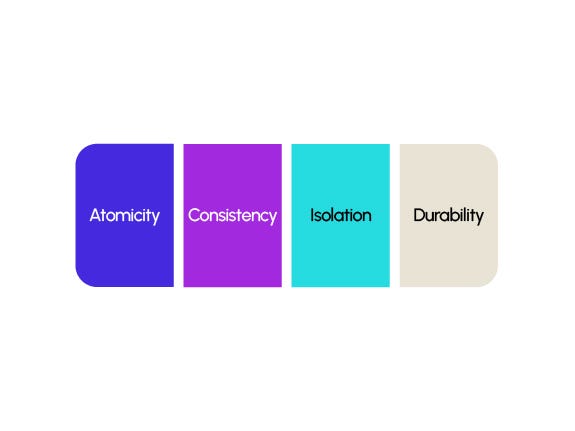
Source: https://datascientest.com/en/acid-in-database-management
Every modern application you interact with — banking apps, e-commerce platforms, food delivery systems, trading terminals — has one thing in common: they all rely on databases that must never go wrong.
Imagine transferring money and it gets deducted from your account, but never reaches the recipient. Imagine booking a movie ticket, only to find out the seat was sold twice. Imagine stock trades being partially applied during market hours.
These real-world problems don’t happen because databases follow a powerful set of principles known as ACID.
ACID stands for:
- Atomicity
- Consistency
- Isolation
- Durability
These four properties work together to guarantee that every transaction — no matter how small or complex — is processed accurately, reliably, and safely, even when thousands of users are performing operations simultaneously.
In this article, we will demystify ACID using a simple and relatable example: transferring money from Alice to Bob. (While the example uses SQL Server (SSMS), the concepts are completely database-agnostic and apply to MySQL, PostgreSQL, Oracle, and every traditional relational database.)
Let’s break down what makes ACID the foundation of trustworthy data systems.
Understanding Transactions in Databases
What Is a Transaction?
A transaction is the smallest logical unit of work in a database. It represents a sequence of operations performed as a single, indivisible action.
Think of it like this:
Either everything happens, or nothing happens.
A transaction ensures that related database operations (such as transferring money between two accounts) succeed together or fail together, maintaining data integrity at all times.
Examples of real-life transactions:
- Transferring money between accounts
- Booking a flight ticket
- Placing an order in an e-commerce app
- Updating multiple related tables in a billing system
No matter the database engine (SQL Server, MySQL, PostgreSQL, Oracle), the concept of a transaction remains the same.
Transaction Lifespan
Every transaction follows a predictable lifecycle:
1. Start / Begin
The moment the first operation is executed, the transaction begins.
2. Execute Operations
All SQL statements within the transaction are executed:
INSERTUPDATEDELETE- Reads (
SELECT) depending on isolation
3. Commit
If everything succeeds, the transaction is committed. Changes become permanent and visible to other transactions.
4. Rollback
If anything goes wrong (errors, system failure, business rule violation), the transaction is rolled back, undoing all changes so the database returns to its previous consistent state.
Visual Summary:
| Stage    | Description                  |
| ---------| ---------------------------- |
| BEGIN    | Start transaction            |
| WORK     | Execute multiple operations  |
| COMMIT   | Save all changes permanently |
| ROLLBACK | Undo all changes             |
Nature of Transactions
Transactions have four important characteristics that are database-agnostic:
1. Atomic
Everything inside the transaction is treated as a single unit.
2. Consistent
The database moves from one valid state to another valid state.
3. Isolated
Intermediate states of a transaction are not visible to others.
4. Durable
Once committed, the changes survive crashes or failures.
These four properties form the famous ACID principle, which you’ll discuss later.
Now Let’s Move to Microsoft SQL Server (SSMS)
Below is a clean and simple example of using a transaction in SQL Server.
Step 1: Create a Database
CREATE DATABASE BankingDB;
GO

USE BankingDB;
GO
Step 2: Create an Accounts Table
CREATE TABLE Accounts (
    AccountID INT PRIMARY KEY,
    HolderName VARCHAR(100),
    Balance DECIMAL(18,2)
);
Step 3: Insert Sample Data
INSERT INTO Accounts VALUES
(1, 'Alice', 5000.00),
(2, 'Bob', 3000.00);
Step 4: 🏦 Transaction Example: Transfer ₹1000 from Alice to Bob
This example demonstrates how multiple SQL operations are wrapped inside a transaction so that they behave as a single, atomic unit of work.
🎯 What We Want to Do
- Check Alice’s balance.
- If she has at least ₹1000 →
- Deduct ₹1000 from her account
- Add ₹1000 to Bob’s account
- If she does not have enough balance →
- Cancel the entire transaction
- Ensure no money is deducted
This logic guarantees that the database remains consistent and no partial updates occur.
🔄 Implementing the Transfer Using a Transaction
Below is the complete SQL code that performs the safe transfer:
BEGIN TRANSACTION;

DECLARE @amount DECIMAL(18,2) = 1000;
DECLARE @aliceBalance DECIMAL(18,2);

-- Step 1: Fetch Alice's current balance
SELECT @aliceBalance = Balance
FROM Accounts
WHERE AccountID = 1;  -- Alice

-- Step 2: Check whether she has enough balance
IF @aliceBalance >= @amount
BEGIN
    -- Deduct from Alice
    UPDATE Accounts
    SET Balance = Balance - @amount
    WHERE AccountID = 1;
    -- Add to Bob
    UPDATE Accounts
    SET Balance = Balance + @amount
    WHERE AccountID = 2;
    COMMIT TRANSACTION;
    PRINT 'Transfer Successful: ₹1000 moved from Alice to Bob';
END
ELSE
BEGIN
    ROLLBACK TRANSACTION;
    PRINT 'Transfer Failed: Insufficient Balance in Alice''s Account';
END;
📝 What This Logic Ensures
- The transaction is safe.
- Alice’s account is checked before any update.
- No partial update happens even if:
- Alice lacks sufficient balance
- Bob’s update fails
- A runtime error occurs
This fits perfectly when you explain Atomicity and Consistency in ACID.
🧩 Atomicity (A): All-or-Nothing Execution
Atomicity is the first and most fundamental property of ACID. It ensures that a transaction is treated as a single, indivisible unit of work — meaning:
Either every step of the transaction completes successfully, or none of them do.
There is no “half-success” in an atomic transaction.
🏦 Explaining Atomicity with Our Banking Example
Let’s use the money transfer scenario:
Goal: Transfer ₹1000 from Alice to Bob Steps involved:
- Check if Alice has enough balance
- Deduct ₹1000 from Alice
- Add ₹1000 to Bob
All three steps are part of one logical action — a fund transfer.
Without Atomicity
If a system allowed partial updates:
- Alice could be debited ₹1000
- But Bob might not be credited
- Or vice versa
This would corrupt the financial data.
🟢 How Atomicity Works in Our SQL Transaction
Here’s the key part of the example:
BEGIN TRANSACTION;
-- Check balance
IF @aliceBalance >= @amount
BEGIN
    UPDATE Accounts SET Balance = Balance - @amount WHERE AccountID = 1;
    UPDATE Accounts SET Balance = Balance + @amount WHERE AccountID = 2;
    COMMIT TRANSACTION;
END
ELSE
BEGIN
    ROLLBACK TRANSACTION;
END;
What this guarantees:
✔ If Alice has enough money
Both updates happen, and COMMIT makes them permanent.
Alice → -₹1000, Bob → +₹1000
✔ If Alice does not have enough money
The system executes:
ROLLBACK TRANSACTION;Meaning:
- No deduction happens
- No credit happens
- The database returns to its original state
Not even a single rupee moves.
🎯 Why This Demonstrates Atomicity
Atomicity ensures the transaction behaves like a binary outcome:
Condition Outcome All steps succeed COMMIT → changes are saved Any step fails ROLLBACK → everything is undone
In simple terms:
A fund transfer either fully succeeds or it does not happen at all.
This prevents:
- Double debits
- Missing credits
- Partial updates
- Inconsistent account balances
And ensures transactional systems like banking, payments, and ordering remain trustworthy.
🧭 Consistency ( C ): Ensuring the Database Moves from One Valid State to Another
Consistency ensures that every transaction brings the database from one valid state to another valid state, without violating any rules, constraints, or business logic.
If a transaction violates a rule (like causing negative balance or breaking a foreign key), the database must reject the transaction and revert to the previous consistent state.
In simple terms:
After the transaction completes, all data must still follow the rules defined for the database.
Consistency is enforced by:
- Constraints (PK, FK, CHECK, UNIQUE)
- Data types
- Business rules
- Triggers
- Application logic
🏦 Consistency in the Banking Example (Alice → Bob Transfer)
Let’s use your transfer scenario:
- Alice has ₹5000
- Bob has ₹3000
- We want to transfer ₹1000 from Alice to Bob
Your transaction steps:
IF @aliceBalance >= @amount
BEGIN
    UPDATE Accounts SET Balance = Balance - @amount WHERE AccountID = 1;
    UPDATE Accounts SET Balance = Balance + @amount WHERE AccountID = 2;
    COMMIT;
END
ELSE
BEGIN
    ROLLBACK;
END
✔ Consistency Check #1 — Balance Must Not Go Negative
Alice should not be allowed to go below ₹0.
You enforced this business rule in the logic:
IF @aliceBalance >= @amountIf Alice has less than ₹1000, the transaction refuses to execute and rolls back. This protects the integrity of account balances.
✔ Consistency Check #2 — Total Money in the System Remains Correct
Before transfer: Alice + Bob = ₹5000 + ₹3000 = ₹8000
After transfer: Alice = ₹4000 Bob = ₹4000 Total = ₹8000
The total money remains unchanged, proving that the transaction preserved system consistency.
If the database accidentally:
- Deducted from Alice
- But failed to add to Bob
- Or added to Bob without deducting from Alice
Then the system would enter an inconsistent state.
Atomicity + Consistency ensure this never happens.
✔ Consistency Check #3 — Constraints Must Not Be Violated
Let’s say your table has:
CHECK (Balance >= 0)If a buggy transaction tried to deduct more than Alice has, the database would:
- Reject the update
- Trigger a rollback
- Keep the database consistent
Constraints enforce consistency automatically, even if the application logic fails.
✔ Consistency Check #4 — Data Types Remain Valid
If Balance is DECIMAL(18,2):
- You can’t insert a string
- You can’t insert more decimal places
- You can’t overflow the type
These rules keep the data internally consistent.
🧠 What Consistency Is Not
Many beginners confuse Consistency with Isolation, but they are very different:
| Consistency                                | Isolation                                            |
| ------------------------------------------ | ---------------------------------------------------- |
| Ensures data follows rules and constraints | Ensures transactions don’t interfere with each other |
| Valid state → Valid state                  | Independent execution                                |
| Protects *data integrity*                  | Protects *transaction integrity*                     |
Consistency is about correctness, Isolation is about concurrency protection.
🔐 Consistency = Business Rules + Database Rules
A database is consistent if it satisfies:
✔ Structural rules
- Primary key uniqueness
- Foreign key validity
- Check constraints
- Data type validity
✔ Logical rules
- Money cannot disappear
- Balances cannot go negative
- Transfer must have equal debit & credit
- Inventory cannot go below zero
- User account cannot exist without a profile (FK constraint)
If any of these rules are violated, the database must reject the transaction.
🎯 Final Takeaway
Consistency ensures that the database always stores valid, correct, rule-abiding data. A transaction must transform the database from a valid state → to another valid state. If any rule is violated, the transaction must fail and roll back.
Our transfer example demonstrates this perfectly:
- Alice never goes below ₹0
- Total money remains correct
- Constraints remain satisfied
- No invalid data enters the system
This makes the database trustworthy, predictable, and robust.
🔒 Isolation (I): Keeping Transactions Independent
Isolation ensures that multiple transactions running at the same time do not interfere with each other. Each transaction should behave as if it is running alone, even when hundreds of others are running in parallel.
In other words:
Every transaction must be protected from the intermediate, uncommitted changes of other transactions.
This prevents anomalies, inconsistencies, and data corruption that occur when transactions “step on each other’s toes.”
🏦 Explaining Isolation Using the Alice → Bob Money Transfer
Let’s reuse our banking scenario:
Transaction T1: Transfer ₹1000 from Alice to Bob Transaction T2: Check Alice’s balance (maybe her banking app is refreshing)
Without proper isolation, these might see or modify each other’s uncommitted data, causing serious issues.
Let’s break this down.
🚫 What Can Go Wrong Without Isolation?
1️⃣ Dirty Reads
T2 reads data that T1 has updated but not yet committed.
Example:
- T1 deducts ₹1000 from Alice → Balance becomes ₹4000
- But hasn’t committed yet
- T2 reads Alice’s balance and sees ₹4000
- Then T1 rolls back (error) → Balance goes back to ₹5000
T2 saw a value that never truly existed.
2️⃣ Non-Repeatable Reads
T1 reads the same row twice but gets different results because T2 modified it in between.
Example:
- T1 reads Alice’s balance → ₹5000
- T2 withdraws ₹500 (commits) → Alice is now at ₹4500
- T1 reads again → now sees ₹4500
T1 sees changing data within the same transaction.
3️⃣ Phantom Reads
When a transaction reads a set of rows, another transaction inserts or deletes rows that match the same condition.
Example:
- T1 queries all accounts with balance > 4000
- T2 deposits money into a different account, increasing its balance above 4000
- T1 runs the same query again → sees an extra row
Rows appear or disappear like “phantoms.”
🛡 How Isolation Protects Our Banking Transaction
Look at your fund transfer code:
BEGIN TRANSACTION;

-- Fetch Alice's balance
SELECT @aliceBalance = Balance
FROM Accounts
WHERE AccountID = 1;

-- Deduct and credit only after validation
IF @aliceBalance >= @amount
BEGIN
    UPDATE Accounts SET Balance = Balance - @amount WHERE AccountID = 1;
    UPDATE Accounts SET Balance = Balance + @amount WHERE AccountID = 2;
    COMMIT TRANSACTION;
END
ELSE
BEGIN
    ROLLBACK TRANSACTION;
END;
What Isolation ensures here:
✔ No other transaction can use Alice’s intermediate balance
Before the commit, the deduction is not visible to other sessions.
✔ No one can modify Alice’s balance until we finish
This prevents race conditions (two transactions deducting at the same time).
✔ Other transactions cannot read partial or uncommitted updates
They only see committed, stable data.
🧱 SQL Server Isolation Levels (Quick Overview)
| Isolation Level          | Prevents                               | Allows                              |
| -------------------------| -------------------------------------- | ----------------------------------- |
| Read Uncommitted         | Nothing                                | Dirty reads                         |
| Read Committed (default) | Dirty reads                            | Non-repeatable + phantom            |
| Repeatable Read          | Dirty + non-repeatable reads           | Phantom reads                       |
| Serializable             | Dirty + non-repeatable + phantom reads | Highest locking, lowest concurrency |
| Snapshot                 | Dirty + non-repeatable reads           | Uses versioning, high concurrency   |
🎯 Why Isolation Matters
Without isolation:
- Banking apps could show incorrect balances
- Two transactions could withdraw money simultaneously
- E-commerce inventory could show wrong stock availability
- Online ticket booking could oversell seats
Isolation ensures:
No transaction is affected by partial progress of another. Each sees a stable, consistent snapshot of data.
This is why modern transactional systems remain accurate even under massive concurrency.
🔒 Isolation Levels in Detail
Isolation levels determine how strictly the database protects transactions from each other. They balance two opposing needs:
- Accuracy (avoid dirty reads, race conditions, anomalies)
- Performance (allow higher concurrency)
Higher isolation = safer, but slower Lower isolation = faster, but more anomalies
SQL databases typically support 5 major isolation levels:
- Read Uncommitted
- Read Committed
- Repeatable Read
- Serializable
- Snapshot (MVCC-based)
Let’s break each down with intuitive examples.
1️⃣ Read Uncommitted
“I don’t care if the data is uncommitted — just give me whatever is there.”
This is the lowest isolation level. No locks are honored. Transactions can read data that has not been committed yet.
✔ Allowed
- Dirty Reads (Reading data that might later be rolled back)
❌ Prevents
- Nothing. It prevents nothing.
🏦 Example
Transaction T1: — Deducts ₹1000 from Alice → Balance becomes ₹4000 (But has NOT committed yet)
Transaction T2: — Reads Alice’s balance → sees ₹4000
Then T1 fails and rolls back → Alice’s balance goes back to ₹5000.
T2 saw something that never truly existed.
When used?
Rarely. Only in analytics/read-heavy systems where perfect accuracy doesn’t matter.
2️⃣ Read Committed (Default in SQL Server, Oracle, PostgreSQL)
“Only show me committed data.”
This is the most widely used isolation level.
✔ Prevents
- Dirty Reads
❌ Allows
- Non-repeatable reads
- Phantom reads
🏦 Example
- T1 reads Alice’s balance: ₹5000
- T2 deducts ₹1000 and commits → ₹4000
- T1 reads again → now sees ₹4000
The data changed between two reads. This is allowed under Read Committed.
Used when?
Most OLTP systems (e-commerce, banking apps, CRMs). Good balance of safety + performance.
3️⃣ Repeatable Read
“If I read a row once, it should not change until I finish.”
This level locks the rows you read. Others can’t modify them until your transaction finishes.
✔ Prevents
- Dirty reads
- Non-repeatable reads
❌ Allows
- Phantom reads (new rows appearing)
🏦 Example
T1: SELECT Balance FROM Accounts WHERE AccountID = 1
=> Reads ₹5000 and locks the row.
T2 tries to modify Alice’s balance → BLOCKED (T2 must wait until T1 finishes)
But if T1 runs a query like:
SELECT * FROM Accounts WHERE Balance > 4000
T2 can insert a new account with balance ₹5000 That is a phantom row.
Used when?
Systems that require repeatable reads but can tolerate changing row sets (e.g., reports).
4️⃣ Serializable (Highest, Most Strict)
“Behave as if transactions run one after another, never in parallel.”
This is the safest but slowest isolation level. It applies range locks to prevent phantoms, meaning:
- No inserts
- No updates
- No deletes are allowed that affect your query range.
✔ Prevents
- Dirty reads
- Non-repeatable reads
- Phantom reads ➡ All anomalies
🏦 Example
T1:SELECT * FROM Accounts WHERE Balance > 4000
T1 wants to operate on this set of rows.
Now T2 tries to:
- Insert a new account with balance ₹4500
- Update an account’s balance from 3000 → 4500
→ Both are BLOCKED.
Serializable ensures that while T1 is running, the entire query range stays stable.
Used when?
- Banking ledgers
- Financial posting systems
- Situations where correctness > performance
5️⃣ Snapshot Isolation (Using Versioning, Not Locks)
“Give me the data as it looked when my transaction started.”
Snapshot uses row versions rather than locks.
Reads never block writes. Writes never block reads. Perfect for high concurrency.
✔ Prevents
- Dirty reads
- Non-repeatable reads
- Phantom reads (for SELECT queries)
❌ But…
If two transactions update the same row, one fails with a write conflict.
🏦 Example
T1 starts at 10:00 — sees Alice’s balance as ₹5000 T2 deducts ₹1000 → commits → Alice’s balance is now ₹4000
T1 still sees ₹5000, because it sees the snapshot from 10:00.
When T1 tries to update: If the row has changed, SQL Server throws: “Update conflict: Snapshot isolation transaction aborted.”
Used when?
- High concurrency systems
- Applications that read heavily
- Systems where waiting/blocking is unacceptable
🧠 Summary Table
| Isolation Level  | Dirty Reads | Non-Repeatable Reads | Phantom Reads         | Locking                   |
| -----------------| ----------- | -------------------- | --------------------- | ------------------------- |
| Read Uncommitted | Allowed     | Allowed              | Allowed               | None                      |
| Read Committed   | Prevented   | Allowed              | Allowed               | Row locks during write    |
| Repeatable Read  | Prevented   | Prevented            | Allowed               | Stronger row locks        |
| Serializable     | Prevented   | Prevented            | Prevented             | Range locks               |
| Snapshot         | Prevented   | Prevented            | Prevented (for reads) | Versioning, no read locks |
🎯 Final Takeaway
Isolation levels determine how much a transaction is allowed to “see” or be affected by others.
- Higher isolation = more safety, more locking, slower
- Lower isolation = more concurrency, fewer guarantees
Modern systems choose isolation levels based on their needs. For example:
- Banking → Serializable or Snapshot
- E-commerce → Read Committed
- Analytics → Read Uncommitted or Snapshot
Isolation ensures that even in a world of massive parallel processing, each transaction works with its own safe, consistent view of data.
🔒 Durability: Once a Transaction Commits, It Stays Committed
Durability is the final pillar of the ACID properties, and it guarantees one powerful promise:
Once a transaction is successfully committed, its results will survive — no matter what happens next.
That means:
- Power failure?
- Database crash?
- Server reboot?
- Network outage?
Your committed data remains safe and intact.
Durability ensures permanent persistence.
🧠 What Durability Really Means
Imagine your database as a notebook.
- When a transaction is in progress, you’re writing in pencil (it can still be erased).
- When the transaction commits, the database writes it in ink (it becomes permanent).
Durability is that “ink”.
Once written:
- It cannot fade.
- It cannot be lost.
- It will always be there after recovery.
💾 How Databases Ensure Durability Internally
Modern databases use several techniques to guarantee durability:
1️⃣ Write-Ahead Logging (WAL)
Before data is changed in memory, the intended changes are first written to a log file on disk.
This log acts like a black box in an airplane.
If the database crashes:
- The log is replayed during recovery.
- All committed transactions are restored.
2️⃣ Checkpointing
Periodically, the database writes in-memory data to permanent storage (disk/SSD).
This reduces recovery time.
3️⃣ Redo Logs
During a crash recovery, the redo logs help recreate the state of committed transactions.
4️⃣ Replication (Optional but common)
In distributed systems (e.g., MySQL replication, Postgres streaming replication):
- Committed data is copied to replica machines.
- Even if the primary server fails, replicas ensure durability.
5️⃣ Hardware Guarantees
Durability also depends on:
- Non-volatile storage (SSD/HDD)
- Battery-backed write caches
- RAID configurations
🏦 Banking Example: Durability in Action
Let’s continue with your scenario:
Transfer ₹1000 from Alice to Bob.
When the system executes:
BEGIN TRANSACTION;
UPDATE accounts SET balance = balance - 1000 WHERE user = 'Alice';
UPDATE accounts SET balance = balance + 1000 WHERE user = 'Bob';
COMMIT;
What happens after the COMMIT?
- Even if the database crashes 1 millisecond later…
- Even if the server loses power…
- Even if the OS crashes…
The ₹1000 transfer will not be lost.
The logs ensure that the transaction’s effects remain preserved forever.
Alice’s and Bob’s balances will always reflect the completed transaction.
🖥️ What If the System Crashes Before COMMIT?
No problem.
Durability only applies after commit.
If a crash happens before the commit:
- The transaction is rolled back.
- No change is made to any account.
- Database restores to the last consistent state.
🔐 Key Benefits of Durability
- No data loss after commit
- Strong integrity guarantees
- Reliable financial transactions
- Stability even during unexpected failures
- Foundation for distributed database reliability
📝 One-Line Definition
Durability ensures that once a transaction is committed, its results become permanent and will survive any subsequent failures.
🏁 Conclusion: Why ACID Still Matters
In a world where billions of transactions happen every second — bank transfers, online shopping, ticket bookings, healthcare records, stock trades — the reliability of data is non-negotiable. This is exactly why ACID properties remain the backbone of modern database systems.
- Atomicity ensures that every transaction is all-or-nothing, protecting us from half-completed or inconsistent changes.
- Consistency guarantees that the database always moves from one valid state to another, preserving rules, constraints, and integrity.
- Isolation lets transactions run side-by-side without stepping on each other’s toes, ensuring correctness in a multi-user environment.
- Durability makes sure that once a transaction is successfully committed, it becomes a permanent part of the system — even in the face of crashes, failures, or unexpected shutdowns.
Together, these four principles form a powerful shield that prevents data corruption, maintains accuracy, and builds trust in any application that relies on persistent storage.
Whether you’re designing a banking system, an e-commerce platform, a social network, or a healthcare system, ACID gives you a blueprint for handling data safely and predictably.
In short:
ACID is not just a database concept — it’s the foundation of reliability in the digital world.
If you found this article helpful, consider supporting my work:
👉 Clap 👉 Follow me on Medium for deep-dive articles on Databases, SQL, Distributed Systems, and Backend Engineering 👉 Leave a comment — I’d love to hear your thoughts, questions, or topics you want covered next
Your support helps me continue writing high-quality, beginner-friendly tech content. Thanks for reading! 🚀
메타데이터
- post_id
- 2c5e0e13d92f
- slug
- acid-in-databases-the-backbone-of-reliable-transactions-2c5e0e13d92f
- url
- https://medium.com/learning-sql/acid-in-databases-the-backbone-of-reliable-transactions-2c5e0e13d92f
- canonical_url
- https://medium.com/learning-sql/acid-in-databases-the-backbone-of-reliable-transactions-2c5e0e13d92f
- author_url
- https://medium.com/@basubinayak05
- status
- ok
- fetched_at
- 2026-06-11 17:15:47