Is Generative Fill Really Useful in Photoshop 2025?
Is Generative Fill Really Useful in Photoshop 2025?
Is Generative Fill Really Useful in Photoshop 2025?
Is Generative Fill Really Useful in Photoshop 2025?
Photoshop has been a cornerstone of digital editing for years, but the 2025 update brings something truly groundbreaking: generative fill. This AI-powered feature promises to revolutionize how we edit and create visual content. But is it as useful as it claims to be? Let’s dive in and find out.
Understanding Generative Fill
What is Generative Fill?
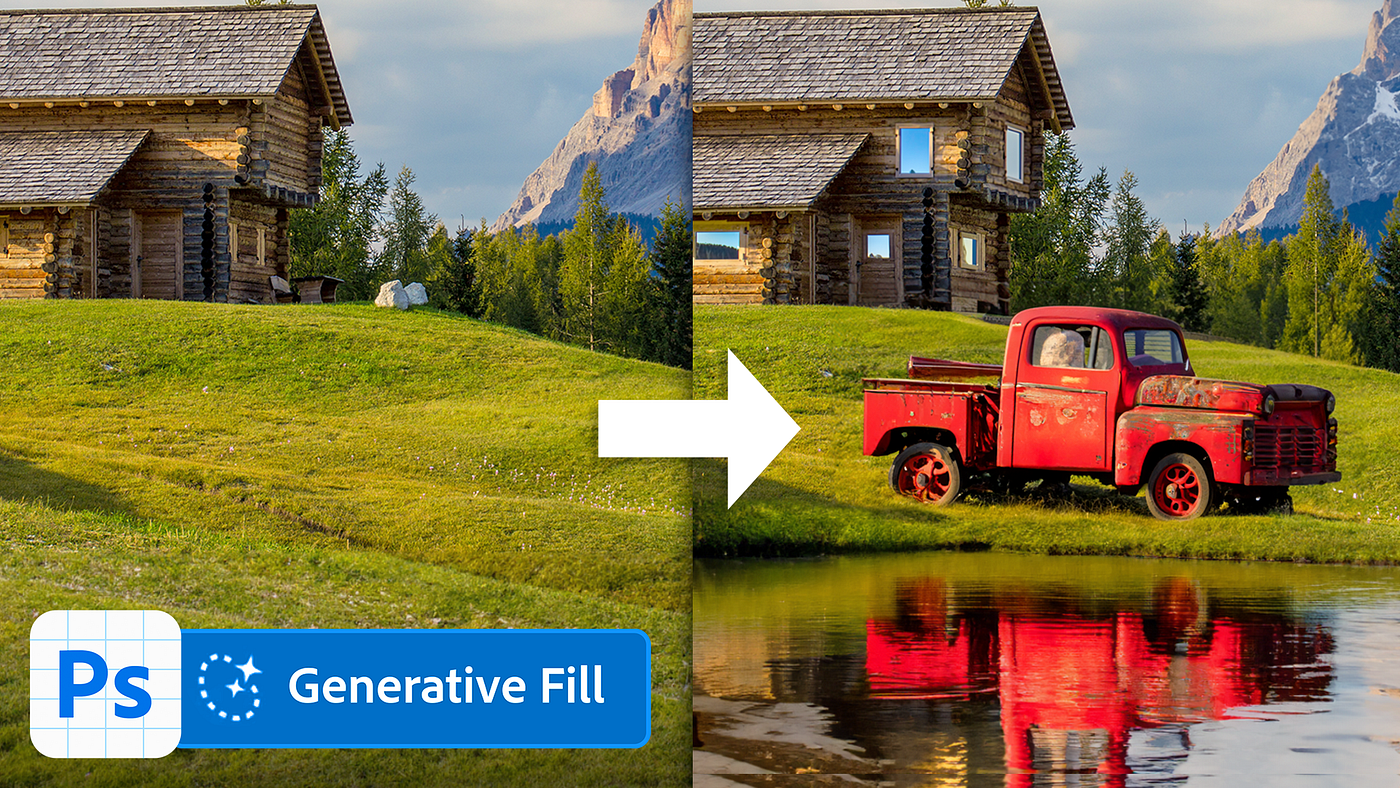
Generative fill is an AI-driven tool that enables users to edit images by intelligently generating content to fill selected areas. Whether you want to remove an unwanted object, extend an image, or create something entirely new, generative fill analyzes the surrounding pixels and produces results that seamlessly blend with the rest of the image.
How Does It Work?
Powered by Adobe’s AI framework, generative fill relies on machine learning to interpret the image and predict what the missing or altered areas should look like. It uses an extensive dataset to ensure that the additions or replacements look natural and realistic.
New Features of Generative Fill in Photoshop 2025
Improved AI-Powered Image Editing
Photoshop 2025 boasts an upgraded AI model that ensures more precise and context-aware edits, making it easier than ever to achieve professional results.
Enhanced Precision and Control
Users can now fine-tune generative fill settings, allowing for greater customization. Whether you’re working on a detailed project or a quick edit, the added control makes the process smoother.
Faster Rendering Times
Speed matters, especially for professionals. Photoshop 2025 has significantly reduced the rendering time for generative fill, ensuring that your workflow is uninterrupted.
Applications of Generative Fill
Editing Photos with Generative Fill
- Removing Unwanted Objects Tired of those photobombers? Generative fill can clean up your images effortlessly, leaving no trace of the edits.
- Expanding Image Dimensions Ever wished a photo had more background? With generative fill, you can expand the canvas and let the AI generate realistic extensions.
Creative Content Creation
- Generating Backgrounds and Landscapes Whether you’re designing a poster or enhancing a photo shoot, generative fill can create stunning backgrounds with minimal effort.
- Adding Realistic Textures and Elements Need a brick wall or a sandy beach? Generative fill can add lifelike textures and elements in seconds.
Advantages of Generative Fill
Time-Saving Benefits for Professionals
Gone are the days of spending hours on intricate edits. Generative fill drastically reduces editing time without compromising quality.
Enhanced Creativity for Designers
The tool empowers designers to push their creative boundaries, allowing them to experiment with ideas that would have been time-consuming or impractical before.
Accessibility for Beginners
Even if you’re new to Photoshop, generative fill makes advanced editing techniques accessible with just a few clicks.
Limitations of Generative Fill
Occasional Inaccuracies in Output
While impressive, generative fill isn’t perfect. It can occasionally produce results that look out of place or unnatural.
Dependence on AI-Generated Data
Since it relies on pre-existing datasets, the tool might struggle with highly specific or unique edits.
Ethical Considerations in Creative Work
The ease of AI editing raises questions about originality and authenticity in design and photography.
Generative Fill vs Traditional Editing
Comparing Workflow and Results
Traditional editing methods often require painstaking attention to detail, while generative fill automates much of the process. However, combining both approaches often yields the best results.
Advantages of Blending AI with Manual Editing
Using generative fill alongside manual techniques allows for greater precision and creativity, giving users the best of both worlds.
Industries Benefiting from Generative Fill
Photography and Photo Retouching
Photographers can quickly retouch images, removing distractions and enhancing compositions.
Graphic Design and Advertising
Designers can create eye-catching visuals in record time, making the tool invaluable for advertising projects.
Social Media Content Creation
Content creators can generate stunning posts and stories without needing extensive design expertise.
Generative Fill in Competitive Tools
Photoshop 2025 stands out for its intuitive interface and seamless integration of generative fill compared to other software. While competitors offer similar features, Adobe’s decades of experience give it a distinct edge.
Tips for Using Generative Fill Effectively
- Select the Right Images The better the image quality, the more realistic the generative fill results.
- Adjust and Refine AI-Generated Results Don’t be afraid to tweak the output manually for a polished final product.
Real-World Examples of Generative Fill
Professionals worldwide have shared inspiring projects where generative fill has been a game-changer. From breathtaking landscapes to flawless portraits, the possibilities are endless.
The Future of Generative Fill in Photoshop
Generative fill is just the beginning. As AI technology continues to advance, we can expect even more sophisticated tools in future Photoshop updates, further blurring the lines between reality and imagination.
Conclusion
So, is generative fill really useful in Photoshop 2025? Absolutely. Whether you’re a seasoned professional or a complete beginner, this tool has something to offer. It saves time, boosts creativity, and opens up new possibilities in digital editing. While it’s not without its limitations, the benefits far outweigh the drawbacks.
FAQs
- What makes generative fill unique in Photoshop 2025? Its advanced AI engine ensures seamless edits that blend perfectly with the surrounding image.
- Can generative fill be used for professional projects? Yes, many professionals are already leveraging it for high-quality work.
- How does generative fill handle complex edits? It analyzes the context of the image to produce realistic results, though manual adjustments might be needed for intricate details.
- Are there ethical concerns with generative fill? Some worry about authenticity and originality in AI-assisted creations, but these concerns can be mitigated with responsible use.
- Is Photoshop 2025 worth upgrading for generative fill alone? If you regularly edit or create visuals, the new features make the upgrade highly worthwhile.
메타데이터
- post_id
- 2c6b95647dda
- slug
- is-generative-fill-really-useful-in-photoshop-2025-2c6b95647dda
- url
- https://medium.com/@graphicshub/is-generative-fill-really-useful-in-photoshop-2025-2c6b95647dda
- canonical_url
- https://medium.com/@graphicshub/is-generative-fill-really-useful-in-photoshop-2025-2c6b95647dda
- author_url
- https://medium.com/@graphicshub
- status
- ok
- fetched_at
- 2026-07-25 14:00:21




