Rwanda’s Digital ID Implementation
Context
Rwanda’s Digital ID Implementation
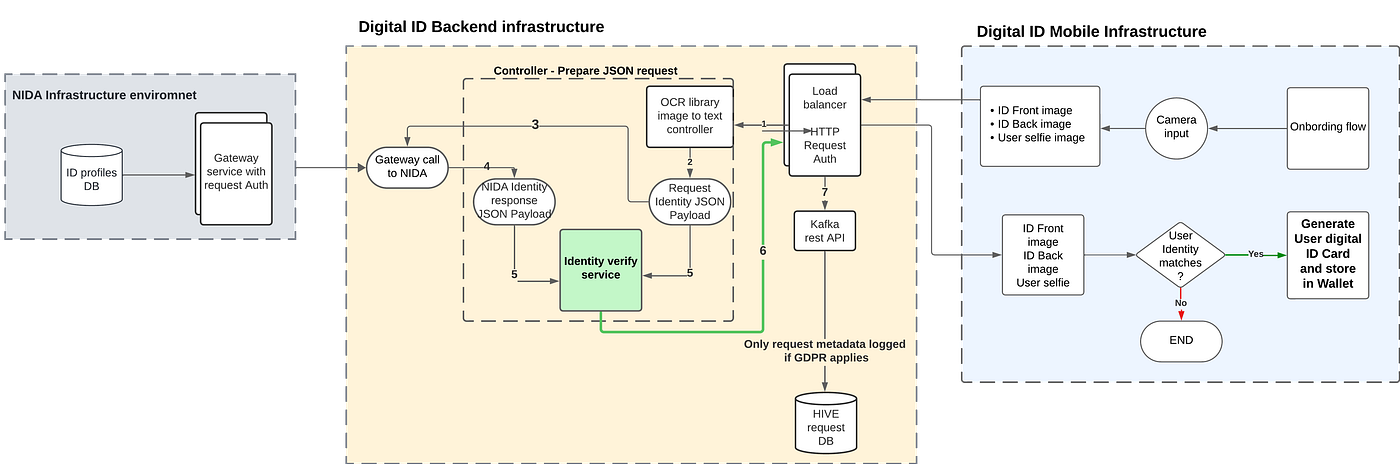
Rwanda’s Digital ID Proposed Architecture
Context
Covered use case: In light of the recent news that Rwanda passed legislation to allow the rollout of digital IDs, this post explores the actual implementation of how users can be onboarded to the digital ID platform and start using it.
Not covered: This post only explores user onboarding to Digital ID, and a different system would be required to integrate digital IDs with merchants like Banks and other GOV tech platforms.
Mobile Client Data flow
Onboarding flow:
- A user utilizes a mobile app available in the App Store or Android Store to begin the digital ID verification process. Users would then be prompted to scan the front and back of their national ID or driver’s license. In addition, the user is asked to take a live selfie as an additional security requirement. To enhance user privacy, no verification images of IDs or selfies are temporarily or permanently stored. Upon the end of the lifecycle of a request, all user data is scrapped from the verification platform. In the rare case of a cyber attack, no personal user information is exposed.
Proposed user onboarding screenshots:


Digital ID onboarding flow
Backend Data flow
- Request auth: The entry point for requests to the proposed backend system would be an authentication layer to ensure incoming mobile requests are authenticated. Additional industry standard auth steps would be taken here.
- Controller — OCR(Optical Character Recognition) library: Google Cloud exposes the Cloud Vision API which encapsulates an OCR library that would extract text elements like full name, date of birth, and ID number from the uploaded ID. Both TEXT_DETECTION and DOCUMENT_TEXT_DETECTION are provided annotations to the input request but in our case, we’ll only explore the use of TEXT_DETECTION. The incoming request only contains image_urls which will be stored in a CDN upon upload, therefore the “Detect text in a remote image” method will be utilized. All the necessary identification fields will be obtained here and prepared into a request to NIDA API.
syntax = "proto3";

// Assumptions are made here given that we don't know NIDAs API schema
message VerifyNationalIdRequest {
  string first_name = 1;
  string last_name = 2;
  string id_number = 3;
  string date_of_birth = 4; // Format DD-MM-YYY (e.g., "25-05-2024")
  // Other details to be added later.
}
NIDA Infrastructure
Since NIDA infra is closed source, we’ll make a couple of assumptions for the sake of our implementation. the following response would be expected
syntax = "proto3";

message VerifyNationalIdResponse {
  enum VerificationResult {
    UNKNOWN = 0;
    SUCCESS = 1;
    FAILURE = 2;
  }
  VerificationResult result = 1;
  string id_number = 2;
  string first_name = 3;
  string last_name = 4;
  string date_of_birth = 5;
  string expiry_date = 6; // Used to invalidate Digital ID card in mobile wallet.
  string user_image_url = 7; // Used to create ID rendering on mobile side.
}
Note: **expiry_date, would be sent back in the backend response to the mobile client. Every time a digital ID Card is invoked on the mobile client, this value which will be stored as an NSUserDefault on iOS and SharedPreferences **on Android will be read.
Upon NIDA API call, we’ll do the final verification step. We’ll perform an image comparison between the user_image_url retrieved from NIDA and the selfie uploaded by the user. This step allows us to check how visually identical the two images are with a degree of certainty (0–100%). After this step, we prepare a response to the mobile client.
Kafka request/response logs:
Once the Backend verification process is complete we’ll log requests and responses into Hive for debugging and further system analysis. We can plot insightful graphs and analyze how users interact with the app. Google Analytics integrated on the mobile client can accomplish a simpler version of this.
메타데이터
- post_id
- 2c6eaa188b07
- slug
- rwandas-digital-id-implementation-2c6eaa188b07
- url
- https://medium.com/@nouru/rwandas-digital-id-implementation-2c6eaa188b07
- canonical_url
- https://medium.com/@nouru/rwandas-digital-id-implementation-2c6eaa188b07
- author_url
- https://medium.com/@nouru
- status
- ok
- fetched_at
- 2026-07-13 06:23:13