How Enterprise Teams Run Terraform in Production
How large engineering teams structure repositories, state files, modules, and deployment workflows to manage Terraform safely at scale.
How Enterprise Teams Run Terraform in Production
How large engineering teams structure repositories, state files, modules, and deployment workflows to manage Terraform safely at scale.
***Free link: => If this helped, I’d really appreciate your full 50 claps. It supports my work and helps others find it***

Tutorials teach you how to write Terraform, but don’t teach you what happens when 60 engineers start writing it together.
When you learn Terraform, you work with a single repository, state file, and a single environment. You run terraform apply from your laptop, and your infrastructure is provisioned. That model works fine until the day you join a company and realize engineers rarely apply to production from a laptop.
A lot of what you see will not match what you practiced.
This article explains how large engineering teams actually run Terraform, the repositories, workflows, ownership rules, and what goes wrong without them. You will learn how enterprise teams structure repositories and state files, how they store and version reusable modules through GitHub, why infrastructure changes move to production through pipelines, how they catch changes that happen outside of Terraform, and how they recover when things go wrong.
Every practice here exists because **a team hit a specific wall** and built something to get past it.
How State Corruption Happens
The state file is how Terraform tracks what it has built. It remembers every resource, every ID, every configuration value. When it gets out of sync with what actually exists in the cloud, that is state corruption.
It gets blamed for a lot of things. But engineers who have dealt with it in production know it usually traces back to one of a handful of situations, each with a different cause and a different fix.
Two engineers run Terraform apply at the same time
Before understanding this one, you need to understand something about how Terraform works.
When you run terraform apply, two things happen separately:
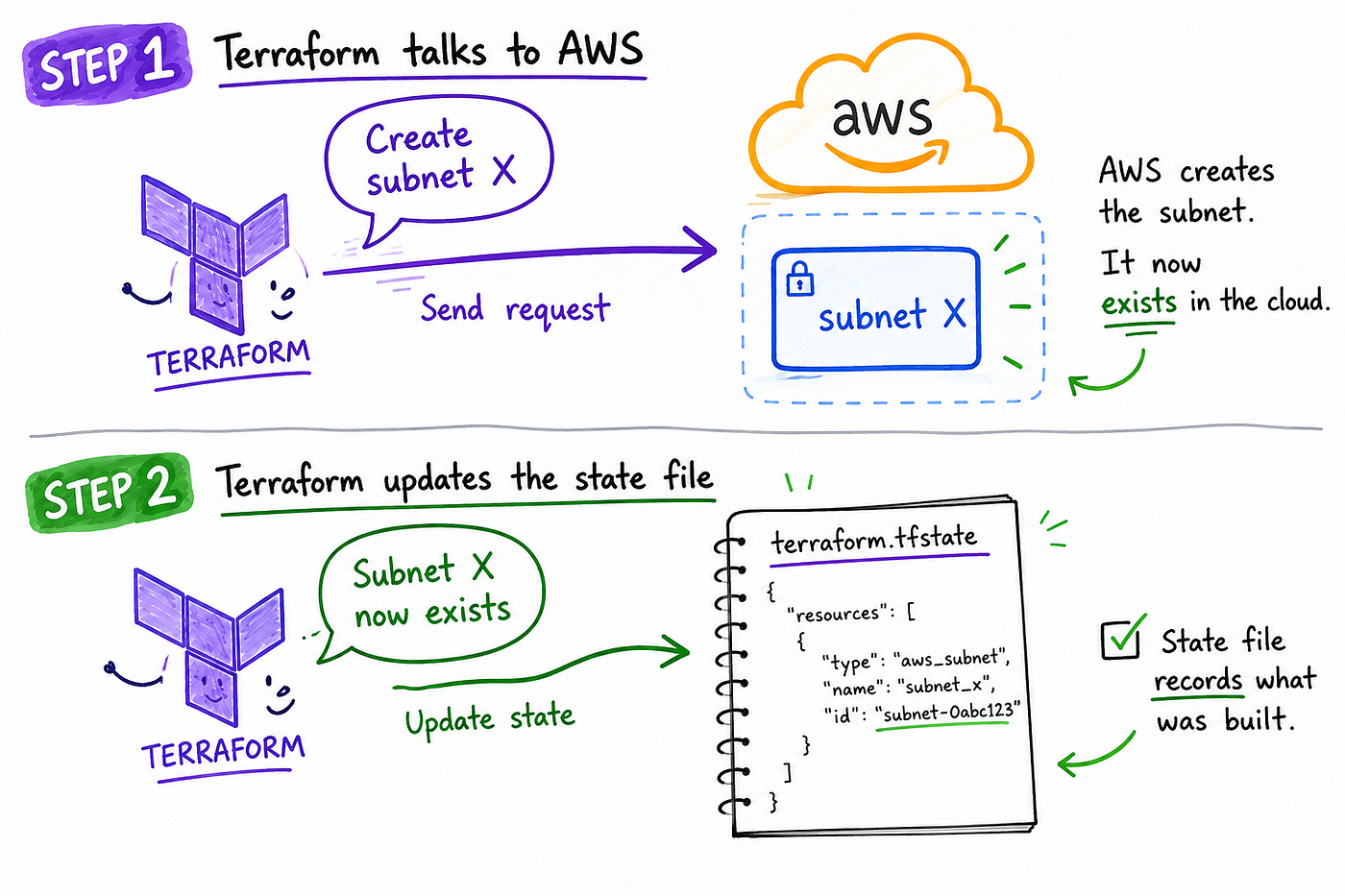
These are two different things. AWS holds the real infrastructure. The state file is Terraform’s notebook about that infrastructure. They can get out of sync.
Now here is what happens when two engineers apply at the same time without locking.

Sarah opens the state file and starts adding a subnet. Marcus opens the same state file at the same moment and starts updating a NAT gateway. Both are working from the same starting copy.
Sarah finishes first. Her apply creates the subnet in AWS and updates the state file to record it.
Marcus finishes second. His apply updates the NAT gateway in AWS. Terraform then updates the state file using the version of state Marcus read when his apply started. That version did not include Sarah’s subnet, so the updated state no longer contains a record of it.

The subnet exists in AWS. But Terraform’s notebook no longer has a record of it. The next terraform plan thinks the subnet was never created and proposes building it again.
State locking prevents this. Sarah’s apply acquires a lock before it starts. When Marcus tries to apply, Terraform makes him wait.
After Sarah finishes, Terraform updates the state file and releases the lock. Marcus then runs against the updated state, so both the subnet and NAT gateway changes are recorded correctly.
An apply gets interrupted
A GitHub Actions pipeline is applying changes to the payments infrastructure, adding three new security group rules and a database parameter group. Halfway through, the pipeline runner hits its 60-minute timeout limit, and the job gets killed.
Here is what the apply actually managed to do before dying:

Security group rule 1          → created ✓
Security group rule 2          → created ✓
Security group rule 3          → created ✓
Database parameter             → not created ✗
State file update              → never wrote (job died first)
The three security group rules now exist in AWS. The problem is that the pipeline died before Terraform could finish updating the state file. AWS knows the rules exist. Terraform’s state file does not.
At this point, reality and the state file no longer match.
Fortunately, this is usually easy to recover from. When the pipeline runs again, Terraform checks what already exists in AWS. It sees the three security group rules and does not try to create them again. It then creates the database parameter group that never got built.
The second run completes successfully, and the state file catches up.
This works because Terraform is idempotent, running the same configuration again moves infrastructure toward the desired state rather than blindly creating everything from scratch.
One small complication remains: the state lock.
If the pipeline was interrupted while holding a lock, Terraform may still think another apply is running. The next pipeline run fails immediately with an error like this:

Before clearing the lock, make sure no Terraform apply is still running.
Open your CI/CD system. GitHub Actions, GitLab CI, Jenkins, or whatever your team uses, and check the pipeline history for that environment:

If the previous apply was cancelled or timed out, the lock is stale. Clear it with terraform force-unlock plus the lock ID from the error. The pipeline then runs normally.
Only force-unlock when you are certain nothing is actively running. Clearing a live lock lets two applies write to the same state at the same time, which is exactly the problem locking was built to prevent.
Someone runs a Terraform state command in the wrong environment
A database engineer is cleaning up an old test database in the staging environment.
The database still exists in AWS, but Terraform should stop managing it. To do that, the engineer uses terraform state rm.
This command does not delete anything in AWS. It only removes Terraform’s record of the resource from the state file. Think of it as telling Terraform: “forget this resource exists, but leave it running.”
The engineer intends to run it against staging:
Intended: staging state → forget the old test databaseBut they are working in the wrong directory. They run it against production instead.
Actual: production state → forget the live payments databaseNothing gets deleted. The production database is still running in AWS. But Terraform has now forgotten it exists.

Now Terraform and reality disagree. The next terraform plan sees a database defined in the code but missing from the state file, so it assumes the database does not exist and proposes creating a new one.
If nobody catches it in the plan output, Terraform creates a second production database alongside the original, two databases running in production, neither fully managed, and a very expensive mess to untangle.
terraform state rm, terraform import, and terraform state mv make immediate changes to the state file with no confirmation prompt.
Run them from the wrong directory, the wrong workspace, or with the wrong resource address, and you change the wrong state in seconds.
Two teams manage the same resource
The networking team owns a security group that controls access to the payments database. When a new microservice needs database access, a payments engineer has two options: ask the networking team to add a new rule, or manage the security group themselves.
They choose the second option. The engineer imports the existing security group into the payments state file and adds a rule for Microservice C. From that moment, both teams think they own the same security group.

The problem is that Terraform does exactly what each state file tells it to do. The networking state says the security group should allow A and B. The payments state says it should allow A, B, and Microservice C. Both cannot be true at the same time.
When the payments team applies their state, Microservice C gets access. But later that night, the networking pipeline runs. Terraform reads the networking state, sees only A and B, and updates the security group to match. Microservice C’s rule disappears silently.
No errors are seen, and both pipelines pass, which is exactly what makes this so hard to debug. Terraform is not broken; it is receiving conflicting instructions from two different state files and doing exactly what each one says.
This is not something to be fixed with Terraform commands. It is an ownership decision that should have been made before anyone ran an import. If the payments team had submitted a pull request to the networking repository asking them to add the rule, one team would own the security group, one state file would manage it, and the conflict could never have happened.
Why State File Gets Treated Like a Production Database
The state file looks like bookkeeping, a record of what Terraform created. The reason teams treat it differently is that it often contains secrets.
The state file stores sensitive values in plaintext. Database passwords, API keys, connection strings- if those values were passed to a Terraform resource during an apply, they are now sitting in the state file. Even if you marked the variable as sensitive in your Terraform code, the value still lands in the state file. Terraform needs it there to compute diffs on future plans.
That means: whoever can read the state file can read your database password.
In large organizations, engineers typically do not have direct access to the production state bucket. Instead, Terraform runs through a CI/CD pipeline that assumes a dedicated IAM role with permission to read and write the state bucket and perform applies. Engineers interact with infrastructure through pull requests and plan output, not by touching the state bucket directly.
This separation reduces risk and creates an audit trail. Every state change is performed by the pipeline and logged, making it straightforward to trace what changed and when.
How Enterprise Teams Structure Their Terraform Repositories
When you join a large engineering organization, the first thing you notice is the number of repositories. You might expect one repository for all infrastructure, but what you find is dozens.
The structure maps directly to ownership. Each repository belongs to one team, and that team is responsible for everything in it. A typical layout looks like this:

The key thing to understand here is that, the platform team repositories do not create production resources. They create reusable modules that the product teams call when building their actual infrastructure.
That distinction matters because some repositories are used by one team, while others are shared by everyone.
A mistake in a product team’s repository usually affects only that team. A mistake in a shared module can affect every team that depends on it.

This is why experienced engineers pay close attention to shared modules and policy repositories.
If the payments team’s infrastructure breaks, the problem is probably in the payments repository.
If five different teams start seeing the same issue at the same time, the shared modules and policy repositories become the first place to investigate.
How Teams Split State Files to Protect Each Other
A single state file managing everything, VPC, Kubernetes cluster, databases, monitoring, is fine when one person is running things, but quickly becomes a problem when multiple teams share it.
Three specific problems emerge.
Blast radius. If the networking configuration and the database configuration live in the same state file, a bad networking apply can accidentally affect database resources that had nothing to do with the change. Separate state files keep failures contained.
Deployment speed. Networking infrastructure might change a few times a year. Applications might deploy dozens of times a day. If they share a state file, teams end up waiting on each other’s locks.
Ownership conflicts. When multiple teams share a state file, one team can change something the other team depends on without realizing it.
The solution is to split state along ownership boundaries. A structure that addresses all three problems looks like this:
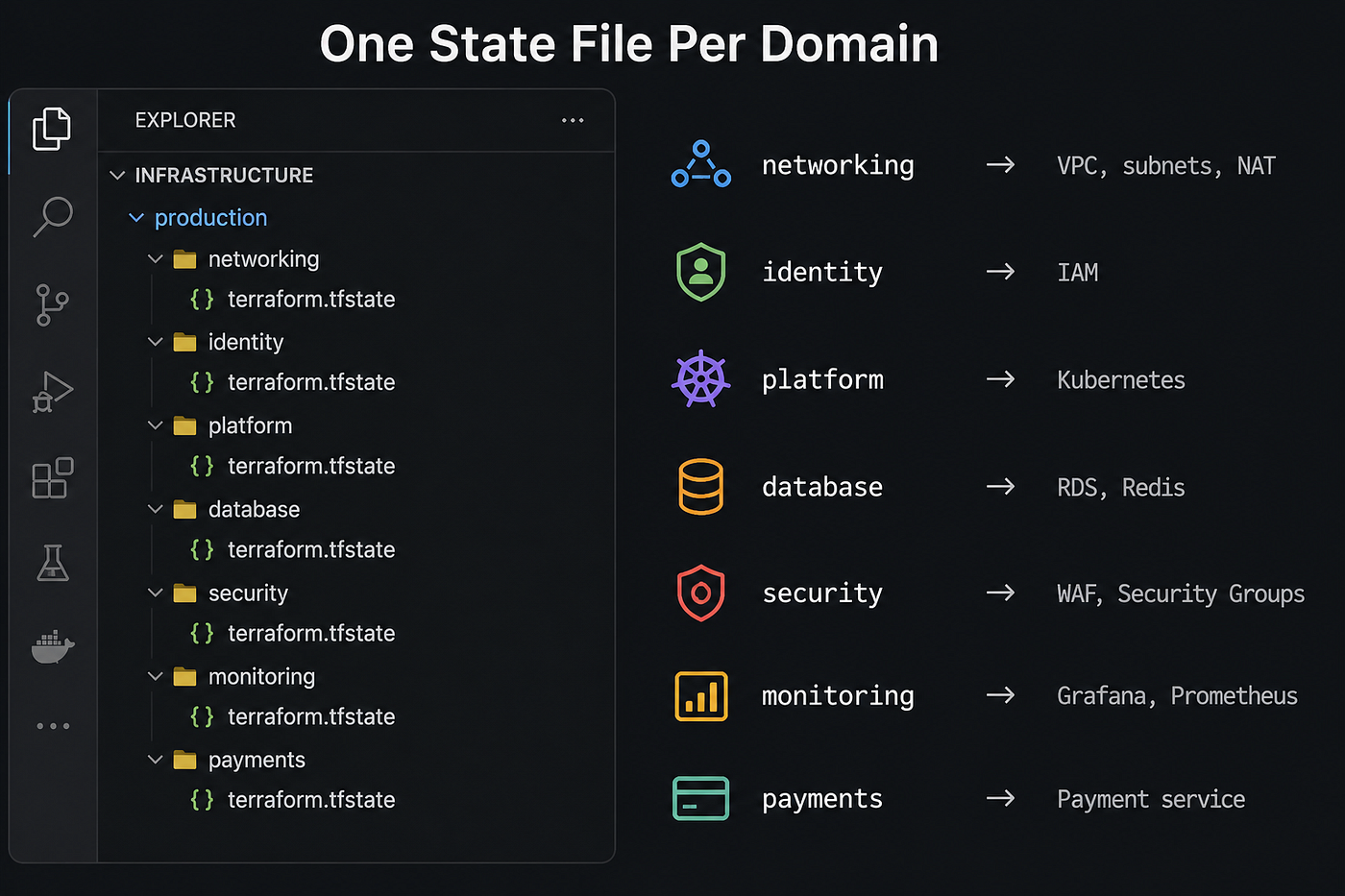
This is one example, not a universal standard. Larger organizations often split further. The principle is the same: one owning team per state file, one pipeline, one blast radius.
The rule is simple: every resource belongs to one state file. If the networking team owns a security group, it stays in the networking state. Other teams can reference it as a data source, but they do not import it into their own state. That is what prevents the ownership collision described in the first section.
Why Some Teams Prefer Directories Over Workspaces for Production
Terraform CLI workspaces let you manage multiple environments like dev, staging, and production from a single directory. Each workspace gets its own state file, but they all share the same .tf configuration files.

You switch environments with terraform workspace select production, then apply.
The risk is that switching workspaces is a manual step. If the wrong workspace is active, changes meant for staging can end up in production.
Many teams prefer separate directories for long-lived environments:

To apply against production, you have to be in the production directory. Each environment has its own state, backend, and execution path.
The tradeoff is duplication. Teams usually solve that with shared modules, so each environment directory contains only environment-specific configuration.
Workspaces are still useful for short-lived environments such as feature branches, preview deployments, and temporary test infrastructure.
How Teams Share Infrastructure Through Modules on GitHub
When 30 teams each need a PostgreSQL database, two things happen.
Without a shared standard, every team writes their own database configuration. Six months later, a security audit runs across all environments and finds that:
Nobody skipped those things on purpose, there was just no shared standard.
With a shared module, the platform team writes a postgres module once. They encode every organizational requirement into it: encryption on, 7-day backups, monitoring alarms, required tags, deletion protection enabled. They publish it to a GitHub repository called terraform-aws-postgres.
Every team that needs a database now writes this:
module "payments_db" {
  source         = "git::ssh://github.company.com/platform/terraform-aws-postgres.git?ref=v2.1.0"
  name           = "payments"
  environment    = "production"
  instance_class = "db.m5.large"
}
Four inputs. Everything else is handled by the module.
Large organizations usually expose approved modules through an internal registry so engineers can discover and version them without browsing GitHub repositories. Instead of the full Git URL, the reference becomes:
module "payments_db" {
  source  = "app.terraform.io/mycompany/postgres/aws"
  version = "~> 2.1"
}
HCP Terraform and Terraform Enterprise both include a private registry that connects to GitHub, watches for version tags on module repositories, and publishes new versions automatically.
Notice how Terraform is no longer operating by itself. It is connected to source control, pull requests, security scanning, CI/CD pipelines, and production operations. Understanding those connections is often what transforms individual tool knowledge into system understanding, which is the idea behind the **DevOps Operating System**. Rather than learning each topic separately, you build them together as parts of the same project.
How Teams Version and Release Terraform Modules
The ?ref=v2.1.0 in a module source URL is not decoration. At the scale of 40 teams sharing one module, it is the thing that prevents a well-intentioned change from becoming a company-wide incident.
Without version pinning, the payments team references the postgres module from main meaning whatever the latest code is at any given moment. The module owners rename an output variable from db_endpoint to database_endpoint to match a new naming convention. The next time any team runs terraform init, they pull that change. Their configuration still references db_endpoint.
Plans break:
payments-infra                        → plan fails
analytics-infra                       → plan fails
auth-infra                            → plan fails
reporting-infra                       → plan fails
Version pinning prevents this. The payments team stays on v2.1.0. The module owners release v2.2.0 with the renamed output and write a changelog. Teams upgrade when they are ready, after testing in staging. Nobody's pipeline breaks without warning.
The versioning convention is called semantic versioning:

How Teams Maintain Terraform Modules at Scale
Building a Terraform module takes an afternoon, maintaining it for two years is a different job entirely.
A networking engineer needs a VPC module. The platform team has one, but their backlog is full. So the engineer creates a slightly different version. Three months later, another team does the same. Then another. Now this exists:
terraform-aws-vpc           ← original, maintained by platform team
terraform-aws-vpc-v2        ← created by the app team, author unknown
terraform-aws-vpc-shared    ← no idea which environments use this
terraform-aws-vpc-prod      ← unclear if this was ever different from the original
No one created a module graveyard on purpose. It grew one “I’ll just make a quick variation” at a time. Each variant has slightly different security settings, different tagging, different defaults. When a compliance audit requires all VPCs to enable flow logging, the team has to investigate four different modules to figure out which environments are compliant.
Teams that avoid this treat their modules like shared services: named owner, contributions through pull requests, breaking changes in major versions with a migration guide, deprecated modules with a retirement date. A CODEOWNERS file routes every pull request to the right reviewer automatically.
Organizations that skip this end up with modules that nobody owns, nobody wants to touch, and nobody is sure can be safely removed.
How Teams Share Data Between State Files
Once infrastructure is split into separate state files, a practical problem surfaces: teams need information from each other’s infrastructure. The platform team’s Kubernetes state needs the VPC ID from the networking team’s state. The database state needs subnet IDs. The payments state needs the database endpoint.
Two patterns exist for solving this.
Reading another team’s state outputs
The terraform_remote_state data source lets one state read the outputs of another. The networking team marks their VPC ID and subnet IDs as outputs. The database team reads those outputs and uses them to place databases in the right subnets.
Networking state
  └── outputs: vpc_id, private_subnet_ids
                          ↓
               Database state reads them
               └── places RDS in the right subnets
This works, but there is a limitation. Reading another team’s state requires full read access to their entire state file, not just the outputs you want. State files contain database passwords and API keys in plaintext. More dependencies means more teams reading each other’s secrets.
Looking up resources directly from the cloud
The alternative, and the one HashiCorp now recommends, is to look up resources through the cloud provider’s API instead of reading another team’s state:
data "aws_vpc" "main" {
  tags = {
    Name        = "production-vpc"
    Environment = "production"
  }
}
No cross-team state access needed, each team’s state stays isolated. The tradeoff is consistent tagging, the networking team has to tag their VPC in a way the database team can reliably search for, which forces teams to agree on naming conventions early.
Many teams use both. Remote state for a small number of trusted, tightly coupled dependencies. Cloud data sources for everything broader.
How Infrastructure Changes Actually Move to Production
In large organizations managing production Terraform at scale, changes do not come from someone’s laptop. Applying directly from a local machine requires production cloud credentials sitting on that machine, a security risk and leaves no audit trail if something breaks.
Instead, production changes move through a pipeline. Every change goes through a pull request in GitHub, and the pipeline does the work:
Engineer opens a pull request
        ↓
Pipeline: terraform validate + fmt check
        ↓
Pipeline: security scan (Checkov, tfsec, or similar)
        ↓
Pipeline: terraform plan → posts the full output as a comment on the PR
        ↓
Reviewer reads the plan output (not just the code)
        ↓
Required reviewers approve (enforced by CODEOWNERS + branch protection)
        ↓
Merge triggers the apply pipeline
        ↓
Pipeline: acquires state lock → applies → releases lock → logs result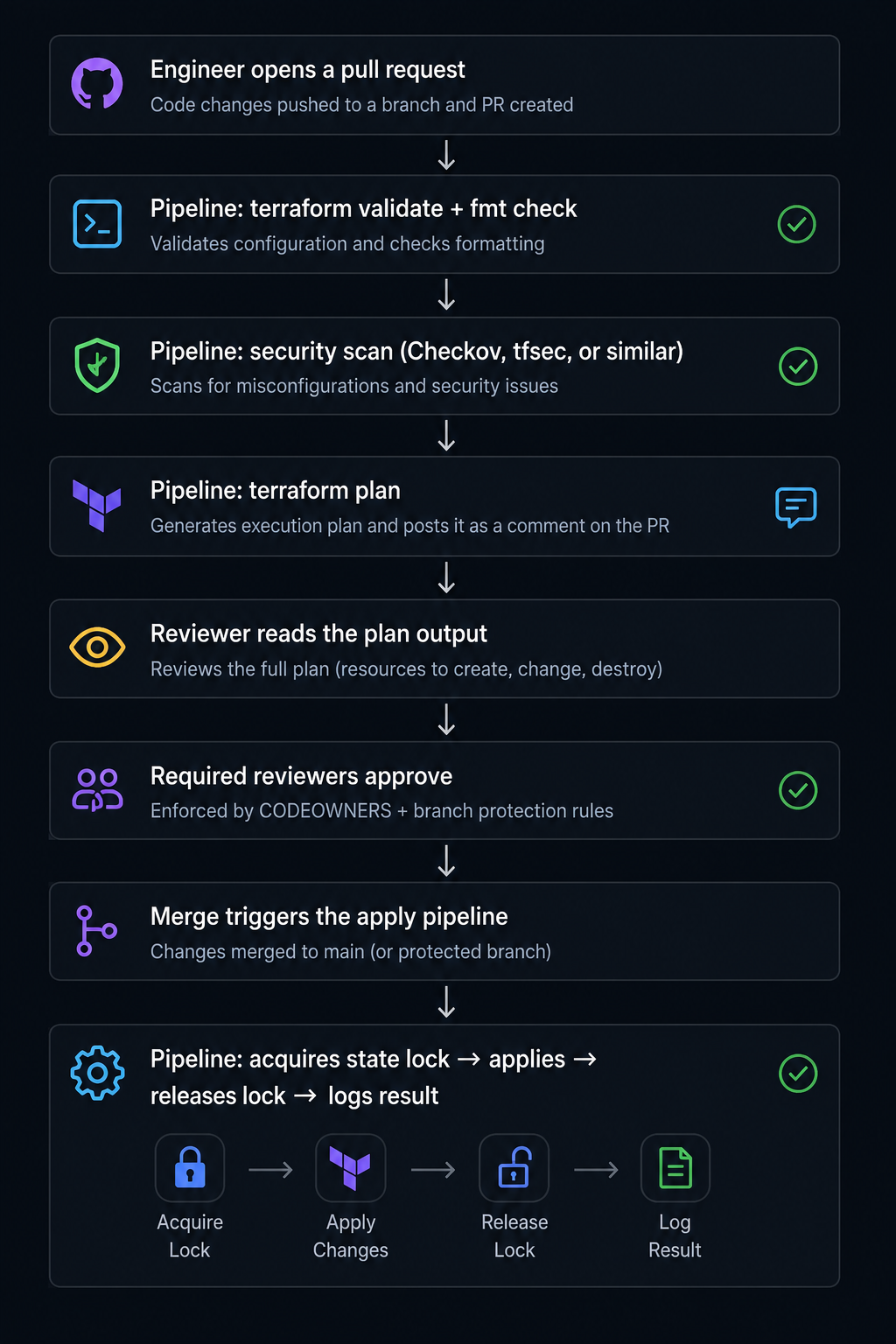
The part that surprises engineers when they first encounter this is that the reviewer is not approving the code, they are approving the plan output and the list of exactly what will be created, changed, or destroyed in the cloud.
A code change can look completely harmless and produce a destructive plan. Changing one database parameter might force a resource replacement, meaning Terraform destroys the current database and creates a new one. Seeing this in the plan output before the PR merges:
# aws_db_instance.payments must be replaced
-/+ resource "aws_db_instance" "payments" {
Catching that before merge is the entire point of reviewing the plan. Not the code.
How CODEOWNERS enforces who reviews what
Earlier, we talked about module ownership. A VPC module might belong to the platform team, while database infrastructure belongs to the database team.
The challenge is making sure changes are actually reviewed by the people who own them.
GitHub solves this with a feature called CODEOWNERS. It lets a repository define which team is responsible for which directories. When someone opens a pull request that touches those files, GitHub automatically requests reviews from the correct team.
For example, if an engineer modifies the PostgreSQL module, GitHub can automatically require approval from the platform team before the change can be merged.
Without CODEOWNERS, engineers have to remember who owns which parts of the infrastructure.
CODEOWNERS makes ownership explicit and automatically requests reviews from the right team.
How Teams Detect Infrastructure Drift
Drift is the diff between what Terraform says should exist and what actually exists in the cloud.
Here is the scenario that produces drift more reliably than anything else:
Monday 3:00 AM  Production database CPU spikes. Outage.
Monday 3:15 AM  Engineer resizes database in AWS console: db.m5.large → db.m5.4xlarge
Monday 3:20 AM  Incident resolved. Engineer goes to sleep.
Monday 3:21 AM  Terraform state file: still says db.m5.large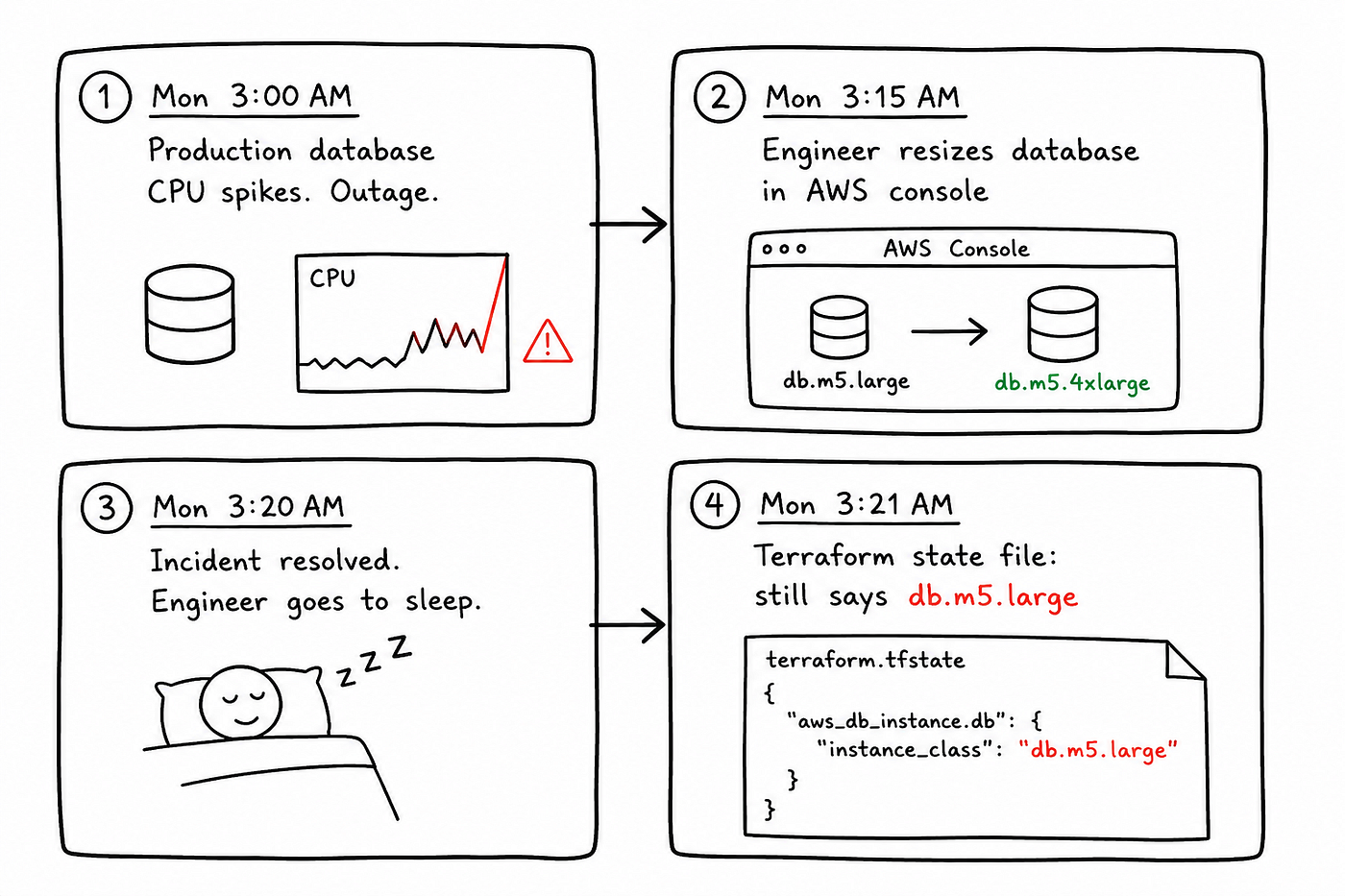
The incident is forgotten, the ticket is closed, and life moves on.
Three months later, a routine Terraform apply runs. Terraform sees db.m5.large in the configuration but finds db.m5.4xlarge running in AWS. From Terraform's perspective, the database is larger than it should be, so the plan proposes changing it back.
Nobody notices the change in the plan output. The apply goes through, the database is downsized, and users begin reporting slow queries. The team spends hours investigating before eventually tracing the issue back to a Terraform change that reverted the emergency fix from months earlier.
Teams that handle this well run scheduled terraform plan jobs against every production state. If terraform plan exits with code 2, differences were found and an alert fires. The team then decides whether to apply to restore declared state or update the configuration to match reality. Either way, the change is visible and deliberate. Invisible drift always gets worse.
How Teams Recover When State Goes Wrong
State is recoverable in almost every situation, as long as the team set things up correctly before the incident happened.
The teams that recover in twenty minutes instead of three days are not the ones with the deepest Terraform expertise. They are the ones who prepared.
Step 1: Pull a backup before touching anything.
terraform state pull > backup-$(date +%Y%m%d-%H%M%S).jsonThis saves the current state to a local file. Whatever you try next, you have a starting point to return to.
Step 2: Run terraform plan and look at what it proposes.
If Terraform proposes destroying resources that still exist in the cloud, the state is behind reality. If it proposes creating resources that already exist, reality is ahead of the state. Either way, the plan output tells you which direction the mismatch runs.
Step 3: Restore from S3 versioning if the state is corrupted.
Every write to a versioned S3 bucket saves a new version automatically. If the state file is corrupted or wrong, list the previous versions, download the last known good one, and push it back:
# List previous versions
aws s3api list-object-versions \
  --bucket mycompany-terraform-state \
  --prefix production/database/terraform.tfstate
# Download a specific version
aws s3api get-object \
--bucket mycompany-terraform-state \
--key production/database/terraform.tfstate \
--version-id "the-version-id-here" \
recovered-state.json# Push it back
terraform state push recovered-state.jsonRun terraform plan after restoring to confirm it looks correct before running any apply.
Step 4: Clear a stale lock if the pipeline is blocked.
If a lock was never released after a failed apply, clear it:
terraform force-unlock LOCK_IDOnly do this after confirming no apply is actively running. Clearing a live lock corrupts the state.
Step 5: Re-import resources that fell out of state.
If a resource exists in the cloud but Terraform no longer knows about it — because of an accidental terraform state rm — bring it back without recreating it:
terraform import aws_db_instance.payments db-ABCD1234EFGH5678Run terraform plan after importing to confirm no unexpected changes are proposed.
Conclusion
Every practice in this article traces back to a specific problem teams ran into as Terraform usage grew.
State locking prevents engineers from overwriting each other’s changes. State splitting reduces blast radius. Module versioning prevents shared infrastructure from breaking unexpectedly. Drift detection catches changes made outside Terraform. CODEOWNERS ensures the right people review the right changes.
Different problems with different solutions. But they all point to the same underlying theme, which is ownership.
As teams grow, many Terraform problems have less to do with infrastructure and more to do with ownership.
State collisions happen when multiple people can modify the same state. Module sprawl happens when nobody is responsible for maintaining a shared standard. Drift becomes dangerous when changes are made without anyone taking ownership of bringing Terraform and reality back into alignment. Even review bottlenecks often trace back to uncertainty about who should approve what.
Understanding this changes how you read an unfamiliar Terraform repository.
Dozens of small state files are not necessarily over-engineering; they are often ownership boundaries. A CODEOWNERS file is not bureaucracy, it is an ownership map. A pipeline that posts plan output on a pull request is not just automation, it is a review process built around infrastructure consequences rather than code.
The infrastructure matters. But as teams grow, ownership is what keeps the system understandable.
I write about DevOps weekly- real systems, real incidents → Join the newsletter
If you want to build the kind of system intuition that makes AI actually useful instead of just fast, the DevOps Operating System is where I’d start. Real infrastructure, real failure modes, eight products that build on each other. → **DevOpsOS link**
if you enjoyed reading this, we can connect on **Linkedin**
메타데이터
- post_id
- 2c923a038def
- slug
- how-enterprise-teams-run-terraform-in-production-2c923a038def
- url
- https://blog.devops.dev/how-enterprise-teams-run-terraform-in-production-2c923a038def
- canonical_url
- https://blog.devops.dev/how-enterprise-teams-run-terraform-in-production-2c923a038def
- author_url
- https://medium.com/@osomudeyazudonu
- status
- ok
- fetched_at
- 2026-07-09 03:40:04