HTTP Request Smuggling: Basic CL.TE Vulnerability
Learn how CL.TE request smuggling works, why it’s dangerous, and how attackers exploit server parsing differences.
HTTP Request Smuggling: Basic CL.TE Vulnerability
Learn how CL.TE request smuggling works, why it’s dangerous, and how attackers exploit server parsing differences.
🔓 **Free Link**

HTTP Request Smuggling: Basic CL.TE Vulnerability
Disclaimer: The techniques described in this document are intended solely for ethical use and educational purposes. Unauthorized use of these methods outside approved environments is strictly prohibited, as it is illegal, unethical, and may lead to severe consequences.
It is crucial to act responsibly, comply with all applicable laws, and adhere to established ethical guidelines. Any activity that exploits security vulnerabilities or compromises the safety, privacy, or integrity of others is strictly forbidden.
Table of Contents
Summary of the Vulnerability
In the CL.TE (Content-Length / Transfer-Encoding) HTTP request smuggling scenario, the security issue arises when two servers in a request chain (a front-end and a back-end) interpret the boundaries of an HTTP request differently.
In the referenced lab setup, the front-end server does not support chunked transfer encoding and strictly accepts only **GET or `POST** requests. The back-end, however, does support chunked encoding. This difference in behavior opens the door for request smuggling: by crafting an HTTP request that contains bothContent-Length` and **Transfer-Encoding** headers, the attacker can cause the two servers to disagree on where one request ends and the next begins.
In this lab’s case, the attacker’s goal is to smuggle a malicious request to the back-end so that the next request it processes appears to use the method **GPOST** — effectively altering the semantics of the request pipeline. This is achieved by manipulating how each server parses the HTTP body and headers, exploiting their inconsistent interpretations.
Even though the lab supports HTTP/2, this attack relies on quirks specific to HTTP/1 parsing, so the solution must be performed in HTTP/1 mode.
Steps to Reproduce & Proof of Concept (PoC)
① Set Up and Observe the Target
- Open the lab environment in Burp Suite.
- Look at the HTTP history for the
**GET /** request. - Right-click → Send to Repeater for manual testing.
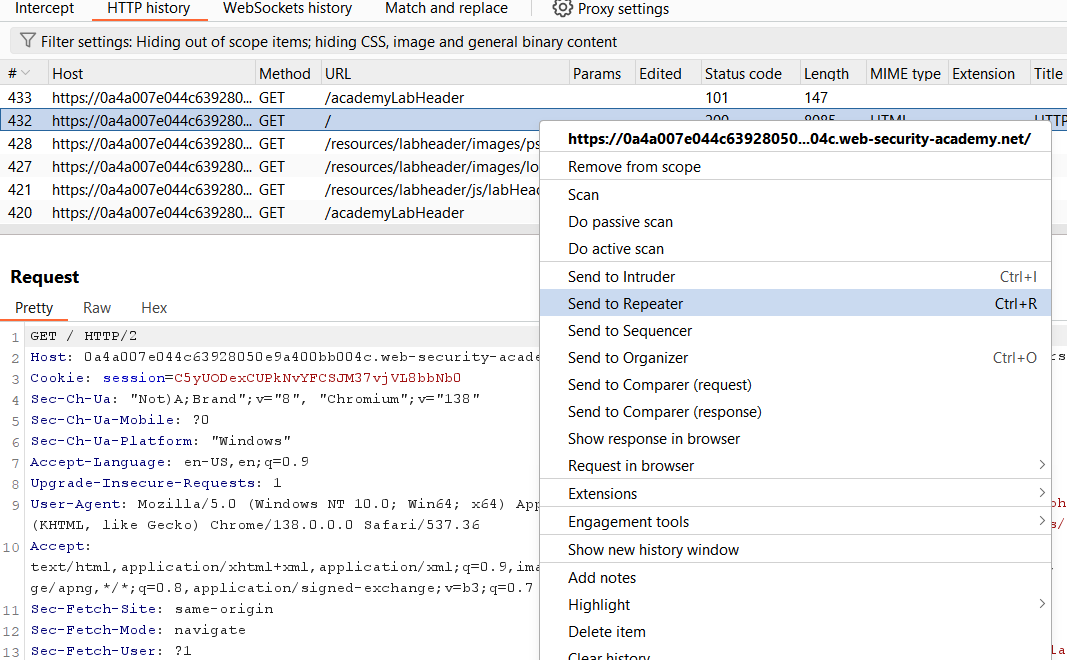
② Downgrade from HTTP/2 to HTTP/1
The lab description notes that the vulnerability is exploitable only in HTTP/1.
- In Repeater, open the Request attributes section in the Inspector panel.
- Change the protocol from HTTP/2 to HTTP/1.

③ Create Two Requests
- Change the
**GETrequest to `POST**.` - Right-click → Change request method.

We’ll use two requests:
- Request 1: The smuggling payload.
- Request 2: A normal request that will be impacted by the smuggle.
To organize:
- Right-click Request 1 → Add tab to group → New tab group.
- Tick both Request 1 and Request 2.
- Click Create to group them together.

④ Configure the Group to Send Sequentially
- Change the drop-down from Send to Send group in sequence (separate connections). This ensures that Request 1 smuggles data into the connection before Request 2 runs, affecting how the back-end processes it.

⑤ Test the Smuggle
Please refer to this URL before conducting the attack:
https://portswigger.net/web-security/request-smuggling#cl-te-vulnerabilities
- In Request 1, add both
**Transfer-Encoding: chunkedand `Connection: keep-alive`** headers. - Add an extra HTTP request inside the body (this is the smuggled payload).
- Send the group.
You’ll see:
- Request 1 returns
**200 OK**. - Request 2 returns an unexpected response — a clear sign that smuggling worked.


⑥ About Content-Length
In Burp Suite, you don’t have to manually calculate the **Content-Length**. It updates automatically based on the request body.
In this case based on the CL.TE vulnerability. However, if the lab is vulnerable to the TE.CL, then we need to specify manually for the **Content-Length**.

⑦ Build the Final Attack
The lab’s objective is to trick the back-end into reading **GPOST** as the next request’s method.
- In the smuggled request body, change
**SMUGGLEDto just `G`**. - Send the group.
You’ll see:
- Request 1 →
**200 OK**. - Request 2 →
**403 Forbiddenwith the message "Unrecognized method GPOST"**.


⑧ Confirm the Lab Is Solved
Switch back to the browser tab with the lab, it will now display “Lab solved”, confirming that the smuggling attack successfully altered how the back-end parsed the next request.

Impact
- Bypassing Security Controls Smuggling allows attackers to bypass these controls entirely, sending dangerous requests directly to the back-end.
- Hijacking User Sessions If a smuggled request is timed so that a victim’s request is processed immediately afterward, attackers can steal cookies, tokens, or sensitive data.
📢 Enjoyed this post? Stay connected! If you found this article helpful or insightful, consider following me for more:
- 📖 Medium: bashoverflow.medium.com
- 🐦 Twitter / X: @_havij
- </> Github: havij13
🙏Your support is appreciated.
메타데이터
- post_id
- 2cadaa2d9640
- slug
- http-request-smuggling-basic-cl-te-vulnerability-2cadaa2d9640
- url
- https://infosecwriteups.com/http-request-smuggling-basic-cl-te-vulnerability-2cadaa2d9640
- canonical_url
- https://infosecwriteups.com/http-request-smuggling-basic-cl-te-vulnerability-2cadaa2d9640
- author_url
- https://medium.com/@bashoverflow
- status
- ok
- fetched_at
- 2026-08-08 20:49:04