☸️ CKA Journey: Building & Upgrading a Home Lab Cluster (The Hard Way)
Learning Journal: A comprehensive guide on installing, troubleshooting, and upgrading a Kubernetes cluster in an on-premise environment
☸️ CKA Journey: Building & Upgrading a Home Lab Cluster (The Hard Way)
Learning Journal: A comprehensive guide on installing, troubleshooting, and upgrading a Kubernetes cluster in an on-premise environment
My Workhorse: 💻 ThinkpadL15 | Intel i7 | 64GB RAM | 1TB SSD | Ubuntu 22.04 (Jammy Jellyfish)
Documented during my preparation for the CKA (Certified Kubernetes Administrator) exam.
🏗️ 1. Infrastructure Overview
Constructing a 3-node cluster with a focus on deep-diving into infrastructure-level components:
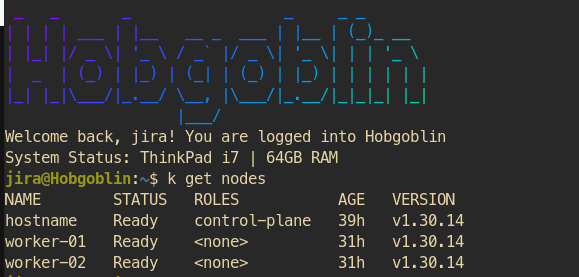
3 node-cluster
hostname (Control Plane) Ubuntu 22.04 192.168.122.50
worker-01(Worker Node) Ubuntu 22.04. 192.168.122.209
worker-02(Worker Node) Ubuntu 22.04. 192.168.122.154
🛠️ 2. Setup Phase: Facing the Real World
The installation phase provided invaluable “field lessons” that are often omitted from standard textbooks:
🌐 2.1 Networking: WLAN Stability vs. Physical LAN
- Challenge: Utilizing Wi-Fi led to high latency, causing unstable Calico CNI performance and frequent Node Flapping.
- Solution: Used a Ethernet LAN and tuned kernel parameters to optimize container traffic:
# Enable IP Forwarding & Bridge Netfilter
cat <<EOF | sudo tee /etc/sysctl.d/k8s.conf
net.bridge.bridge-nf-call-iptables  = 1
net.bridge.bridge-nf-call-ip6tables = 1
net.ipv4.ip_forward                 = 1
EOF
sudo sysctl --system
📦 2.2 Package Management: The “Held Packages” Trap
- Challenge: Failed to install
kubeadmdue to "Held" status (version locking). - Solution: Applied the
--allow-change-held-packagesflag to override system restrictions and install critical components.
📛 2.3 Node Identity: Hostname Conflicts
- Challenge: Worker nodes failed to join the cluster due to hostname conflicts with the Master.
- Solution: Resolved the root cause using
hostnamectl set-hostnameand performed akubeadm resetbefore re-joining to ensure certificate integrity.
🚀 3. Upgrade Phase: The Zero-Downtime Test
Upgrading from v1.30.14 to v1.31.14 served as a true test of administrative composure:
🕵️♂️ 3.1 The Post-Reboot Identity Crisis
- Problem: Nodes returned to
NotReadystatus after rebooting because hostnames reverted to default. - Key Learning: The Kubelet is strictly tied to node identity (hostname). If the name changes, synchronization breaks. Ensure hostname changes are permanent.
“Lesson learned: Trying to rename nodes later causes identity issues. Set it once, set it right.”
🔑 3.2 The Locked Gates: Minor Version Repos
- Problem:
apt updatefailed to find version 1.31 because modern Kubernetes repositories separate folders by minor version. - Solution: Used
sedto update the repository path in the source list fromv1.30tov1.31.
🛑 3.3 The CoreDNS Roadblock (Pre-flight Error)
- Problem:
kubeadm upgrade planwas halted by CoreDNS errors regarding unsupported automatic migration. - Insight: As an admin, you must make critical decisions. Utilizing
--ignore-preflight-errorsis a vital tool for pushing through upgrades in imperfect real-world scenarios.
⚠️ 3.4 The Version Mismatch & The Master’s Kubelet
- Problem: The control plane was upgraded, but
kubectl get nodesstill displayed the legacy version. - Key Learning:
upgrade applyonly upgrades internal components (Static Pods). You must manually upgrade the Kubelet binary on each node to align versions across the cluster.
🏆 4. Final Verification
Final cluster status after successful upgrades and troubleshooting:
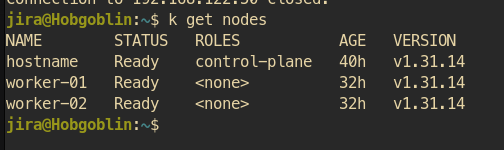
upgraded to 1.31.14
💡 Key Takeaway
“The CKA exam might teach you how to type the right commands, but building a home lab teaches you how to stay ‘calm’ when red errors flood your screen — and how to dig through logs to find out why a node refuses to talk to the Master.”
✨ Skills Developed:
- Infrastructure: KVM/Virtualization, Network Routing, Persistent Storage.
- Troubleshooting: Journalctl analysis, Kubelet debugging, Repository management.
- Security: RBAC design (Role vs. ClusterRole).
#Kubernetes #CKA #HomeLab #Linux
Disclaimer: This article summarizes my hands-on lab experience. To provide the best reading experience, AI assistance was used for grammatical corrections and language polishing, as I am a non-native English speaker.
메타데이터
- post_id
- 2cf662946723
- slug
- ️-cka-journey-building-upgrading-a-home-lab-cluster-the-hard-way-2cf662946723
- url
- https://medium.com/@geepep/%EF%B8%8F-cka-journey-building-upgrading-a-home-lab-cluster-the-hard-way-2cf662946723
- canonical_url
- https://medium.com/@geepep/%EF%B8%8F-cka-journey-building-upgrading-a-home-lab-cluster-the-hard-way-2cf662946723
- author_url
- https://medium.com/@geepep
- status
- ok
- fetched_at
- 2026-06-11 07:46:00