Office Ergonomics for Northern Virginia Workers: A Back and Neck Comfort Checklist
Desk work can feel harmless because it does not look physically demanding. But sitting for hours, leaning toward a screen, using a laptop…
Office Ergonomics for Northern Virginia Workers: A Back and Neck Comfort Checklist
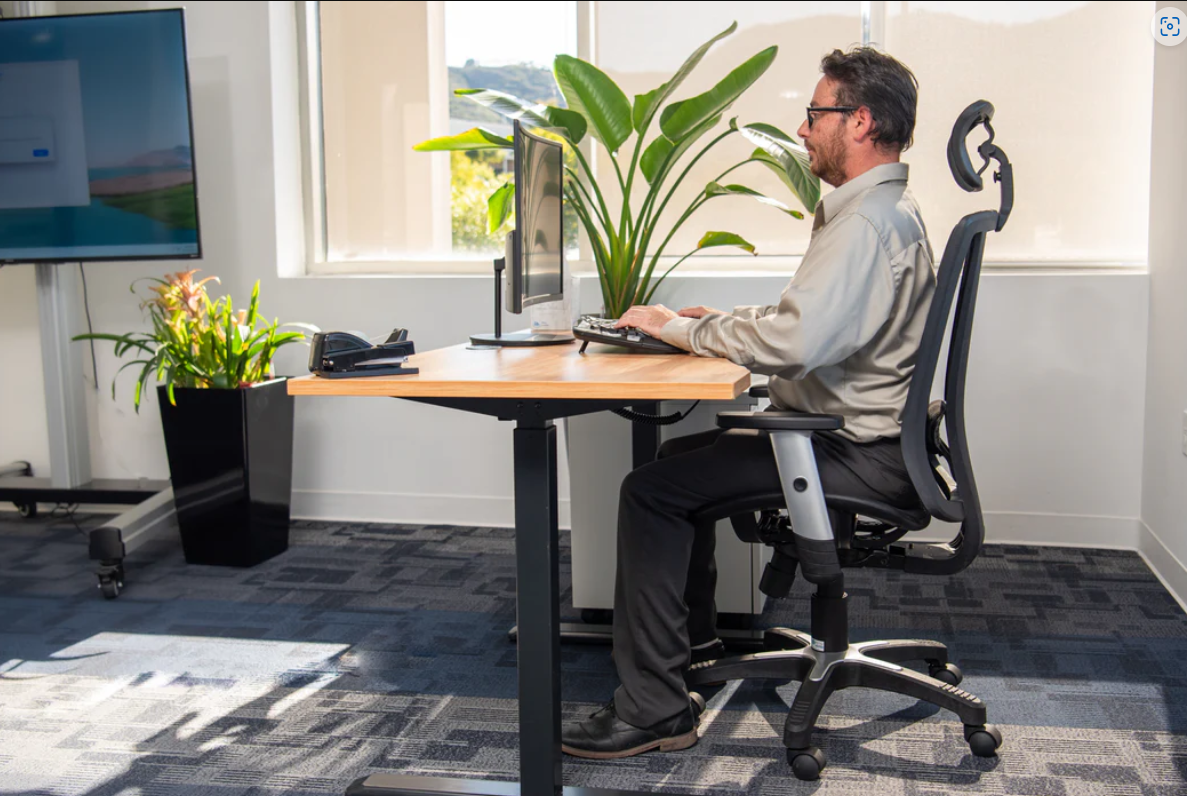
Desk work can feel harmless because it does not look physically demanding. But sitting for hours, leaning toward a screen, using a laptop at the wrong height, or working from a couch can all add stress to the neck, shoulders, upper back, lower back, hips, and wrists.
For many people in Northern Virginia, the problem is not just the desk. It is the full routine. A normal day may include commuting from Woodbridge, Fairfax, Arlington, Tysons, Reston, McLean, Herndon, or Washington, DC, sitting through meetings, working on a laptop, checking a phone, and then driving home in traffic. By the end of the day, stiffness can feel normal.
This checklist is meant to help you notice simple workstation and movement habits. It is not a diagnosis, and it does not replace a professional evaluation for pain that keeps returning or gets worse.
Why Ergonomics Matters
Ergonomics is about fitting the work environment to the worker. It is not about buying the most expensive chair or building a perfect office. It is about reducing repeated strain and making daily tasks easier on the body.
The CDC’s National Institute for Occupational Safety and Health explains that ergonomics focuses on preventing injuries and discomfort that happen at work. You can review the CDC/NIOSH resource on ergonomics and work-related musculoskeletal disorders.
For office workers, the biggest risk is often repetition. One awkward posture for five minutes may not cause a problem. But holding that posture for five hours a day, five days a week, can become a trigger for stiffness and pain.
Desk Height and Chair Checklist
Start with the chair. Your feet should rest flat on the floor or on a footrest. Your knees should be around hip level or slightly lower. Your lower back should feel supported, not rounded forward.
Check these points:
- Are both feet supported?
- Are your shoulders relaxed?
- Is your lower back supported?
- Are your elbows close to your body?
- Are you sitting evenly on both hips?
- Are you avoiding a wallet or phone in your back pocket?
- Can you sit without leaning toward the screen?
A chair does not need to be fancy to be useful. It needs to support a position you can maintain comfortably while still allowing you to move.
Monitor and Screen Checklist
Your monitor should be high enough that you do not spend the day looking down. If you use a laptop, this can be tricky because the screen and keyboard are attached. For long work sessions, consider raising the laptop and using an external keyboard and mouse.
Ask yourself:
- Is the top of the screen near eye level?
- Is the monitor directly in front of me?
- Am I leaning forward to read text?
- Is the screen too far away?
- Am I looking down for most of the day?
- Do I need better lighting or larger text?
Neck stiffness often builds when the head drifts forward for long periods. Small screen changes may reduce that habit.

Keyboard, Mouse, and Shoulder Checklist
Your keyboard and mouse should allow your shoulders to stay relaxed. If your keyboard is too far away, you may reach forward all day. If your mouse is off to the side, your shoulder may stay tense.
Look for these signs:
- Shoulders lifted toward the ears
- Elbows reaching forward
- Wrists bent sharply
- Mouse placed too far away
- Keyboard too high or too low
- Frequent tension between the shoulder blades
Try keeping the mouse close and the keyboard positioned so your elbows can stay near your body. Small changes can make the workday feel less tiring.
Movement Break Checklist
Even a good desk setup cannot replace movement. Sitting still for long periods can contribute to stiffness and general inactivity. MedlinePlus explains that an inactive lifestyle can raise the risk of several chronic health problems and is sometimes called “sitting disease.” You can read its overview of health risks of an inactive lifestyle.
A simple movement plan may include:
- Standing briefly every 30 to 60 minutes
- Taking short walking breaks
- Gently moving the neck through a comfortable range
- Rolling the shoulders
- Stretching the chest
- Walking during some phone calls
- Changing sitting positions during the day
The goal is not to interrupt productivity. The goal is to stop your body from staying locked in one position for too long.
Work-From-Home Problems to Watch
Remote work can create unusual posture habits. Kitchen chairs, couches, beds, and coffee tables are usually not built for long workdays. A laptop on the couch may feel comfortable at first, but it often leads to rounded shoulders, forward head posture, and lower back strain.
If you work from home, create one main workstation when possible. It does not need to be perfect. Use books to raise a laptop, add a small pillow for lower back support, or use a footrest if your feet do not reach the floor.
Avoid working from bed for long sessions. It may feel relaxed, but it often places the neck and back in awkward positions.
When Ergonomic Changes Are Not Enough
Ergonomic changes can help many people, but they may not solve every problem. Pain that keeps returning may involve joint restriction, muscle tension, nerve irritation, old injury, poor movement habits, or another issue that needs evaluation.
Consider scheduling an evaluation if you notice:
- Neck or back pain that lasts more than a few days
- Headaches with neck tension
- Shoulder pain that affects work
- Numbness, tingling, or burning in an arm or hand
- Lower back pain after sitting
- Pain that affects sleep
- Stiffness that keeps returning despite setup changes
- Symptoms after a fall, accident, or lifting strain
For local patients looking into posture, movement, and pain-related care options, Virginia Family Chiropractic & PM provides information about local care for posture and movement concerns.

A Simple Weekly Ergonomics Reset
Once a week, take five minutes to reset your workspace.
Check:
- Chair height
- Foot support
- Monitor height
- Keyboard and mouse distance
- Lighting
- Phone position
- Break reminders
- Clutter under the desk
- Whether your body feels better or worse by Friday
This quick habit can prevent your workspace from slowly drifting back into uncomfortable patterns.
메타데이터
- post_id
- 2d4f06596e14
- slug
- office-ergonomics-for-northern-virginia-workers-a-back-and-neck-comfort-checklist-2d4f06596e14
- url
- https://medium.com/@reazulreaz111/office-ergonomics-for-northern-virginia-workers-a-back-and-neck-comfort-checklist-2d4f06596e14
- canonical_url
- https://medium.com/@reazulreaz111/office-ergonomics-for-northern-virginia-workers-a-back-and-neck-comfort-checklist-2d4f06596e14
- author_url
- https://medium.com/@reazulreaz111
- status
- ok
- fetched_at
- 2026-07-20 02:34:30
