From CLI to Full Workflow: Integrating jira-subtask-cli with GitHub Copilot and Atlassian MCP
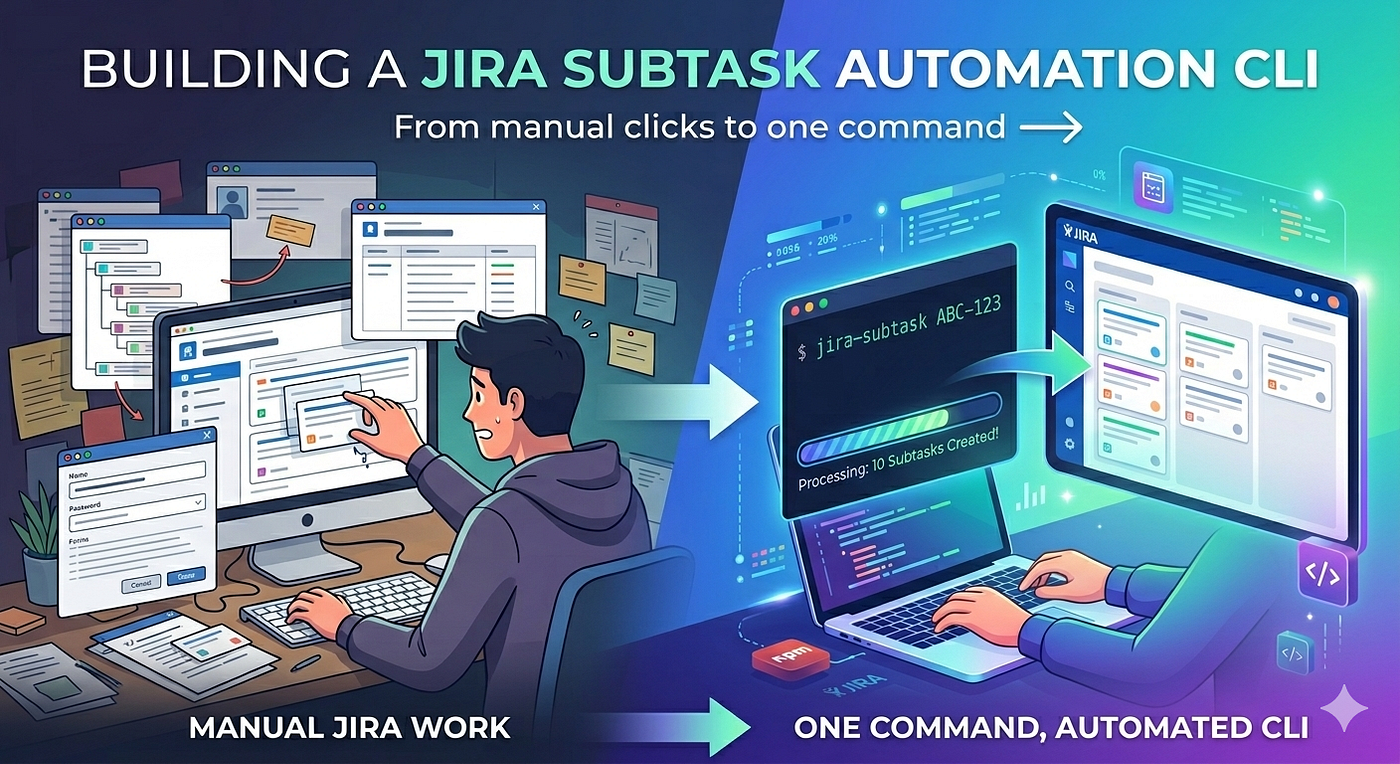
In my previous article, I built a CLI tool that creates Jira subtasks with a single command:
From CLI to Full Workflow: Integrating jira-subtask-cli with GitHub Copilot and Atlassian MCP
In my previous article, I built a CLI tool that creates Jira subtasks with a single command:
jira-subtask ABC-123 --dev-onlyAt the end of that article, I promised to share how I’m integrating this CLI with GitHub Copilot and the Atlassian MCP server. A few months of actual use later, here’s what the integration looks like in practice.
What I was trying to solve
Using GitHub Copilot for development tasks is genuinely useful. But “useful” and “consistent” are different things.
When AI handles planning, classification, and code generation freely, the outputs vary. Some days Copilot picks up a Jira ticket and produces a clean backend plan. Other days it drifts, skips layers, or re-plans mid-implementation. And Jira subtasks — the thing I’d already automated — were still being created ad hoc, sometimes manually, sometimes skipped entirely.
The goal was to fix that without over-engineering it. I wanted:
- A repeatable developer flow from Jira ticket to implementation
- The CLI enforcing subtask structure at the right moment — after planning, before coding
- Copilot handling the variable parts (analysis, classification, code)
- Confluence documentation updated automatically, not as an afterthought
The structure: .github/prompts
GitHub Copilot supports prompt files stored in .github/prompts/. These are Markdown files that act as reusable slash commands inside Copilot Chat. You invoke them with /filename.
The workflow is built on four prompt files:
.github/
├── copilot-instructions.md        ← global rules for this repo
└── prompts/
    ├── copilot-orchestrator.md    ← core logic: classification + CLI flag decision
    ├── fullstack-plan.prompt.md   ← planning (user pastes Jira ticket)
    ├── fullstack-plan-mcp.prompt.md  ← planning (Copilot fetches via MCP)
    ├── fullstack-implementation.prompt.md  ← executes approved plan
    └── confluence-doc-update.prompt.md     ← standalone doc updates
Each prompt file has a narrow, specific job. None of them try to do everything.
How the workflow runs
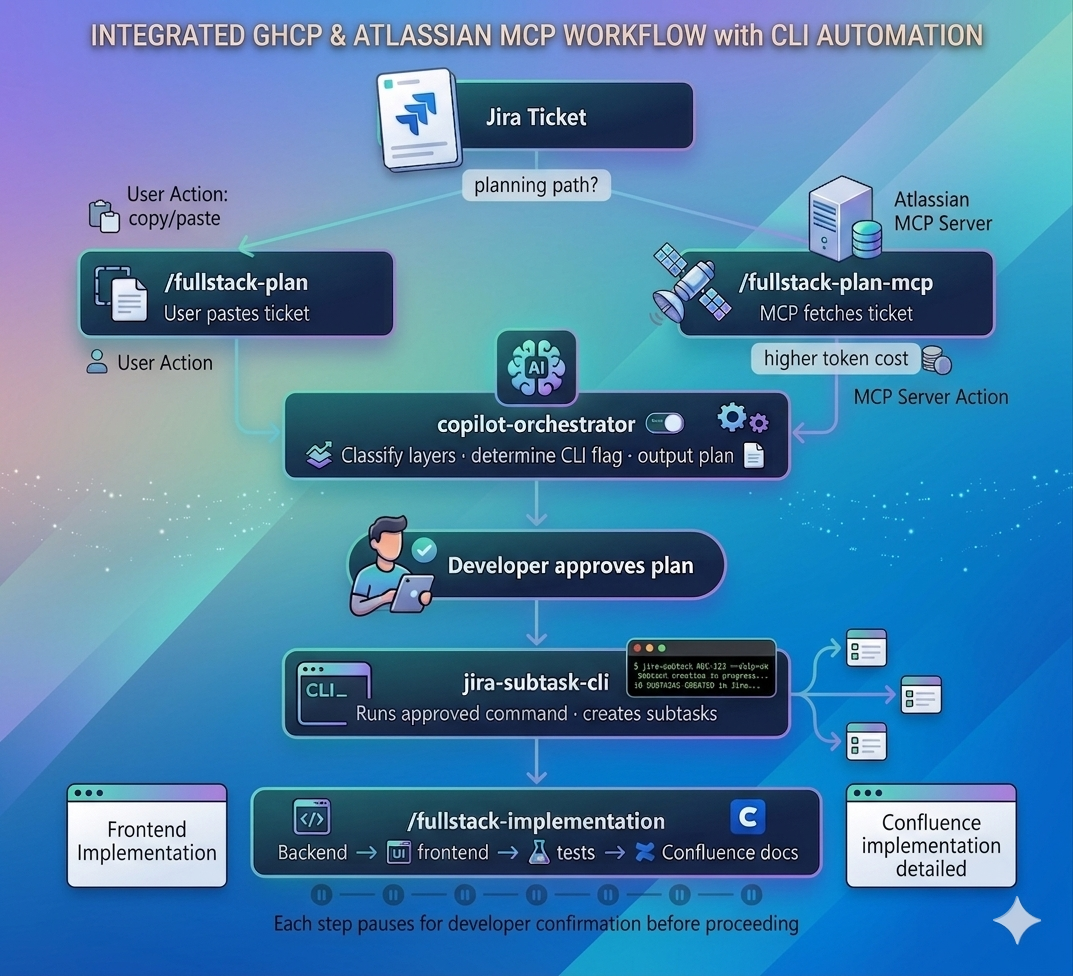
Step 1 — Planning
The developer invokes one of two planning prompts:
**/fullstack-plan** — User pastes the Jira ticket content manually. Copilot analyzes it, classifies the layers (FRONTEND / BACKEND / DATABASE), and builds an implementation plan. No MCP involved.
**/fullstack-plan-mcp** — Copilot fetches the ticket directly from Jira using Atlassian MCP, then does the same analysis.
Both prompts reference the same orchestrator file for classification logic, so the output format is identical regardless of which path is used.
The key excerpt from copilot-orchestrator.md:
## Step 2 — Task ClassificationClassify the work into one or more of:
- FRONTEND — changes in UI/
- BACKEND — changes in any backend services/
- DATABASE — DB schema change or query change
- FULLSTACK — any combination of the aboveAt the end of planning, Copilot outputs the implementation plan and pauses. It asks the developer to confirm before proceeding. Nothing runs automatically.
Step 2 — The CLI gate
Once the plan is confirmed, Copilot determines the correct CLI flag based on decision rules in the orchestrator:
## Step 3 — CLI Flag Decision RulesEvaluate in order — pick the FIRST matching rule:| Condition | Flag |
|--------------------------------------------------------|-------------|
| Ticket has UI changes along with or without backend | --dev-only |
| Ticket is backend/API/DB only — zero UI changes in AC | --skip-ux |Copilot then shows the command to the developer and waits for explicit approval before running it:
Proposed jira-subtask CLI Command:
jira-subtask ABC-123 --dev-only
⚠️ Awaiting user approval before execution.
This is the critical design decision: Copilot decides the flag, the developer approves, then the CLI runs. Subtasks are never created speculatively, never created twice, never skipped.
Step 3 — Implementation
After subtasks are created, the developer invokes /fullstack-implementation. This prompt explicitly does not re-plan:
The plan has been approved. Do not re-plan. Do not ask for confirmation.It executes layer by layer — backend first, then frontend, then tests — pausing after each layer for developer confirmation. Tests are non-negotiable: the prompt marks them as always-run regardless of ticket scope.
Step 4 — Confluence documentation
The final step updates API documentation in Confluence automatically using MCP. The developer does not re-enter endpoint details — everything needed is already in context from the implementation step.
For changes outside the main flow, there’s a standalone prompt:
/confluence-doc-update serviceName=<service_name> change="Added POST API"Why two planning prompts? The MCP token tradeoff
This is the design decision worth explaining explicitly.
Using Atlassian MCP to fetch Jira tickets is convenient — no copy-pasting. But MCP tool calls consume tokens. For a complex ticket with a long description and multiple acceptance criteria, the MCP fetch plus the planning analysis can get expensive, especially across a full day of development work.
The no-MCP path (/fullstack-plan) solves this by having the developer paste the ticket content. It's one extra manual step, but the planning quality is identical because both paths use the same orchestrator logic.
The choice is left to the developer per ticket. High-context tickets where manual pasting is tedious → use MCP. Simple tickets → paste and save tokens.
Known limitation
The MCP planning prompt updates Jira ticket status to “In Progress” after the CLI runs. The no-MCP planning prompt does not — that status update is missing from that path.
This is an inconsistency I haven’t fixed yet. If you use /fullstack-plan, you need to update the Jira status manually after the CLI runs. It's a small gap, but worth knowing before you adopt the same pattern.
What this is not
This is not a tutorial on how to prompt Copilot better. The prompts here are not clever. They are explicit, narrow, and repetitive by design. The orchestrator file repeats the same rules across multiple prompts because ambiguity compounds — if the classification logic lives in one place but the implementation logic assumes it’s in another, something eventually breaks.
The system works because each file has one job and the handoffs between them are explicit. The CLI is embedded as a gate, not an afterthought. And the human approves at every meaningful decision point.
Try it
The CLI is available on npm:
npm install -g jira-subtask-cliThe npm package: https://www.npmjs.com/package/jira-subtask-cli
The prompt structure from this article can be adapted to any full-stack repo. The orchestrator logic — classification, flag decision, layer-by-layer execution — is not specific to my tech stack.
This is part 2 of a series. Part 1 covers building the CLI itself.
If you’ve hit the same MCP token cost problem, I’m curious what tradeoff you landed on.
메타데이터
- post_id
- 2d743124d7c3
- slug
- from-cli-to-full-workflow-integrating-jira-subtask-cli-with-github-copilot-and-atlassian-mcp-2d743124d7c3
- url
- https://medium.com/@sayaligp/from-cli-to-full-workflow-integrating-jira-subtask-cli-with-github-copilot-and-atlassian-mcp-2d743124d7c3
- canonical_url
- https://medium.com/@sayaligp/from-cli-to-full-workflow-integrating-jira-subtask-cli-with-github-copilot-and-atlassian-mcp-2d743124d7c3
- author_url
- https://medium.com/@sayaligp
- status
- ok
- fetched_at
- 2026-06-09 15:37:30