Your KQL Query Is More Than Just a Query
The metadata risk MSSPs aren’t talking about in Microsoft Sentinel
Your KQL Query Is More Than Just a Query (Hunting LAQueryLogs)
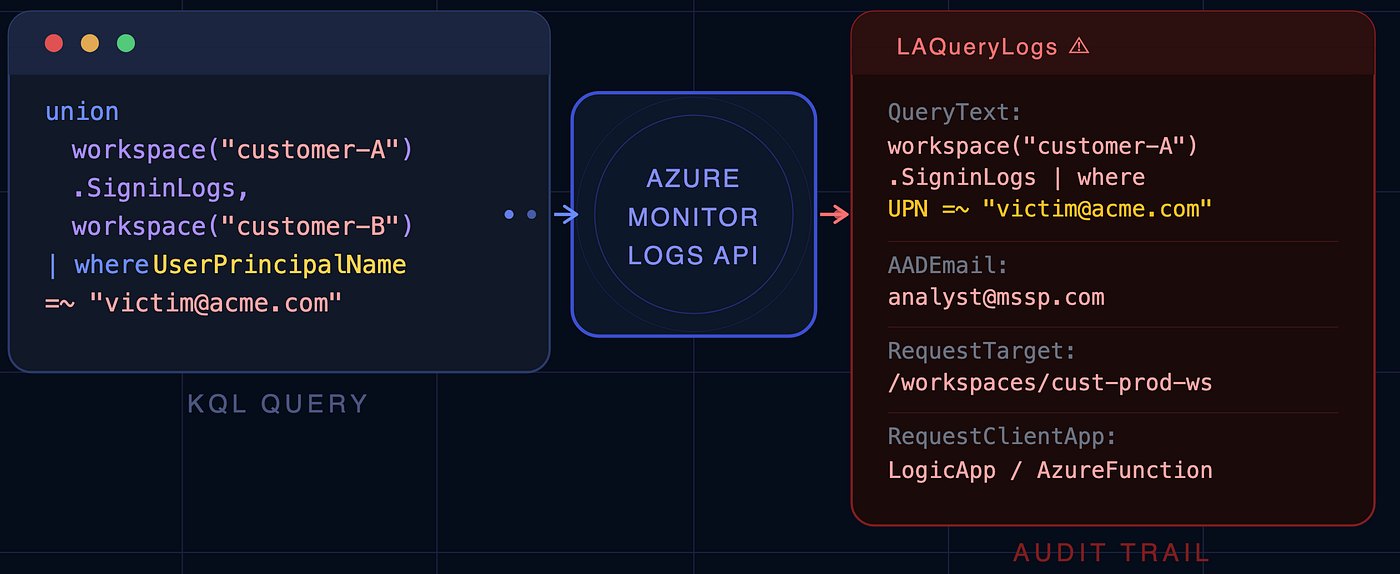
The metadata risk MSSPs aren’t talking about in Microsoft Sentinel
If you run a multi-tenant SOC or work as an MSSP analyst, there’s a good chance cross-workspace queries are part of your daily life. They’re one of Sentinel’s best features — write once, hunt everywhere.
But here’s something I came across while testing cross-workspace investigation workflows that’s worth sharing with the community:
In multi-tenant environments, your query text itself can become sensitive data.
Not a bug. Not a vulnerability. Not a reason to stop using the feature.
Just something the architecture docs don’t spell out clearly enough — and the kind of thing that can silently create governance problems at scale.
First, a quick highlights on Cross-Workspace Queries
Microsoft Sentinel’s workspace() function lets you do this:
// Running manually for workspaces
union
  workspace("customer-abc").SigninLogs,
  workspace("customer-xyz").SigninLogs,
  workspace("customer-qrs").SigninLogs
| where IPAddress == "198.51.100.42"
You can also add all these as Workspace Function —
unionSigninLogs
// Running by creating workspace function
unionSigninLogs
| where IPAddress == "198.51.100.42"
One query. Three customers. Done.
For MSSPs managing dozens or hundreds of environments through Azure Lighthouse, this is genuinely transformative. You can:
- Hunt an IOC across every customer simultaneously
- Reuse detection logic without duplicating it everywhere
- Build centralized automation and reporting
- Run investigations from a single pane of glass (Portal/Log Analytics API)
- Dramatically reduce operational overhead
The model works. It scales. Analysts love it. Most MSSP architectures lean into it heavily — and for good reason.
If the LAQueryLogs are enabled for Log Analytics Workspace then you can hunt that too.
Audit queries in Azure Monitor Logs (Enable/Disable Auditing)
Configuring alerts for Microsoft Sentinel activities (Alerting)
The Role of Cross-Workspace Queries in Threat Detection — by Junaid Mumtaz
So What’s the Issue?
Here’s what I noticed while hunting for metadata in Log Analytics own Audit logs (LAQueryLogs)
Disclaimer: There is no reliable way for an MSSP to completely hide Microsoft Sentinel detections from a customer. The moment an analyst clicked on “Edit” analytics rule, audit events can be generated and logged. If audit logging is enabled, these activities may expose details about the detection content and implementation.
When queries are executed through certain ways — particularly the Azure Monitor Logs and Log Analytics APIs — and query auditing is enabled, Azure may record those executions in a table called LAQueryLogs.
That table can capture fields like (click for more):
QueryTextRequestTargetRequestContextAADEmailAADClientId,AADObjectIdRequestClientApp— List of Request Client App
From a pure audit perspective? That’s great. You get full visibility into who queried what and when.
The problem is what’s inside the QueryText.
What Your Query Text Can Reveal
Think about what’s typically embedded inside a cross-workspace hunting query:
Customer identifiers. Workspace names, tenant references, internal abbreviations. Anyone reading that audit log now knows which customers you manage.
Active investigation targets. Imagine a query like is executed on MSSP side:
// Assume Cross-workspace function updated to support multiple customers.
unionSigninLogs
| where UserPrincipalName =~ "victim.user@customer-abc.com"
That user’s name, their domain, the fact that they’re being investigated — all of it is sitting in an audit record of other customers (targeted Workspaces).
Hardcoded allowlists and exclusions. Detection tuning is a normal part of SOC life:
// Assume Cross-workspace function updated to support multiple customers.
unionSigninLogs
| where IPAddress !in ("10.20.30.40", "192.168.1.100")
| where UserPrincipalName !in ("svc-backup@customer-abc.com")
If that ends up in query audit logs again for all the customers available in Crossworkspace Function, you’ve just documented your blind spots.
Workspace and subscription paths. Full ARM-style resource references in queries like:
workspace("/subscriptions/abc-123/resourcegroups/prod-rg/providers/microsoft.operationalinsights/workspaces/customer-xyz")That’s subscription IDs, resource group names, and workspace naming conventions all in one line.
🚩Proprietary detection logic. For MSSPs, detection content is often IP. Custom correlation logic, hunting methodologies, tuning parameters — if it’s in the query, it could be in the audit trail.
The Principle That Gets Missed
Security teams spend a lot of energy protecting query results — making sure Customer A can’t see Customer B’s data. That’s the right instinct.
But results aren’t the only thing worth protecting.
Metadata is data.
The query itself — what you’re looking for, where you’re looking, who you’re investigating — can be just as sensitive as what you find. In regulated industries especially (finance, healthcare, government), that distinction matters.
Practical Design Guidance
None of this requires re-architecting your entire MSSP platform. It’s mostly about making deliberate choices.
Treat KQL like code that contains secrets. If a query has customer names, email addresses, or investigation context embedded in it, treat it accordingly. Don’t paste it into chat tools or shared notebooks without thinking about who has access.
Keep customer-specific values out of shared queries. Use watchlists, customer-scoped functions, and local configuration tables instead of hardcoding customer identifiers into hunting queries that run from a central context.
Scope your hunts. Broad “search all customers” queries increase both exposure and noise. Query from specific customer for investigation.
Review LAQueryLogs configuration and IP protection requirements. Where feasible, customers should either disable LAQueryLogs or forward the audit logs to the MSSP’s Sentinel environment. If disabling the logs is not possible due to compliance obligations along with forwarding logs to MSSP Sentinel, an NDA should be considered to protect MSSP intellectual property.
A Quick Detection Query (For Your Own Awareness)
If you want to see what your own environment is logging, this gives you a starting point:
LAQueryLogs
| where TimeGenerated > ago(30d)
Run it from your Customer’s Workspace.
Where I’m Taking This
This isn’t a issue — there’s nothing broken. But it is good to be added as a practical note in the Microsoft’s documentation that explains what query audit records can contain and how to design around it.
Pull Request : https://github.com/MicrosoftDocs/azure-monitor-docs/pull/291
메타데이터
- post_id
- 2d8a7e14b5cb
- slug
- your-kql-query-is-more-than-just-a-query-2d8a7e14b5cb
- url
- https://medium.com/@0ccupi3R/your-kql-query-is-more-than-just-a-query-2d8a7e14b5cb
- canonical_url
- https://medium.com/@0ccupi3R/your-kql-query-is-more-than-just-a-query-2d8a7e14b5cb
- author_url
- https://medium.com/@0ccupi3R
- status
- ok
- fetched_at
- 2026-06-11 21:11:36




