A Step-by-Step Guide to Install Cribl
Installing Cribl Leader & a Worker Node
Wiki topics:
🔧 · Data Engineering
A Step-by-Step Guide to Install Cribl
Installing Cribl Leader & Worker Node
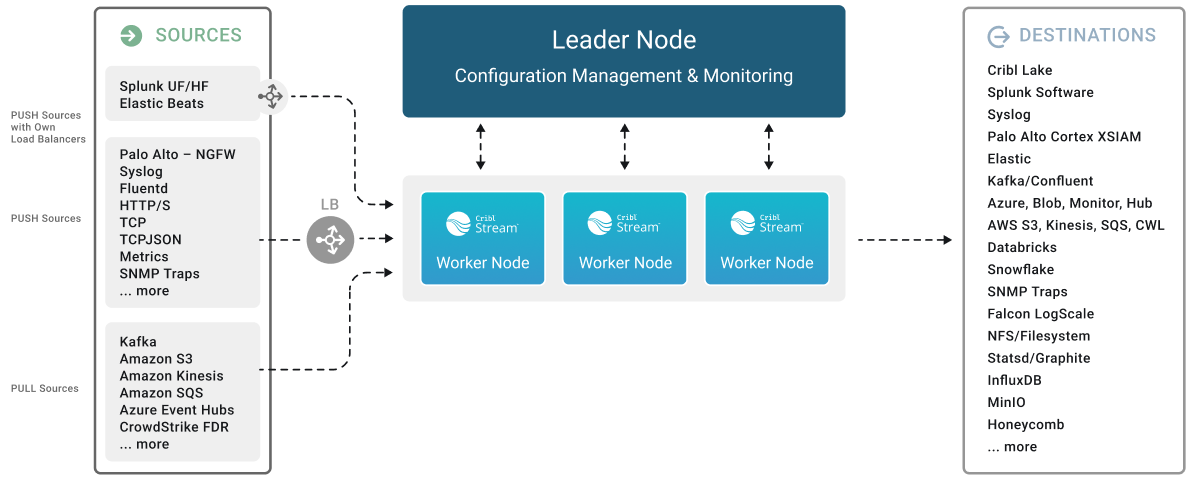
Installing Leader (Binary Download)
# Download & move the binary to your linux system

# Create user
useradd cribl

# Create installation directory
mkdir /opt/cribl

# Go to Installation Directory and paste the binary there (Say /opt/cribl)
cp cribl-xxxxx.tgz /opt/cribl

# Untar Binary
sudo tar xvzf cribl-xxxxx.tgz

# Bootstart enable Cribl service
/opt/cribl/bin/cribl boot-start enable -u cribl

# Change directory ownership
sudo chown -R cribl:cribl cribl

# Modify the systemd file:
cd /etc/systemd/system/

# Look for cribl.service file, add the below stanza to listen on privileged port (0-1024)

[Service]
AmbientCapabilities=CAP_NET_BIND_SERVICE

# eload daemon
systemctl daemon-reload

# Start cribl service
systemctl start cribl
You leader should be up and running now.
- Access the UI through http://<IP>:9000
- Follow in-screen notification
- Change the mode to Leader: Settings >> Global >> System >> Distributed Settings >> General Settings >> Mode → Leader
- Retrieve “Leader Token” from Leader which we will use to connect worker with this leader node: Settings >> Global >> System >> Distributed Settings >> Leader Settings >> Auth Token
Installing Worker (Binary Download)
# Download & move the binary to your linux system

# Create user
useradd cribl

# Create installation directory
mkdir /opt/cribl

# Go to Installation Directory and paste the binary there (Say /opt/cribl)
cp cribl-xxxxx.tgz /opt/cribl

# Untar Binary
sudo tar xvzf cribl-xxxxx.tgz

# Bootstart enable Cribl service
/opt/cribl/bin/cribl boot-start enable -u cribl

# Change directory ownership
sudo chown -R cribl:cribl cribl

# Modify the systemd file:
cd /etc/systemd/system/

# Look for cribl.service file, add the below stanza to listen on privileged port (0-1024)

[Service]
AmbientCapabilities=CAP_NET_BIND_SERVICE

# Reload daemon
systemctl daemon-reload

# Switch to Cribl user
su - cribl

# Connect with Leader
cd /opt/cribl/bin
./cribl mode-worker -H <Leader IP> -p <Leader Port> -u <Leader Token>

#Start cribl service
systemctl start cribl
You can install worker with the script generated from leader as well. However, this requires either one of the access,
- Install package location: Cribl CDN → Access to Cribl CDN should be allowed in your network control
- Install package location: Download URL → Access to a machine where we can download Cribl package from (internal or external file hosting server/application) should be allowed
If you are using RHEL, kindly ensure SELinux is disabled
# Check SELinux status
getenforce -v

# If your output has the below sentence, this means SELinux is enabled
SELINUX=enforcing

# Edit the file and change it to disabled.
sudo vi /etc/selinux/config
SELINUX=disabled

# Reboot system
sudo reboot now
I welcome your discussion and feedback on this topic. Feel free to reach me via email at “kaviarasan one one nine five at gmail dot com” or connect on LinkedIn.
References
메타데이터
- post_id
- 2dbd1e4b5304
- slug
- a-step-by-step-guide-to-install-cribl-2dbd1e4b5304
- url
- https://medium.com/@kaviarasan_ak/a-step-by-step-guide-to-install-cribl-2dbd1e4b5304
- canonical_url
- https://medium.com/@kaviarasan_ak/a-step-by-step-guide-to-install-cribl-2dbd1e4b5304
- author_url
- https://medium.com/@kaviarasan_ak
- status
- ok
- fetched_at
- 2026-06-23 17:05:31





