Installing the gymnasium python library and the MUJOCO physics engine on Windows 11
Required Packages
Installing the gymnasium python library and the MUJOCO physics engine on Windows 11
Required Packages
Gymnasium
Gymnasium is a project that provides an API (application programming interface) for all single agent reinforcement learning environments, with implementations of common environments: cartpole, pendulum, mountain-car, mujoco, atari, and more. This page will outline the basics of how to use Gymnasium including its four key functions: [make()](https://gymnasium.farama.org/api/registry/#gymnasium.make), [Env.reset()](https://gymnasium.farama.org/api/env/#gymnasium.Env.reset), [Env.step()](https://gymnasium.farama.org/api/env/#gymnasium.Env.step) and [Env.render()](https://gymnasium.farama.org/api/env/#gymnasium.Env.render).
MuJoCo
MuJoCo is a free and open source physics engine that aims to facilitate research and development in robotics, biomechanics, graphics and animation, and other areas where fast and accurate simulation is needed.
Installation process
- Download MUJOCO and unzip MUJOCO.
- Create the environment variable
MUJOCO_PY_MUJOCO_PATHwith the path where you saved the MUJOCO directory (see figure 1).
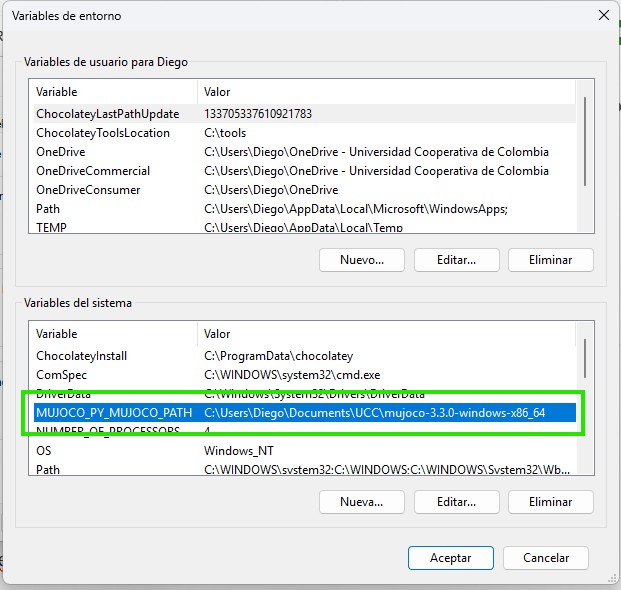
Figure 1. MUJOCO Environment Variable.
- Create a virtual environment in python.
python -m venv gym-env- Activate the virtual environment.
.\gym-env\Scripts\activateNote: If you get an error saying that you are denied execution permission, open powershell as administrator and run the following command and select the option yes to all
Set-ExecutionPolicy -ExecutionPolicy RemoteSigned- Upgrade pip
python -m pip install --upgrade pip- Install gymnasium with mujoco.
python -m pip install gymnasium[mujoco]Test
Below is a test script whose result can be seen in figure 2.
import gymnasium
import mujoco
import time

env = gymnasium.make("Humanoid-v5", render_mode="human")

observation, info = env.reset()

for _ in range(1000):
    action = env.action_space.sample()

    observation, reward, terminated, truncated, info = env.step(action)

    if terminated or truncated:
        observation, info = env.reset()

    time.sleep(0.50)

env.close()
Figure 2. Test.
Recommended reading
메타데이터
- post_id
- 2dde5e9889d3
- slug
- installing-the-gymnasium-python-library-and-the-mujoco-physics-engine-2dde5e9889d3
- url
- https://medium.com/@diegorestrepoleal/installing-the-gymnasium-python-library-and-the-mujoco-physics-engine-2dde5e9889d3
- canonical_url
- https://medium.com/@diegorestrepoleal/installing-the-gymnasium-python-library-and-the-mujoco-physics-engine-2dde5e9889d3
- author_url
- https://medium.com/@diegorestrepoleal
- status
- ok
- fetched_at
- 2026-07-20 19:09:02





