ReconOverlay: Catching CVEs, Exploit Paths, and Version Clues in Real Time
Speed matters.
ReconOverlay: Catching CVEs, Exploit Paths, and Version Clues in Real Time
Speed matters.
Whether you are experienced and moving fast, or less experienced and trying to stay accurate under pressure, the same problem appears sooner or later: important clues show up on screen, but they do not always get the attention they deserve before the moment is gone.
That is the idea behind ReconOverlay.
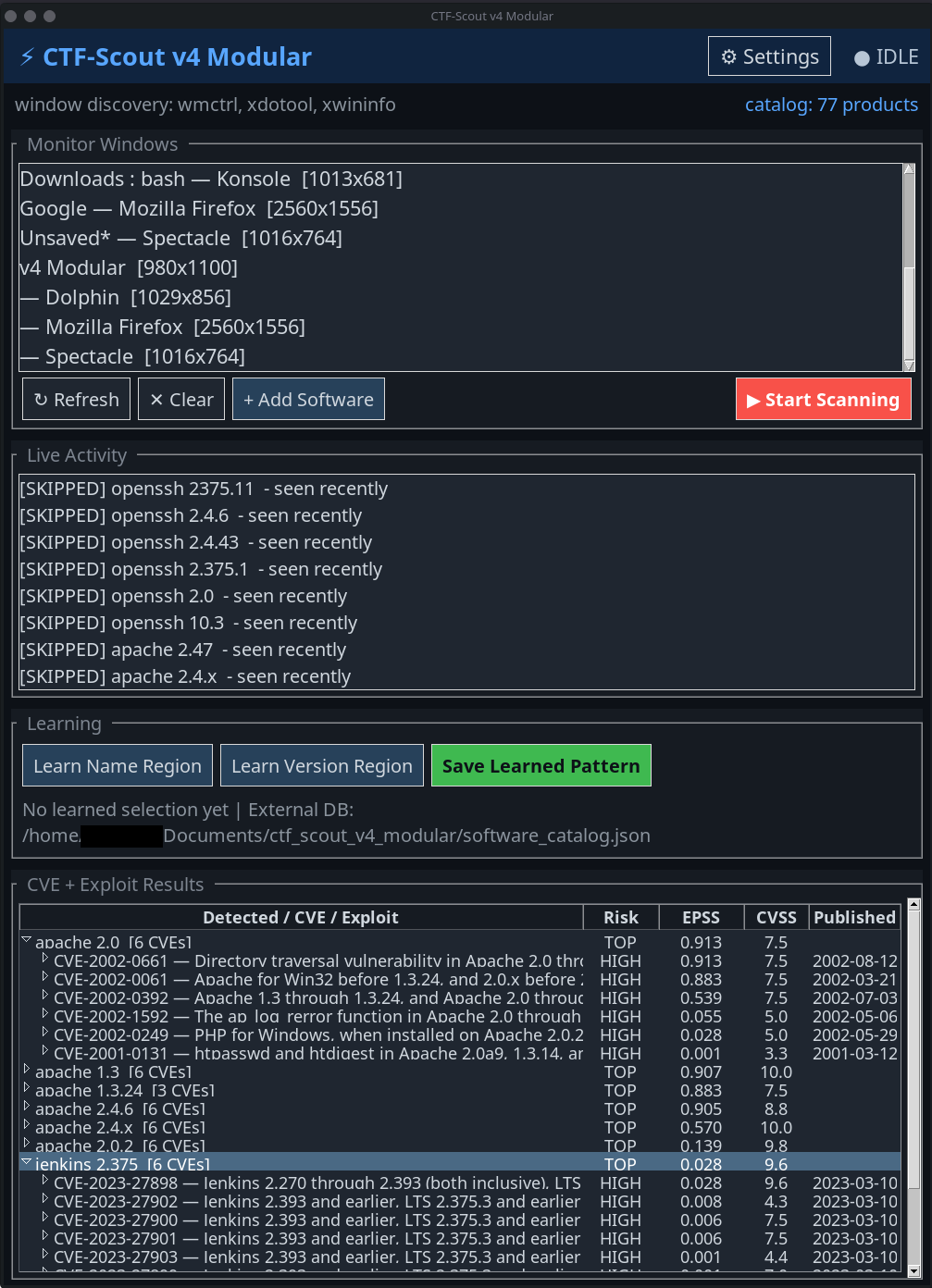
Do your stuff on enumeration. Either you got a script to fire up “basic” stuff one after another, or you do you and go from CLI command to CLI command. Either way, Recon Overlay is built it to help catch what is happening inside the windows you choose to monitor and turn that into useful, real-time vulnerability context during an active CTF, lab, or pentest.
Whether the clue appears in a browser window, an installer, an admin panel, a terminal, a setup wizard, or a dashboard, the goal is the same: identify what is relevant and surface the information that actually matters while you continue working.
That includes things like CVEs, CVSS scores, exploit references, version numbers, product names, frameworks, CMS platforms, and services that may open an attack path.
The point is not to replace enumeration. The point is to support it in real time.
The problem with good clues
A lot of useful information is already sitting in plain sight during recon.
A footer tells you what CMS is running. A setup page exposes an exact software version. A banner in a terminal gives away a service. A browser tab shows a framework name. A login portal reveals more than it should.
The challenge is not always discovery. Quite often, the challenge is what happens immediately after discovery.
- Do you stop everything and start searching?
- Do you open more tabs?
- Do you copy version strings into Google?
- Do you search for CVEs, public exploit references, or package advisories?
- searchsploit XYZ?
- sudo gedit findings.txt?
- A fart?
You get it :)
During a CTF or hands-on assessment, rhythm, and methodology matters. Once you are forced to constantly stop and manually process every clue, the workflow may become slower, noisier, and easier to lose control over.
At least for me. During work, no problem. But on CTFs when you have your own family and the time is very limited and you are tired from all the work. This is pretty epic. It saves me time, energy and it helps me to collect my focus.
What ReconOverlay actually does
ReconOverlay watches the windows you select and tries to understand what visible software clues they contain.
If it sees a recognizable product name or version string, it starts correlating that information against vulnerability and exploit sources in real time. That workes actually surprisingly well!
The practical outcome is straightforward: you stay focused on enumeration, while the overlay helps turn what is already visible on screen into usable security context.
That means if a setup wizard exposes a version, if a dashboard footer reveals a framework, if the nmap scan found a version or if a browser page leaks a software identifier, the tool can begin pulling in the things you would normally have to search manually:
- CVE references.
- CVSS severity context.
- Exploit references.
- Known software identifiers.
- Version-specific leads worth checking first.
In other words, ReconOverlay tries to shorten the time between seeing something interesting and understanding whether it may matter.
Why that matters in practice
In theory, manually looking everything is the way it’s done. For some; it is one of the easiest ways to miss good leads. Especially if you are tired, fairly new to it or at the end, we are just humans. :)
Maybe laziness, maybe cognitive overload?
During active recon, you are already tracking ports, services, directories, login flows, credentials, notes, screenshots, commands, and possible pivots. Adding constant manual vulnerability lookup on top of that makes even experienced operators slower. For someone newer, stressed, or still building confidence, it becomes even more punishing.
That is where a tool like this becomes useful.
For experienced people, it may speeds things up and and help to preserve a better flow. For less experienced people, it improves accuracy and reduces the chance that something important gets ignored or misunderstood. For anyone working under pressure, it acts like a second set of eyes focused on the clues already visible in front of them.
That is the value.
How it works
The workflow is intentionally simple.
- You choose the windows that matter. ReconOverlay monitors them.
- It extracts readable text using OCR.
- It tries to detect known product names and version strings.
- If it finds something useful, it starts searching for relevant vulnerability and exploit context.
That context can include CVE references, severity data, exploit sources, and other indicators that help show whether a clue deserves immediate attention.
The goal is not to dump noise into your face. The goal is to make the on-screen clues you are already exposed to more useful, faster.
There is also a practical side to this. OCR is never perfect. Real environments are messy. Product names are not always written consistently. Version numbers are sometimes split, partially visible, or embedded in awkward interfaces.
That is why the tool also supports learning and manual enrichment. If you repeatedly encounter the same software pattern, you can help the tool identify where the product name and version usually appear. If a platform is missing from the catalog, you can add it. Over time, the overlay becomes more useful rather than staying frozen in a default state.
ReconOverlay exists to make that recognition easier and faster while the work is still in motion.
What it is not
This is important to say clearly.
- ReconOverlay is not an exploitation engine.
- It is not a replacement for real enumeration.
- It is not proof that something is exploitable.
- It does not remove the need for validation, technical judgment, or context.
It is a support layer.
It helps catch, correlate, and surface the things that are already visible so that you can spend less time doing repetitive manual lookups and more time making informed decisions.
- You still need to verify what you find.
- You still need to confirm the environment.
- You still need to test responsibly.
- You still need to think.
That is exactly how it should be.
Closing thoughts
ReconOverlay is built around a simple idea:
If your screen is already revealing useful software and version information, that information should be turned into actionable vulnerability context in real time.
That is what the tool is trying to do.
- Help the experienced move faster.
- Help the less experienced miss less.
- Help both stay focused on recon while the overlay catches what the eye might not have time to process fully in the moment.
Link? Sure! :)
메타데이터
- post_id
- 2def7dcfd558
- slug
- reconoverlay-catching-cves-exploit-paths-and-version-clues-in-real-time-2def7dcfd558
- url
- https://medium.com/@hhrk/reconoverlay-catching-cves-exploit-paths-and-version-clues-in-real-time-2def7dcfd558
- canonical_url
- https://medium.com/@hhrk/reconoverlay-catching-cves-exploit-paths-and-version-clues-in-real-time-2def7dcfd558
- author_url
- https://medium.com/@hhrk
- status
- ok
- fetched_at
- 2026-06-15 20:49:13