Midjourney Info Drop #13 — Week of May 4th, 2026
Midjourney News Updates, 10 Expert Prompts, 16 SREF Retextures, and 15 NEW Profile Codes
Midjourney Info Drop #13 — Week of May 4th, 2026
Midjourney News Updates, 10 Expert Prompts, 16 SREF Retextures, and 15 NEW Profile Codes

banner image for “Midjourney Info Drop #13 — Week of May 4th, 2026” — created by the author in Midjourney AI v.8.1
Part 1 — Updated News and the Office Hours Recap Notes
My Notes from the Midjourney Office Hours, Wednesday, May 6th, 2026
Although it was mentioned last week that this Office Hours would be with the technical team, it was actually another David Holz Office Hours.
The moderator, Ancient Chaos, indicated that next week is confirmed to be a “Duncan and Sharmeen” Office Hours. (I guess we will see if it actually happens.)
David began the meeting with the announcement that he thought today would be a shorter than usual Office Hours because he had several things that needed his attention to keep them moving forward.
He said that they had two major priorities. The first one was new aesthetics system that would lead to a v8.2 release. He doesn’t like to put deadlines on things but he said it would probably be about two weeks, certainly before the end of the month. The aesthetic system upgrade would enable the “much stronger aesthetics” that the version 8 model is capable of, while introducing bolder and “weirder” visual styles.
They are also working on updating the personalization system and he wanted it to be easier to use so that more users would utilize it more.
David posted some images in the #vc-text channel that he felt demonstrated more of the type of aesthetics that could be accessed through the v8 model. The goal is to expose more of this creative capability to users.
The second priority he emphasized was improved edit model capabilities. David has felt and mentioned that the current editor needs a lot of updating to meet user needs. Separate edit models are actively being trained, tested, and evaluated. Improvements will include “inpainting” and “outpainting”, removal and replacement of “objects”, and multiple object editing. This may crossover with users asking to have an OREF replacement. Because this is a big project it may be done in stages. The first release may ship with fewer capabilities than the long-term vision. The team reports that the edit model progress is reportedly moving smoothly internally.
David did mention that there will probably be a V8.3 release that may include an updated dataset, and additional tuning work.
Early work on Midjourney V9 is underway. It is focused on larger-scale data/model improvements. Bigger models are still needed for major gains in prompt understanding, image coherence, and Structural consistency.
David answered a few questions submitted by the listeners.
Before he closed the meeting, he did tease the “secret projects and hardware products” that they are working on again. He said again that he felt they were close to announcing a hardware-related soon (but he didn’t mention a specific time frame).
Note: I think that it sounds like the Midjourney team is working on a lot of things. I personally feel that version 8.1 has improved since its first release. I am using it more and more. And I have many more things that I like about it.
Part 2 — Weekly Midjourney Treasures
A Gallery of 10 Images from A Few Interesting Midjourney Prompts
One of the things I collect when I am scraping information in Midjourney is interesting prompts.
I usually find some each day. Today I would like to share a few of them with you.
Image from an Interesting Prompt #1 — Extreme Paul Klee Abstract Painting
The first one I will share does not have a lot of text in the prompt — only four words, “extremely abstract klee style”. The rest of the prompt however interested me because of the other parameters and the fact that the author of it mentioned that it combined six moodboard codes.
Here is the full prompt:
extremely abstract klee style --v 8.1 --chaos 20 --ar 2:3 --exp 20
--profile 48e6gay piwsa6i qz2smog 8d9sxj7 zb1zfyt ip767s7 --stylize 200
(I tested the codes and all of them did test as moodboards except the first code “48e6gay” which was a profile.)
I ran the prompt and I think this combination of codes made some very cool art that does remind me of Paul Klee’s work.
Here are the four sample images arranged next to each other.

Extreme Paul Klee Abstract Painting — the four sample images from the prompt above arranged side by side for comparison
And here are larger versions that you can examine more carefully (I think they are stunning!).
Extremely Abstract Klee Style Image #1

Extremely Abstract Klee Style Image #1 — an image in an extreme Paul style using 1 profile and 5 moodboard codes — created by the author in Midjourney AI v.8.1
Extremely Abstract Klee Style Image #2

Extremely Abstract Klee Style Image #2 — an image in an extreme Paul style using 1 profile and 5 moodboard codes — created by the author in Midjourney AI v.8.1
Extremely Abstract Klee Style Image #3

Extremely Abstract Klee Style Image #3 — an image in an extreme Paul style using 1 profile and 5 moodboard codes — created by the author in Midjourney AI v.8.1
Extremely Abstract Klee Style Image #4

Extremely Abstract Klee Style Image #4 — an image in an extreme Paul style using 1 profile and 5 moodboard codes — created by the author in Midjourney AI v.8.1
Paul Klee (1879–1940) was a Swiss-German artist whose multifaceted work was influenced by movements such as Expressionism, Cubism, and Surrealism.
Web links:
- **Expressionism** from the Museum of Modern Art, New York City
- **All About Cubism** from the Tate Gallery, England
- **The Surrealism Guide** from the Dalí Museum, St. Petersburg, Florida
Klee was a master of color theory and a skilled violinist, he believed that art should “render visible” the spiritual and subconscious worlds rather than merely imitate reality. During his tenure as a teacher at the Bauhaus, he published his extensive notebooks, which became foundational texts for modern abstract art. He created a vast legacy of over 9,000 whimsical and deeply symbolic pieces.
Another Web link: The **Zentrum Paul Klee** is a renowned art museum and cultural center in Bern, Switzerland, dedicated to the life and work of artist Paul Klee.
You can explore the additional links if you wish, or come back to them at a later time.
Image from an Interesting Prompt #2 — A John Berkey Spacecraft
The prompt:
a massive, utopian spacecraft, digital art style, dark blue and
light gold, in the style of john berkey
--ar 7:3 --stylize 400 --hd --v 8.1
#2 — A John Berkey Spacecraft — created from the prompt above — by the author in Midjourney AI v.8.1
Image from an Interesting Prompt #3 — Old European Gothic Illustration
The prompt:
decorative forms creating a dreamlike gothic mood, elegant illustration
with old European fantasy charm
--ar 7:3 --stylize 400 --hd --v 8.1
#3 — Old European Gothic Illustration — created from the prompt above — by the author in Midjourney AI v.8.1
Image from an Interesting Prompt #4 — The Jazz Saxophonist
The prompt:
concept art, half-body shot of man playing saxophone in jazz festival,
blues with a splash of orange, moody
--ar 7:3 --stylize 400 --hd --v 8.1
#4 — The Jazz Saxophonist — created from the prompt above — by the author in Midjourney AI v.8.1
Image from an Interesting Prompt #5 — Hyper-realistic Tree House
The prompt:
a colossal organic house woven entirely from massive ancient tree
roots, curving and intertwining to form living walls and arched
doorways, in a hyper-realistic cinematic style
--ar 7:3 --stylize 400 --hd --v 8.1
#5 — Hyper-realistic Tree House — created from the prompt above — by the author in Midjourney AI v.8.1
Image from an Interesting Prompt #6 — Tiny Crystal World
The prompt:
crystal sphere netsuke, a tiny miniature world inside a checkered
crystal sphere with miniature landscape, intricate, geometric
patterns formed by tiered, interlocking niches, shadow, carved crystal
--ar 7:3 --stylize 400 --hd --v 8.1
#6 — Tiny Crystal World — created from the prompt above — by the author in Midjourney AI v.8.1
Image from an Interesting Prompt #7 — A Kinetic Fair Tale Book
The prompt:
a kinetic fairy tale book with a hand-cranked mechanism revealing
a moving forest made of layered paper, where paper trees sway in
wind and a silhouette walks through, cover textured like handmade parchment
--ar 7:3 --stylize 400 --hd --v 8.1
#7 — A Kinetic Fair Tale Book — created from the prompt above — by the author in Midjourney AI v.8.1
Image from an Interesting Prompt #8 — The Old Steam Locomotive
The prompt:
a deeply nostalgic scene depicting an old steam locomotive pulling
into a bustling 1930s-era train station during the golden hour,
rendered in the blended style of Howard Fogg and Norman Rockwell,
the massive steam train is the primary focus, its dark metal body
glistening and releasing powerful clouds of steam that frame
the composition
--ar 7:3 --stylize 400 --hd --v 8.1
#8 — The Old Steam Locomotive — created from the prompt above — by the author in Midjourney AI v.8.1
Image from an Interesting Prompt #9 — All-Seeing Crystal Ball
The prompt:
crystal ball on a table, inside tiny humans observing a giant eye
looking at them, but the eye reflection reveals they are actually
inside another sphere, layered realities, optical illusion, extreme
refraction and lens distortion, sharp focus, conceptual surrealism
--ar 7:3 --stylize 400 --hd --v 8.1
#9 — All-Seeing Crystal Ball — created from the prompt above — by the author in Midjourney AI v.8.1
Image from an Interesting Prompt #10 — The Metaverse Social Hub
The prompt:
massive metaverse social hub, thousands of digital avatars gathering
in a futuristic plaza, floating holographic architecture, neon light
reflections, interactive VR interface elements, immersive virtual
world, global illumination, volumetric lighting
--ar 7:3 --stylize 400 --hd --v 8.1
#10 — The Metaverse Social Hub — created from the prompt above — by the author in Midjourney AI v.8.1
It has been a while since I wrote an article that included some image retextures. I think retextures are a fun feature of the Midjourney editor. Note: Retextures are not supported in v8.1 (yet) but hopefully they will be soon. You can retexture images created in v8.1 but the retexture prompt will drop back to V7. (link to **MJ editor documentation**)
A Gallery of 16 Retextured Images Using Style References (SREFs)
The Original Prompt and Image Grid Images
I was looking for an image that would work well with SREF retexturing and I came across this one from one of my favorite Midjourney artists, The Prompter (a **link to her Facebook feed and a [link to the post with the prompt](https://www.facebook.com/aibraingain/posts/pfbid02g1B7VLN5ALUnkVYWk3iR2uJHtwAgyJfUt3GG44FE7ErShYJKgXnRxBr9VZeg9dGLl)**).
nearly empty white room with faint floor-wall boundary line,
soft ambient light, high-key minimal interior composition, total void
--ar 5:4 --exp 90 --profile mtg94fg pnc4rlx ie8u7ms
--stylize 900 --hd --v 8.1
a screen capture of the four grid images from this program run from my account in Midjourney
Each of these grid images exhibit a lot of minimalism so they will show the attributes of each SREF really well.
To view the effects of each style reference I used each of the four images from the grid, and created four retextures of each one.
Original Grid Image #1

the original of grid image #1 (no SREF) — created by the author in Midjourney v8.1
And here are the retextures:
Retexture #1 for Grid Image #1: using SREF ID: 107473926

Retexture 1 — a retextured image of grid image #1 using SREF ID: 107473926 — created by the author in Midjourney v7 (in the editor)
Retexture #2 for Grid Image #1: using SREF ID: 529402455

Retexture 2 — a retextured image of grid image #1 using SREF ID: 529402455 — created by the author in Midjourney v7 (in the editor)
Retexture #3 for Grid Image #1: using SREF ID: 912313371

Retexture 3 — a retextured image of grid image #1 using SREF ID: 912313371 — created by the author in Midjourney v7 (in the editor)
Retexture #4 for Grid Image #1: using SREF ID: 1097793647

Retexture 4 — a retextured image of grid image #1 using SREF ID: 1097793647 — created by the author in Midjourney v7 (in the editor)
Original Grid Image #2

the original of grid image #2 (no SREF) — created by the author in Midjourney v8.1
And here are the retextures:
Retexture #5 for Grid Image #2: using SREF ID: 1367249430

Retexture 5 — a retextured image of grid image #2 using SREF ID: 1367249430 — created by the author in Midjourney v7 (in the editor)
Retexture #6 for Grid Image #2: using SREF ID: 1556372237

Retexture 6 — a retextured image of grid image #2 using SREF ID: 1556372237 — created by the author in Midjourney v7 (in the editor)
Retexture #7 for Grid Image #2: using SREF ID: 1804657614

Retexture 7 — a retextured image of grid image #2 using SREF ID: 1804657614 — created by the author in Midjourney v7 (in the editor)
Retexture #8 for Grid Image #2: using SREF ID: 2056589299

Retexture 8 — a retextured image of grid image #2 using SREF ID: 2056589299 — created by the author in Midjourney v7 (in the editor)
Original Grid Image #3

the original of grid image #3 (no SREF) — created by the author in Midjourney v8.1
And here are the retextures:
Retexture #9 for Grid Image #3: using SREF ID: 2293887278

Retexture 9 — a retextured image of grid image #3 using SREF ID: 2293887278 — created by the author in Midjourney v7 (in the editor)
Retexture #10 for Grid Image #3: using SREF ID: 2962147190

Retexture 10 — a retextured image of grid image #3 using SREF ID: 2962147190 — created by the author in Midjourney v7 (in the editor)
Retexture #11 for Grid Image #3: using SREF ID: 3012553404

Retexture 11 — a retextured image of grid image #3 using SREF ID: 3012553404 — created by the author in Midjourney v7 (in the editor)
Retexture #12 for Grid Image #3: using SREF ID: 3620214801

Retexture 12 — a retextured image of grid image #3 using SREF ID: 3620214801 — created by the author in Midjourney v7 (in the editor)
Original Grid Image #4

the original of grid image #4 (no SREF) — created by the author in Midjourney v8.1
And here are the retextures:
Retexture #13 for Grid Image #4: using SREF ID: 3684112327

Retexture 13 — a retextured image of grid image #4 using SREF ID: 3684112327 — created by the author in Midjourney v7 (in the editor)
Retexture #14 for Grid Image #4: using SREF ID: 4001862444

Retexture 14 — a retextured image of grid image #4 using SREF ID: 4001862444 — created by the author in Midjourney v7 (in the editor)
Retexture #15 for Grid Image #4: using SREF ID: 4102917714 The final retexture uses two blended SREFs.

Retexture 15 — a retextured image of grid image #4 using SREF ID: 4102917714 — created by the author in Midjourney v7 (in the editor)
Retexture #16 for Grid Image #4: using two blended SREF IDs: 2440475077 3038057848

Retexture 16 — a retextured image of grid image #4 using SREF ID: 2440475077 3038057848 — created by the author in Midjourney v7 (in the editor)
Taking Retexturing One Step Further
One of my favorite retextures was #11 which used SREF ID: 3012553404. I am always encouraging readers to take something they like and use it in another creation so I decided I would use that SREF ID to retexture a completely different type of image.
I had this image I was playing around with and trying to add different colors and styles to. I think this would look cool using this texture.
I went to the editor and uploaded my image. Here it is.

the pre-existing image that I wanted to try retexturing with SREF ID: 3012553404 uploaded by the author
In the editor’s retexture panel there is a little “star” icon which if you mouseover it says “Suggest Prompt”.

a screen capture of the Retexture panel with the star icon
I clicked it and the editor gave me a suggestion of a “describe-type” text prompt which I shortened to, “a vibrant digital painting features a woman in a colorful, ornate futuristic outfit against a bright, splattered background”, I added the desired SREF ID and clicked the “Submit Retexture” button.
a vibrant digital painting features a woman in a colorful,
ornate futuristic outfit against a bright, splattered background
--sref 3012553404 --v 7
And here is the retextured image it produced.

the result of retexturing the image above with SREF ID: 312553404
I think it came out great! It was kind of fun! I may use this ID to retexture some different images!
Here are all of the SREFs used in this section:
--sref 107473926
--sref 529402455
--sref 912313371
--sref 1097793647
--sref 1367249430
--sref 1556372237
--sref 1804657614
--sref 2056589299
--sref 2293887278
--sref 2962147190
--sref 3012553404
--sref 3620214801
--sref 3684112327
--sref 4001862444
--sref 4102917714
--sref 2440475077 3038057848
Let’s move on to some more images created with scraped profile codes.
A Gallery of 15 Image Grids Created with Profile Codes
Profile codes and moodboard codes share the same prefix in prompts. They both use “dash-dash-profile” or “dash-dash-p” before the desired code (or codes for blended codes). What makes them different is that a “profile” usually combine styles from a diverse group of images selected by the user, and moodboard codes are usually created by combining images with similar characteristics.
Because of that difference moodboards seem to focus in on a specific style with certain characteristics, and profiles seem to allow more diversity of styles in its sample image grids.
If you are wondering how to tell if a “profile” code is really a profile or if it is a moodboard there are a few things you can do.
- Create a test prompt using the code(s), for example:
. --ar 3:2 --profile wb2ud5p rxl7ruu --stylize 320The type of “profile” shows in the details just to the right of the image.

a screen capture of the details for an image made with this prompt
The screen capture shows that of the three codes in this prompt, the first one is a profile, and the second and third codes are moodboards.
- Create a test prompt that includes the “dash-dash-weird” prefix with a numeric value, like this
. --ar 3:2 --profile wb2ud5p rxl7ruu --stylize 320 --weird 100The weird feature is not compatible with moodboards so Midjourney will pop up an error message.
I usually do this with codes in the Discord server because the error message stops the prompt from running and it doesn’t use any of my fast hours.
In the web interface, a message popped up saying that the weird parameter was not compatible with moodboards and that it would be ignored by Midjourney (in the screen capture above you can see a “ar” value and a “stylize” value but there isn’t a “weird” value because it was ignored. (Even though there is an error notification, this does allow the image grid to be generated and does consume fast hours.)
Here are the image grids made with the scraped profile codes.
The first two image grids have profile codes that can only be used with Niji models in Midjourney.
This code can be used with both Niji 6 and Niji 7.
Profile Code Image Grid #1: using profile code: dey27jn
The Niji 6 version

an image grid using the profile code: dey27jn (niji 6 version) — created by author in Midjourney Niji 6
The Niji 7 version

an image grid using the profile code: dey27jn (niji 7 version)— created by author in Midjourney Niji 7
. --niji 6 --ar 3:2 --s 320 --weird 100 --profile dey27jn
. --niji 7 --ar 3:2 --s 320 --weird 100 --profile dey27jn
This code can only be used with Niji 7. It is not compatible with Niji 6.
Profile Code Image Grid #2: using profile code: grcumcj

an image grid using the profile code: grcumcj (niji 7 only version) — created by author in Midjourney Niji 7
. --niji 7 --ar 3:2 --s 320 --weird 100 --profile grcumcjAll of the rest of these codes can be used with both V7 and V8.1. I have chosen to show only the grids for V8.1.
Profile Code Image Grid #3: using profile code: 351cwh1

an image grid using the profile code: 351cwh1 — created by author in Midjourney v8.1 (v7 version not displayed)
Profile Code Image Grid #4: using profile code: 7icewtr

an image grid using the profile code: 7icewtr — created by author in Midjourney v8.1 (v7 version not displayed)
Profile Code Image Grid #5: using profile code: crthtre

an image grid using the profile code: crthtre — created by author in Midjourney v8.1 (v7 version not displayed)
Profile Code Image Grid #6: using profile code: r5p5dnh
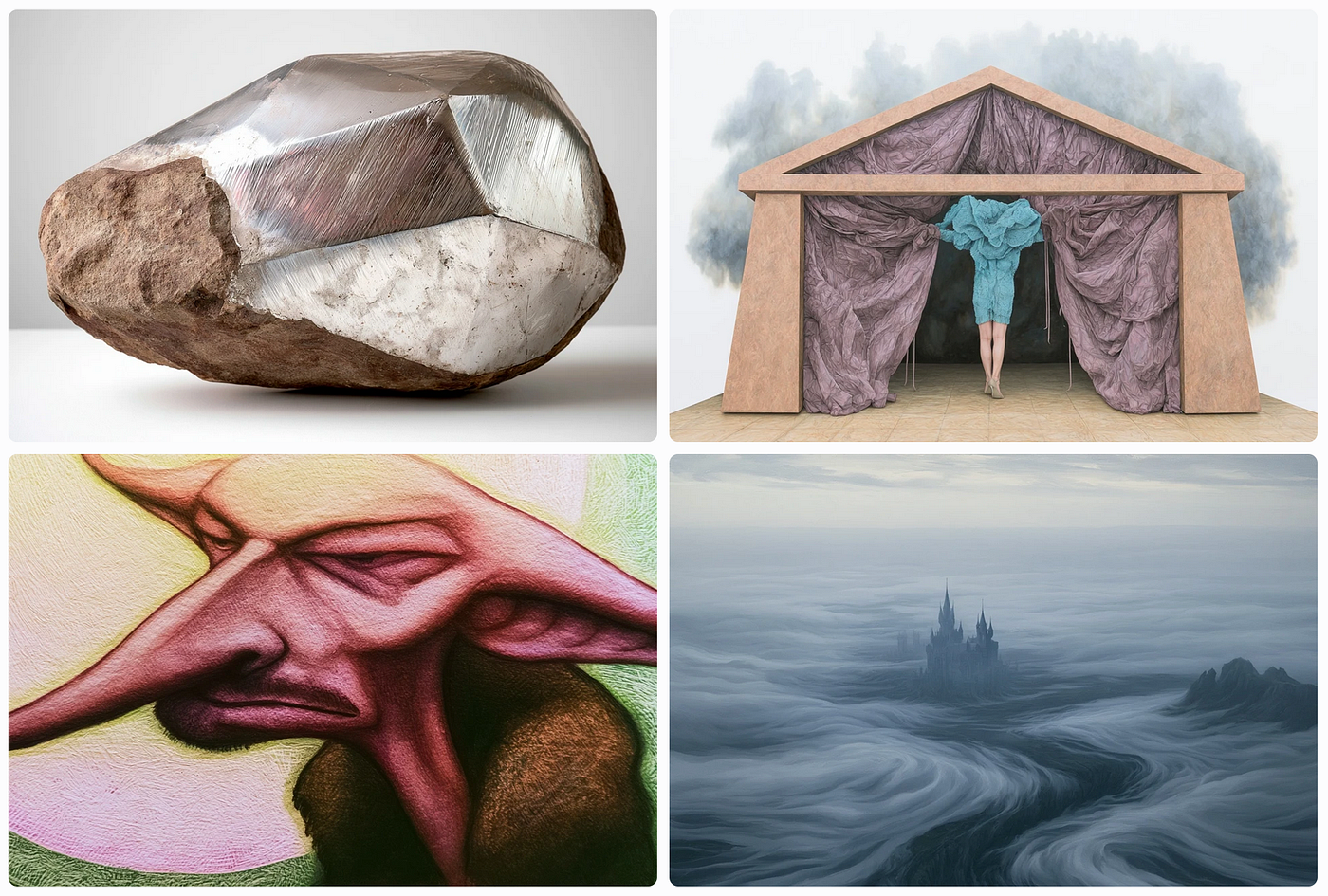
an image grid using the profile code: r5p5dnh — created by author in Midjourney v8.1 (v7 version not displayed)
Note: For Harry Potter Fans — does image 3 remind you of Dobby, the house-elf?
Profile Code Image Grid #7: using profile code: rxl7ruu

an image grid using the profile code: rxl7ruu — created by author in Midjourney v8.1 (v7 version not displayed)
. --v 8.1 --ar 3:2 --s 320 --weird 100 --profile 351cwh1
. --v 7.0 --ar 3:2 --s 320 --weird 100 --profile 351cwh1

. --v 8.1 --ar 3:2 --s 320 --weird 100 --profile 7icewtr
. --v 7.0 --ar 3:2 --s 320 --weird 100 --profile 7icewtr

. --v 8.1 --ar 3:2 --s 320 --weird 100 --profile crthtre
. --v 7.0 --ar 3:2 --s 320 --weird 100 --profile crthtre

. --v 8.1 --ar 3:2 --s 320 --weird 100 --profile r5p5dnh
. --v 7.0 --ar 3:2 --s 320 --weird 100 --profile r5p5dnh

. --v 8.1 --ar 3:2 --s 320 --weird 100 --profile rxl7ruu
. --v 7.0 --ar 3:2 --s 320 --weird 100 --profile rxl7ruu
Profile Code Image Grid #8: using profile code: rxz7ter

an image grid using the profile code: rxz7ter — created by author in Midjourney v8.1 (v7 version not displayed)
Profile Code Image Grid #9: using profile code: umai569

an image grid using the profile code: umai569 — created by author in Midjourney v8.1 (v7 version not displayed)
Profile Code Image Grid #10: using profile code: v54782t

an image grid using the profile code: v54782t — created by author in Midjourney v8.1 (v7 version not displayed)
Profile Code Image Grid #11: using profile code: wb2ud5p

an image grid using the profile code: wb2ud5p — created by author in Midjourney v8.1 (v7 version not displayed)
Profile Code Image Grid #12: using profile code: y87i262

an image grid using the profile code: y87i262 — created by author in Midjourney v8.1 (v7 version not displayed)
Profile Code Image Grid #13: using profile code: z7hp9vg

an image grid using the profile code: z7hp9vg — created by author in Midjourney v8.1 (v7 version not displayed)
. --v 8.1 --ar 3:2 --s 320 --weird 100 --profile rxz7ter
. --v 7.0 --ar 3:2 --s 320 --weird 100 --profile rxz7ter

. --v 8.1 --ar 3:2 --s 320 --weird 100 --profile umai569
. --v 7.0 --ar 3:2 --s 320 --weird 100 --profile umai569

. --v 8.1 --ar 3:2 --s 320 --weird 100 --profile v54782t
. --v 7.0 --ar 3:2 --s 320 --weird 100 --profile v54782t

. --v 8.1 --ar 3:2 --s 320 --weird 100 --profile wb2ud5p
. --v 7.0 --ar 3:2 --s 320 --weird 100 --profile wb2ud5p

. --v 8.1 --ar 3:2 --s 320 --weird 100 --profile y87i262
. --v 7.0 --ar 3:2 --s 320 --weird 100 --profile y87i262

. --v 8.1 --ar 3:2 --s 320 --weird 100 --profile z7hp9vg
. --v 7.0 --ar 3:2 --s 320 --weird 100 --profile z7hp9vg
The next image grid uses 2 blended profile codes.
Profile Code Image Grid #14: using 2 blended profile codes: wb2ud5p rxl7ruu

an image grid using 2 blended profile codes: wb2ud5p rxl7ruu — created by author in Midjourney v8.1 (v7 version not displayed)
. --v 8.1 --ar 3:2 --s 320 --weird 100 --profile wb2ud5p rxl7ruu
. --v 7.0 --ar 3:2 --s 320 --weird 100 --profile wb2ud5p rxl7ruu
The next image grid uses 3 blended profile codes.
Profile Code Image Grid #15: using 3 blended profile codes: umai569 xky1ezj lgmho9i

an image grid using 3 blended profile code: umai569 xky1ezj lgmho9i — created by author in Midjourney v8.1 (v7 version not displayed)
Note: A reminder that using the “dash-dash-weird” prefix may cause an error message to be displayed.
. --v 8.1 --ar 3:2 --s 320 --profile umai569 xky1ezj lgmho9i
. --v 7.0 --ar 3:2 --s 320 --profile umai569 xky1ezj lgmho9i
Taking A Profile Image One Step Further
I was very drawn to the first image in Image Grid #13 of this section using the profile code: z7hp9vg.

a copy of Image 1 from Image Grid #13 above (using profile code: z7hp9vg)
I took a copy of the image and dragged it into the Create page of the main Midjourney website. The “describe” box popped up and I dropped the image in. Midjourney’s describe feature created 4 text description of the images. This was the most detailed one:
a detailed, hyperrealistic oil painting depicts a fair skinned man
with platinum blonde hair, styled to appear windswept, gazing downwards
to the left. he is seated and draped in voluminous, flowing red silk robes,
which pool around him, creating intricate folds and textures. a long,
beaded necklace of the same red color hangs around his neck and descends
over his chest. the background is a stark, dark black with horizontal
lines that are barely visible.
--ar 3:2 --profile z7hp9vg --stylize 320 --weird 100
I added the Midjourney prefixes to match the original image (these are on the last line of the text box above) and clicked the button to create a new image. Here is what Midjourney returned:

a new image created with the “describe” prompt and the same profile code as the original image — created by the author in Midjourney v8.1
I decided to change a few details in the prompt and then to run the image again. Here is my new prompt:
a detailed, hyperrealistic oil painting depicts a lovely pale white woman
with red hair, styled to appear windswept, gazing downwards to the left.
she is seated and draped in voluminous, flowing forest green silk robes,
which pool around her creating intricate folds and textures. a long,
beaded necklace of the same green color hangs around her neck and
descends over her chest. the background is a stark, dark black with
horizontal lines that are barely visible.
--ar 3:2 --profile z7hp9vg --stylize 320 --weird 100
I changed the subject to a woman with red hair, wearing green robes and a green necklace in essentially the same position. I clicked to generate the new version of the image. Here is what Midjourney returned:

a new image created with the edited “describe” prompt and the same profile code as the original image — created by the author in Midjourney v8.1
Just another example of how you can use your Midjourney tools to use some resources in creating your own images.
We will end this article here. I hope you have enjoyed seeing the images created from the interesting text prompts, retextured SREF images, and the genuine profile codes. Let me know what you were able to do with this information.
Thank you for reading my article.
I enjoy sharing these Midjourney resources with you as much as I enjoy discovering and testing them. Please let me know what you think of my articles and the images I create to illustrate Midjourney treasures and techniques.
All of my articles are available on **my Medium profile**. You can also follow me and subscribe to get my future articles via email if you wish.
You can also follow the **Enthusiastically Midjourney** publication on medium.
I appreciate any feedback, comments, questions, or suggestions that you may have for me — please send me a response. I read and respond to every response that I get.
Thank you again. Have a great week! David
메타데이터
- post_id
- 2ea11e0550d0
- slug
- midjourney-info-drop-13-week-of-may-4th-2026-2ea11e0550d0
- url
- https://medium.com/enthusiastically-midjourney/midjourney-info-drop-13-week-of-may-4th-2026-2ea11e0550d0
- canonical_url
- https://medium.com/enthusiastically-midjourney/midjourney-info-drop-13-week-of-may-4th-2026-2ea11e0550d0
- author_url
- https://medium.com/@David_Bates
- status
- ok
- fetched_at
- 2026-06-09 15:37:30