More About API Documentation Errors, Part II
By Robert Delwood, a Lead API Documentation Writer

Il David di Michelangelo in dettaglio
More About API Documentation Errors, Part II
By Robert Delwood, a Lead API Documentation Writer
Thinking like a developer to the rescue. Again. And again.
This is the second part of an API documentation page critique. See Part I.
There is more to API documentation writing than just writing documentation. Thinking like a technical writer produces good descriptions. This information can come from knowing the product, reading the engineer’s specification, or listening to meetings. This is a valid approach when beginning API documentation.
However, this only gets writers so far. We shouldn’t be thinking like a technical writer. Those descriptions are not necessarily complete or great descriptions. We should be thinking like a developer. This is API documentation writing.
There’s information missing.
- Did the writer make the call, such as with Postman?
- Did the writer actually use the call in an application, as a developer would do?
If they have not, then clearly, information may be missing.
We writers need to know what clients know and we need to think how they think. Only in this way can we make a connection with them. This helps provide the information they need and in the format they need. Some may think these are minor or nuanced points or that they don’t matter. I heard that before. Ignore the points here that aren’t right for you or right for your documentation.
The following API documentation page looks complete at first glance. It’s got dense text, examples, and each field has a description. However, initial impressions are wrong. It’s when you get down to the details and start using, or trying to use, each field that a series of disappointing descriptions and a lack of details become apparent. I suspect a technical writer wrote this page because there is a lack of programmatic details. A lack of details that clients immediately spot. There are nuances, yes. Nuances that developers notice.
Take a moment to review this portion from an API reference page, and try to anticipate my comments. There are enough issues here that I needed two articles, not just one.
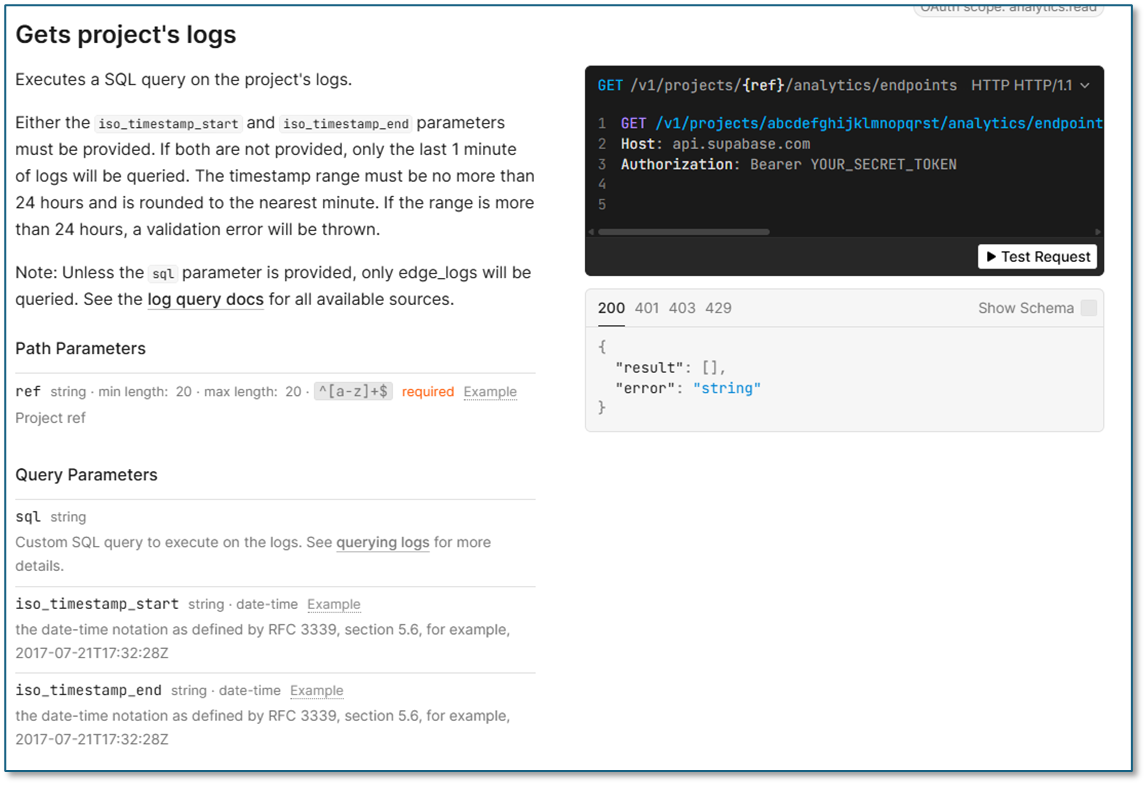
The Endpoint Description
The endpoint description is supposed to be an overview of the endpoint, along with any general information, warnings, or caveats. I like seeing a lot of text here. It tells me the writer has done their homework and that the quality of information is going to be good.
They got the first sentence right. I advocate that the first sentence of any description is short, to the point, and stands alone. That is, it’s a single sentence that, in 10 words, tells me what this does. Literally, “This endpoint does X.” In this case, it’s “Executes a SQL query on the project’s logs.” What could be more to the point? If the client decides this is not the endpoint they are looking for, the details won’t matter. The clients move on, actually happy that you saved them time. Writers don’t get victories like that often enough.
Or they decide this is the endpoint they are looking for. And this one sentence does that exactly. In fact, it’s so well done, it makes me think this is a mistake by the writer or that the writing manager argued to take it out. But don’t worry. No good deed lasts for long.
Supporting the First Sentence
The rest of the description needs to support that sentence. In this case, not in the slightest. Unfortunately, I have to go sentence by sentence because every one of them is just plain wrong.
It goes beyond not supporting the initial sentence to I don’t know what the hell it says. “Either the iso_timestamp_start and iso_timestamp_end parameters must be provided. If both are not provided, only the last 1 minute of logs will be queried.”
This doesn’t make a lick of sense. The construct Either-And is correct and contradictory. They meant Either-Or, meaning at least one of the two timestamps is included. This scenario makes sense in having open-ended timestamps. That means, for example, if iso_timestamp_start is present, the logs after that time are included. If iso_timestamp_end is present, the logs up to that time are included. That’s a reasonable and common scenario. But that’s not what it says, though. The next sentence contradicts that meaning. “If both are not provided…” It sounds like both must be present. That forms a date-time range and that range must be less than 24 hours. This is also a reasonable and common scenario, even though it took some work to get that meaning.
One of the few things the writers did correctly was the example code. In the Test Request panel, the example shows:
“iso_timestamp_start”: “2025–03–01T00:00:00Z”, “iso_timestamp_end”: “2025–03–01T23:59:59Z”
This is exactly 24 hours. It’s a welcomed level of detail I wasn’t expecting, not after reading the previous sentences.
About Examples
The quality of the examples is worth noting.
First, I advocate that every field has an example. Keep in mind that:
- Clients often learn more from seeing just an example than from reading text. In this example, the timestamp fields do have an example, although there is more about this later. The sql field does not. Even more of a problem because that’s the one example I want.
- Clients are skimming the material and they might get the information they need at nothing more than a glance. For instance, for a telephone number field, all they want may be just the format, and an example shows that.
Second, the examples should be representative of the actual values. Don’t use patterns like abcdefg. It looks fake and, so, less credible. The irony is that, for as good an example as the timestamps were earlier, the examples displayed on the screen are both the same time. It’s possible that they are interested in the logs only in that 100th of a second. But unlikely. It would have been a nice touch if not only the times were different but also like the previous code, showing a day separation. Having an example is good. In this case, they provide timestamp formats. But they could have gone one step further and provided useful coding details. It’s those little details that add to documentation credibility.
Third, I like all my timestamp examples to be recent. These show a 2017 date. Unless the example intends to show historical dates, I interpret this to mean the documentation hasn’t been updated since 2017, a considerable amount of time, ancient in computer terms. Again, it’s the details.
Fourth, as mentioned, the SQL field doesn’t have an example. But the problems that cause do not end there. This will be discussed in a moment.
“The timestamp range must be no more than 24 hours and is rounded to the nearest minute.” This seems to be two thoughts at the same time. This is one of the reasons I advocate short sentences and one fact per sentence. The first part is clear: be no more than 24 hours.
It’s the second part that muddies things. What does “rounded to the nearest minute” mean? I have to make an assumption here. Technical documentation isn’t about making readers guess or make assumptions. One assumption is that the client has not provided both timestamp fields. This would mean “only the last 1 minute of logs will be queried,” and “is rounded to the nearest minute.” Technically, times less than 30 seconds, rounded to the “nearest minute,” is zero. Are there no logs searched? Times 30 seconds or more round up to the nearest minute. That would be in keeping, I think, with the intent. The description could have been written more clearly as “rounded up to the nearest minute.” See the importance a single word makes? The truth, however, is for the writer to find out what the code does. If the call does round down to zero, that’s worth writing a ticket, for the developers because it needs to be fixed. Even if that’s what the code does, it’s bad design for the client.
The Cost for Clarity
The last two sentences are just a mess.
First, do not use Note. It’s overused and almost every time is not needed. Why is this even considered a note? Why is that information any more or less important than anything else on the page? I will answer that. It is not. It is just more information.
Here’s a confusing sentence: Unless the sql parameter is provided, only edge_logs will be queried. This raises an astonishing number of questions.
WTH are edge_logs? Are there other types of log files it queries instead?
If no SQL command is provided, how do the edge_logs even get queried? It might mean it returns all the logs. This might mean there is a default query that the writer never tells us about. I think that would be an important detail to mention.
Then, clients will have to know the formatting of the edge_logs. Would they have seen one? Do they know the field names and values? Do they have access to one? How else will they be able to write SQL commands?
How do they enter the command? It’s a string, so something like these may work:
SELECT * FROM logs WHERE status_code = 500;
or
WITH recent_orders AS (SELECT o.id, o.user_id, o.total_amount, o.created_at FROM orders o WHERE o.created_at >= NOW() — INTERVAL ’30 days’), user_totals AS (SELECT ro.user_id, COUNT(ro.id) AS order_count, SUM(ro.total_amount) AS total_spent FROM recent_orders ro GROUP BY ro.user_id), ranked_users AS (SELECT ut.user_id, ut.order_count, ut.total_spent, RANK() OVER (ORDER BY ut.total_spent DESC) AS spending_rank FROM user_totals ut), top_products AS (SELECT oi.product_id, SUM(oi.quantity) AS total_quantity FROM order_items oi JOIN recent_orders ro ON ro.id = oi.order_id GROUP BY oi.product_id), product_details AS (SELECT p.id, p.name, tp.total_quantity FROM products p JOIN top_products tp ON tp.product_id = p.id) SELECT u.id, u.name, ru.order_count, ru.total_spent, ru.spending_rank, pd.name AS top_product, pd.total_quantity FROM users u JOIN ranked_users ru ON ru.user_id = u.id LEFT JOIN product_details pd ON pd.total_quantity = (SELECT MAX(total_quantity) FROM product_details) WHERE ru.spending_rank <= 10 ORDER BY ru.spending_rank ASC, u.name ASC;
The second example is awkward if the command has to both be direct and be one line. Here’s where an example is convenient. It gives clients an idea of what is possible and the format it uses. There is a help link in the documentation. “See querying logs for more details.” More details? So far, there have not been any details. No matter, it’s a bad link and returns an error. Whoever wrote this document needs a good talking to. In fact, whoever approved this document needs a good talking to, also.
Timestamps
The timestamps are a beacon of hope. There is nothing technically wrong with these descriptions.

The field names are reasonable. The iso prefix is a nice touch towards understanding their use. Without the examples, clients will likely assume they are ISO timestamps anyhow but the confirmation is reassuring. The date-time label is good, providing extra confirmation. The clickable example is also good but it’d be better displayed directly. You want to make it as easy on the client as possible.
The description is the interesting part. First, use proper grammar. Initial capitalization on the first letter and a period at the end. Why is it that so many writers don’t do this? The writing manager should have more points deducted more points for allowing this to go out.
Second, and this is going to sound ironic, but it’s too detailed. ISO 8601 is a very broad specification of time. For dates and times, it specifies 13 different formats for month/day to the full time to an unlimited fraction of milliseconds. So, simply saying, as many do, ISO 8601 format, isn’t specific enough. RFC 3339, section 5.6, which defines these formats, does specify date-time exactly. But the reference still isn’t widely known. So, it becomes equally unhelpful. The compromise is to show an example. Specifically, for what they call Z, UTC, or time zone offset formats:
2017–07–21T17:32:28Z 2017–07–21T17:32:28+05:30
As mentioned earlier, keep the examples fresh, too. 2017 is too old and raises document accuracy considerations with clients. At the end of each year, update all the year examples.
Timestamp Descriptions Placement
The last point here is the placement of the timestamp descriptions. They are included in the endpoint overview at the top of the page. This is thinking like a technical writer. The writer shows this in two ways.
First, writers consolidate common information in one place. The problem is, this is not one piece of information. It’s two. They each need to go into different places.
Second, writers know the complete picture. Clients don’t. Clients are going to be looking, or searching, for the timestamp note. We need to be thinking like a developer. Developers likely have found this section through a search, or the timestamp field caught their eye. They start reading there and likely will read only that one field. There’s no guarantee they saw any other part of the page, or any other field. Neither would they have a reason to look anywhere else. No, put the information into the correct place.
At first, that sounds like a massive amount of redundant text, and also harder to maintain for the writer. Perhaps so, but the effort of maintaining the document is not a goal of documentation. Assisting clients is. Remember the adage: We’re here for their convenience, not ours. Think like a developer.
We just covered that clients are likely to find the location through a search. Now add the common fact that clients don’t read documentation, they skim. In other words, after finding the information they want, they’re going to skim and copy what they need. They may not look at the field right below or above where they are. And that’s assuming the two fields are even adjacent. Many times, they’re not, being separated by other fields. I discuss this more in another article. I advocate putting related fields adjacent, such as firstName and lastName. I even go so far as pushing back and suggest renaming the fields, such as nameFirst and nameLast, so they are together alphabetically.
The same comment applies to the SQL note in the endpoint overview. Move that to the relevant SQL field.
Responses
The response section introduces its own set of problems.
In the simplest of cases, there is no example of successful operation. The main field clients want to see is empty. Response 200: “result”: []. What was the writer thinking?
First, almost never include null or empty in an example. It does not illustrate anything. Then, while the result data type is described as result Type:array object[], it never describes what kind of object that is. Clients do not know the object type and they have no examples.
How did anyone consider this documentation to be helpful? This is compelling evidence for me that the author is a technical writer, with no development training or experience, does not know Postman, never ran any of these endpoints, and that the manager is equally clueless. Why does this matter? Because clients are not getting what they need. They have to stop, taking time to figure these things out themselves. Along the way, they are probably straining customer service with a lot of unnecessary and completely avoidable questions, and stressing developers as they are taken away from their coding to respond to client questions.
Second, as for the error object, there are no descriptions. There are no examples in either the fields or the comprehensive display under the Test Request panel.
The other errors, such as 401, 403, and 429, are not documented. The middle column documentation implies they return specific errors, and, yes, that is the intent. The comprehensive display under the Test Request panel supports this by even saying there is no response body. The problem is that the actual Test Request responds with a response body. In this case, the only error I can see without being a client:
{ “message”: “Unauthorized” }
Why does this matter? Because for clients to retrieve the result programmatically, they have to know the exact structure and name. Returning a value without a response body is different than returning a value with a response body. Developers know that. Telling them incorrect information is going to do nothing more than annoy clients. It may actually lose potential clients.
Conclusion
At this point, with everything I have discussed, I think upper management really needs to re-evaluate the documentation team’s management, the writer, and the procedures.
메타데이터
- post_id
- 2eb48bb787b2
- slug
- more-about-api-documentation-errors-part-ii-2eb48bb787b2
- url
- https://medium.com/@robertdelwood/more-about-api-documentation-errors-part-ii-2eb48bb787b2
- canonical_url
- https://medium.com/@robertdelwood/more-about-api-documentation-errors-part-ii-2eb48bb787b2
- author_url
- https://medium.com/@robertdelwood
- status
- ok
- fetched_at
- 2026-08-04 02:16:29




