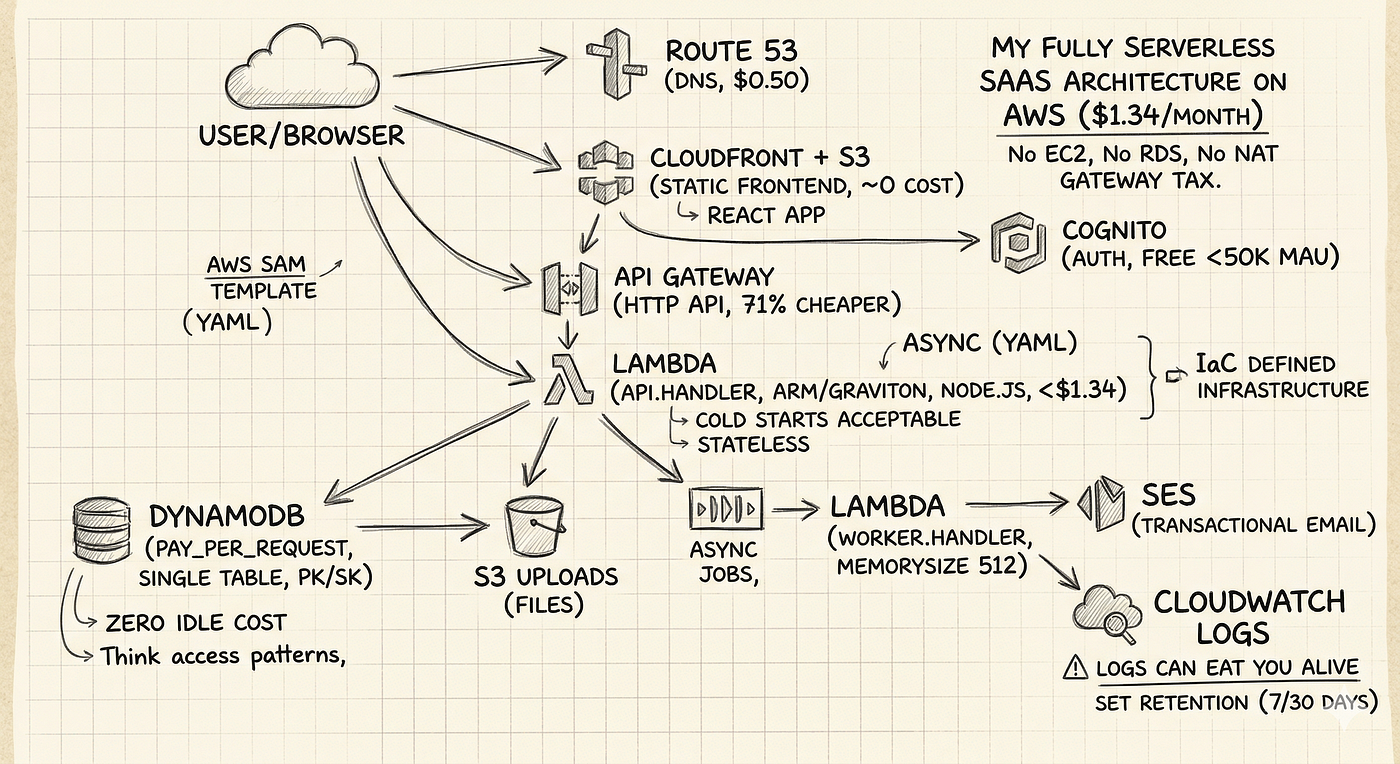
10 Real-World Tips to Supercharge Your AWS Lambda Performance
I still remember the excitement when I first started using AWS Lambda: the promise of serverless simplicity, automatic scaling, and a…
10 Real-World Tips to Supercharge Your AWS Lambda Performance
I still remember the excitement when I first started using AWS Lambda: the promise of serverless simplicity, automatic scaling, and a pay-as-you-go cost model. But as projects grew and demands increased, I realized that squeezing every bit of performance out of Lambda was key to delivering a smooth user experience. Over time, I’ve picked up several tips (and even some tricks) that helped me cut execution time and lower latency. Today, I’m excited to share these 10 practical tips with you.

1. Optimize Your Code for Speed
It all begins with writing efficient code. I started by profiling my functions to find the bottlenecks. Streamlining complex loops, reducing heavy synchronous calls, and even rewriting critical sections in a more efficient language made a noticeable difference. Even small tweaks can save precious milliseconds on each invocation!
2. Mitigate Cold Starts with Provisioned Concurrency
Cold starts were one of my early challenges — those pesky delays when a Lambda function sat idle for a bit. Enabling provisioned concurrency helped keep a set number of function instances pre-warmed, meaning users no longer had to wait on the very first request during busy times. For performance-critical workloads, this has been a lifesaver.
3. Tune Your Memory Allocation
Here’s an interesting observation: AWS allocates CPU power proportional to the memory you set. Increasing your function’s memory can speed up processing time — even if it feels like overkill initially. I experimented with different memory settings and found that sometimes a modest bump reduced your runtime enough to lower costs overall. It’s all about finding that sweet spot.
4. Keep Your Deployment Package Lean
A bloated deployment package can slow down your function start-up. I made a habit of regularly cleaning out unnecessary libraries and files from my packages. The result? Leaner, meaner deployments with faster cold start times. Remember: what you don’t include matters just as much as what you do!
5. Leverage Caching Wherever Possible
Caching is a powerful friend when it comes to performance. Whether it’s using in-memory caching (benefiting from Lambda container reuse) or incorporating external caches like DynamoDB Accelerator (DAX), I found that caching non-volatile data can significantly cut down on repeated processing. Evaluate your data access patterns and cache wisely!
6. Invest in Robust Observability
You can’t improve what you don’t measure. I integrated AWS CloudWatch for logging and set up AWS X-Ray for distributed tracing. These tools helped me pinpoint performance issues and track down inefficient code paths. By monitoring function behavior continuously, I was able to quickly react to any anomalies or spikes in latency.
7. Embrace Asynchronous Processing
Not every task needs to be performed synchronously. I redesigned parts of my workflow to use asynchronous patterns — offloading long-running or less time-sensitive tasks to background jobs via SQS or SNS. This change allowed my functions to handle requests faster and made the overall system more resilient.
8. Optimize Dependency Management
Heavy libraries and unnecessary dependencies can slow your function’s initialization. I reviewed my package requirements and replaced bulky libraries with lighter alternatives whenever possible. Sometimes, using native functionality or a micro-library is all you need to get the job done faster.
9. Fine-Tune Environment Variables and Configurations
Environment variables give you a powerful way to configure your functions without hardcoding values. I learned to use them to control behavior dynamically across environments. Experimenting with configurations (for example, controlling debug verbosity or toggling features) enabled me to reduce overhead during production runs, keeping my functions lean and agile.
10. Use API Gateway Caching and Efficient Integration Patterns
If your Lambda function serves an API, consider leveraging API Gateway’s caching capabilities. By caching responses for repeated requests, you can reduce the load on your function and speed up response times. Additionally, adopting efficient integration patterns (like using direct Lambda integration instead of proxy integrations when appropriate) helped optimize the end-to-end flow of data in my application.
Wrapping It All Up
Improving AWS Lambda performance is a journey that blends good engineering practices with continuous experimentation. Each tip above comes from my own experiences — some small changes led to significant improvements, and a combination of many best practices took my Lambda functions from “good enough” to blazing fast.
I’d love to hear your thoughts or additional tips you’ve learned along the way. What has worked best for you? Feel free to share your experiences in the comments.
Happy coding, and here’s to crafting lightning-fast, cost-efficient serverless applications!
Thank you for being a part of the community
Before you go:
- Be sure to clap and follow the writer ️👏️️
- Follow us: **X | [LinkedIn](https://www.linkedin.com/company/inplainenglish/) | [YouTube](https://www.youtube.com/@InPlainEnglish) | [Newsletter](https://newsletter.plainenglish.io/) | [Podcast](https://open.spotify.com/show/7qxylRWKhvZwMz2WuEoua0) | [Differ](https://differ.blog/inplainenglish) | [Twitch](https://twitch.tv/inplainenglish)**
- **Check out CoFeed, the smart way to stay up-to-date with the latest in tech 🧪**
- **Start your own free AI-powered blog on Differ** 🚀
- **Join our content creators community on Discord** 🧑🏻💻
- For more content, visit **plainenglish.io + [stackademic.com](https://stackademic.com/)**
메타데이터
- post_id
- 2ed5f14ce5fe
- slug
- 10-real-world-tips-to-supercharge-your-aws-lambda-performance-2ed5f14ce5fe
- url
- https://aws.plainenglish.io/10-real-world-tips-to-supercharge-your-aws-lambda-performance-2ed5f14ce5fe
- canonical_url
- https://aws.plainenglish.io/10-real-world-tips-to-supercharge-your-aws-lambda-performance-2ed5f14ce5fe
- author_url
- https://medium.com/@lalits77
- status
- ok
- fetched_at
- 2026-09-11 06:57:06