Complete explanation of all table types in Snowflake
🧊 1. Permanent Table
Complete explanation of all table types in Snowflake
🧊 1. Permanent Table
Default table type in Snowflake.
🔹Purpose:
Used for long-term storage of data (production tables).
🔹Key Points:
- Data persists permanently until you explicitly drop it.
- Fail-safe (7 days) is available — helps recover data even after time travel expires.
- Time Travel (1–90 days) depending on account setting.
🔹Example:
CREATE OR REPLACE TABLE sales_data (
    sale_id INT,
    product VARCHAR,
    amount FLOAT,
    sale_date DATE
);
✅ Use Case:
Production and reporting tables (main business data).
🧾 2. Temporary Table
Exists only during your session.
🔹Key Points:
- Data is automatically dropped when your session ends.
- No Fail-safe.
- Useful for intermediate calculations or temporary joins.
🔹Example:
CREATE TEMPORARY TABLE temp_sales AS
SELECT * FROM sales_data WHERE sale_date > '2025-01-01';
✅ Use Case:
When running ETL jobs or ad-hoc queries and you don’t need to keep the data permanently.
🧮 3. Transient Table
Middle ground between permanent and temporary.
🔹Key Points:
- Data persists across sessions, but no fail-safe period.
- Has time travel (default: 1 day).
- Costs less because fail-safe is skipped.
🔹Example:
CREATE TRANSIENT TABLE staging_sales (
    sale_id INT,
    product VARCHAR,
    amount FLOAT
);
✅ Use Case:
For staging, intermediate, or test data that doesn’t require fail-safe recovery.
🌐 4. External Table
Table that references data stored outside Snowflake (like in AWS S3, Azure Blob, GCP).
🔹Key Points:
- Data remains in external storage.
- Snowflake stores metadata only.
- You can query it directly using SQL.
- Commonly used with Snowflake stages and data lakes.
🔹Example:
CREATE OR REPLACE EXTERNAL TABLE ext_sales_data (
    sale_id INT AS (value:c1::INT),
    amount FLOAT AS (value:c2::FLOAT)
)
WITH LOCATION = @my_s3_stage/sales/
FILE_FORMAT = (TYPE = CSV);
✅ Use Case:
Querying data lake or raw files without loading them into Snowflake.
⚡ 5. Dynamic Table (formerly Materialized View++)
New generation table for continuous transformation automation.
🔹Key Points:
- Automatically refreshes based on source data changes.
- Used to maintain transformed or aggregated views of base data.
- Refresh schedule can be set (
WAREHOUSE_SIZE,TARGET_LAG, etc).
🔹Example:
CREATE OR REPLACE DYNAMIC TABLE daily_sales
TARGET_LAG = '1 hour'
WAREHOUSE = my_wh
AS
SELECT product, SUM(amount) AS total_sales
FROM sales_data
GROUP BY product;
✅ Use Case:
Automate ETL pipelines and transformations (like incremental refresh).
🧠 6. Hybrid Table (new, still evolving feature)
Combines structured (OLAP) + semi-structured (OLTP-like) behavior.
🔹Key Points:
- Allows real-time inserts, updates, and deletes.
- Optimized for frequent small transactions
- Think of it as a mix of database + analytics use case.
🔹Example:
CREATE HYBRID TABLE customer_activity (
    id INT PRIMARY KEY,
    customer_id INT,
    last_active TIMESTAMP
);
✅ Use Case:
Real-time tracking systems, IoT, or high-frequency updates.
📁 7. Directory Table
Virtual table representing files in a Snowflake stage.
🔹Key Points:
- Helps list and manage files (e.g., S3, Azure Blob).
- Returns metadata like file name, size, and last modified timestamp.
🔹Example:
CREATE OR REPLACE DIRECTORY TABLE my_dir_table
AS DIRECTORY @my_stage;
✅ Use Case:
File tracking, loading automation, and data ingestion monitoring.
📊 8. Event Table
Stores event logs generated by Snowflake services or your custom apps.
🔹Key Points:
- Used for auditing and monitoring.
- Can automatically capture event streams.
- Often paired with Snowpipe Streaming or Tasks.
🔹Example:
CREATE EVENT TABLE user_activity_events;✅ Use Case:
Audit logs, API event tracking, or pipeline activity monitoring.
🔁 Summary Table
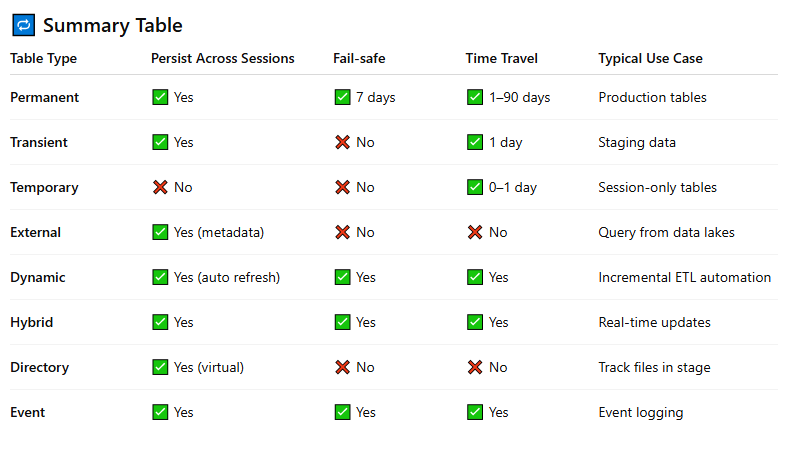
Would you like me to make this into a visually engaging infographic post for your LinkedIn (like your earlier ones)? It would be titled something like:
메타데이터
- post_id
- 2eefa04ebb57
- slug
- complete-explanation-of-all-table-types-in-snowflake-2eefa04ebb57
- url
- https://medium.com/@singole/complete-explanation-of-all-table-types-in-snowflake-2eefa04ebb57
- canonical_url
- https://medium.com/@singole/complete-explanation-of-all-table-types-in-snowflake-2eefa04ebb57
- author_url
- https://medium.com/@singole
- status
- ok
- fetched_at
- 2026-06-15 22:55:51



