How Java Is Truly Platform Independent? </>
A deep dive into JVM, JRE, JDK, and JIT 📖
How Java Is Truly Platform Independent? </>
A deep dive into JVM, JRE, JDK, and JIT 📖
Java is used in a wide range of real-world systems, from backend services to large-scale enterprise applications.
Some of the most well-known platforms rely heavily on Java for their core backend infrastructure:
- Amazon’s backend services for order processing, and payments
- Netflix’s backend services and APIs
- LinkedIn’s core backend systems
- Uber’s backend services built on the JVM ecosystem
- Financial systems such as JPMorgan Chase trading platforms, Goldman Sachs internal tools, Visa transaction processing, Mastercard payment infrastructure, and PayPal’s backend services.
These systems handle massive scale, sensitive data, and millions of users. Trust at this level is not accidental.
One of the main reasons Java is trusted in such environments is its ability to run the same program across different platforms without modification.
This is possible not just because of the language itself, but because Java seperates application code from the underlying machine. That seperation allows Java programs to run consistently, regardless of the operating system or hardware.
Java’s real superpower lies in how it runs.
To understand that, we need to look closely at the JDK (Java Development Kit), JVM (Java Virtual Machine), JRE (Java Runtime Environment), and JIT (Just-In Time compiler), and how they work together to make Java truly platform independent.
Let’s understand this step by step 💻
How Java code actually moves?
Step 0: The IDE is not doing what we think it’s doing!!
VS Code, IntelliJ, NetBeans, Eclipse.. these are code editors and assistants, not the thing that runs Java.
Our IDE let’s us type code, Highlight errors, Suggests completions, calls Java tools on our behalf. That’s it!!
When we click Run, the IDE (Integrated Development Environment) is basically saying “Hey JDK, do your thing.” real work starts after this.
Step 01: Java source code (.java)
Let’s say we write something like:
public class Main{
  public static void main(String[] args){
    System.out.println("Hello");
   }
}
This code is plain text. Our operating system doesn’t understand this. Our CPU absolutely does not understand this.
Step 02: The compiler enters (javac)
When we run the program, IDE invokes (call):
javac Main.javaThis is the Java compiler, part of the JDK.
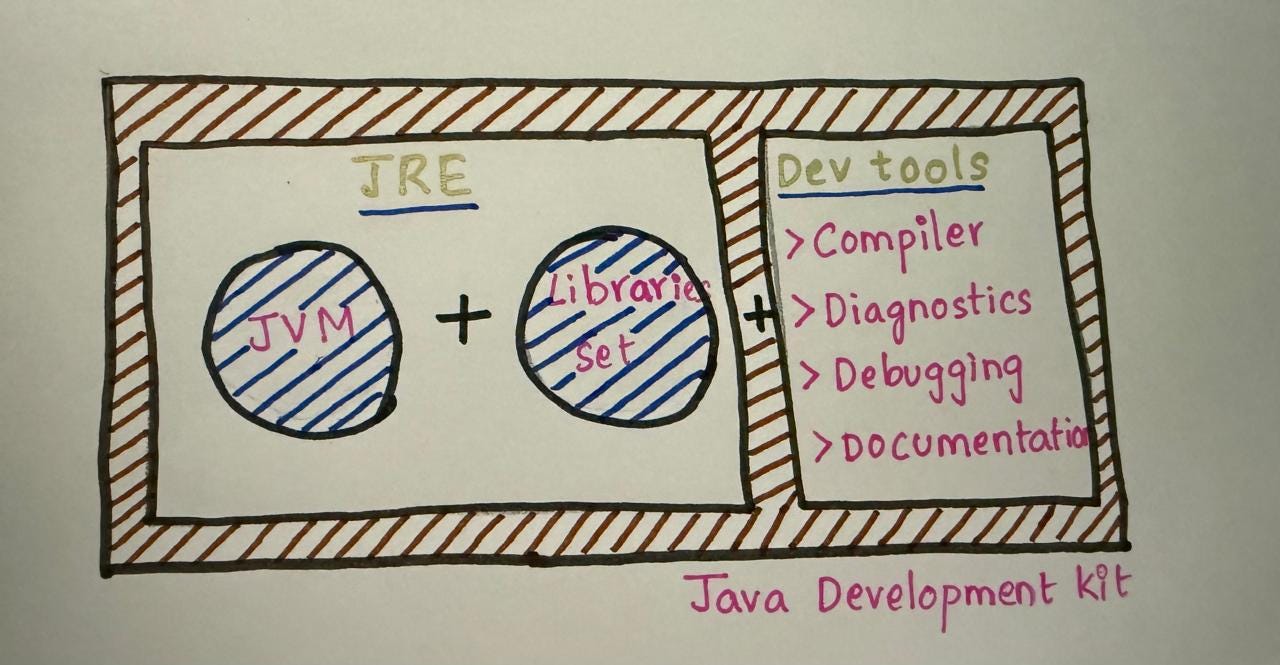
JDK representation
The Java Development Kit is everything we need to create Java programs.
It is meant for developers, not for running apps casually.
The JDK allows us to Write Java source code, Compile it into bytecode, Debug and test our programs.
One important thing to understand early is: “We cannot write or compile Java code without the JDK”
Inside the JDK are tools like:
javac: the Java compiler
java: the program launcher
Debugging and documentation tools
The JDK also includes the JRE, which means it already contains everything needed to run Java programs well.
So, IDE just invoked javac compiler which is a part of JDK. Now what? 🤔
The compiler does multiple things, not just “convert to bytecode”.
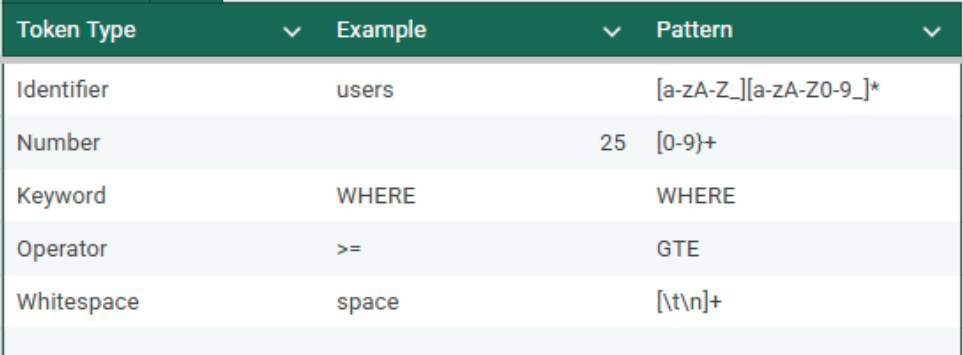
- Lexical analysis: Breaks code into tokens (Keywords, identifiers, symbols) i.e., If we mess up syntax, it dies here.
- Syntax analysis: Builds a syntax tree, checks structure. This is where missing braces, wrong method signatures, etc. are caught.
- Semantic analysis: Compiler checks Type correctness, Method existence, Access modifiers, Inheritance rules, etc. This is where Type mismatch errors, Method not found, Incompatible return types are detected.
What about the libraries we have imported?
When we write,
import Java.util.ArrayList;During compilation, Java does not load library code into memory. It only verifies that the code exists and is compatible.
The actual library code is loaded later, at runtime.
Step 03: Bytecode generation (.class files)
Once all checks pass, the compiler generates bytecode.
This bytecode is not raw 0s and 1s in the CPU sense, It is an intermediary instruction set for the JVM and is stored in .class files.
NOTE: Bytecode is binary, but is not machine code. It is meant to be executed by the JVM, not by direct hardware.
“Each class becomes its own .class file”
Step 04: Where does the bytecode go?? 🤨
Once a Java program is written and compiled, it needs an environment to run. That environment is the JRE (Java Runtime Environment).
The Java Runtime Environment provides everything required to execute a Java application, but not to create one.
- JDK → used by developers
- JRE → used to run Java programs
The JRE contains JVM (Java Virtual Machine) & Core Java libraries needed during execution.
“The JRE cannot compile Java code. It can only run already compiled bytecode.”
Now, the execution happens only when this happens:
java MainStep 05: JVM starts and ClassLoader wakes up
The JVM is the heart of Java’s platform independence.
“Each operating system has it’s own implementation of the JVM”
Windows JVM
Linux JVM
macOS JVM
But the bytecode remains the same.
“Java programs are compiled once into bytecode, and that bytecode can run on any system that has a compatible JVM.”

JVM representation
As the JVM is launched, first component will get involved is ClassLoader.
ClassLoader loads our .class files, loads required library classes, loads dependencies lazily (i.e., only when needed). This lazy-loading strategy ensures that the system only consumes memory for what it actually uses, preventing the waste of resources during startup.
There are multiple class loaders (Bootstrap, Extension, Application).
Before execution, the JVM verifies bytecode.
It checks illegal memory access, type correctness at runtime. If bytecode verification fails JVM shuts the program down immediately.
Step 06: Execution begins (Interpreter + JIT)
Now the real execution starts.
Initially: JVM interprets bytecode instruction by instruction.
While running: JVM monitors which methods run frequently, these Hot code paths are sent to JIT (Just-In Time compiler). JIT compiles them into native machine code.
At this point, CPU is executing real machine instructions. Performance improves over time. (This is why Java backend services often get faster after warm-up)
The JIT:
- Monitors which parts of the code are executed frequently
- Converts those “hot” sections into native machine code
- Reuses the optimized code for future executions
“JIT doesn’t compile everything. It optimizes only what matters.”
Step 07: Libraries at runtime
Remember the libraries we imported earlier?
Their .class files are loaded by ClassLoader, their bytecode gets verified & their hot paths are JIT-compiled too. (Same as our code)
Here’s the big picture:
- JDK helps developers write and compile Java code
- JRE provides the environment to run Java applications
- JVM executes bytecode and abstracts the underlying machine
- JIT improves performance by compiling hot code paths at runtime
Let’s test our understanding: 💡
“Java is platform independent because it runs everywhere”?
Not Exactly!!
Java source code does not run everywhere. Bytecode runs everywhere, as long as JVM exists for that platform.
“JVM is the same on every system”?
No
The concept of the JVM is the same, but the implementation differs for each operating system.
“JRE is enough to develop Java applications”?
It isn't
You need the JDK to compile and develop Java programs. The JRE is only for execution.
“JIT compiles the whole program”?
Wrong
JIT selectively optimizes frequently executed code, not everything.
(Details matter & vague answers kills clarity)
Wohooo!! I hope you leave this article with a deeper understanding and confidence (˶ᵔ ᵕ ᵔ˶) ‹𝟹
Feel free to ask in case you have any questions 𓍯𓂃𓏧
See ya 👋
메타데이터
- post_id
- 2f82926ca92a
- slug
- how-java-is-truly-platform-independent-2f82926ca92a
- url
- https://medium.com/@karlapudisol/how-java-is-truly-platform-independent-2f82926ca92a
- canonical_url
- https://medium.com/@karlapudisol/how-java-is-truly-platform-independent-2f82926ca92a
- author_url
- https://medium.com/@karlapudisol
- status
- ok
- fetched_at
- 2026-07-13 13:07:09