What Happens When You Turn 150+ Icons Into One Font
by Madhankumar J
What Happens When You Turn 150+ Icons Into One Font
The cost of “simple” icons
This is part of the Unity Craft series, where we share how we’re improving our application — performance, tooling, and consistency. In this instalment we talk about icons.
Icons are everywhere in modern UIs — buttons, navigation, charts, empty states. How you ship them can have a big impact on load time and bundle size. In our Analytics Frontend app we used to rely on importing SVGs as modules across the codebase. That approach was simple to adopt but eventually became a real cost. Here’s what went wrong for us, why we switched to an icon font, and how we automated the whole thing in CI — including preview and changelogs — so the team could move fast without regressing bundle size.
Problems with the SVG approach (for us)
Before we adopted icon fonts, we relied on importing SVGs as modules across the app. That led to several issues:
- Bundle bloat — Every import icon from ‘images/some-icon.svg’ (or inline SVG components) added to the JS bundle. With dozens of icons used in different screens and components, the total cost added up quickly.
- Duplicate assets — The same or similar icons were sometimes imported in multiple places (e.g. info.svg, connection_error.svg, no_access.svg), so we risked shipping the same graphic more than once.
- No single cache story — Icons were either inlined or split across many small assets, so we didn’t get one long-lived, cacheable “icon set” that the browser could reuse.
- Scattered ownership — Icons lived next to the feature that used them. There was no single place to see “what icons we have” or to enforce naming and consistency.
- Heavier runtime cost — Inline SVGs or SVG-as-component meant more DOM nodes and more work for the bundler and the runtime than a single font + CSS.
So we had many small SVG imports, no central inventory, and noticeable impact on bundle size. That’s what we set out to fix.
Pros of icon fonts (why we switched)
We consolidated our UI icons into a single icon font generated from our SVGs. That gave us:
- One (or few) font files — woff2/woff instead of dozens of SVG modules. The browser downloads and caches one asset for the whole icon set.
- Smaller JS bundle — No icon path data or inline SVG markup in the bundle for those icons. Usage is just a class name (e.g. fw-icon-search), so the main bundle shrinks.
- Single request, long-lived cache — One font URL that can be cached aggressively and shared across pages and deploys.
- Easy to style — Size and color via CSS (font-size, color) without extra components or props.
- Simple usage — <i class=”fw-icon fw-icon-pie-chart” aria-label=”pie-chart-icon”></i> is consistent everywhere and doesn’t require importing a file per icon.
- Central source of truth — All icons live in one SVG folder; one build step produces the font and CSS. That made it possible to add automated preview and changelogs in CI (see below).
We still use plain SVGs for a few cases (e.g. complex illustrations, logos, or one-off graphics). For the bulk of UI icons (charts, actions, navigation), the icon font was a clear win and led to our 25KB bundle size improvement (values posted all are after Brotli compression) in main bundle, totally overall we have gained 15% reduction in bundle size.
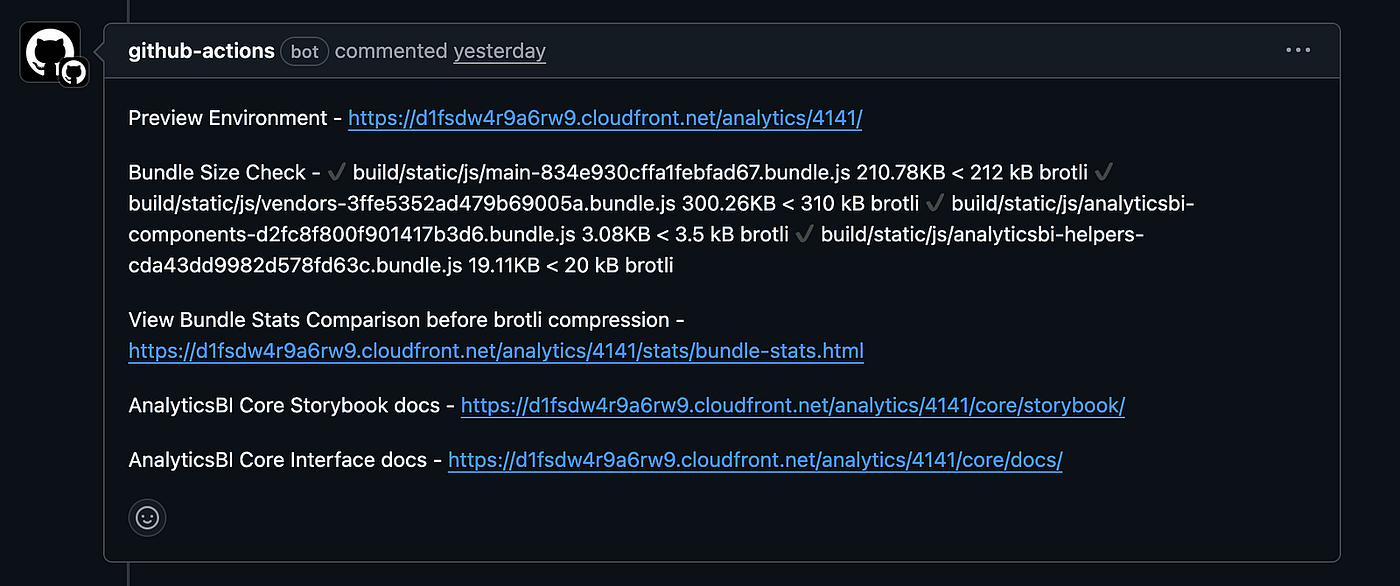
Before Icon fonts enablement
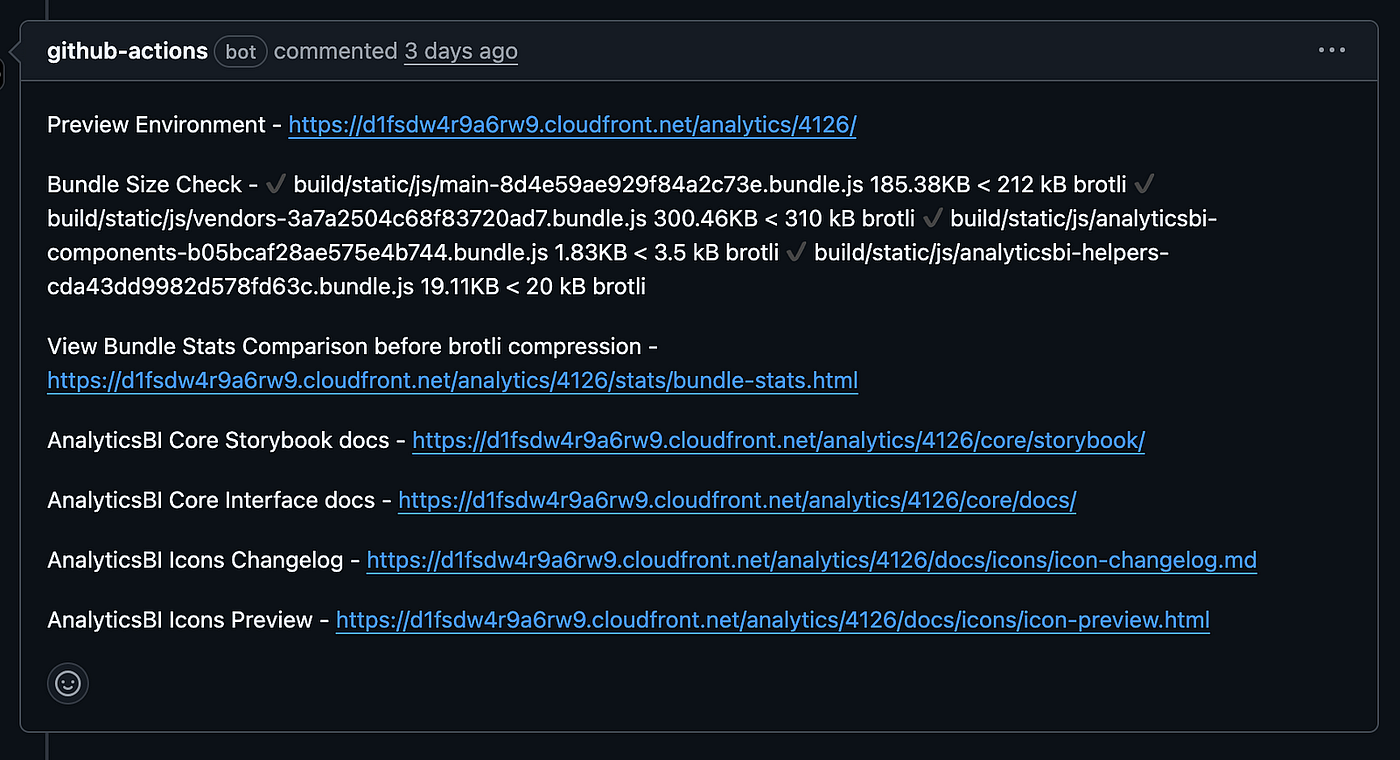
After Icon fonts enablement
Hybrid approach (icon fonts + SVG)
A hybrid approach works best when you have both
We use icon fonts for most UI icons — single-color, simple shapes: nav, actions, chart types, etc. They stay in one font, one request, small bundle. For multi-color icons, logos, or complex illustrations, we still use SVG (as components or assets). So we don’t choose “only fonts” or “only SVG” — we use fonts for the bulk of simple icons and SVG where we need more flexibility. That keeps the bundle small while still supporting the few icons that need extra control. If your app has both simple and multi-color icons, a hybrid like this is usually the better option.
Icon generation in the CI pipeline (with preview and changelogs)
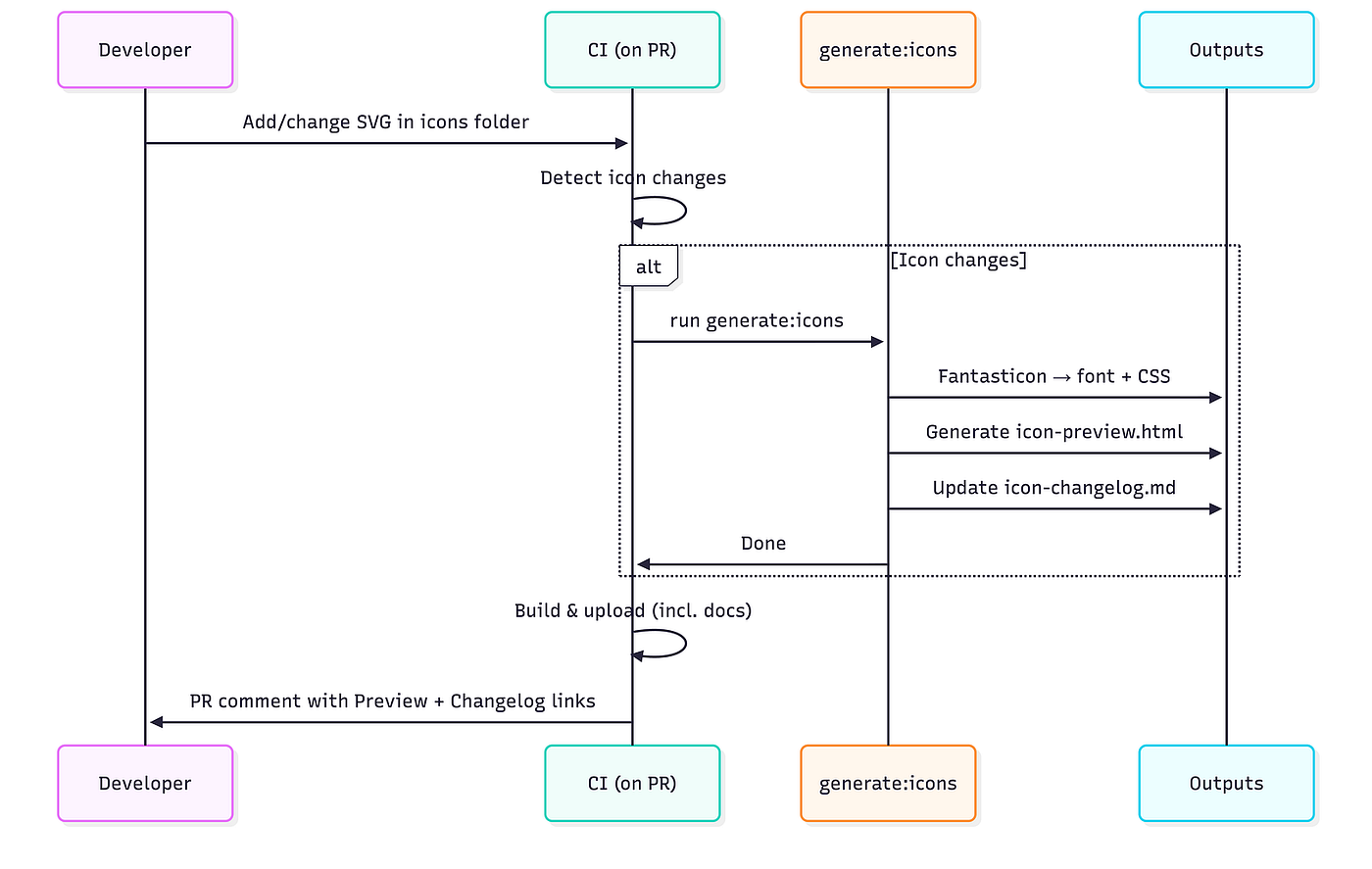
We didn’t want icon font generation to be a manual, one-off step. We wired it into our preview CI pipeline so that whenever someone adds or changes SVGs, we regenerate the font, update a preview and a changelog, and expose both from the preview environment.
When do we regenerate?
Our preview workflow (e.g. on PRs) first detects icon-related changes:
- Any change under */icons/svg/.svg
- Or a change to fantasticon.config.json
If either is true, we set a flag (e.g. has_icon_changes=true) and run the icon generation step. If not, we skip it so we don’t regenerate fonts on every PR.
The generation script (generate:icons)
The generation script does four things in sequence. Here’s the flow:
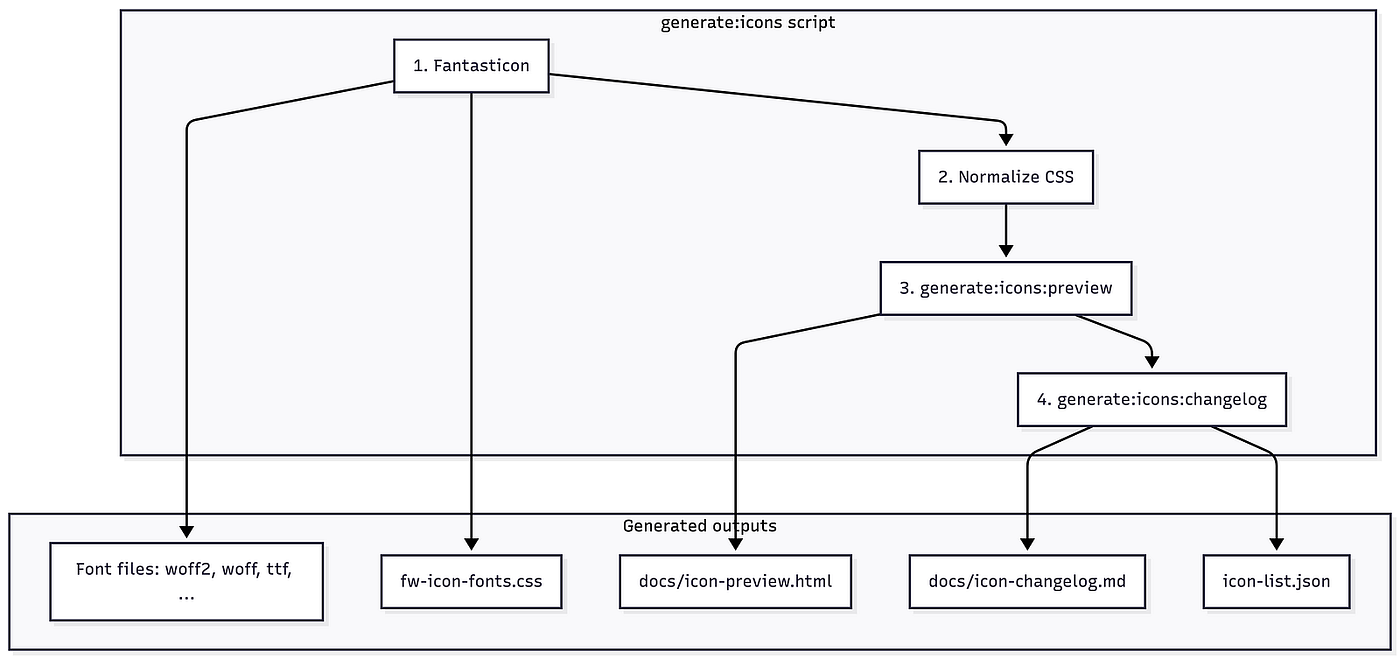
So in one command we: regenerate the font → fix the CSS → refresh the preview page → update the changelog
Exposing preview and changelog in the preview environment
After the build, we upload the app and docs to the preview environment (e.g. S3 + CDN). We explicitly:
- Upload docs/icon-changelog.md to a stable path (e.g. docs/icons/icon-changelog.md)
- Upload docs/icon-preview.html to a stable path (e.g. docs/icons/icon-preview.html)
So for every preview build (and especially when icon changes are present), icon changelog and icon preview are available at fixed URLs.
PR comment with links
When the preview deploy finishes, we post a PR comment with links to:
- The preview app
- Bundle size / bundle stats
- Analytics Icons Changelog — link to the uploaded icon-changelog.md
- Analytics Icons Preview — link to the uploaded icon-preview.html
So reviewers and designers can:
- See what changed in the icon set (changelog)
- See all current icons and their class names (preview), without opening the app
End-to-end flow (summary)
- Developer adds or edits SVGs under …/icons/svg/ (or edits fantasticon.config.json)
- They push and open a PR
- Preview CI runs:
- Detects icon changes → runs yarn run generate:icons
- That runs Fantasticon → normalizes CSS → generates icon-preview.html → updates icon-changelog.md and the stored icon list
- Build runs; build artifacts and docs (including icon-changelog.md and icon-preview.html) are uploaded to the preview bucket
- PR comment includes links to the Icons Changelog and Icons Preview for that preview URL
How others can use or leverage this
You don’t need to be on our stack to reuse the idea:
- Same pipeline elsewhere: Use one SVG folder, one config (e.g. Fantasticon), and one generate:icons-style script. Run it in CI when SVGs or config change, then upload the font + CSS and optionally a preview/changelog. Any frontend app (React, Vue, etc.) can consume the generated font and CSS.
- Preview + changelog: Generate an HTML preview and a changelog (added/removed icons) from the generated CSS and commit or publish them. That gives designers and reviewers a single place to see “what’s in the font” and what changed — without opening the app.
So: same workflow (SVG → font → preview/changelog in CI), adapted to your repo and your product name.
Final thoughts
Icon fonts and SVG icons both deliver scalable graphics, just in different ways. Fonts are easy to add and keep things lean, but they’re limited when you want multiple colors or fancy effects. SVGs give you more control and room for animation, in exchange for more setup and sometimes more bytes. So: lots of simple icons? Icon fonts can be a great fit. Lots of customization or motion? SVGs are the better tool. Big companies are increasingly standardizing on SVG, and that’s a reasonable direction — but the right choice is the one that matches what you’re building, not the latest trend.
Google, Apple, and Microsoft still ship icon fonts (Material Icons, SF Symbols, Fluent Icons), so the approach is still valid at scale.
메타데이터
- post_id
- 2f876589ebcc
- slug
- what-happens-when-you-turn-150-icons-into-one-font-2f876589ebcc
- url
- https://medium.com/freshworks-engineering-blog/what-happens-when-you-turn-150-icons-into-one-font-2f876589ebcc
- canonical_url
- https://medium.com/freshworks-engineering-blog/what-happens-when-you-turn-150-icons-into-one-font-2f876589ebcc
- author_url
- https://medium.com/@freshworks.engg
- status
- ok
- fetched_at
- 2026-06-13 16:00:06
