TechArt Gaming Diary: Lumen and VSM in Avowed
Next episode in my gaming diaries. 😄 Let’s see how Obsidian handled Lumen with Virtual Shadow Maps.
TechArt Gaming Diary: Lumen and VSM in Avowed
Next episode in my gaming diaries. 😄 Let’s see how Obsidian handled Lumen with Virtual Shadow Maps.

My hardware and settings
Hardware used for the review:
- CPU: AMD Ryzen 5 7600X
- GPU: 4070 Ti Super 16GB
- RAM: 64GB
I was playing at 4k on Epic settings with DLSS on Quality, v-sync off.
The game was mostly running between 50–60FPS, dropping to 40-45 in some areas.

Lighting and Global Illumination
First region looked quite promising.
Game features time of day, which is fairly easy to implement with Lumen. Sunset-dusk transition looks nice and takes about 5–6 minutes:
[embed]
At night time you can see a lot of glowing mushrooms, which is pretty cool:


Many interiors here have some openings to let the light in, which is good for Lumen — this gives enough of directional light for GI and reduces the potential noise in unlit areas:


Some are really nice and atmospheric:


After first region, things started falling apart immediately.


[embed]
This doesn’t look like any kind of Ray Tracing or anything close to that (this is Epic quality settings still):

Well.
Alright, back to the settings.

Ray Tracing option is enabling HWRT (Hardware Ray Tracing) mode for Lumen. It’s only supported by RTX video cards, so if the GPU doesn’t support that, the game will simply run in SWRT (Software Ray Tracing) mode regardless of the setting.
The most obvious differences between those you can notice in the games is Global Illumination accuracy, Ambient Occlusion and reflections detail (we will look at these later).
HWRT traces against fallback mesh (a lower polygon representation of Nanite-enabled asset) as the most accurate option, while SWRT traces against Distance Field of a mesh. In addition to that, SWRT has two modes: Detail Tracing (Mesh Distance Field or MDF) and Global Tracing (Global Distance Field or GDF). Difference between those is level of detail, GDF resolution is much lower and GI would be the least accurate with that.
To learn more about all that, you can check this article:
In this example, you can clearly see the difference between HWRT and SWRT:

Raytracing On (HWRT)

Raytracing OFF (SWRT)
Notice how AO around the grass, bushes and trees disappears on SWRT mode — this happens because Distance Fields were disabled on foliage assets:


Raytracing On (HWRT) vs Raytracing OFF (SWRT)
This is a common solution for overshadowing that distance fields are usually creating in foliage. Another solution would be making custom meshes for Distance Fields generation in some cases. At least the trunks and big branches should have some representation, otherwise the scene ends up looking flat with this lack of AO:


Raytracing On (HWRT) vs Raytracing OFF (SWRT)
Since there are no DFs for many trees in the game, Lumen is just skipping those, so the forest looks flat on SWRT mode.
The purple-pinkish color all over the place started to make it annoying for me after some time, to be honest, just because there’s too much of it, or maybe just because of the colorful noise that happens on lower settings.
[embed]
Interiors with not enough direct lighting struggle with GI — on lower quality settings it’s getting very noisy and update speed is quite low. Too much variation in the colors add a lot of issues:


Epic, High


Medium, Low
The further into the game I go, the worse it gets, unfortunately. Here’s another example of interior that struggles to calculate GI:


Epic vs Low (RT on)
After a while, it started to remind me Immortals, where all the colorful emissive messed up the GI the same way. It feels like the Lumen quality settings were dropped way too far to the point where it just breaks with lack of direct light sources:
[embed]
On top of that, exposure in some places is not adjusted at all:


Ryngrim’s Domain entrance
Sometimes the colors are too saturated and watching that is physically painful (if you’re photosensitive). Things like this should be toned down. When color saturation is too high, colors appear too vivid and can bleed:


one of the rooms inside of Ryngrim’s Domain
Here’s an example from Indiana Jones, of course you may say that the style is totally different, but the point is in keeping the values in correct range, without hitting the bleeding threshold.
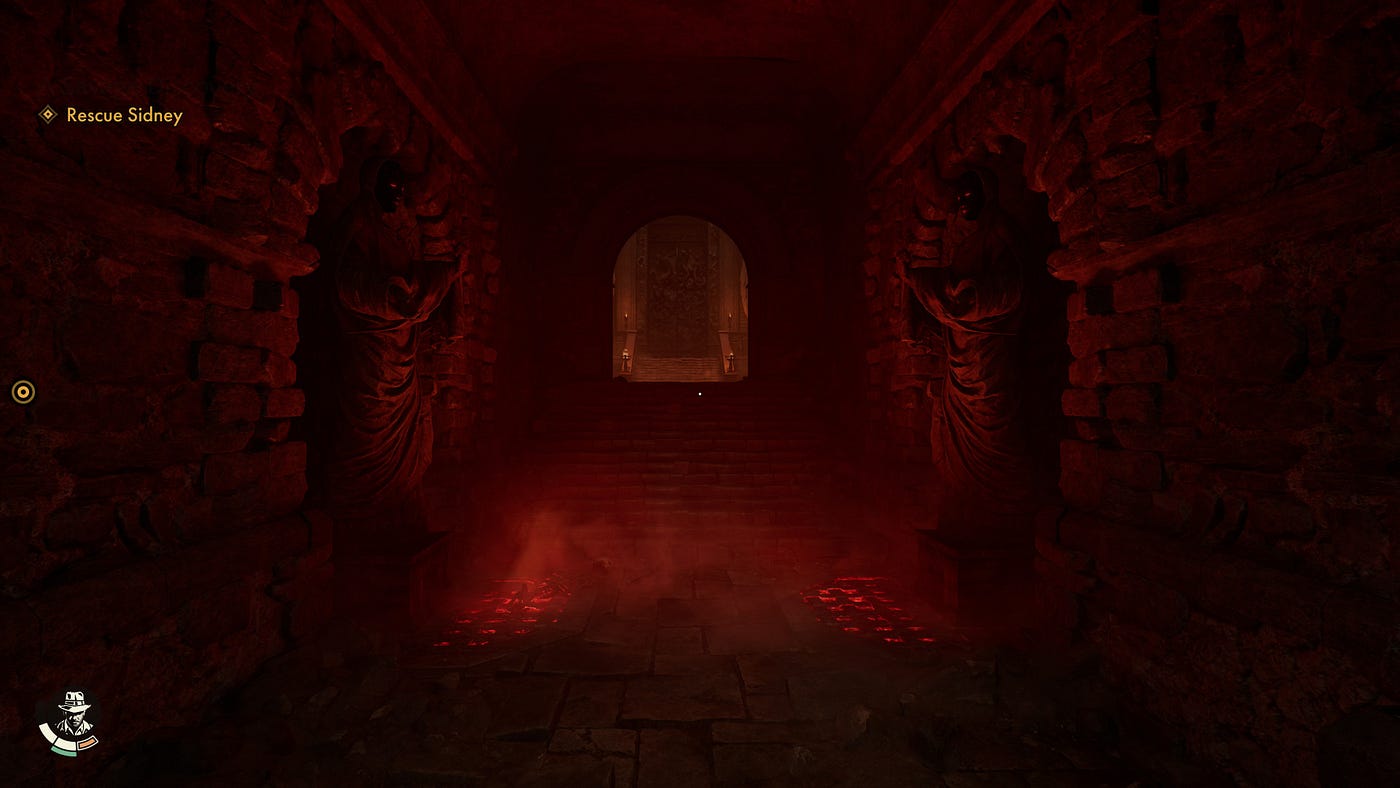
But even violent Doom is less violent to your eyes:

Lack of direct lighting in interiors also makes it too dark to see the enemies in some arenas. GI noise and bleeding caused by bright emissive materials are blinding. This makes it hard to navigate, sometimes I could see an enemy only when I ignited it:

Ghosting from emissive in such places is too evident and disturbing also:

There’s a trick you can do when you want to have emissive intensity on the same level in different lighting conditions - divide your emissive intensity by eye adaptation.
There’s also this bug that happened a couple of times, seems to me like a directional light intensity (or angle?) glitch:
[embed]
Side note
Main quest “Shadows of the Past” is bugged, the objective got stuck on “Proceed to the second trial”, hard blocking the progress, and replaying the whole thing over again, because last save was done quite a while ago, would be just a huge waste of time, so I dropped the game at this point. Lots of players seem to be having the same issue.
Reflections
As mentioned earlier, Ray Tracing enables HWRT which is only supported by rtx cards. If the gpu doesn’t support rtx, the game will run in SWRT mode regardless of the option.
Reflections quality settings with Ray Tracing ON:


Epic — 49FPS, High — 55FPS


Medium — 55FPS, Low — 59FPS
High and Medium settings seem to be exactly the same, just the resolution is lower than on Epic.
Reflections quality settings with Ray Tracing OFF:


Epic, High


Medium, Low
Lumen reflection consists of two parts — screen space and simplified scene, which in turn has different modes:
- HWRT mode uses Fallback mesh (Nanite’s simplified mesh used for certain features like this case)
- SWRT mode uses Distance Field
You can see the difference between how HWRT and SWRT work on this example:

Ray Tracing ON, Epic settings, 45 FPS (DLSS3 on Quality at 4k)

Ray Tracing OFF, Epic settings, 50 FPS (DLSS3 on Quality at 4k)
Since Distance Fields are disabled on these trees, they are visible only in Screen Trace part of the reflection in SWRT mode (you can see the holes in the parts of tree reflection which camera doesn’t see):


Ray Tracing ON (HWRT) vs Ray Tracing OFF (SWRT)
The same happens with the characters, because Skeletal Meshes have no Distance Fields in general.


Ray Tracing ON (HWRT) vs Ray Tracing OFF (SWRT)
In this example above, lack of trees in the reflection is questionable, the trees are huge and should at least have had the trunks Distance Fields for ambient occlusion and reflections, because this is not how it should be done:

only the mushrooms are reflected when RT is off
Here’s a good example of both layers of reflections in HWRT (mesh behind screen traces) and SWRT (distance field behind the screen trace):


Ray Tracing ON (HWRT) vs Ray Tracing OFF (SWRT)
Low profile uses basic SSR, you see only on-screen assets reflected:

Reflections on Low
Virtual Shadow Map
In general, it looks good on Epic-Medium settings, but Low has sharp shadows that do not make much sense, because performance gain is minimal while visual quality degrade is significant:
[embed]
Nothing much to say about them, the quality settings are changing the amount of rays, having 0 on Low.


Epic, High


Medium, Low
Just don’t do this:

The forests are the hardest to optimize with VSM, so the performance drop is expected. Here’s a comparison of performance on different settings:


Epic — 40FPS, High — 45FPS


Medium — 47FPS, Low — 48FPS
Volumetric fog and clouds
First region has really nice clouds:
[embed]
In the next one though, they make no sense and waste performance for no visual benefit at all. This overcast sky could be an HDRI with flowmap, would look much better and cost nothing:
[embed]
Volumetrics in some cases seem to be not tested on lower settings at all, which may lead to quite ugly experience for players with lower hardware:
[embed]
Conclusions
Feels like more effort was put into the first area while the rest of the game was left in unfinished state. Overall positive experience was shifting to the negative end of spectrum the further I went. The “this is how you should make the games with Lumen” switched to the “this is not how you should do this” after few hours.
Speaking of optimization and quality settings, feels like Low profile was not tested and adjusted properly. Players may expect to run this game on lower hardware but would get quite messy while still not performant enough result.
It could be a better choice to either remove low quality profile, or spend some extra time to set up the scalability properly or even use SSGI+DFAO on it for more stable image and much better performance. In comparison, Remnant 2 was made using SSGI, looks nice and runs great on gtx1650, Avowed is unplayable on that.
In addition, bugs and hardblock on the main quest ruined the whole enthusiasm to ever come back and finish the game. The world has no life in it, there are no any interactions with the environment.
메타데이터
- post_id
- 2fa5e69be147
- slug
- techart-gaming-diary-lumen-and-vsm-in-avowed-2fa5e69be147
- url
- https://medium.com/@shinsoj/techart-gaming-diary-lumen-and-vsm-in-avowed-2fa5e69be147
- canonical_url
- https://medium.com/@shinsoj/techart-gaming-diary-lumen-and-vsm-in-avowed-2fa5e69be147
- author_url
- https://medium.com/@shinsoj
- status
- ok
- fetched_at
- 2026-06-15 22:55:51





