How to Create a Profile in Cloud Pak for Command Line Interface (CPD-CLI)
Why Do We Use a Profile in CPD-CLI?
How to Create a Profile in Cloud Pak for Command Line Interface (CPD-CLI)
Why Do We Use a Profile in CPD-CLI?
A profile in the CPD-CLI is essential for the following reasons:
- It verifies that you are a Cloud Pak for Data user and ensures you have the required administrative permissions to perform tasks.
- If you manage multiple Cloud Pak for Data instances, you must create a unique profile for each instance.
- For instances with multiple administrators, each administrator can create their own profile for ease of management.
Prerequisites
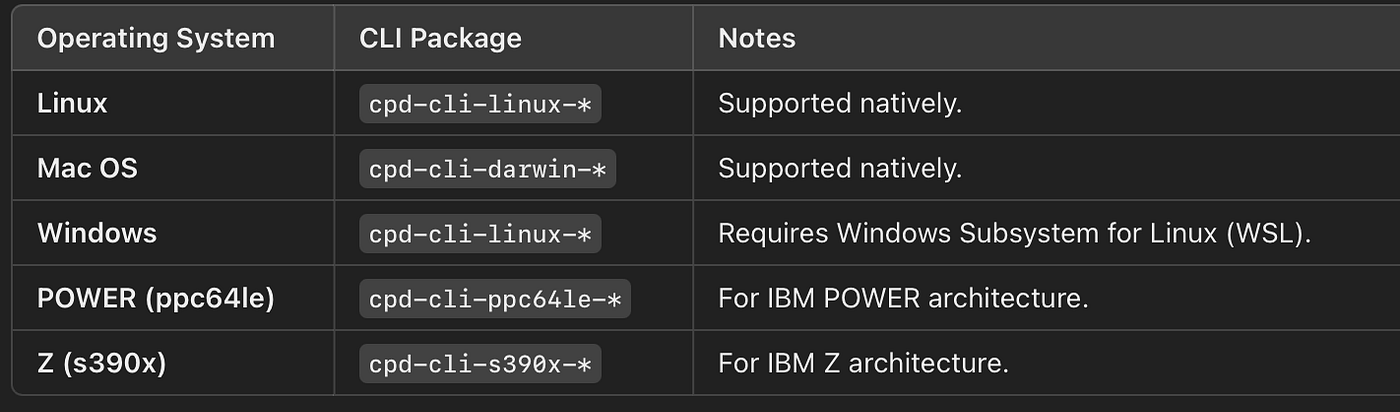
- Ensure that the CPD-CLI is installed on your system. 👉 Refer to my step-by-step guide to installing CPD-CLI.
Steps to Create a Profile
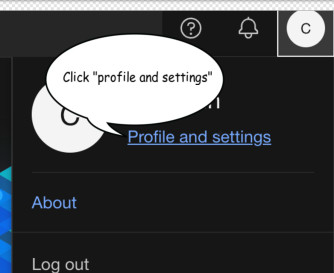
1. Generate an API Key via Cloud Pak for Data Dashboard , Click here
2. Set Environment Variables
Use the following commands to set up the required environment variables:
# Set your API Key which Generated via UI,example
export API_KEY=qAaUgjdfasIixxxxxxxxpOlxdxxxxxCX5H

# Set your CPD Username
export CPD_USERNAME=admin

# Define a local user name for configuration
export LOCAL_USER=test-user

# Set the profile name
export CPD_PROFILE_NAME=test-profile

# Provide the URL of the Cloud Pak for Data instance
export CPD_PROFILE_URL=<cloud-pak-url>
💡 Tip: To get the CPD_PROFILE_URL:
Run the following command:
oc get route cpd --namespace=${PROJECT_CPD_INST_OPERANDS}The output will look like this:
cpd-namespace.apps.OCP-default-domain
Add https:// to the returned value. For example:
https://cpd-namespace.apps.OCP-default-domain
3. Configure Local User
Run the following command to create a local user configuration:
cpd-cli config users set ${LOCAL_USER} \
--username ${CPD_USERNAME} \
--apikey ${API_KEY}
Note: Anytime you regenerate your API key, you must rerun this command to update the local user configuration.
4. Set Up the Profile
Create a profile and associate it with the local user configuration using the following command:
cpd-cli config profiles set ${CPD_PROFILE_NAME} \
--user ${LOCAL_USER} \
--url ${CPD_PROFILE_URL}
5. Verify the Profile
To confirm your profile is set up correctly, list all service instances using the profile:
cpd-cli service-instance list --profile=${CPD_PROFILE_NAME}Complete Example: Setting Up a Profile in CPD-CLI
This example demonstrates how to set up a CPD-CLI profile for practical use, step by step.
Set the project namespace, where my services installed
export PROJECT_CPD_INST_OPERANDS=myproject
Get the CPD_PROFILE_URL, use route command
oc get route cpd --namespace=${PROJECT_CPD_INST_OPERANDS}
Example output:
NAME HOST/PORT PATH SERVICES PORT TERMINATION WILDCARD
cpd cpd-api.clustername.com ibm-nginx-svc ibm-nginx-https-port reencrypt/Redirect None
Set environment variables
API_KEY taken from the UI,CPD_USERNAME is the Cloud Pak for data admin username
export API_KEY=qAxxxxUgjIixxxxxxxxpOlxdxxxxxCX5H export CPD_USERNAME=admin export LOCAL_USER=test-user export CPD_PROFILE_NAME=test-profile export CPD_PROFILE_URL=https://cpd-api.clustername.com
Configure the local user
cpd-cli config users set ${LOCAL_USER} \ --username ${CPD_USERNAME} \ --apikey ${API_KEY}
Set up the profile
cpd-cli config profiles set ${CPD_PROFILE_NAME} \ --user ${LOCAL_USER} \ --url ${CPD_PROFILE_URL}
Verify the profile by listing service instances
cpd-cli service-instance list --profile=${CPD_PROFILE_NAME}
Namespace Service type Version ID Name Provision status Upgrade version option
zen assistant 5.1.0 xxxxxxxxxxxxxxxx wxo-assistant-ab PROVISIONED [] zen assistant 5.1.0 xxxxxxxxxxxxxxxx wxo-assistant-de PROVISIONED [] zen volumes - xxxxxxxxxxxxxxxx zen::iaewdpthirdpartylib PROVISIONED []
메타데이터
- post_id
- 2fb0c249fbb5
- slug
- how-to-create-a-profile-in-cloud-pak-for-command-line-interface-cpd-cli-2fb0c249fbb5
- url
- https://medium.com/@farsin28/how-to-create-a-profile-in-cloud-pak-for-command-line-interface-cpd-cli-2fb0c249fbb5
- canonical_url
- https://medium.com/@farsin28/how-to-create-a-profile-in-cloud-pak-for-command-line-interface-cpd-cli-2fb0c249fbb5
- author_url
- https://medium.com/@farsin28
- status
- ok
- fetched_at
- 2026-07-21 20:13:58