AZURE PROJECT: Azure Container Apps platform with KEDA scaling, revision-based blue/green deploys…
You have a small microservices estate (maybe 5 or 6 services), you do not want to run an AKS cluster, you do not want to babysit nodes, and…
AZURE PROJECT: Azure Container Apps platform with KEDA scaling, revision-based blue/green deploys, Dapr sidecar, and Azure DevOps CI/CD
You have a small microservices estate (maybe 5 or 6 services), you do not want to run an AKS cluster, you do not want to babysit nodes, and you want the bill to drop to almost nothing on weekends when nobody is using the thing. That is the Container Apps sweet spot. We will stand up a Container Apps environment in a VNet, deploy three services, wire up KEDA scale rules (HTTP concurrency, Service Bus queue length, custom Prometheus), do revision-based blue/green with traffic splitting, turn on the Dapr sidecar for pub/sub via Service Bus and state via Cosmos, and ship the lot from Azure DevOps with az containerapp commands.
Tools used
- Azure Container Apps (resource provider
Microsoft.App/containerApps, API version2025-02-02-preview) - Azure Container Apps Environment (
Microsoft.App/managedEnvironments) sitting inside a delegated VNet subnet - KEDA (the autoscaler baked into Container Apps; HTTP, TCP, and any KEDA-supported
ScaledObject) - Dapr sidecar (currently
1.13.6-msft.x) for pub/sub and state building blocks - Azure Service Bus (queue used for the KEDA queue-length scaler & a Dapr pub/sub component)
- Azure Cosmos DB (state store behind the Dapr state component)
- Azure Container Registry (private registry, AcrPull granted to the app’s managed identity)
- Log Analytics workspace + Application Insights (built-in diagnostics target)
- Bicep for the platform layer
- Azure DevOps Pipelines +
az containerapp updateandaz containerapp ingress traffic setfor the rollout
Prerequisites
- An Azure subscription where you can create resource groups, a VNet, Container Apps, Service Bus, Cosmos DB, and an ACR
- Azure CLI 2.66+ with the
containerappextension installed:az extension add --name containerapp --upgrade - The
Microsoft.App,Microsoft.OperationalInsights,Microsoft.ServiceBus, andMicrosoft.DocumentDBresource providers registered on the subscription - An Azure DevOps project with a service connection to the subscription (we will call it
sp-containerapps) - Docker images already pushed to ACR for the three services we will deploy:
api-gateway,orders-svc,notifications-worker - Basic familiarity with KEDA scalers; if you have written a
ScaledObjectfor AKS before, this will feel like home
Project Architecture
We are building a small order processing estate:
api-gatewayis HTTP-fronted. External ingress, scales on HTTP concurrency.orders-svcis HTTP-internal. It accepts orders from the gateway, persists state to Cosmos via the Dapr state building block, and publishes anorders.createdevent to Service Bus via the Dapr pub/sub building block.notifications-workeris HTTP-internal but mostly idle. It subscribes toorders.createdand pushes notifications. It scales on Service Bus queue length using KEDA, and scales to zero between bursts.
The Container Apps environment lives in a /23 subnet that we delegate to Microsoft.App/environments. ACR, Service Bus, and Cosmos sit outside the subnet, reached through private endpoints in a real production cut (we will note where to wire those in). Everything emits logs to Log Analytics by default, and Application Insights is the APM target.
Step 1. Create the resource group, VNet, and supporting services
Run the following to create the resource group and the VNet with a delegated subnet. The /23 is deliberate, the Container Apps environment wants room.
RG=rg-aca-prod-uks
LOC=uksouth
VNET=vnet-aca-prod
SUBNET=snet-aca-env
ACR=acrprodaca$RANDOM
SB=sb-aca-prod-uks
COSMOS=cosmos-aca-prod-uks
LAW=law-aca-prod
AI=ai-aca-prod
ENV=cae-prod-uks
az group create -n $RG -l $LOCaz network vnet create \
-g $RG -n $VNET \
--address-prefixes 10.40.0.0/16 \
--subnet-name $SUBNET --subnet-prefixes 10.40.0.0/23Then create ACR, Service Bus (with a queue called orders-events-queue), a Cosmos DB account, the Log Analytics workspace, and Application Insights.
az acr create -g $RG -n $ACR --sku Standard --admin-enabled falseaz servicebus namespace create -g $RG -n $SB --sku Standard
az servicebus queue create -g $RG --namespace-name $SB -n orders-events-queueaz cosmosdb create -g $RG -n $COSMOS --kind GlobalDocumentDB \
--locations regionName=$LOC failoverPriority=0 isZoneRedundant=False
az cosmosdb sql database create -g $RG -a $COSMOS -n orders-db
az cosmosdb sql container create -g $RG -a $COSMOS -d orders-db \
-n state --partition-key-path "/partitionKey"az monitor log-analytics workspace create -g $RG -n $LAW
az monitor app-insights component create -g $RG -a $AI -l $LOC \
--workspace $(az monitor log-analytics workspace show -g $RG -n $LAW --query id -o tsv)Nothing exotic here, but make sure the queue name matches what the KEDA rule will reference later, otherwise the worker will sit at zero forever and you will spend a sad afternoon wondering why.
Step 2: Stand up the Container Apps environment in the VNet
Run the command to create the managed environment, bound to the subnet, with Log Analytics wired in.
WID=$(az monitor log-analytics workspace show -g $RG -n $LAW --query customerId -o tsv)
WKEY=$(az monitor log-analytics workspace get-shared-keys -g $RG -n $LAW --query primarySharedKey -o tsv)
SUBNET_ID=$(az network vnet subnet show -g $RG --vnet-name $VNET -n $SUBNET --query id -o tsv)
az containerapp env create \
-g $RG -n $ENV -l $LOC \
--logs-workspace-id $WID \
--logs-workspace-key $WKEY \
--infrastructure-subnet-resource-id $SUBNET_ID \
--internal-only false--internal-only false keeps the environment externally reachable for the gateway. Flip it to true if you are putting Front Door or APIM in front and want the environment fully private. Either way the env takes about 4 to 6 minutes to provision; spin up a coffee.
Step 3. Provision identity and registry access
The apps will pull images from ACR using a user-assigned managed identity. This avoids storing ACR creds anywhere.
UAMI=uami-aca-pullers
az identity create -g $RG -n $UAMI
UAMI_ID=$(az identity show -g $RG -n $UAMI --query id -o tsv)
UAMI_PRINCIPAL=$(az identity show -g $RG -n $UAMI --query principalId -o tsv)
ACR_ID=$(az acr show -g $RG -n $ACR --query id -o tsv)
az role assignment create \
--assignee-object-id $UAMI_PRINCIPAL \
--assignee-principal-type ServicePrincipal \
--role AcrPull --scope $ACR_IDSame identity will also be granted Azure Service Bus Data Receiver on the queue and Cosmos DB Built-in Data Contributor on the database; that way the KEDA rule and the Dapr components both authenticate without secrets.
SB_ID=$(az servicebus namespace show -g $RG -n $SB --query id -o tsv)
az role assignment create \
  --assignee-object-id $UAMI_PRINCIPAL --assignee-principal-type ServicePrincipal \
  --role "Azure Service Bus Data Receiver" --scope $SB_ID
Step 4: Deploy the three Container Apps with Bicep
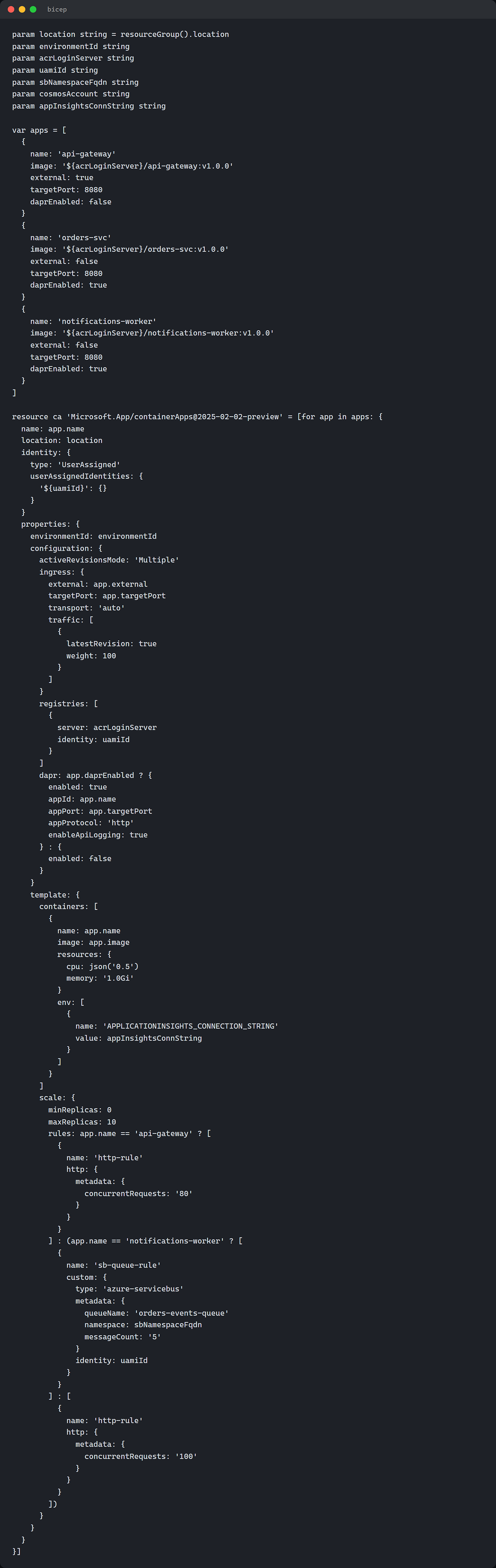
Paste the following into containerapps.bicep. This declares all three apps, enables Dapr on the two that need it, and sets activeRevisionsMode to Multiple so we can do blue/green.
param location string = resourceGroup().location
param environmentId string
param acrLoginServer string
param uamiId string
param sbNamespaceFqdn string
param cosmosAccount string
param appInsightsConnString string
var apps = [
{
name: 'api-gateway'
image: '${acrLoginServer}/api-gateway:v1.0.0'
external: true
targetPort: 8080
daprEnabled: false
}
{
name: 'orders-svc'
image: '${acrLoginServer}/orders-svc:v1.0.0'
external: false
targetPort: 8080
daprEnabled: true
}
{
name: 'notifications-worker'
image: '${acrLoginServer}/notifications-worker:v1.0.0'
external: false
targetPort: 8080
daprEnabled: true
}
]resource ca 'Microsoft.App/containerApps@2025-02-02-preview' = [for app in apps: {
name: app.name
location: location
identity: {
type: 'UserAssigned'
userAssignedIdentities: {
'${uamiId}': {}
}
}
properties: {
environmentId: environmentId
configuration: {
activeRevisionsMode: 'Multiple'
ingress: {
external: app.external
targetPort: app.targetPort
transport: 'auto'
traffic: [
{
latestRevision: true
weight: 100
}
]
}
registries: [
{
server: acrLoginServer
identity: uamiId
}
]
dapr: app.daprEnabled ? {
enabled: true
appId: app.name
appPort: app.targetPort
appProtocol: 'http'
enableApiLogging: true
} : {
enabled: false
}
}
template: {
containers: [
{
name: app.name
image: app.image
resources: {
cpu: json('0.5')
memory: '1.0Gi'
}
env: [
{
name: 'APPLICATIONINSIGHTS_CONNECTION_STRING'
value: appInsightsConnString
}
]
}
]
scale: {
minReplicas: 0
maxReplicas: 10
rules: app.name == 'api-gateway' ? [
{
name: 'http-rule'
http: {
metadata: {
concurrentRequests: '80'
}
}
}
] : (app.name == 'notifications-worker' ? [
{
name: 'sb-queue-rule'
custom: {
type: 'azure-servicebus'
metadata: {
queueName: 'orders-events-queue'
namespace: sbNamespaceFqdn
messageCount: '5'
}
identity: uamiId
}
}
] : [
{
name: 'http-rule'
http: {
metadata: {
concurrentRequests: '100'
}
}
}
])
}
}
}
}]Deploy it with:
ENV_ID=$(az containerapp env show -g $RG -n $ENV --query id -o tsv)
ACR_SERVER=$(az acr show -g $RG -n $ACR --query loginServer -o tsv)
SB_FQDN="${SB}.servicebus.windows.net"
AI_CONN=$(az monitor app-insights component show -g $RG -a $AI --query connectionString -o tsv)
az deployment group create -g $RG \
--template-file containerapps.bicep \
--parameters environmentId=$ENV_ID \
acrLoginServer=$ACR_SERVER \
uamiId=$UAMI_ID \
sbNamespaceFqdn=$SB_FQDN \
cosmosAccount=$COSMOS \
appInsightsConnString="$AI_CONN"Note the notifications-worker rule uses identity: uamiId, which is how KEDA authenticates to Service Bus with the managed identity we created in Step 3. No connection strings stored anywhere. That alone is worth half the effort of moving to Container Apps.
Step 5: Wire up Dapr components for pub/sub and state
Below is the YAML for the two Dapr components. They live at the environment scope and are scoped to the two Dapr-enabled apps with the scopes array.
dapr-pubsub-servicebus.yaml:
componentType: pubsub.azure.servicebus.topics
version: v1
metadata:
  - name: namespaceName
    value: sb-aca-prod-uks.servicebus.windows.net
  - name: consumerID
    value: orders-consumer
  - name: azureClientId
    value: <UAMI_CLIENT_ID>
scopes:
  - orders-svc
- notifications-workerdapr-state-cosmos.yaml:
componentType: state.azure.cosmosdb
version: v1
metadata:
  - name: url
    value: https://cosmos-aca-prod-uks.documents.azure.com:443/
  - name: database
    value: orders-db
  - name: collection
    value: state
  - name: azureClientId
    value: <UAMI_CLIENT_ID>
scopes:
  - orders-svc
Apply them with:
UAMI_CLIENT=$(az identity show -g $RG -n $UAMI --query clientId -o tsv)
sed -i "s/<UAMI_CLIENT_ID>/$UAMI_CLIENT/g" dapr-*.yaml
az containerapp env dapr-component set \
-g $RG --name $ENV --dapr-component-name orders-pubsub \
--yaml dapr-pubsub-servicebus.yamlaz containerapp env dapr-component set \
-g $RG --name $ENV --dapr-component-name orders-state \
--yaml dapr-state-cosmos.yamlIn the orders-svc code the publish call is just an HTTP POST to http://localhost:3500/v1.0/publish/orders-pubsub/orders.created. The state save call is POST http://localhost:3500/v1.0/state/orders-state with the key/value JSON body. No SDK needed in a pinch; the sidecar listens on 3500 (HTTP) and 50001 (gRPC) by default.
Step 6: Build the Azure DevOps pipeline
The pipeline does two things: build/push the container image to ACR, then call az containerapp update with a --revision-suffix so we get a new revision at 0% traffic. A separate stage promotes traffic to 10%, then 50%, then 100%.
Paste the following into azure-pipelines.yml:
trigger:
  branches:
    include: [ main ]
  paths:
    include: [ services/orders-svc/* ]
variables:
rg: rg-aca-prod-uks
acr: acrprodaca12345
app: orders-svc
imageRepo: orders-svc
azureSubscription: sp-containerappsstages:
- stage: Build
jobs:
- job: build_push
pool: { vmImage: ubuntu-latest }
steps:
- task: AzureCLI@2
displayName: ACR build & push
inputs:
azureSubscription: $(azureSubscription)
scriptType: bash
scriptLocation: inlineScript
inlineScript: |
TAG=$(Build.BuildId)
az acr build -r $(acr) -t $(imageRepo):$TAG services/orders-svc
echo "##vso[task.setvariable variable=imageTag;isOutput=true]$TAG"
name: buildStep- stage: DeployRevision
dependsOn: Build
variables:
imageTag: $[ stageDependencies.Build.build_push.outputs['buildStep.imageTag'] ]
jobs:
- deployment: deploy_new_revision
environment: prod
pool: { vmImage: ubuntu-latest }
strategy:
runOnce:
deploy:
steps:
- task: AzureCLI@2
displayName: Push new revision at 0% traffic
inputs:
azureSubscription: $(azureSubscription)
scriptType: bash
scriptLocation: inlineScript
inlineScript: |
SUFFIX=v$(imageTag)
az containerapp update \
-g $(rg) -n $(app) \
--image $(acr).azurecr.io/$(imageRepo):$(imageTag) \
--revision-suffix $SUFFIX
NEW_REV=$(az containerapp revision list -g $(rg) -n $(app) \
--query "[?contains(name, '$SUFFIX')].name | [0]" -o tsv)
CURRENT=$(az containerapp ingress traffic show -g $(rg) -n $(app) \
--query "[?weight==\`100\`].revisionName | [0]" -o tsv)
az containerapp ingress traffic set \
-g $(rg) -n $(app) \
--revision-weight $CURRENT=100 $NEW_REV=0
echo "##vso[task.setvariable variable=newRev;isOutput=true]$NEW_REV"
echo "##vso[task.setvariable variable=oldRev;isOutput=true]$CURRENT"
name: deployStep- stage: ShiftTraffic
dependsOn: DeployRevision
jobs:
- deployment: canary
environment: prod-canary
pool: { vmImage: ubuntu-latest }
strategy:
runOnce:
deploy:
steps:
- task: AzureCLI@2
displayName: 10% to new revision
inputs:
azureSubscription: $(azureSubscription)
scriptType: bash
scriptLocation: inlineScript
inlineScript: |
az containerapp ingress traffic set \
-g $(rg) -n $(app) \
--revision-weight $(oldRev)=90 $(newRev)=10- stage: Promote
dependsOn: ShiftTraffic
jobs:
- deployment: full_rollout
environment: prod-fullrollout
pool: { vmImage: ubuntu-latest }
strategy:
runOnce:
deploy:
steps:
- task: AzureCLI@2
inputs:
azureSubscription: $(azureSubscription)
scriptType: bash
scriptLocation: inlineScript
inlineScript: |
az containerapp ingress traffic set \
-g $(rg) -n $(app) \
--revision-weight $(newRev)=100 $(oldRev)=0
az containerapp revision deactivate \
-g $(rg) -n $(app) --revision $(oldRev) || trueThree things to call out:
- i>
--revision-suffixis what gives the new revision a deterministic name likeorders-svc--v12345. Without it, Container Apps autogenerates a random suffix and your traffic-shift commands will not know what to point at. - ii> Each
ShiftTrafficandPromotestage is bound to a separate Azure DevOps environment, so you can require a manual approval onprod-canaryandprod-fullrolloutif you want a human in the loop. - iii> The final step deactivates the old revision. It does not delete it. You can reactivate it in 30 seconds if the canary blows up.
Step 7: Add a custom Prometheus scaler
The third KEDA flavour we said we would cover is a custom Prometheus metric. Say orders-svc exposes a counter called pending_orders_total on /metrics, and we want to scale on its rate over the last minute. Update the orders-svc scale rules to include a Prometheus rule alongside the HTTP one.
rules: [
  {
    name: 'http-rule'
    http: {
      metadata: {
        concurrentRequests: '100'
      }
    }
  }
  {
    name: 'pending-orders-rule'
    custom: {
      type: 'prometheus'
      metadata: {
        serverAddress: 'http://prometheus.monitoring.svc:9090'
        metricName: 'pending_orders_total'
        threshold: '20'
        query: 'sum(rate(pending_orders_total[1m]))'
      }
    }
  }
]
Container Apps applies the OR of all rules. The app scales out if HTTP concurrency crosses 100 OR the pending-orders rate crosses 20. Polling interval defaults to 30 seconds, cool down period defaults to 300 seconds. Both can be tuned but the defaults are sensible.
Step 8: Observability bits
Logs from every container are streamed to the Log Analytics workspace under the ContainerAppConsoleLogs_CL table. Useful query when the canary looks wobbly:
ContainerAppConsoleLogs_CL
| where ContainerAppName_s == "orders-svc"
| where RevisionName_s endswith "v12345"
| where Log_s has_any ("ERROR", "Exception", "panic")
| project TimeGenerated, RevisionName_s, ReplicaName_s, Log_s
| order by TimeGenerated desc
For metrics, Application Insights picks up the live metrics stream as soon as each container has APPLICATIONINSIGHTS_CONNECTION_STRING set, which the Bicep template already does.
Troubleshooting
A few things that will bite you, mostly from real engagements.
**activeRevisionsModedefaults toSingle.** If you leave it as Single and runaz containerapp update --image, the old revision is deactivated immediately and traffic shifts in one go. Set it toMultiple(Bicep above does this) or your blue/green is not blue/green, it is a hard cutover.- KEDA queue rule says 0 messages but the worker still has replicas. Cool down period is 300 seconds by default. The worker will sit at 1 replica for 5 minutes after the queue drains before scaling to zero. That is not a bug, it is the cool down. Set
cooldownPeriodlower if you want it tighter, but you will pay in cold starts. - Dapr component visible to all apps when you only wanted two. If you forget the
scopesarray, the component is loaded into every Dapr-enabled app in the environment. That can be expensive on Cosmos RUs. Always setscopes. **Microsoft.Appresource provider not registered** on the subscription. Symptom is the env create command sayingMissingSubscriptionRegistration. Fix:az provider register --namespace Microsoft.Appand wait a minute.
Clean up
When you are done playing, drop the resource group:
az group delete -n rg-aca-prod-uks --yes --no-waitThat kills the env, the apps, the Dapr components, ACR, Service Bus, Cosmos, the Log Analytics workspace, and the App Insights resource in one shot. The VNet goes with it too.
When Container Apps wins, and when it loses
Container Apps wins when:
- Your estate is small (1 to ~30 services), and you do not have a dedicated Kubernetes platform team
- Scale-to-zero matters; you have spiky or bursty traffic and you do not want to pay for idle capacity
- You want Dapr without running the Dapr operator yourself
- You want HTTP and event-driven scaling out of the box without writing
ScaledObjectCRDs
Container Apps loses when:
- You need deep custom networking like multiple NICs per pod, custom CNI, or BGP peering
- You need GPUs (Container Apps GPU support is limited to specific workload profile SKUs and not every region)
- You need very low cold-start latency on scale-to-zero (a few seconds of cold start is normal)
- You have an existing AKS investment, a platform team that knows it, and the apps already run there happily
If you are sitting between the two, Container Apps with workload profiles gives you a middle path; dedicated nodes when you need them, consumption when you do not.
That is the whole pattern. If you followed along you must have noticed we deactivated the old revision in the final pipeline stage but did not delete it; that was deliberate, you want a 30-second rollback path available for at least a day before you reap old revisions. Add a scheduled pipeline that deactivates revisions older than 7 days and you have a clean estate without losing the safety net. Same goes for the Dapr components, version them in git, ship them with the app pipeline, and treat them like any other config artefact.
azure #azuredevops #devops #cicdproject #containerapps #keda #dapr #seniordevopsengineer #fortune500


container-apps #keda #dapr #serverless #azure
메타데이터
- post_id
- 30cbeaa0a2df
- slug
- azure-project-azure-container-apps-platform-with-keda-scaling-revision-based-blue-green-deploys-30cbeaa0a2df
- url
- https://medium.com/@ougabriel/azure-project-azure-container-apps-platform-with-keda-scaling-revision-based-blue-green-deploys-30cbeaa0a2df
- canonical_url
- https://medium.com/@ougabriel/azure-project-azure-container-apps-platform-with-keda-scaling-revision-based-blue-green-deploys-30cbeaa0a2df
- author_url
- https://medium.com/@ougabriel
- status
- ok
- fetched_at
- 2026-06-18 00:10:23