The Digital Office With Invisible Doors: How Salesforce Security Protects Businesses Before…
Every company today runs on data.
The Digital Office With Invisible Doors: How Salesforce Security Protects Businesses Before Problems Even Begin
Every company today runs on data.
Customer phone numbers, Employee details, Sales reports, Financial records, Support conversations.
Now imagine this:
- A new intern accidentally gets access to CEO-level financial data
- A sales employee downloads customer records before leaving the company
- A support executive edits information they were only supposed to view
This is not just a technical problem. It is a trust problem.
And this is exactly where Salesforce built one of the strongest cloud security systems in the industry.
Salesforce Security Feels Like a Smart Digital Building
Think of Salesforce like a corporate office building.
- Security guards check identity at the entrance
- Employees only enter authorized floors
- Some rooms require special access cards
- Some people can only view files while others can edit them
That is exactly how Salesforce security works — digitally.
Instead of one security layer, Salesforce uses multiple layers working together.
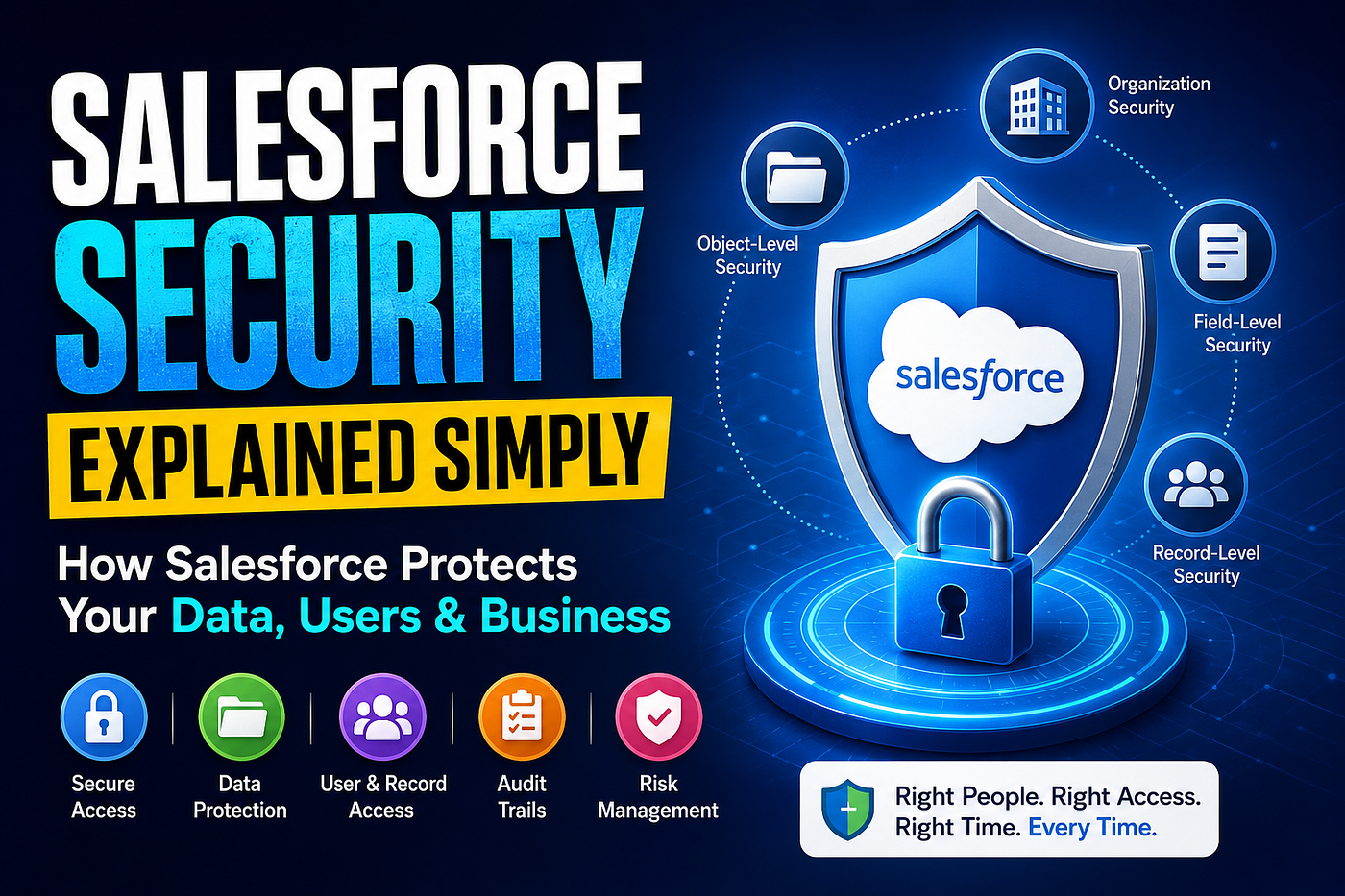
1. Organization-Level Security — The Main Entrance
This layer controls:
- Who can log in
- From where they can log in
- Which devices are trusted
Salesforce provides:
- Login IP restrictions
- Login hour restrictions
- Multi-Factor Authentication (MFA)
This helps prevent:
- Unauthorized access
- Stolen password attacks
- Suspicious remote logins
2. Object-Level Security — Controlling Department Access
In Salesforce, data is stored in objects like:
- Customers
- Orders
- Employees
- Payments
Not every employee should access every type of data.
Salesforce uses:
- Profiles
- Permission Sets
to control:
- Create
- Read
- Edit
- Delete access
This keeps business data organized and protected.
3. Field-Level Security — Protecting Sensitive Details
This is one of Salesforce’s smartest features.
Even inside a single customer record, specific details can be hidden.
Example:
- A support employee may see customer name and phone number
- But not salary or banking details
This reduces:
- Data leakage
- Privacy risks
- Internal misuse
Many traditional systems protect the whole file. Salesforce protects even the smallest details inside it.
4. Record-Level Security — Employees See Only Their Data
Imagine:
- Ravi handles South India clients
- Meera handles North India clients
Should both see each other’s customers?
Not necessarily.
Salesforce controls this using:
- Role Hierarchy
- Sharing Rules
- Organization-Wide Defaults (OWD)
This ensures employees only access records related to their work.
5. Permission Sets — Flexible Access Without Confusion
Sometimes employees need temporary access to certain features.
Instead of changing their entire role, Salesforce admins can use Permission Sets.
Think of them like temporary access passes.
This keeps security flexible and clean.
6. Audit Trails — Tracking Every Important Action
Salesforce records:
- Who logged in
- Who changed data
- What was modified
- When it happened
This becomes extremely useful during:
- Security investigations
- Compliance checks
- Data recovery situations

Disclaimer: The images used in this post are AI-generated for creative and educational purposes.
How Salesforce Differs From Traditional Systems
Many systems mainly protect the application.
Salesforce focuses on protecting:
- The data
- The user
- The permissions
- The activity history
At every level.
That layered approach is why companies across industries trust Salesforce with sensitive business information.
Risks Salesforce Security Helps Manage
- Insider threats
- Human errors
- Data leakage
- Unauthorized access
- Compliance risks
- Privilege misuse
Final Thoughts
The best security systems are invisible.
Employees continue working smoothly. Managers stay in control. Customer data stays protected.
And somewhere in the background, Salesforce is quietly acting like that overprotective friend saying:
“Nope… you don’t have permission for that.” 🔐
From login security to record visibility, Salesforce doesn’t just manage customer relationships — it protects them with layers of smart access control.
At this point, Salesforce security feels less like software and more like a digital office bodyguard that never sleeps.
메타데이터
- post_id
- 30f831e27dae
- slug
- the-digital-office-with-invisible-doors-how-salesforce-security-protects-businesses-before-30f831e27dae
- url
- https://medium.com/@sandyaranikatari2524/the-digital-office-with-invisible-doors-how-salesforce-security-protects-businesses-before-30f831e27dae
- canonical_url
- https://medium.com/@sandyaranikatari2524/the-digital-office-with-invisible-doors-how-salesforce-security-protects-businesses-before-30f831e27dae
- author_url
- https://medium.com/@sandyaranikatari2524
- status
- ok
- fetched_at
- 2026-06-27 07:40:21