Restoring Layout in Documents Can Improve LLM Accuracy from 85% to 97%
LLM pipelines over complex documents are built on a strong foundation — text quality, chunking, model selection, and prompt design.
Restoring Layout in Documents Can Improve LLM Accuracy from 85% to 97%
LLM pipelines over complex documents are built on a strong foundation — text quality, chunking, model selection, and prompt design.
Spatial layout adds another dimension — and in certain documents, it carries as much meaning as the text itself.
Note: The solution is straightforward — no new models, no fine-tuning, no complex pipelines. Just making better use of the data that already exists.
Azure Document Intelligence does an excellent job of extracting text. The OCR accuracy is high, the coverage is thorough, and it handles mixed languages well.
But when you take that raw text and pass it to an LLM, the two-dimensional structure of the original document collapses into a flat stream of words.
A document with two columns — say, sender details on the left and reference numbers on the right — becomes a single jumbled paragraph. Centered headers lose their position. Right-aligned totals sit next to unrelated content. Dates and codes that were spatially isolated get absorbed into surrounding text.
The words are all there. The meaning that came from where those words sat on the page is gone.
LLMs do not just read words — they reason about relationships between words. In structured documents, many of those relationships are spatial.
- Two items side by side often represent a comparison or a bilateral relationship
- A centered heading marks a section boundary
- An isolated block in the corner carries different weight than inline text
When layout is stripped away, the LLM is missing half the context. It can still extract some information, but it has to work much harder — and it gets things wrong more often.
This showed up clearly in our testing. With raw text extraction, we were averaging around 85% accuracy and needing multiple prompt iterations to get reliable results. The LLM was frequently misreading relationships between fields, confusing which values belonged to which entities, and misinterpreting the structure of the document.
Azure Document Intelligence offers a prebuilt-layout model that provides richer structural output -- tables, section roles, heading detection.
We tested it, expecting better results. The problem was different but equally damaging: the Layout model frequently merges content across visually distinct rows, columns, and sections. A header from one column gets absorbed into body text from an adjacent one. A footer gets grouped with the section above it.
Instead of cleaner context, we were getting noisier context — just structured differently. The fundamental problem remained: the two-dimensional layout was not being preserved.
Azure DI’s prebuilt-read model returns not just the text of each paragraph, but the exact polygon coordinates of where that paragraph sits on the page -- in inches.
This is enough information to reconstruct the original layout.
The approach:
- Extract bounding boxes from polygon coordinates
- Group paragraphs into rows using height overlap — if two blocks share more than 80% of their vertical range, they sit on the same line
- Separate into columns using width overlap — if blocks do not overlap horizontally, they sit side by side
- Render each block at its proportional character column position
The output is a monospace text grid that reflects the actual spatial structure of the document:
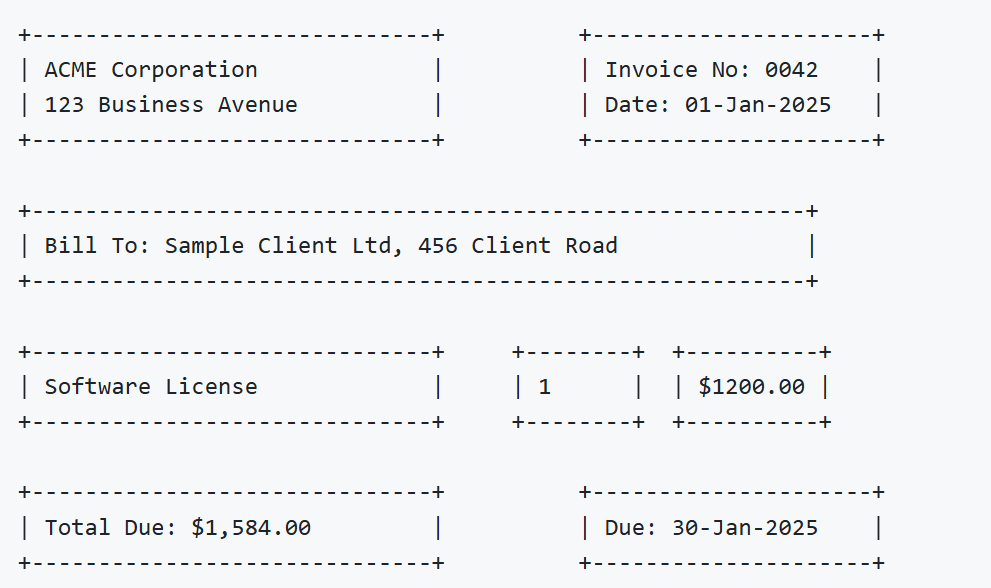
Sample layout reconstructed from Azure DI polygon coordinates.
The LLM now sees the structure, not just the content. It understands which items are side by side, which are section headers, and which are standalone blocks.
Tested on 100+ complex structured documents with mixed languages, multi-column layouts, stamps, and handwritten elements.
The accuracy improvement matters. But the drop in prompt iterations is arguably more significant — it means the LLM is not confused. It gets the right answer first time because the context it receives matches the structure of the original document.
We packaged this into azure-di-reconstruct -- a lightweight Python library with zero dependencies.
pip install azure-di-reconstructFour parameters let you tune the reconstruction to your document type:
The package works with any language Azure DI supports — English, Tamil, Hindi, Arabic, Chinese, and others.
If you are building LLM pipelines over structured documents and hitting an accuracy ceiling, check what you are actually passing to the model.
Raw text extraction discards the layout. Layout carries meaning. When the model cannot see the structure, it has to guess at relationships that should be obvious.
Preserving layout is not a cosmetic improvement — it is a contextual one. And context is what LLMs run on.
- PyPI:
pip install azure-di-reconstruct - GitHub: github.com/Gopi-Pitchai/azure-di-reconstruct
메타데이터
- post_id
- 3138afb936f1
- slug
- restoring-layout-in-documents-can-improve-llm-accuracy-from-85-to-97-3138afb936f1
- url
- https://medium.com/@gopipitchai/restoring-layout-in-documents-can-improve-llm-accuracy-from-85-to-97-3138afb936f1
- canonical_url
- https://medium.com/@gopipitchai/restoring-layout-in-documents-can-improve-llm-accuracy-from-85-to-97-3138afb936f1
- author_url
- https://medium.com/@gopipitchai
- status
- ok
- fetched_at
- 2026-06-09 15:37:30


