GISBox conversion: 3DTiles → OSGB in one step
GISBox Official Teams: https://teams.live.com/l/invite/FEAr12sInvEVy4hFQE Official Teams Group…
GISBox conversion: 3DTiles → OSGB in one step
GISBox Official Teams: https://teams.live.com/l/invite/FEAr12sInvEVy4hFQE Official Teams Group: https://teams.live.com/l/invite/FBAFp0pbqhqlpe1BQI
Contact us to get 7-day Team Plan
In the field of 3D geographic information system (3D GIS) and digital twins, 3DTiles and OSGB are two widely used 3D model formats. 3DTiles, as an open standard developed by the Cesium team, is particularly suitable for the visualization of massive 3D data in a network environment; while OSGB (OpenSceneGraph Binary) is a high-performance format commonly used in localized 3D applications. This article will introduce in detail how to use GISBox, a professional tool, to achieve efficient conversion between 3DTiles and OSGB formats to meet the needs of different application scenarios.
- Create a new tiling task
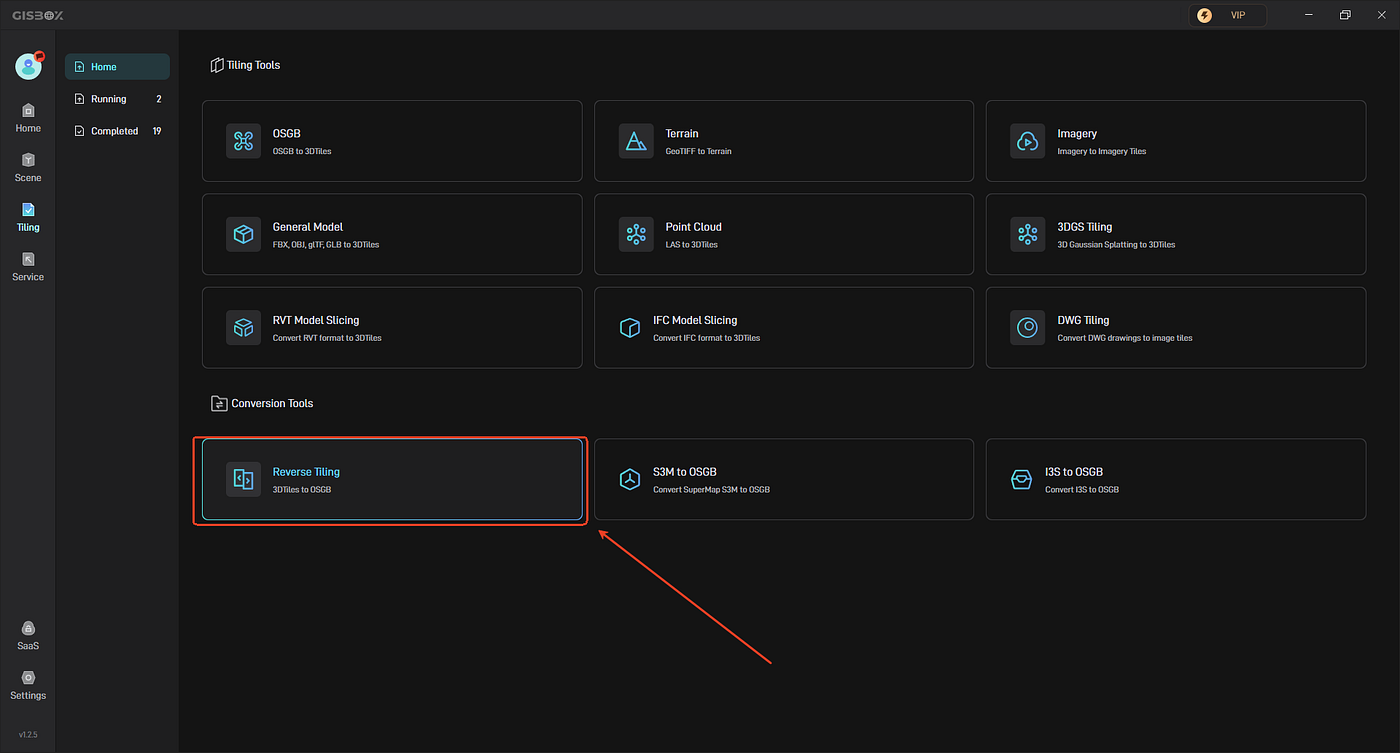
Open the GISBox software, in the “Tiling”, Select “Reverse Tiling ” to create a tilng task.
- Add file
In the pop-up “Create New Tiling Task” window, click the “+ Add File” button above to add our local file, usually a tileset.json file.

- Set parameters and start tiling
After adding the file, you can set the folder path for tile export. You can choose to turn on the “KTX2 Transcoding”, and set up spatial reference, choose “Y up” or “Z up”. Then click “Create”.


메타데이터
- post_id
- 3177f7bcfd13
- slug
- gisbox-conversion-3dtiles-osgb-in-one-step-3177f7bcfd13
- url
- https://medium.com/@gisbox/gisbox-conversion-3dtiles-osgb-in-one-step-3177f7bcfd13
- canonical_url
- https://medium.com/@gisbox/gisbox-conversion-3dtiles-osgb-in-one-step-3177f7bcfd13
- author_url
- https://medium.com/@gisbox
- status
- ok
- fetched_at
- 2026-07-19 10:14:50