Mastering SAP Data Migration: A Comprehensive Guide to Using BAPI
In today’s fast-paced business environment, organizations often need to upgrade their systems to stay competitive. One critical aspect of…
Mastering SAP Data Migration: A Comprehensive Guide to Using BAPI
In today’s fast-paced business environment, organizations often need to upgrade their systems to stay competitive. One critical aspect of this upgrade is Data Migration, which involves transferring data from a legacy system to a modern SAP system. This process ensures that valuable business data is preserved and utilized effectively in the new system. In this blog, we’ll explore what data migration is, the steps involved, and how BAPI (Business Application Programming Interface) plays a crucial role in this process.
What is Data Migration?
Data Migration, also referred to as Data Transfer, is the process of moving data from a Legacy System to an SAP System. This is a critical step when organizations transition from older systems to SAP, ensuring that all historical and operational data is accurately transferred and available in the new environment.
What is a Legacy System?
A Legacy System is any system other than SAP. It is also known as a Non-SAP System. These systems often contain valuable business data that needs to be migrated to the SAP system. Legacy systems are typically outdated but hold critical information that must be preserved during the transition.
Steps of Data Migration
Data migration is a multi-step process that requires careful planning and execution. Here are the key steps involved:
1) Extracting the Data
- The first step is to extract data from the legacy system. This data is usually exported into a file format (e.g., CSV, Excel, or XML) that can be processed further.
2) Converting the Data
- Once the data is extracted, it often needs to be converted into a format that is compatible with the SAP system. This step is known as Conversion. It ensures that the data aligns with SAP’s structure and requirements.
3) Importing the Data
- After conversion, the data is imported into the SAP system. This step involves mapping the data to the appropriate fields in SAP and loading it into the system.
4) Verifying the Data
- The final step is to verify the accuracy and completeness of the migrated data. This ensures that the data has been transferred correctly and is ready for use in the SAP system.
What is BAPI?
BAPI (Business Application Programming Interface) is a powerful tool used for large-scale data migration from legacy systems to SAP systems. It provides a standardized way to interact with SAP systems and is widely used for data migration tasks.
One of the most commonly used BAPIs in SAP is BAPI_MATERIAL_SAVEDATA. This BAPI is used to create and change material master data in SAP. It is particularly useful during data migration when material data from a legacy system needs to be transferred to SAP.
Steps to Use BAPI_MATERIAL_SAVEDATA:
Step 1: Prepare the material data in the required format.
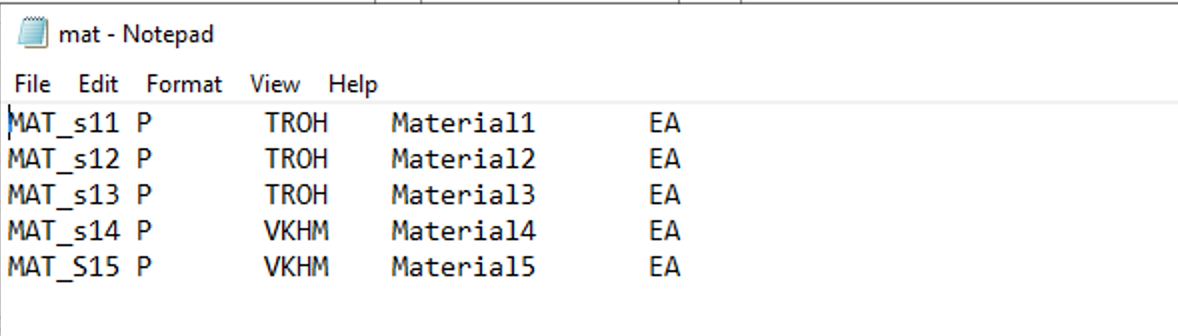
Step 2: Call the BAPI_MATERIAL_SAVEDATA function module in the program and Pass the material data as input parameters.


Step 3: Execute the BAPI to create or update the material master record in SAP.

Data in MARA table
Why is BAPI Preferred for Data Migration?
- Efficiency: BAPIs are designed to handle large volumes of data efficiently.
- Standardization: They provide a standardized way to interact with SAP systems, reducing the risk of errors.
- Flexibility: BAPIs can be customized to meet specific business requirements.
- Reliability: They offer better error handling and logging compared to other methods like BDC.
We can also add custom fields to BAPI using parameters ‘extension’ and ‘extensionx’.
Conclusion
Data migration is a critical process when transitioning from a legacy system to an SAP system. By following the steps of extraction, conversion, import, and verification, organizations can ensure a smooth and accurate transfer of data. Additionally, leveraging tools like BAPI can significantly enhance the efficiency and reliability of the migration process. Whether you’re migrating material master data using BAPI_MATERIAL_SAVEDATA or other business data, understanding these concepts is key to a successful SAP implementation.
If you’re planning a data migration project, make sure to carefully plan each step and choose the right tools to ensure a seamless transition. Happy migrating!
메타데이터
- post_id
- 32c2ef5e0599
- slug
- mastering-sap-data-migration-a-comprehensive-guide-to-using-bapi-32c2ef5e0599
- url
- https://medium.com/@sowjanya.borusu27/mastering-sap-data-migration-a-comprehensive-guide-to-using-bapi-32c2ef5e0599
- canonical_url
- https://medium.com/@sowjanya.borusu27/mastering-sap-data-migration-a-comprehensive-guide-to-using-bapi-32c2ef5e0599
- author_url
- https://medium.com/@sowjanya.borusu27
- status
- ok
- fetched_at
- 2026-06-20 20:29:01