Bulk destroy in Django REST Framework (DRF) using ModelViewSet
One of the great features in DRF (Django REST Framework) is Viewset. It allows a developer to define a set of built-in simple-straight…
Bulk destroy in Django REST Framework (DRF) using ModelViewSet
One of the great features in DRF (Django REST Framework) is Viewset. It allows a developer to define a set of built-in simple-straight action handlers for a resource. Once, it’s registered with the DRF url default-router, it can provide a standard set of CRUD style actions for the resource.
This article explains a way to add a support for the custom action called bulk-destroy, to perform deletion in bulk with the help of a demo application.
Experience in django & DRF would be great to understand the article better.
The challenge
In one of the projects, we used viewsets (ModelViewSet) heavily in our django application to perform simple CRUD operations on resources. There were a set of resources, where authenticated and authorized users were needed to perform a deletion operation for multiple entries/objects. If it was for a single resource, surely, we could have gone with a custom view implementation using APIView class or maybe other way. The application was growing gradually, and we needed a generic approach to tackle this challenge. Finally, it was making sense for us to design bulk-destroy action using the listing route so that it can be invoked with http DELETE method, in similar way how list can be invoked with GET method. Obviously, bulk-destroy needs to be requested with the ids of the to-be-deleted objects so that the application can verify the authority of the requesting user and can delete the requested objects successfully.
Photo by Yoko Correia Nishimiya on Unsplash
The Demo application
We’re going to take a look at a demo application which uses the bulk-destroy action. The complete codebase is available here.
I’ve designed a simple Note resource in this demo for which the django model looks like as follows:
from django.conf import settings
from django.db import models

class Note(models.Model):
    title       = models.CharField(max_length=1024, blank=True, null=True)
    body        = models.TextField(blank=True, null=True)
    created_at  = models.DateTimeField(auto_now_add=True, editable=False)
    modified_at = models.DateTimeField(auto_now=True, editable=False)
    owner       = models.ForeignKey(settings.AUTH_USER_MODEL,
                        null=True, editable=False, db_index=True,
                        on_delete=models.SET_NULL, related_name="note_owner")

    class Meta:
        db_table = "note"

    def __str__(self):
        return f"(pk: {self.pk}, title: {self.title})"
The idea is that a user can own multiple notes with given title, body. The user model is the default django auth-user one.
Now to support bulk-destroy action in form of http rest api with DELETE method, we need to update the router mapping in the DRF which exposes the urls to the client.
# router.py
from rest_framework.routers import DefaultRouter

from restapis import views

class CustomAPIRouter(DefaultRouter):
    def __init__(self, *args, **kwargs):
        super().__init__(*args, **kwargs)

        # by DRF definition, this might be subject to change to version of DRF
        list_route = self.routes[0]
        list_route.mapping.update({
            "delete": "bulk_destroy"
        })

# Routers provide an easy way of automatically determining the URL conf.
APIRouter = CustomAPIRouter()

# note API routers
APIRouter.register(r'notes', views.NoteViewSet, basename="notes")
As you can see in the above snippet, we overridden the router by inheriting the DefaultRouter from DRF. We took out the listing route and updated the mapping with delete HTTP method to the bulk_destroy view method. In other words, now a viewset can implement bulk_destroy view method to handle the multiple objects delete request for the given resource.
The class
DefaultRouterinherits theSimpleRouterclass. Have a look at theSimpleRoutercode to understand why we took the first item from routes to consider it as a list route. More details on custom routes here.
To support the common behavior of bulk destroy action in a model based viewset, we can introduce a mixin called BulkDestroyModelMixin. In fact, ModelViewSet is nothing but a group of mixins to support basic CRUD operations for a resource. The implementation can be seen here.
# serializers

from rest_framework import serializers

class BulkDestroyInstanceSerializer(serializers.Serializer):
    """
    ids of all to be destroyed objects
    """
    ids = serializers.ListField(
        child=serializers.IntegerField(min_value=1),
        write_only=True
    )
# mixins.py
import logging
from rest_framework import status
from rest_framework.response import Response
from rest_framework.exceptions import ValidationError, PermissionDenied
from ..serializers import BulkDestroyInstanceSerializer
log = logging.getLogger(__name__)
class BulkDestroyModelMixin:
"""
BulkDestroyModelMixin provides the flexibility to delete
multiple resources on the list endpoint with the delete
method.
"""
# in case, viewset has not defined bulk-destroy count
__DEFAULT_BULK_DESTROY_COUNT = 5
# safe side max count
__MAX_BULK_DESTROY_COUNT = 10
def bulk_destroy(self, request, *args, **kwargs):
# if not allowed then raise the error
if not getattr(self, "allow_bulk_destroy_method", False):
return Response(status=status.HTTP_405_METHOD_NOT_ALLOWED)
serializer = BulkDestroyInstanceSerializer(data=request.data)
serializer.is_valid(raise_exception=True)
# get ids from serializer validated data
destroy_instance_id_list = serializer.validated_data.get("ids", [])
# validation check - at least one id is provided
if len(destroy_instance_id_list) == 0:
raise ValidationError("at least one object id is required to perform batch delete operation")
# max allowed bulk destroy count
bulk_destroy_count = getattr(self, "bulk_destroy_count", 0) or self.__DEFAULT_BULK_DESTROY_COUNT
bulk_destroy_count = min(bulk_destroy_count, self.__MAX_BULK_DESTROY_COUNT)
if len(destroy_instance_id_list) > bulk_destroy_count:
raise PermissionDenied(f"You do not have permission to delete more than {bulk_destroy_count} objects")
# there might be valid ids to which the requested user doesn't have access
# hence raise the permission denied error
valid_bulk_instance_qs = self.get_queryset().filter(pk__in=destroy_instance_id_list)
if len(destroy_instance_id_list) != valid_bulk_instance_qs.count():
raise PermissionDenied(detail="You do not have permission to delete one or more objects")
for permission in self.get_permissions():
if (
hasattr(permission, "has_bulk_destroy_permission") and
not permission.has_bulk_destroy_permission(request, self, valid_bulk_instance_qs)
):
raise PermissionDenied(detail="You do not have permission to delete one or more objects")
# finally, after all checks, perform bulk destroy
self.perform_bulk_destroy(valid_bulk_instance_qs)
# return response
return Response(status=status.HTTP_204_NO_CONTENT)
def perform_bulk_destroy(self, bulk_instance_qs):
log.info(f"bulk destroy, instance list: {list(bulk_instance_qs)}")
# using filtered querset just delete it
bulk_instance_qs.delete()This mixin has the view method implementation for the bulk_destroy action which we updated in the custom router mapping previously. Simply, it takes the ids, a list of id of the to-be-deleted objects, does the validation check, permission check and if allowed, then it will remove the requested objects finally.
Now we need this mixin BulkDestroyModelMixin to be inherited in the final viewset. In our Note resource example, it can used like this:
# views.py

from rest_framework import viewsets
from rest_framework.permissions import IsAuthenticated

from ..models import Note
from ..serializers import NoteSerializer
from ..permissions import NotePermission
from .mixins import BulkDestroyModelMixin

class NoteViewSet(BulkDestroyModelMixin, viewsets.ModelViewSet):
    """
    NoteViewSet to handle CRUD operations with bulk-destroy.
    """
    queryset = Note.objects.all()
    serializer_class = NoteSerializer
    permission_classes = (IsAuthenticated, NotePermission, )
    allow_bulk_destroy_method = True
    bulk_destroy_count = 5

    def get_queryset(self):
        return Note.objects.filter(owner=self.request.user)
Note that mixin also supports following attributes, which we can define in the viewset if needed:
allow_bulk_destroy_method: if viewset can allow bulk destroybulk_destroy_count: how many objects can be destroyed in a single request
Also, for any reason if a custom permission is needed additionally in the bulk deletion request action, we can define has_bulk_destroy_permission method under the viewset’s permission class. More details on permission here!
Below is the pre-recorded video demo, which exhibits the bulk-destroy action for note resource.
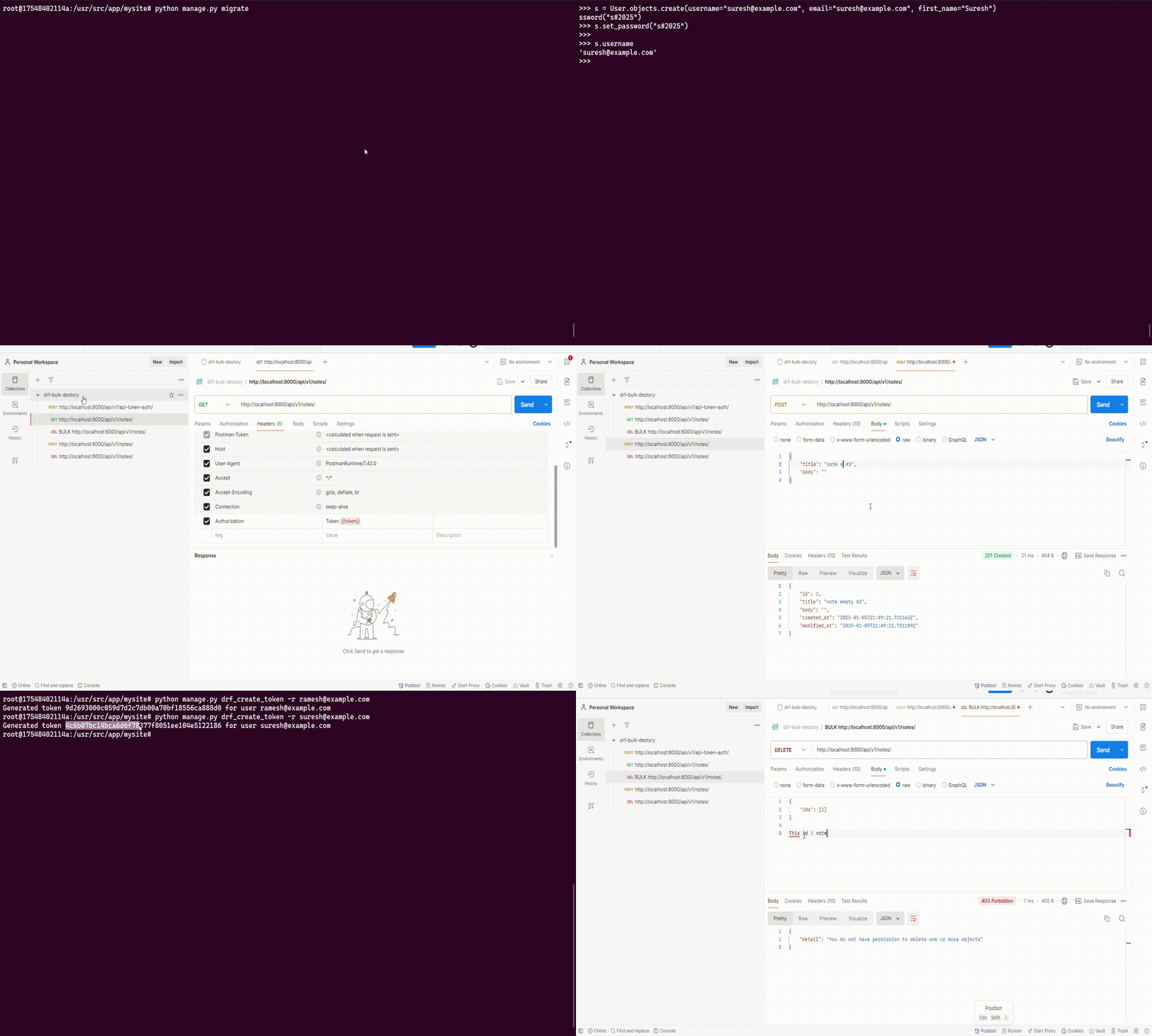
To register users in django shell:
root@17548402114a:/usr/src/app/mysite# python manage.py shell
Python 3.12.7 (main, Oct  1 2024, 22:28:30) [GCC 12.2.0] on linux
Type "help", "copyright", "credits" or "license" for more information.
(InteractiveConsole)
>>> from django.contrib.auth.models import User
>>> r = User.objects.create(username="ramesh@example.com", email="ramesh@example.com", first_name="Ramesh")
>>> r.set_password("r#2025")
>>> s = User.objects.create(username="suresh@example.com", email="suresh@example.com", first_name="Suresh")
>>> s.set_password("s#2025")
To generate auth token for users:
root@17548402114a:/usr/src/app/mysite# python manage.py drf_create_token -r ramesh@example.com
Generated token <token> for user ramesh@example.com
root@17548402114a:/usr/src/app/mysite# python manage.py drf_create_token -r suresh@example.com
Generated token <token> for user suresh@example.com
Conclusion
This approach to handle bulk deletion was very helpful to me, in one of the past Django+DRF applications, where the model based viewsets were heavily used. I hope it’d inspire to design and to implement a custom action in DRF.
Thanks for reading the article!
메타데이터
- post_id
- 32fa0249487c
- slug
- drf-bulk-destroy-in-modelviewset-32fa0249487c
- url
- https://medium.com/@rsudip90/drf-bulk-destroy-in-modelviewset-32fa0249487c
- canonical_url
- https://medium.com/@rsudip90/drf-bulk-destroy-in-modelviewset-32fa0249487c
- author_url
- https://medium.com/@rsudip90
- status
- ok
- fetched_at
- 2026-07-13 08:05:13




