I Built a Family Care Coordination Engine with opencode + Coral
I built CareOps Agent, an open-source AI-powered family care coordination dashboard that connects 9 real data sources (medications, lab…
I Built a Family Care Coordination Engine with opencode + Coral
I built CareOps Agent, an open-source AI-powered family care coordination dashboard that connects 9 real data sources (medications, lab reports, doctor instructions, symptom logs, etc.) into a single queryable surface. This guide walks through the entire architecture, key decisions, and how to build something similar.
The Kraken We Faced
My aging parents see 4 different doctors across 3 hospitals. Their medical data lives in: prescription bottles, lab printouts, WhatsApp messages from doctors, pharmacy receipts, my sister’s notebook, and my mom’s memory.
Every doctor visit starts with the same ritual: frantically collecting papers, trying to remember what changed since the last visit, and writing a summary on the cab ride over.
I wanted one tool that could:
Hold all their care data in one place
Answer questions like "what meds changed since last visit?"
Generate a pre-visit summary packet for the doctor
Let me upload new data as it arrives
Never diagnose, prescribe, or recommend medicine changes
The constraint: I’m not a healthcare startup. I’m one person with a laptop and a deadline (next appointment is in 3 weeks).
The Tech Stack
| Layer         | Choice                      | Why                                                     |
|---------------|-----------------------------|---------------------------------------------------------|
| Query engine  | Coral (opencode.ai)         | SQL interface over any data source; 9 JSONL-backed sources in our case |
| Framework     | Next.js 15 (App Router)     | Server components, API routes, static + dynamic in one |
| UI            | React 19 + Tailwind + lucide-react | Fast iteration, clean look                         |
| Data files    | JSONL (primary) + CSV (fallback) | Coral needs JSONL; CSV for SQLite compatibility    |
| SQLite        | better-sqlite3              | Offline/mock query mode when Coral CLI isn't available |
| Validation    | Zod                         | Schema validation on data load                         |
| AI safety     | Custom boundary check       | Regex blocklist for diagnosis/prescription language    |
| Tests         | Vitest                      | 13 unit tests + 9 Coral integration tests             |
| The builder   | opencode (CLI)              | 90% of the code was written via natural language conversation |
You Can Access My conversation with open code at https://opncd.ai/share/Bk6Rfrcw
The Architecture: 3 Query Modes, 1 Abstraction
The core insight: abstract the query engine so you’re not locked in.
type QueryMode = "coral_cli" | "sqlite" | "mock";A single CoralClient class routes every query to the right backend. There are three paths through it:
Path 1: coral_cli mode (default for production)
The client shells out to coral sql --format json via Node’s execFile. The CLI returns JSON, which is parsed into columns + rows.
Path 2: sqlite mode (fallback for offline/CI)
The SQL is first run through translateForSqlite() which rewrites source.table syntax into quoted view names that SQLite understands. Then it executes against a better-sqlite3 database seeded from CSVs.
Path 3: mock mode (development/testing)
Same SQLite engine, but queries run directly against _spec tables without translation. Useful for unit tests where you control the data.
This means: develop with mock data, test with SQLite, ship with Coral CLI. No other code changes needed.
The 9 Data Sources
Each source is a Coral source spec (YAML manifest with backend: jsonl) pointing at a JSONL file in /data/:
| Source                      | Table             | Records | What It Stores |
|-----------------------------|-------------------|---------|----------------|
| careops_patients            | patients          | 5       | Demographics, condition focus, PCP |
| careops_medications         | medications       | 9       | Drug name, dose, frequency, dates |
| careops_lab_reports         | lab_reports       | 12      | Test name, value, unit, reference range |
| careops_doctor_chats        | doctor_chats      | 7       | Doctor messages, instructions, follow-ups |
| careops_pharmacy_receipts   | pharmacy_receipts | 11      | Refill evidence, quantity, cost |
| careops_symptom_logs        | symptom_logs      | 11      | Symptom + severity (1–5) tracking |
| careops_appointments        | appointments      | 6       | Calendar, speciality, status |
| careops_prescription_ocr    | prescription_ocr  | 5       | OCR text from prescription photos |
| careops_family_notes        | family_notes      | 7       | Free-text caregiver observations
73 records across 9 sources, 5 patients. Enough to be useful, small enough to iterate fast.
Each source spec is ~40 lines of YAML:
name: careops_medications
backend: jsonl
tables:
  - name: medications
    source:
      location: "file:///Volumes/algsoch/careops/data/"
      glob: "medications.jsonl"
    columns:
      - name: patient_id
      - name: medicine_name
      - name: dose
      - name: frequency
The magic of Coral: once the spec is registered (coral source add --file manifest.yaml), you can run SQL queries across sources:
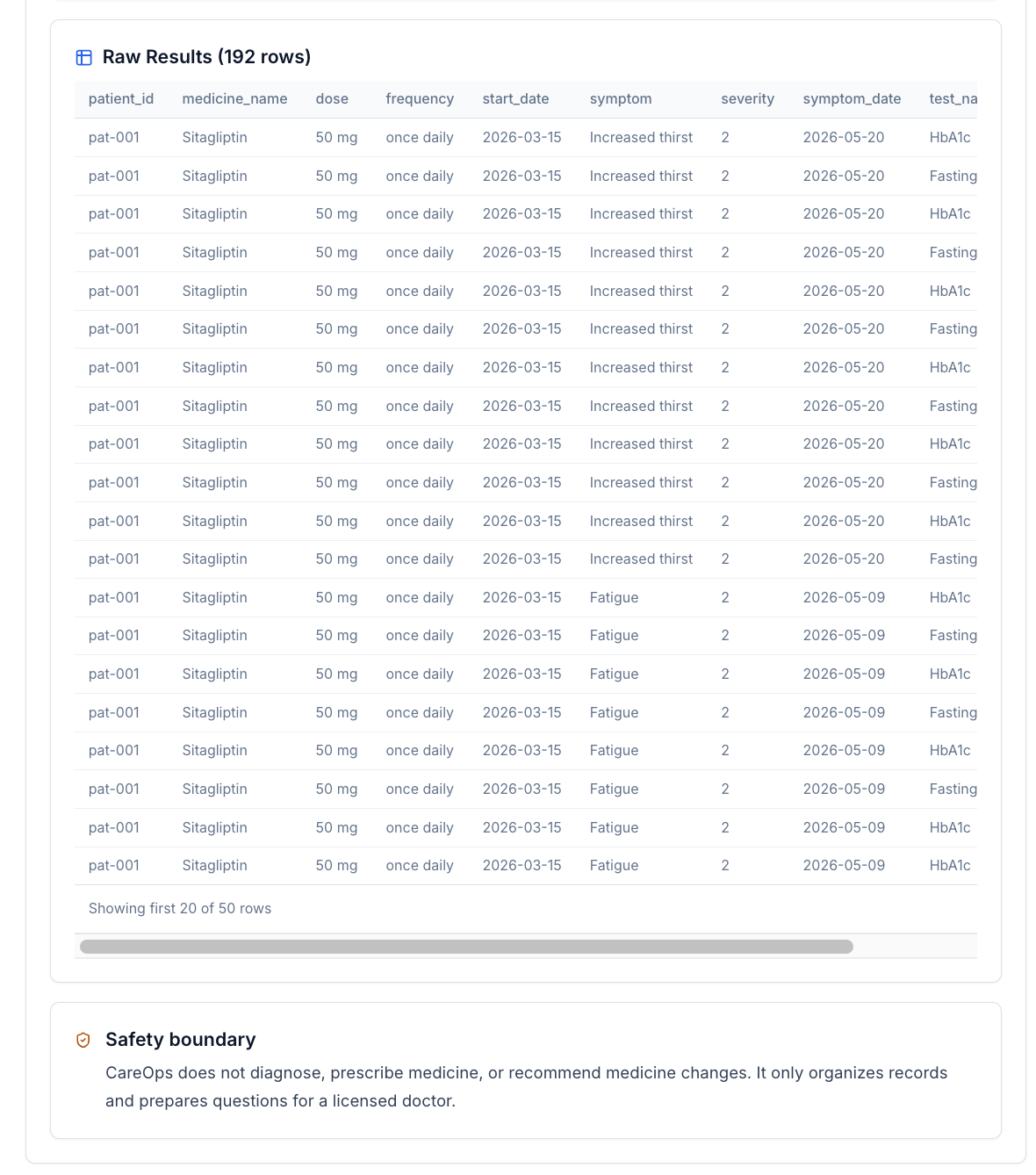
SELECT m.medicine_name, s.symptom, s.severity
FROM careops_medications.medications m
LEFT JOIN careops_symptom_logs.symptom_logs s
  ON s.patient_id = m.patient_id AND s.date >= m.start_date
WHERE m.patient_id = 'pat-001'
The SQLite Fallback (Why It Matters)
Coral CLI queries a live engine. But what if you want to query offline, or in CI, or while developing without coral installed?
Enter the seed script. It reads all 9 CSVs, creates SQLite tables with _spec suffix, then creates views that match Coral’s naming convention:
CREATE VIEW IF NOT EXISTS "careops_medications.medications"
AS SELECT * FROM careops_medications_spec;
The translateForSqlite() function rewrites queries to use quoted view names:
Before: SELECT * FROM careops_medications.medications
After: SELECT * FROM "careops_medications.medications"
Same queries. Same results. Different backend. This took 2 hours to build and saved days of debugging.
The Real Data Ingestion Pipeline
Here’s the piece that makes the app work with real uploaded data instead of just seed files:
- User uploads a CSV, JSON, or JSONL file through the drag-and-drop UI
- File is parsed —
csv-parsefor CSVs,JSON.parsefor JSON/JSONL - Columns are validated against the source manifest schema (required columns, type constraints)
- Rows are appended to the existing JSONL file (the source of truth)
- CSV is rebuilt from the full JSONL data (ensures consistency)
- SQLite database is reseeded by running the seed script
- All 3 query modes now see the new data
Key files created:
**src/lib/data/data-importer.ts** — The orchestrator. Knows all 9 source schemas, handles parsing, validation, file writes, and DB reseeding.**app/api/data/import/route.ts** — POST endpoint acceptingmultipart/form-datawithsourceKey+ file.**app/api/data/counts/route.ts** — GET endpoint returning record counts per source.**app/api/data/download/route.ts** — GET endpoint to download any source’s current CSV.**app/data-import/page.tsx** + a client component — Full drag-and-drop upload UI with per-source status cards.
The validation step catches issues before they corrupt data:
Missing required columns: patient_id, medicine_name
Row 3: severity must be a number 1–5
Unknown columns (will be ignored): extra_field
Reproduce This Yourself
Prerequisites
- Node.js 20+
- Coral CLI (
npm install -g @withcoral/cli) - opencode (optional, for the AI-assisted dev workflow)
Step 1: Scaffold the project
npx create-next-app@latest careops --typescript --tailwind --eslint
cd careops
npm install better-sqlite3 csv-parse zod lucide-react react-markdown remark-gfm
npm install -D tsx vitest @vitejs/plugin-react jsdom @types/better-sqlite3
Step 2: Define your data types
Create a types file with the shapes of your domain entities. We used 9 types representing patient care data. This becomes the contract between data layer, query layer, and UI.
Step 3: Create seed data
Create CSVs in a /data/ directory — one file per source. Keep it small (5–15 rows each) for fast iteration. Write a seed script that loads CSVs and builds a SQLite database.
Step 4: Write Coral source specs
In coral/sources/<domain>/<name>/manifest.yaml, define each source with its columns and file glob. Register them with:
coral source lint manifest.yaml
coral source add --file manifest.yaml
coral source test <source-name>
coral sql "SELECT * FROM <source>.<table> LIMIT 5"
Step 5: Build the query abstraction
Create a client class that wraps all 3 backends. Write query builder functions for each of your domain queries. This is the most important architectural decision — invest in the abstraction.
Step 6: Build the ingestion pipeline
Follow the pattern: append to JSONL, rebuild CSV from scratch, then reseed SQLite. This keeps all 3 backends in sync.
Step 7: Build the UI
Server components for data loading, client components for interactivity. We built a dashboard, analytics page, data sources pipeline, import data UI, evidence panel, timeline, doctor visit packet generator, and markdown export.
Step 8: Add safety guardrails
For any healthcare-adjacent app, add these from day one:
- A safety notice banner on every page
- Server-side blocklist checking on generated text
- A disclaimer in every exported document
- Never auto-prescribe or auto-diagnose
Key Takeaways
1. Abstract your query layer early. The 3-mode client took one afternoon to build and saved us from the “works on my machine” problem forever.
2. JSONL + CSV + SQLite is a surprisingly robust data stack. JSONL is the source of truth (append-only, git-friendly). CSV is the interchange format. SQLite is the query engine. No servers, no APIs, no credentials.
3. Coral’s source.table naming is elegant. It maps naturally to the concept of “data domains” and makes cross-source JOINs feel like normal SQL.
4. opencode changes the iteration speed. We went from idea to working prototype in ~6 hours of conversation. Most of the time was thinking about architecture, not typing code.
5. Safety is not optional. The safety boundary function and the safety notice component are not afterthoughts — they’re part of the core architecture. If your app touches health data, build safety in from day one.
6. Seed data is a product decision. Those 73 records across 5 patients tell a story (Raman’s diabetes journey, Leela’s hypertension, etc.). Good seed data makes development faster and demos more convincing.
Try It
git clone https://github.com/fiscalmindset/careops
cd careops
npm install
npm run seed
npm run dev
Open http://localhost:3000. You’ll see 5 patients with medical histories, 9 queryable data sources, a doctor visit packet generator, and a data import UI to add your own records.
The full architecture and spec guides are in the repo at docs/ARCHITECTURE.md and docs/SPECS.md.
Captain’s Log, Stardate 2026.05.31. Systems nominal. The family care coordination problem is not solved — but it is now queryable. One SQL JOIN at a time.
Built with opencode + Coral. Not medical advice. Consult a licensed doctor for medical decisions.


[embed]
메타데이터
- post_id
- 338d1238e6ae
- slug
- how-i-built-careops-agent-with-coral-opencode-338d1238e6ae
- url
- https://medium.com/@algsoch/how-i-built-careops-agent-with-coral-opencode-338d1238e6ae
- canonical_url
- https://medium.com/@algsoch/how-i-built-careops-agent-with-coral-opencode-338d1238e6ae
- author_url
- https://medium.com/@algsoch
- status
- ok
- fetched_at
- 2026-06-09 15:37:30