Multi-Environment Infrastructure as Code on AWS
How platform teams use Terraform, Terragrunt, and CI/CD gates to safely manage dev, staging, and prod infrastructure.
Multi-Environment Infrastructure as Code on AWS
How platform teams use Terraform, Terragrunt, and CI/CD gates to safely manage dev, staging, and prod infrastructure.
The Problem With Monolithic Infrastructure
A single Terraform project is straightforward: one main.tf, one terraform.tfstate, and confident production deployment. As staging and additional regions are introduced, configurations are copied, state files multiply, and tracking changes becomes challenging. Differences between production and staging environments become difficult to explain.
At this stage, platform teams need multi-environment infrastructure-as-code.
This repository (github.com/btilki/aws-multi-env-iac) implements a proven pattern: environment isolation, shared modules, remote state management, and gated CI/CD delivery. This article explains why this architecture matters and how to implement it.
Platform architecture
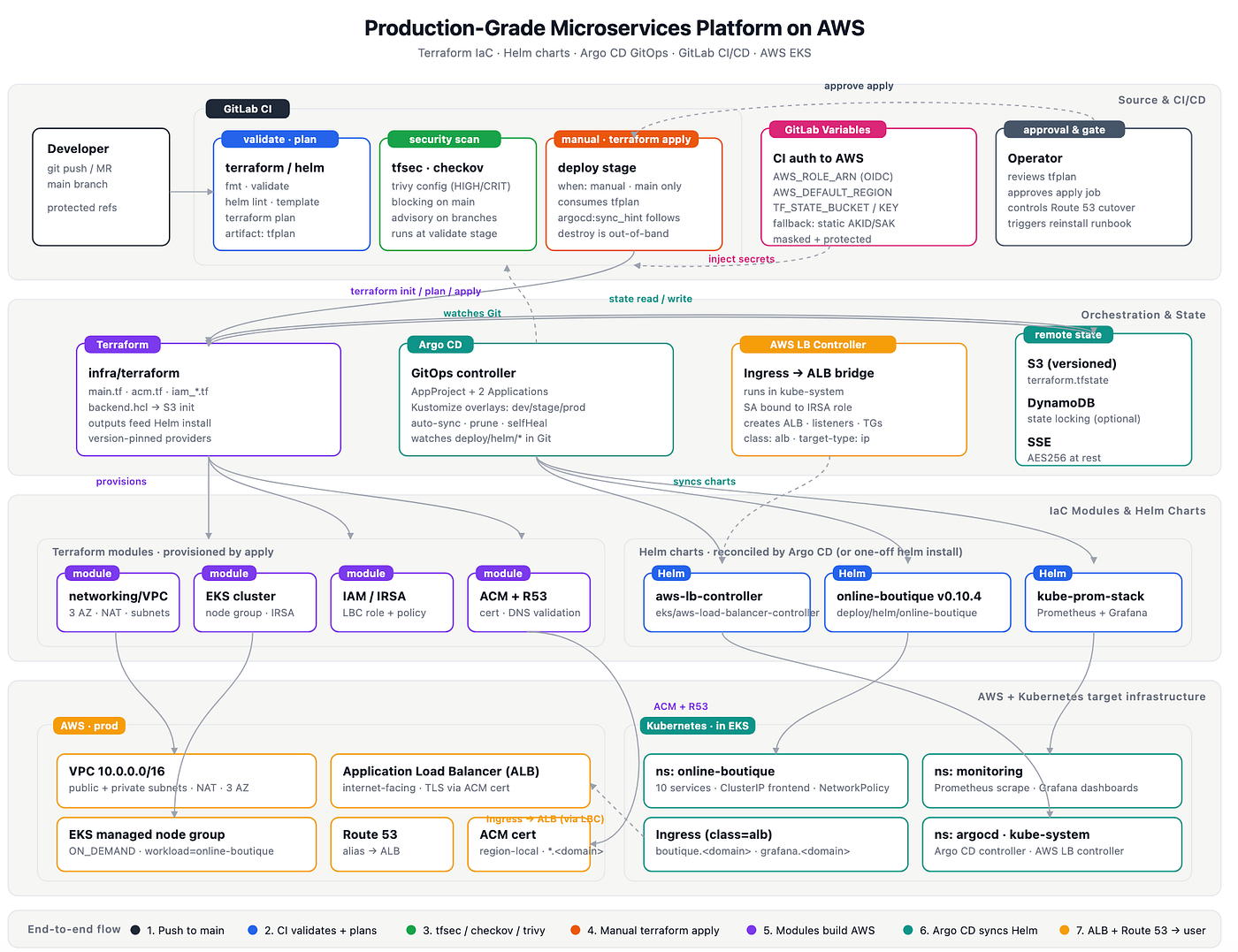
The AWS implementation uses shared modules, Terragrunt stacks for each environment, a one-time bootstrap for remote state, and GitHub Actions promotion gates.

Each environment (dev, staging, prod) has a dedicated VPC and a separate Terraform state key within a single S3 bucket. Networking is provisioned first, with compute and databases referencing its outputs via Terraform dependencies.
Core Challenges
Environment isolation
Using a single terraform.tfstate file for all environments is high risk. An error in staging could impact production resources. The recommended approach is to separate state files by environment, with access protected by authentication and approval gates.
Configuration reuse Copying HCL between environments leads to drift and maintenance overhead. Changes to the base configuration must be duplicated across all environments. The solution is shared Terraform modules plus environment-specific variable layers.
Audit and control Manual resource creation or console changes bypass IaC and reduce traceability. Treat all changes as pull requests, enforce CI/CD checks, and log every deployment.
Secrets management Storing credentials in code or plaintext state files creates security risks. Use GitHub environment secrets and avoid committing sensitive data.
The Solution: Terragrunt + Terraform Modules
Terragrunt is a lightweight orchestration layer for Terraform. It reduces boilerplate by injecting backend configuration, managing dependencies, and validating inputs before Terraform runs.
Terraform modules package reusable components (networking, compute, databases) with clear input/output contracts.
Together, these tools support the following directory structure:
live/
├── root.hcl                       # Shared backend + provider config
├── dev/
│   ├── env.hcl                    # Dev environment variables
│   ├── networking/terragrunt.hcl
│   ├── compute/terragrunt.hcl
│   └── databases/terragrunt.hcl
├── staging/                       # Same structure
└── prod/                          # Same structure

modules/
├── networking/                    # VPC, subnets, security groups
├── compute/                       # EC2/ASG-related resources
└── databases/                     # Database resources and policies
A single terragrunt.hcl in live/dev/networking/ can look like:
include "root" {
  path = find_in_parent_folders("root.hcl")
}

locals {
  env = read_terragrunt_config(find_in_parent_folders("env.hcl")).locals
}

terraform {
  source = "../../../modules/networking"
}

inputs = {
  name_prefix          = local.env.name_prefix
  region               = local.env.region
  vpc_cidr             = local.env.vpc_cidr
  public_subnet_cidrs  = local.env.public_subnet_cidrs
  private_subnet_cidrs = local.env.private_subnet_cidrs
  tags                 = local.env.tags
}
The root.hcl injects backend configuration once, and every stack inherits it:
remote_state {
  backend = "s3"
  config = {
    bucket         = "my-iac-state"
    key            = "${path_relative_to_include()}/terraform.tfstate"
    region         = "eu-central-1"
    dynamodb_table = "iac-state-locks"
    encrypt        = true
  }
}
This approach eliminates repetition, ensures consistent state management, and preserves clear dependencies.
CI/CD Gates: The Safety Net
Direct Terraform access to production introduces risk. Instead, use a three-stage CI/CD pipeline.
1. Validate & Plan (Automatic)
When a pull request opens, the CI pipeline runs:
# Format checks
terraform fmt -check -recursive
terragrunt hcl fmt --check

# Lint and security (this repo)
tflint --init && tflint --recursive
tfsec .
checkov -d . --framework terraform --baseline .checkov.baseline

# Plan for one environment (repeat per workflow strategy)
cd live/dev
terragrunt run-all plan --terragrunt-non-interactive
The plan output is posted as a PR comment. Reviewers see exactly what will be created, modified, or destroyed before the merge.
2. Merge & Approval (Manual)
Reviewers inspect the plan and approve if the changes are safe. After merging to main, an operator can manually trigger apply.
3. Apply & Gates (Gated)
The deployment pipeline requires environment approvals for staging and production. Only designated approvers can sign off, and all deployments are logged.
# .github/workflows/iac-apply.yml (simplified)
on:
  workflow_dispatch:
    inputs:
      environment:
        type: choice
        options: [dev, staging, prod]

jobs:
  apply:
    uses: ./.github/workflows/_terragrunt-run.yml
    with:
      deployment_environment: ${{ github.event.inputs.environment }}
      working_directory: live/${{ github.event.inputs.environment }}
      terragrunt_command: terragrunt run-all apply --terragrunt-non-interactive
The reusable runner assumes an IAM role via OIDC, so no long-lived access keys are stored in GitHub.
Remote State on AWS
AWS uses S3 + DynamoDB:
s3://my-iac-state/
├── dev/networking/terraform.tfstate (locked by DynamoDB)
├── dev/compute/terraform.tfstate
├── staging/...
└── prod/...
DynamoDB provides state locking to prevent concurrent writes.
Key features:
- Encryption at rest (SSE-S3) and TLS in transit
- S3 versioning for rollback
- DynamoDB locking for safe concurrent operations
State isolation by environment and stack prevents one team’s mistakes from affecting another.
Real-World Workflow
Initial Setup
git clone https://github.com/btilki/aws-multi-env-iac.git
cd aws-multi-env-iac

# One-time bootstrap: provision state backend
cp bootstrap/terraform.tfvars.example bootstrap/terraform.tfvars
# Edit bucket/table names; align live/root.hcl values
make bootstrap-init bootstrap-plan bootstrap-apply

export TF_VAR_db_password='...'
make tg-init-dev tg-plan-dev
Making Changes
git checkout -b feat/expand-dev-vpc

# Edit live/dev/env.hcl (for example: vpc_cidr)
make tg-plan-dev

git add live/ modules/
git commit -m "feat: expand dev VPC"
git push origin feat/expand-dev-vpc

# CI runs validate/plan on PR; review output
# Merge to main; apply dev via workflow or make target
# Promote to staging/prod with GitHub Environment approvals
Drift Detection
If infrastructure changes outside IaC, scheduled drift workflows catch it:
terragrunt run-all plan --terragrunt-non-interactive
# Non-empty drift plan -> investigate and reconcile through Git
Security Baseline
Use documented security controls and governance checks (for example, baseline policies and repository security guidance) and keep them versioned with the codebase.
Key Takeaways
- Terragrunt eliminates boilerplate by injecting backend and provider config once, reducing repetition and errors.
- Separate state per environment prevents one team’s mistakes from affecting others.
- CI/CD gates replace manual deployments with automated validation, planning, and approval workflows.
- OIDC to AWS avoids long-lived credentials in GitHub.
- Drift detection catches surprise changes and brings them back under IaC control.
Getting Started
Repository docs:
docs/README.md— documentation indexdesign.md— as-built designonboarding/runbook.md— deployment runbook
Clone https://github.com/btilki/aws-multi-env-iac, adapt it to your organization, and apply the pattern so infra changes stay auditable, repeatable, and safe.
메타데이터
- post_id
- 338fccc9e41a
- slug
- multi-environment-infrastructure-as-code-on-aws-338fccc9e41a
- url
- https://medium.com/@btilki/multi-environment-infrastructure-as-code-on-aws-338fccc9e41a
- canonical_url
- https://medium.com/@btilki/multi-environment-infrastructure-as-code-on-aws-338fccc9e41a
- author_url
- https://medium.com/@btilki
- status
- ok
- fetched_at
- 2026-06-10 22:22:12