Evaluating Small Local LLMs for Spatial Tasks in Blender
The primary objective of this experiment was to evaluate the efficacy of small, localized large language models (LLMs) in delivering…
Evaluating Small Local LLMs for Spatial Tasks in Blender
The primary objective of this experiment was to evaluate the efficacy of small, localized large language models (LLMs) in delivering spatial intelligence for lightweight 3D scene generation. By shifting processing away from cloud-based architectures, this approach aims to eliminate cloud inference latency and associated operational costs while maintaining functional rendering capabilities.
This experiment was guided by an operating-value-first approach:
- Can this run reliably on local hardware?
- Is the quality good enough for business workflows?
- Is the cost profile sustainable for teams that need frequent iteration?
This test was designed to answer those questions with a concrete use case: generating a small Blender scene through natural language using Blender MCP and llama.cpp.
Why This Test Matters
Most teams default to larger hosted models for generative tasks. That works, but it comes with recurring inference costs, data transfer concerns, and latency variability.
For many data-driven applications, especially internal tools and workflow automation, the requirement is not “maximum benchmark intelligence.” The requirement is usually:
- consistent task completion,
- low marginal cost,
- acceptable quality,
- and tight feedback loops.
That is exactly where small local models can shine.
Test Objective
I focused on a narrow but relevant capability: spatial reasoning for a simple 3D instruction.
Prompt used:
“Create a scene with two balls stacked on each other, one red and one green, in a studio environment.”
The objective was not artistic perfection. It was instruction-following quality under local inference constraints.
Stack I Used
- Local machine: Apple Silicon M2 Pro
- LLM runtime: llama.cpp via llama-server
- Blender orchestration: Blender MCP server over HTTP
- UI: local chat interface at http://127.0.0.1:8080/
Reference implementation details: https://projects.blender.org/lab/blender_mcp/wiki/Llama.cpp
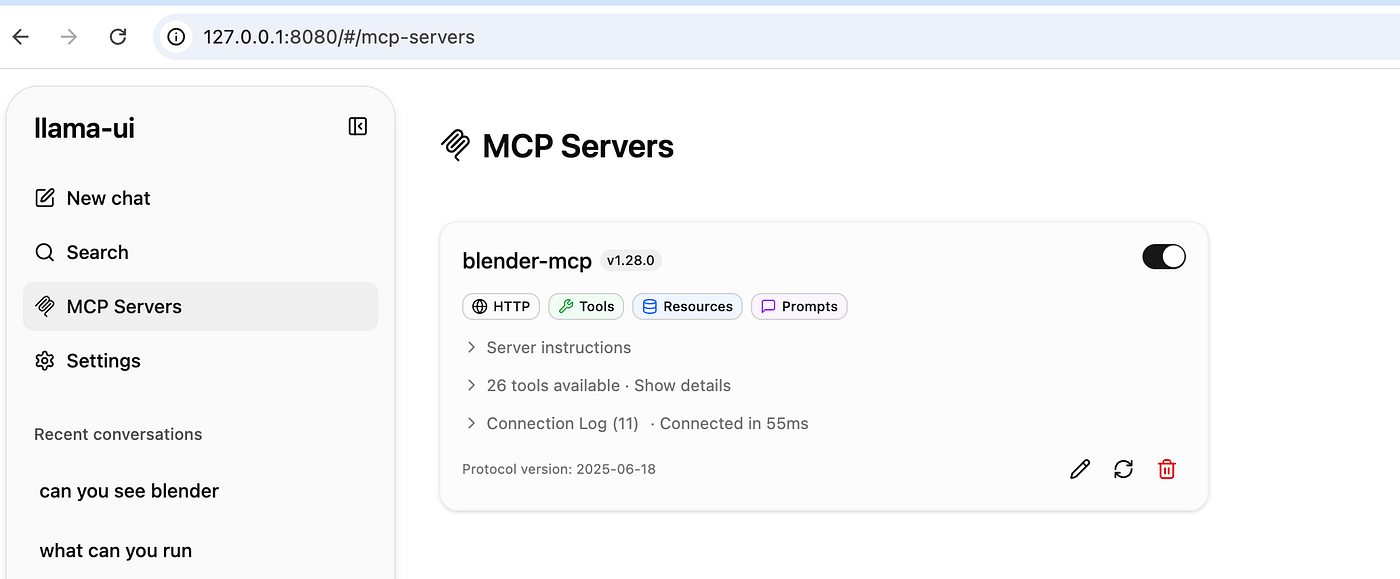
Image By Author
Architecture Overview
The interaction loop is straightforward:
- User sends natural-language instruction in the chat UI.
- Blender MCP enriches the prompt with Blender context.
- Request is sent to local llama-server.
- The model returns a text or code response.
- MCP executes Blender actions through
bpy. - Scene updates appear in Blender.
Core components and ports:

Gemma 4 12B (quantized):
llama-server -m ~/.lmstudio/models/lmstudio-community/gemma-4-12B-it-QAT-GGUF/gemma-4-12B-it-QAT-Q4_0.ggufGPT-OSS 20B:
llama-server -m ~/.lmstudio/models/lmstudio-community/gpt-oss-20b-GGUF/gpt-oss-20b-MXFP4.ggufRun Blender MCP server:
uv --directory $HOME/blender_mcp/mcp run blender-mcp --transport http --port 9191Then open:
http://127.0.0.1:8080/Models Compared
- Gemma 4 12B (Q4)
- Nemotron-3-Nano-Omni-30B-A3B-Reasoning (Q4_K_M)
- GPT-OSS 20B (MXFP4)
Example conversation interface:

Image by Author
Gemma 4 output:

Image by Author
Nemotron output:

Image by Author
GPT-OSS output:

Image by Author
What I Observed
In this specific scene-generation task, Gemma 4 quantized produced the most faithful result to the prompt and completed faster than the other two models.
This is noteworthy because larger parameter counts did not automatically translate into better outcomes for this workflow. For practical deployment decisions, that matters.
Takeaway: Where Small Models Fit
From a portfolio perspective, this supports a useful strategy:
- Use small local models for bounded, repetitive, data-driven tasks.
- Reserve larger hosted models for edge cases requiring broader reasoning depth.
In other words, model selection should be use-case and economics first, not parameter-count first.
For teams building data products, small local models are especially compelling when you need:
- high-frequency execution,
- predictable spend,
- data locality,
- and fast experimentation cycles.
That combination can unlock real operational leverage.
Practical Troubleshooting Note
If the chat UI throws a ServiceWorker registration error, the most common issue is that one of the required services is not up yet.
Quick checks:
lsof -i :8080
lsof -i :9191
lsof -i :8000
If needed, restart servers, wait a few seconds for initialization, then hard-refresh the browser.
Final Thoughts
This was a small test, but it demonstrates a broader point: compact local LLMs are increasingly viable for structured, workflow-centric AI applications.
This means we can design systems that are both intelligent and economically scalable, without assuming that “bigger model” is always the right default.
Note: This article was written while vacating in 45 C weather in the dear historic city of Peshawar, compared with 19 C back home in Kronoberg, Sweden.
메타데이터
- post_id
- 33e9d8b96db0
- slug
- evaluating-small-local-llms-for-spatial-tasks-in-blender-33e9d8b96db0
- url
- https://medium.com/illumination/evaluating-small-local-llms-for-spatial-tasks-in-blender-33e9d8b96db0
- canonical_url
- https://medium.com/illumination/evaluating-small-local-llms-for-spatial-tasks-in-blender-33e9d8b96db0
- author_url
- https://medium.com/@imrankhanbangash
- status
- ok
- fetched_at
- 2026-07-18 16:14:08