⚙️ Implementing ALB in a Three-Tier Architecture: A DevOps Guide to Smart Traffic Distribution
“In scalable architectures, traffic management is not a feature — it’s the foundation.”
⚙️ Implementing ALB in a Three-Tier Architecture: A DevOps Guide to Smart Traffic Distribution
“In scalable architectures, traffic management is not a feature — it’s the foundation.”
As a Senior DevOps/SRE Engineer, I’ve designed and deployed several production-grade infrastructures. One of the most critical components in scalable, secure, and maintainable systems is the Application Load Balancer (ALB). In this blog, I’ll show you how to implement ALB in a three-tier architecture, route traffic intelligently, and make use of listeners, rules, and target groups to create a resilient application delivery framework.
🏗️ What is a Three-Tier Architecture?
A three-tier architecture splits your application into three layers:
- Presentation Layer (Web Tier)
- React, Angular, or static HTML/CSS/JS
- Runs on EC2, S3, or containerized services
2. Application Layer (App Tier)
- Backend services (e.g., Node.js, Python, Java)
- Exposes REST or GraphQL APIs
3. Data Layer (DB Tier)
- Databases like MySQL, PostgreSQL, or MongoDB
💡 Only the Web and App tiers are exposed to ALB. The database tier is internal and accessed by app servers only.
🎯 Goal
Implement an Application Load Balancer that:
- Listens on HTTP/HTTPS
- Routes traffic to Web Tier or App Tier based on path or host
- Uses target groups for scalable backend management
- Integrates health checks and SSL termination
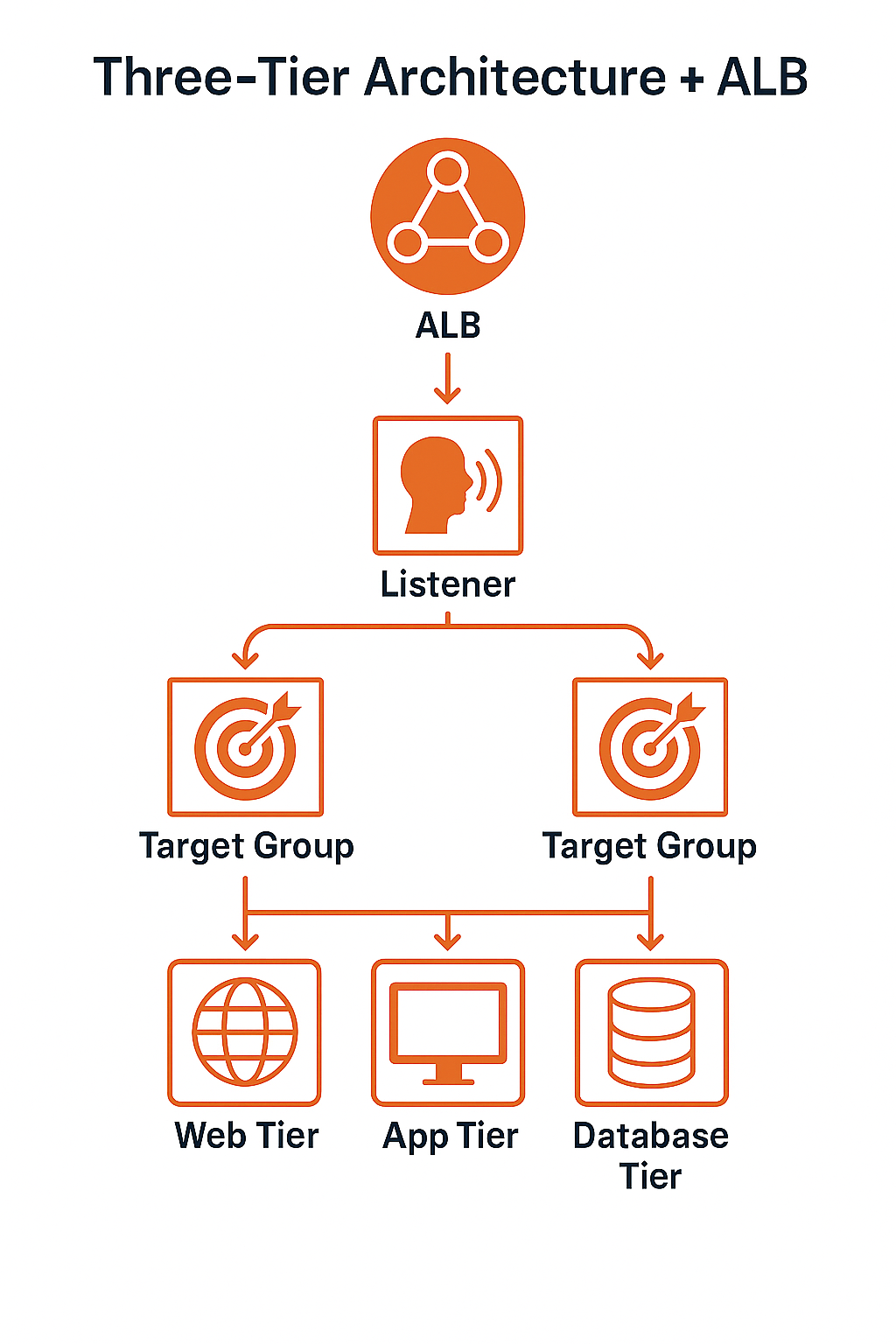
🧭 Architecture Overview
                    +--------------------------+
                    |      Client (Browser)    |
                    +------------+-------------+
                                 |
                        HTTPS (443) / HTTP (80)
                                 |
                    +------------v-------------+
                    |   Application Load Balancer (ALB)  |
                    +------------+-------------+
                                 |
       +-------------------------+-------------------------+
       |                         |                         |
+------v------+         +--------v--------+        +-------v------+
| Web Target  |         |  App Target     |        |  Default TG  |
| Group (EC2) |         | Group (ECS/EC2) |        | (404 page)   |
+-------------+         +-----------------+        +--------------+
🔑 Key Components
🔹 1. Listeners
- ALB listens on port 80 (HTTP) and 443 (HTTPS)
- Redirects HTTP → HTTPS
- Defines routing rules
listener {
  port     = 443
  protocol = "HTTPS"
  ssl_policy = "ELBSecurityPolicy-2016-08"
  certificate_arn = "arn:aws:acm:..."
}
🔹 2. Listener Rules
Define how traffic is routed.
Example:
# If path starts with /api → App Tier
condition {
  path_pattern {
    values = ["/api/*"]
  }
}
action {
  type             = "forward"
  target_group_arn = aws_lb_target_group.app_tg.arn
}

# If host is www.example.com → Web Tier
condition {
  host_header {
    values = ["www.example.com"]
  }
}
action {
  type             = "forward"
  target_group_arn = aws_lb_target_group.web_tg.arn
}
🔹 3. Target Groups
Each backend tier (web or app) has its own target group:
resource "aws_lb_target_group" "web_tg" {
  name     = "web-tg"
  port     = 80
  protocol = "HTTP"
  vpc_id   = var.vpc_id

  health_check {
    path = "/"
    matcher = "200"
  }
}
resource "aws_lb_target_group" "app_tg" {
name = "app-tg"
port = 8080
protocol = "HTTP"
vpc_id = var.vpc_id
health_check {
path = "/health"
matcher = "200-399"
}
}🚀 Deployment Strategy
- Create Target Groups
web-tg: points to EC2 with Nginx/Reactapp-tg: points to backend service (ECS/EC2)
2. Launch EC2 or ECS instances
- Register them to target groups
3. Provision ALB
- Attach security groups (allow HTTP/HTTPS)
- Enable access logs for observability
4. Configure Listeners & Rules
- Path-based (
/api/*) → App - Host-based (
www.example.com) → Web
5. Enable SSL with ACM
- SSL termination at ALB
- Backend traffic stays HTTP (for performance)
🔍 Example Terraform Snippet (Simplified)
module "alb" {
  source  = "terraform-aws-modules/alb/aws"
  name    = "three-tier-alb"
  vpc_id  = var.vpc_id
  subnets = var.public_subnets

  listeners = [
    {
      port     = 443
      protocol = "HTTPS"
      ssl_policy = "ELBSecurityPolicy-2016-08"
      certificate_arn = var.certificate_arn

      rules = [
        {
          priority = 1
          actions = [{
            type               = "forward"
            target_group_index = 0
          }]
          conditions = [{
            path_pattern = ["/api/*"]
          }]
        },
        {
          priority = 2
          actions = [{
            type               = "forward"
            target_group_index = 1
          }]
          conditions = [{
            host_header = ["www.example.com"]
          }]
        }
      ]
    }
  ]

  target_groups = [
    {
      name_prefix = "web"
      backend_protocol = "HTTP"
      backend_port     = 80
    },
    {
      name_prefix = "app"
      backend_protocol = "HTTP"
      backend_port     = 8080
    }
  ]
}
📈 Benefits of This Setup
✅ Scalable Each tier can scale independently based on load.
✅ Secure SSL is terminated at the ALB; DB tier is never exposed.
✅ Maintainable Rules and target groups make it easy to isolate and debug issues.
✅ Flexible Path or host-based routing allows you to expand to multiple microservices or subdomains easily.
📚 Observability & Monitoring
- Enable ALB access logs → Store in S3
- Use CloudWatch to monitor:
HTTPCode_Target_5XX_CountTargetResponseTime- Integrate with Prometheus/Grafana using exporters for ECS/EC2 metrics
🎯 Final Thoughts
The ALB is more than a traffic router — it’s the backbone of application delivery in the cloud. In a three-tier architecture, it becomes your front-line gatekeeper, security enforcer, and traffic balancer. Whether you’re building monoliths, microservices, or a mix of both, learning how to wield ALB effectively is a must-have DevOps/SRE skill.
메타데이터
- post_id
- 347f0efed7de
- slug
- ️-implementing-alb-in-a-three-tier-architecture-a-devops-guide-to-smart-traffic-distribution-347f0efed7de
- url
- https://medium.com/@kirann.bobby/%EF%B8%8F-implementing-alb-in-a-three-tier-architecture-a-devops-guide-to-smart-traffic-distribution-347f0efed7de
- canonical_url
- https://medium.com/@kirann.bobby/%EF%B8%8F-implementing-alb-in-a-three-tier-architecture-a-devops-guide-to-smart-traffic-distribution-347f0efed7de
- author_url
- https://medium.com/@kirann.bobby
- status
- ok
- fetched_at
- 2026-06-09 15:37:30




