Good vs Bad Devin Instructions: Real Examples of What Works (and What Burns Your ACUs)
Writing the wrong kind of prompt to Devin isn’t just ineffective — it’s expensive. Here’s how to tell the difference before you hit send.
Good vs Bad Devin Instructions: Real Examples of What Works (and What Burns Your ACUs)
Writing the wrong kind of prompt to Devin isn’t just ineffective — it’s expensive. Here’s how to tell the difference before you hit send.
You open Devin, you’ve got a task in mind, and you type something like: “Clean up the codebase a bit.” You hit enter and go make coffee. When you come back, Devin has done something — renamed some variables, reformatted a few files, maybe refactored a function you weren’t thinking about — but it’s not what you needed, and you’ve spent an hour of Devin’s compute time finding that out.
That scenario plays out a lot for developers new to Devin. The problem isn’t the tool — it’s the instruction. And because Devin bills by ACUs (Agent Compute Units), where one ACU represents roughly 15 minutes of active compute work, a vague prompt doesn’t just produce bad results: it burns real money on the wrong outcome.
Day 7 of my #45DayDevinChallenge is all about instruction quality. Specifically: what separates prompts that get reliable, reviewable results from the ones that send Devin off on a well-intentioned but expensive detour.
Why Instructions Matter More With Devin Than With Other Tools
With a code assistant like GitHub Copilot or Cursor, you’re sitting right there in the loop. If an autocomplete suggestion goes sideways, you just ignore it. The feedback loop is instant and the cost of a bad suggestion is zero.
Devin is different. It’s an autonomous agent — it plans, executes, writes code, runs tests, and iterates across a multi-step session without you in the loop. That means the quality of your initial instruction determines the trajectory of the entire session. There’s no steering wheel to grab partway through (well, there is — you can interrupt and redirect — but that itself costs time and ACUs).
Think of it like briefing a contractor who’s going to build something while you’re offline. If you hand them a napkin sketch and say “build something like this,” you might come back to something structurally sound but completely wrong for your use case. If you give them blueprints, material specs, and inspection checkpoints, you get exactly what you needed.
The Anatomy of a Bad Instruction
Bad Devin instructions share a few common traits. They’re vague about what to do, silent about where to look, and offer no way for Devin to verify it’s done.
Here are real categories of poor instructions, with examples:
Too Vague
Make the app faster.Improve our database's performance.Improve the onboarding flow.These instructions tell Devin what you want to achieve but give it zero signal about how to get there. Devin will make a plan — it always does — but that plan will be based on guesswork about what “faster” means to you, which query you’re worried about, and which step in the onboarding is broken. It might choose the right thing, or it might spend 2 ACUs optimizing something that wasn’t the bottleneck.
Missing File Context
Fix the login bug.The checkout page is broken. Can you fix it?Without file paths or function names, Devin has to search the codebase first. That search itself takes time. And it might find multiple places that could be “the login bug” — a session handler, a redirect logic, a token validator — and pick the wrong one.
No Acceptance Criteria
Refactor the payment module.Add better error handling.What does “done” look like here? Devin can’t know without you telling it. It’ll apply changes it thinks are reasonable, open a PR, and wait — but you’ll be staring at a diff wondering whether the right errors are now handled, whether tests cover the new behavior, and whether the behavior matches your system’s conventions.
Over-Scoped for a Single Session
Migrate our entire API to use async/await, add TypeScript types everywhere, and clean up unused dependencies.This isn’t a task — it’s a project. Devin will start, make progress, hit ambiguities, and either stall or make decisions you’d want to weigh in on. Multi-step migrations need to be broken into verifiable chunks, each with its own session and acceptance criteria.
The Anatomy of a Good Instruction
Good Devin instructions have three things: specificity about the what, context about the where, and criteria for the done.
Here’s how those same bad examples get rewritten:
Specific + Scoped
Optimize the `getOrderDetails` query in `src/services/orderService.js` by adding
a composite index on the `order_id` and `product_id` columns in the `order_items`
table. The query currently takes ~800ms on orders with more than 50 line items.
Target is under 100ms.
The login flow is failing when a user's session token expires mid-session. The
issue is in `src/auth/sessionHandler.ts` around line 142 — `validateToken()`
returns null instead of throwing, and the calling code doesn't handle null. Fix
the null case so it redirects to /login with an appropriate flash message.These give Devin a starting point, a target, and a way to measure success. It doesn’t have to guess.
Includes Verification Steps
Refactor the state management in `src/components/Header.tsx` to use React's
`useReducer` hook instead of multiple `useState` calls. Keep the existing
behavior identical — all the same UI states should still work. After refactoring,
run `npm test src/components/Header.test.tsx` and make sure all tests pass before
opening a PR.
The last sentence is critical. Telling Devin to run its own tests before surfacing a PR is the single highest-leverage addition you can make to any instruction. It turns Devin into a self-checking agent instead of one that submits untested work.
Links to References When Needed
Add Stripe webhook support to `src/routes/payments.js` following the official
Stripe webhook verification guide at https://stripe.com/docs/webhooks/best-practices.
Handle `payment_intent.succeeded` and `payment_intent.payment_failed` events.
Log both to our existing logger at `src/utils/logger.js`. Include a test in
`tests/payments.test.js` that mocks the Stripe signature header.
When Devin needs to integrate with an external API or follow a standard, giving it the exact documentation URL saves it the search time and ensures it’s reading from the authoritative source, not a Stack Overflow answer from 2021.
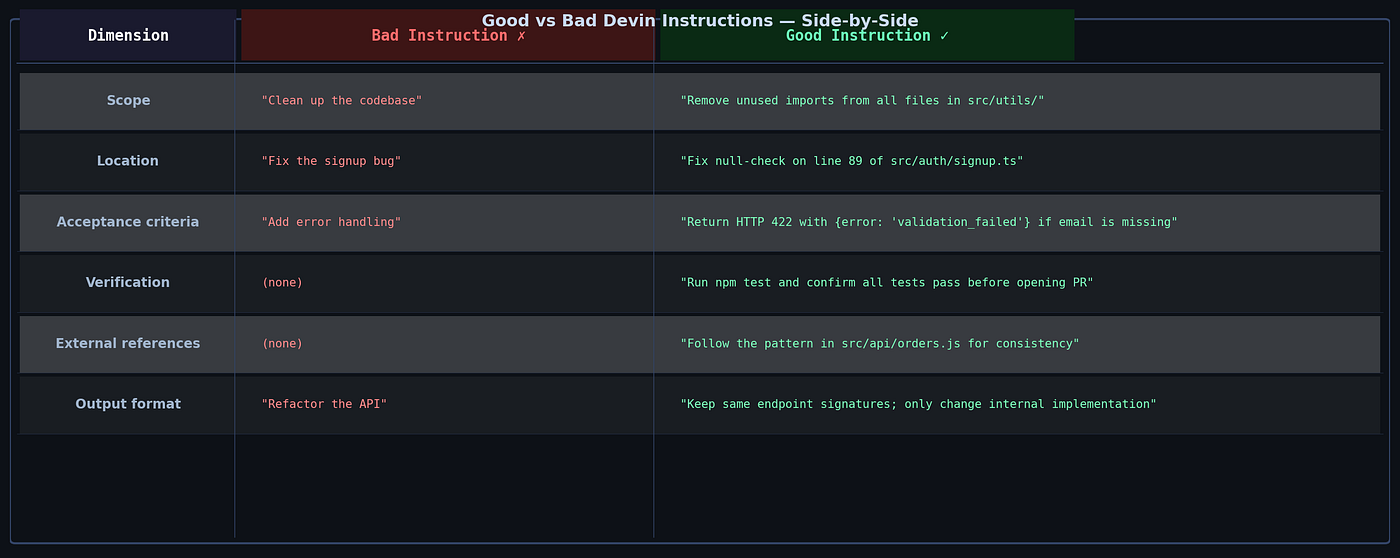
A Side-by-Side Comparison
Five Rules for Instructions That Don’t Waste ACUs
1. Name the file, not just the feature. If you know which file contains the problem, say so. src/components/UserProfile.tsx is worth ten times "the user profile component."
2. Define done before Devin starts. If you can’t describe what success looks like in two sentences, your task isn’t ready to delegate. Spend five minutes writing the acceptance criteria and you’ll save thirty minutes of confused Devin output.
3. Tell Devin how to verify. Always include a verification step: run the test suite, check an API response, load the page and confirm a behavior. This is the difference between a PR you can merge and one you have to unpack.
4. Break big tasks into small checkpoints. Each major phase of a complex task should be its own session. Migrate one endpoint, test it, then move to the next. This keeps sessions focused, makes failures obvious, and lets you course-correct early — before 5 ACUs are committed to the wrong direction.
5. Point Devin at examples. Whether it’s a reference file in your own codebase or an official documentation URL, examples dramatically reduce ambiguity. “Follow the pattern in src/api/orders.js" is one of the most powerful phrases you can add to a Devin prompt.
The Gotchas That Trip People Up
“But it’s obvious what I mean.” It’s obvious to you — you have context. Devin doesn’t. It has your instruction, the codebase, and whatever you’ve put in the knowledge base. Assume zero context and write accordingly.
“I’ll just iterate.” Iteration is fine, but each failed or misdirected session still costs ACUs. Front-loading clarity is almost always more efficient than fix-and-rerun cycles.
“I gave it a good prompt last time.” Instructions don’t carry over between sessions unless you put them in a Playbook or the knowledge base. Each session starts fresh. If you have a repeating task, invest in a Playbook (Day 9 covers this) so you write the good prompt once.
“Devin asked me a clarifying question — should I just say yes?” Read it carefully. Sometimes Devin’s clarifying questions reveal that the task is more ambiguous than you thought, and answering with more specificity will produce a much better result than “yes, sounds good.”
Conclusion
The most expensive mistake you can make with Devin isn’t giving it a hard task — it’s giving it an ambiguous one. Devin is remarkably capable when it knows exactly what you want and has a way to check its own work. When it doesn’t, it does its best with what it has, and “its best” under uncertainty often isn’t what you needed.
The pattern is simple: name the location, define the behavior, specify the acceptance criteria, and always include a verification step. Do that consistently and you’ll find that most sessions complete cleanly on the first try — and your ACU budget goes a lot further than you’d expect.
Tomorrow (Day 8): Knowledge Base — how to teach Devin your conventions once so you don’t have to repeat yourself in every prompt.
This is Day 7 of my 45-day Devin AI learning series. If you’re following along, I’d love to hear what instruction patterns have worked — or spectacularly failed — in your own sessions.
메타데이터
- post_id
- 348d71dbc492
- slug
- good-vs-bad-devin-instructions-real-examples-of-what-works-and-what-burns-your-acus-348d71dbc492
- url
- https://medium.com/@nitinmatani22/good-vs-bad-devin-instructions-real-examples-of-what-works-and-what-burns-your-acus-348d71dbc492
- canonical_url
- https://medium.com/@nitinmatani22/good-vs-bad-devin-instructions-real-examples-of-what-works-and-what-burns-your-acus-348d71dbc492
- author_url
- https://medium.com/@nitinmatani22
- status
- ok
- fetched_at
- 2026-06-09 15:37:30






