Java OCP 17 Certification: Introduction to Java and OOP — 2024
Explore the fundamentals of Java for certification: acronyms, classes, objects, and more in this essential article for beginner developers.
Java OCP 17 Certification: Introduction to Java and OOP — 2024
Introduction
First of all, I need to inform you that this article is the third in a series that I started over a month ago. To ensure we’re all on the same page, I recommend reading it.
If you want to read the previous article, access this link.
In this article, we will start the content that will be covered by the exam, getting to know basic and essential aspects for those who are preparing for this certification. The topics covered will include:
- Essential Java Acronyms: Presentation of the main acronyms related to the Java environment;
- Class: Basic and initial knowledge about the function and use of classes;
- Object: Techniques and recommended practices to solidify the acquired knowledge;
- Attribute: Understanding what a variable is and when to use it;
- Method: Understanding what a method is and when to use it;
- Package: Introduction to the use and function of packages;
- Syntax: Presentation of Java syntax aimed at the use of comments;
- Reserved Words: List of all the reserved words that will be presented throughout the article with their respective meanings.
The Java Environment — Main Acronyms
Some acronyms are very common when using Java as a programming language. The following are essential to set up an environment capable of executing and compiling Java code.
JDK — Java Development Kit
It consists of a Java development kit, containing commands and libraries necessary to produce, compile, and execute Java code.
Some commands are:
- javac — Represents the Java compiler, used to convert files with the .java extension into files with the .class extension. Documentation of the javac command.
javac Sample.java- java — Represents the command for executing Java code. It is used to run an application written in Java. Documentation of the java command.
jar cvf Exemplo.jar *- javadoc — Represents a documentation generator based on Java code. It is used to generate HTML pages based on comments and the implemented code.
javadoc *.javaClass
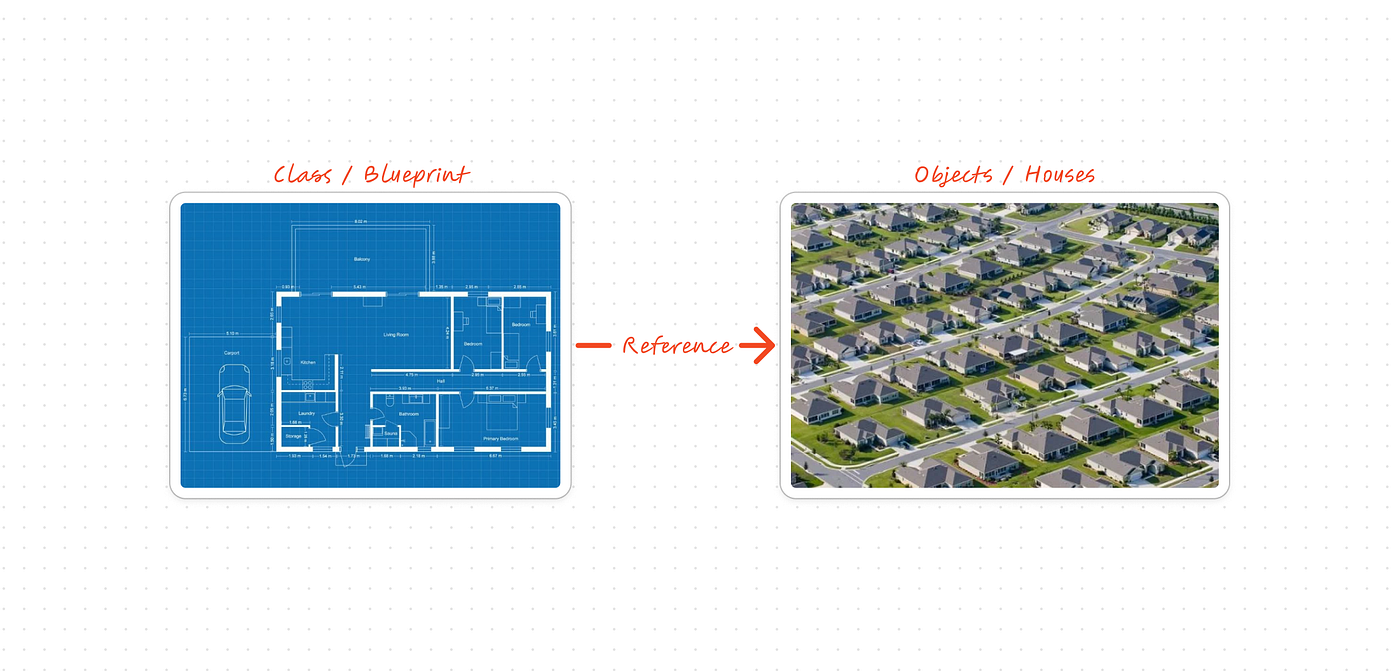
A class essentially consists of a file with Java code. Classes are composed of attributes and methods, which are also known respectively in other languages as variables and functions.
Classes serve to create objects. Java follows the Object-Oriented Programming paradigm. Therefore, almost everything in Java is an object.
By making a simple analogy, a class is like a kind of mold (in the sense of actual metal plates, for making cookies, for example). They serve to define what the characteristics and behaviors of something will be.
Image generated with DALL-E
Object
Objects, in turn, are instances of a class. But, in this case, what would an instance be?
In a very abstract yet technical manner, an instance consists of a space allocated in the computer’s memory, this allocated space is used to concretely represent what was defined in the class.
Based on the previous analogy where classes are like cookie cutters, the objects would then be the cookies themselves.
For the cookies to actually exist, they need to allocate some space in the universe.
Image generated with DALL-E
Attribute
An attribute is the same as a variable. Attributes are used to store a value/state of something that characterizes an object.
To complement the analogy I previously made with molds and cookies, some attributes for the Cookie class would be:
- Flavor;
- Shape;
Method
A method is the same as a function. Methods are used to represent behaviors in a class. Such behaviors tend to involve changes in the attributes.
Each method can be defined through the use of some verb. For example, in the analogy we made earlier, what would be a method of the Cookie class?
We can define it as the verb “break,” after all, a cookie can break.
The “break” method will be responsible for precisely changing the attribute we also defined for this Cookie class, which will be the Shape attribute. After using the “break” method, we would have the alteration of the attribute’s value, going from “Dolphin” to “Broken”.
Image generated with DALL-E
Package
Java organizes itself based on various packages, which function like several folders, much like how it works on your own computer. To use a class that has been created by someone else at some point, it will be necessary to import that class into your code, and in this case, it will also be important to know where this class is located.
When creating an original class, it is also necessary to inform where in the world it can be found, hence, the website convention is used to define the package. In this case, the website is informed in reverse.
Suppose there is my site caiocv18.com.br (it’s not up yet, maybe soon haha). In this case, the package we would define for one of my original classes would be “br.com.caiocv18”.
This package would follow the following folder hierarchy:
br
|__com
   |__caiocv18
      -MyClass.java
Despite this website convention for defining packages, in the exam, there will be packages that do not follow it.
package
A reserved word used to define a package. It allows any number or letter to be used in the nomenclature, separating child packages by the character ..
It is necessary that the package definition be on the very first line of the file.
package br.com.caiocv18

public class MyClass{
  // Class code here
}
import
A reserved word used to import existing packages.
The character * is a wildcard used to import all the classes that belong to the package (it does not import classes within subpackages below).
It is necessary that the import is below the package definition line.
package br.com.caiocv18

import java.util.*
import java.util.ArrayList

public class MinhaClasse{
  // Class code here
}
Using an import for each class can be better in some cases because it details more explicitly which class is being used from the package.
There is a special package in the Java world called “java.lang.” This package is special because it is automatically imported. You can type this package in an import declaration, but you don’t need to.
It’s also not necessary to import classes that belong to the same package as the class you’re trying to import. The Java compiler automatically searches for classes within the same package.
Syntax for comments
This topic is not usually covered in the exam, but it’s important to know them, as they can be responsible for a compilation error.
//: Single-line comment;
//Example of a single-line comment/**/: Comments spanning multiple lines;
/*
* Comment across
* multiple lines
*//**: Comments using javadoc;
/**
* JAVADOC comments
* @param
* @author me
*/
Reserved words presented in this article
public= access modifier;new= used to instantiate a new object based on the constructor;class= used to represent a class;String= data type used to represent words (string of characters);void= empty, a return type, indicates that there is no return;static= static, indicates that it is not necessary to instantiate an object;return= used to signal what will be returned in a function;this= used within a method or constructor of a class, aiming to refer to the current instance of the object (yes, it’s a bit confusing to understand for now, but it will become clearer soon);package= used to define the class’s package;import= used to import classes into a file/class.
Conclusion
Thank you for reading this far, and I hope you enjoyed this third day of the journey diary towards certification. If you wish to continue following this journey, I invite you to follow me here on Medium and on other platforms:
My current goal is to publish an article per week (Wednesday or Friday night) and share it on all the above networks.
For the next article, I plan to cover the following topics:
- Constructors;
- Data types;
- Strings;
- Variables;
- Garbage collector.
Feel free to leave any comments, questions, or suggestions below, and see you in the next article! :)
메타데이터
- post_id
- 34a536682bb5
- slug
- java-ocp-17-certification-introduction-to-java-and-oop-2024-34a536682bb5
- url
- https://medium.com/@caiocv18/java-ocp-17-certification-introduction-to-java-and-oop-2024-34a536682bb5
- canonical_url
- https://medium.com/@caiocv18/java-ocp-17-certification-introduction-to-java-and-oop-2024-34a536682bb5
- author_url
- https://medium.com/@caiocv18
- status
- ok
- fetched_at
- 2026-06-17 14:04:09