[GCP] Cloud NAT — Dropped sent packets rate 해결방안
Cloud NAT는 외부 IP 주소가 없는 Google Cloud의 가상 머신(VM) 인스턴스, Google Kubernetes Engine(GKE) 클러스터, Cloud Run 서비스 등이 인터넷으로 아웃바운드(outbound) 통신을 할 수…
[GCP] Cloud NAT — Dropped sent packets rate 해결방안
Cloud NAT는 외부 IP 주소가 없는 Google Cloud의 가상 머신(VM) 인스턴스, Google Kubernetes Engine(GKE) 클러스터, Cloud Run 서비스 등이 인터넷으로 아웃바운드(outbound) 통신을 할 수 있도록 해주는 관리형 네트워크 주소 변환(Network Address Translation) 서비스입니다. https://cloud.google.com/nat/docs/overview
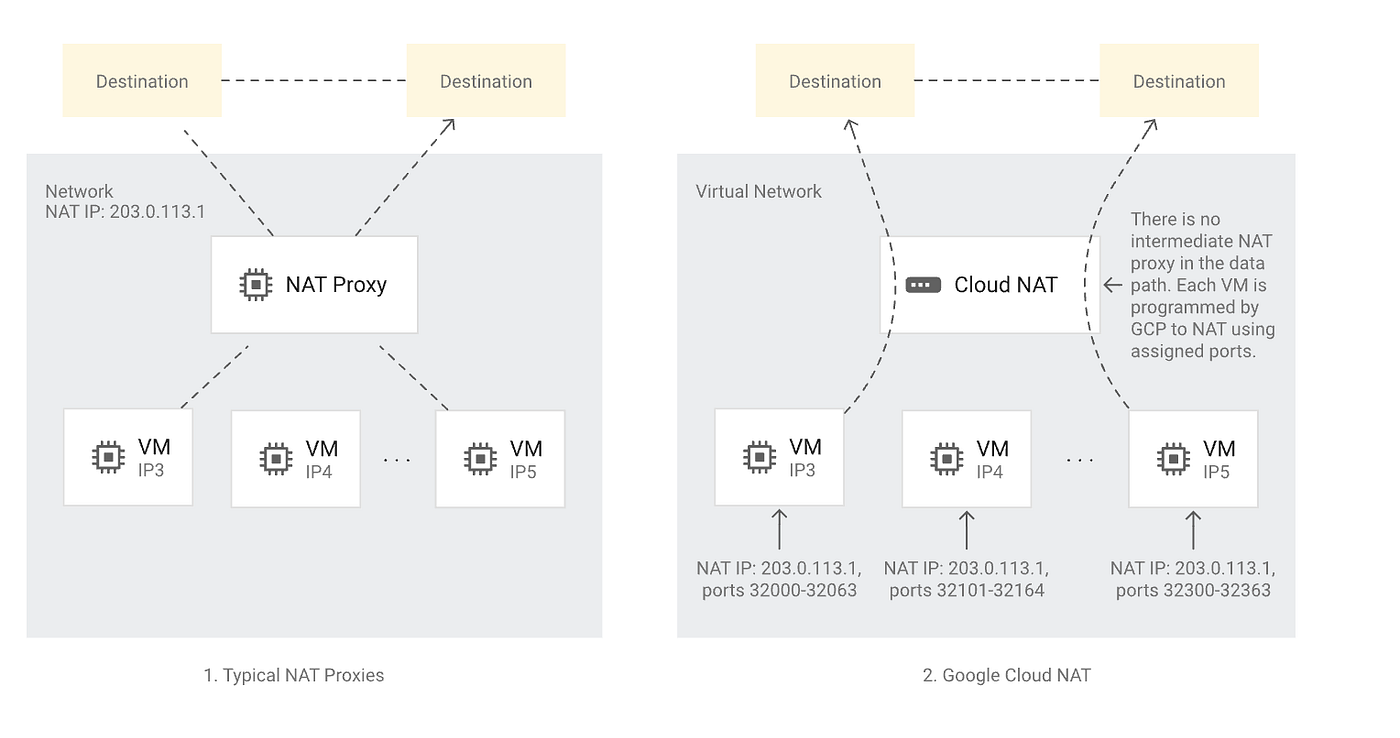
Typical NAT Proxies vs Google Cloud NAT
주요 특징은 다음과 같습니다:
소프트웨어 정의 및 분산형 관리 서비스: Cloud NAT는 프록시 VM이나 어플라이언스를 기반으로 하지 않습니다. Google의 Andromeda 소프트웨어 정의 네트워킹으로 구현되어 있으며, 네트워크 트래픽에 따라 수평 확장됩니다. 이로 인해 일반적으로 네트워크 병목 현상이 NAT에서 발생하는 경우는 흔하지 않습니다.
최근에 여러 고객으로부터 비슷한 유형의 NAT Packet drop 문의를 받아서 정리해보고자 합니다. 아래와 같이 Dropped sent packets rate 가 모니터링에서 발견된다고 연락이 왔습니다. 고객이 보기에 그렇게 많이 쓰지 않는 것 같은데, Port가 부족해보이니 원인을 알려달라고 하시네요. 어떤 고객은 심지어 NAT IP 를 추가해도 좋아지지 않는다고 합니다.

OUT_OF_RESOURCES / Dropped sent packets rate — Cloud Monitoring
조사해본 결과, 대부분의 고객들의 경우 Port Usage 가 60000개를 넘거나, Cloud NAT allocation errors 가 발생하지 않았습니다.

NAT allocation error가 발생하지도 않고, port Usage 가 꽉 차서 부족하지도 않았는데, NAT 의 out of resources 가 발생하고, packet drop이 발생한걸까요. 원인은 갑자기 spike 성으로 증가하는 port allocation 을 따라가지 못해서 발생하는 것으로 보입니다.
Cloud NAT 에서는 두가지의 방법으로 Port 를 할당합니다. 정확한 정보는 공식 홈페이지를 참고해주세요. https://cloud.google.com/nat/docs/overview
여기서 Google Cloud NAT 의 특이한 점은, VM 인스턴스당 최소 포트수를 할당한다는 겁니다. 일반적인 NAT instance 로 운영되는 다른 회사와 달리 완전한 SDN 으로 구성되다보니 생기는 차이점인 것 같습니다.
포트 할당 방법: Cloud NAT 게이트웨이를 생성할 때 정적 포트 할당(Static Port Allocation) 또는 동적 포트 할당(Dynamic Port Allocation) 중 하나를 선택할 수 있습니다. 게이트웨이 생성 후에도 포트 할당 방법을 변경할 수 있습니다.
- 정적 포트 할당: VM 인스턴스당 최소 포트 수를 지정하며, 모든 VM에 동일한 고정된 포트 수가 할당됩니다. VM의 이그레스 사용량이 비슷한 경우에 효율적이며, Public NAT의 기본 설정입니다. Endpoint-Independent Mapping(EIM)을 사용하려면 정적 포트 할당을 사용해야 합니다.
- 동적 포트 할당(DPA): VM 인스턴스당 최소 포트 수와 최대 포트 수를 지정합니다. VM 사용량을 기준으로 VM별로 다른 포트 수를 할당할 수 있으며, 초기에는 최소 포트 수가 할당되고 포트 소진 시 두 배로 증가합니다. Private NAT의 기본 설정입니다.
해결방법은 필요한 만큼 VM 인스턴스당 최소 포트수를 늘리면 해결이 됩니다. (min_ports_per_vm) 최소 포트수를 늘리면 VM 마다 port 를 미리 할당해놓기 때문에 갑자기 증가하는 상황에서 발생하는 packet drop 을 막을수 있습니다. 물론 NAT 를 사용하는 VM 이 많을 경우 최소 포트수를 너무 늘리면 또 다른 부족상황이 발생할수 있으니 참고해서 적용하시기를 추천드립니다.
min_ports_per_vm 개수에 따라서 급작스런 port allocation spike 에 대해서 packet drop이 없어지는지 테스트를 해봤는데요. 32->64–>4096–>8192–>16384 식으로 늘려가며 테스트 해본 결과 아래 보시는 바와같이 out_of_resource가 없어지는걸 확인할 수 있습니다.

min_ports_per_vm 증가 테스트 모니터링 결과
그럼 Dynamic Port Allocation 의 경우, 늘어 나는데 얼마나 걸리나 테스트를 해봤는데요. 아래와 같았습니다. 32-> 64로 늘어나는데 대략 10초 정도 걸리더라구요. 64->128 도 비슷하게 걸린것 같습니다. 간단하게 스크립트로 테스트한거니 참고만 해주세요.
[2025-08-08 02:12:23] Connection #32 successful
[2025-08-08 02:12:24] Connection #33 failed. Retrying...
[2025-08-08 02:12:25] Connection #33 failed. Retrying...
[2025-08-08 02:12:26] Connection #33 failed. Retrying...
[2025-08-08 02:12:27] Connection #33 failed. Retrying...
[2025-08-08 02:12:28] Connection #33 failed. Retrying...
[2025-08-08 02:12:29] Connection #33 failed. Retrying...
[2025-08-08 02:12:30] Connection #33 failed. Retrying...
[2025-08-08 02:12:31] Connection #33 failed. Retrying...
[2025-08-08 02:12:32] Connection #33 failed. Retrying...
[2025-08-08 02:12:33] Connection #33 failed. Retrying...
[2025-08-08 02:12:33] Connection #33 successful

[2025-08-08 02:12:33] Connection #63 successful
[2025-08-08 02:12:34] Connection #64 failed. Retrying...
[2025-08-08 02:12:35] Connection #64 failed. Retrying...
[2025-08-08 02:12:36] Connection #64 failed. Retrying...
[2025-08-08 02:12:37] Connection #64 failed. Retrying...
[2025-08-08 02:12:38] Connection #64 failed. Retrying...
[2025-08-08 02:12:39] Connection #64 failed. Retrying...
[2025-08-08 02:12:40] Connection #64 failed. Retrying...
[2025-08-08 02:12:41] Connection #64 failed. Retrying...
[2025-08-08 02:12:42] Connection #64 failed. Retrying...
[2025-08-08 02:12:42] Connection #64 successful
[2025-08-08 02:12:42] Connection #65 successful
[2025-08-08 02:12:42] Connection #66 successful
[2025-08-08 02:12:43] Connection #67 failed. Retrying...
[2025-08-08 02:12:43] Connection #67 successful
다음엔 포트 사용량을 확인하는 방법에 대해서 정리해보겠습니다.
메타데이터
- post_id
- 34b80d5589db
- slug
- gcp-cloud-nat-dropped-sent-packets-rate-해결방안-34b80d5589db
- url
- https://medium.com/@hyosukan/gcp-cloud-nat-dropped-sent-packets-rate-%ED%95%B4%EA%B2%B0%EB%B0%A9%EC%95%88-34b80d5589db
- canonical_url
- https://medium.com/@hyosukan/gcp-cloud-nat-dropped-sent-packets-rate-%ED%95%B4%EA%B2%B0%EB%B0%A9%EC%95%88-34b80d5589db
- author_url
- https://medium.com/@hyosukan
- status
- ok
- fetched_at
- 2026-06-24 16:30:55




