I Built a Clean Dashboard UI with Vue 3 + Vuetify 3 (Beginner-Friendly)
No complex setup. No overengineering. Just a clean dashboard — built step by step.
I Built a Clean Dashboard UI with Vue 3 + Vuetify 3 (Beginner-Friendly)
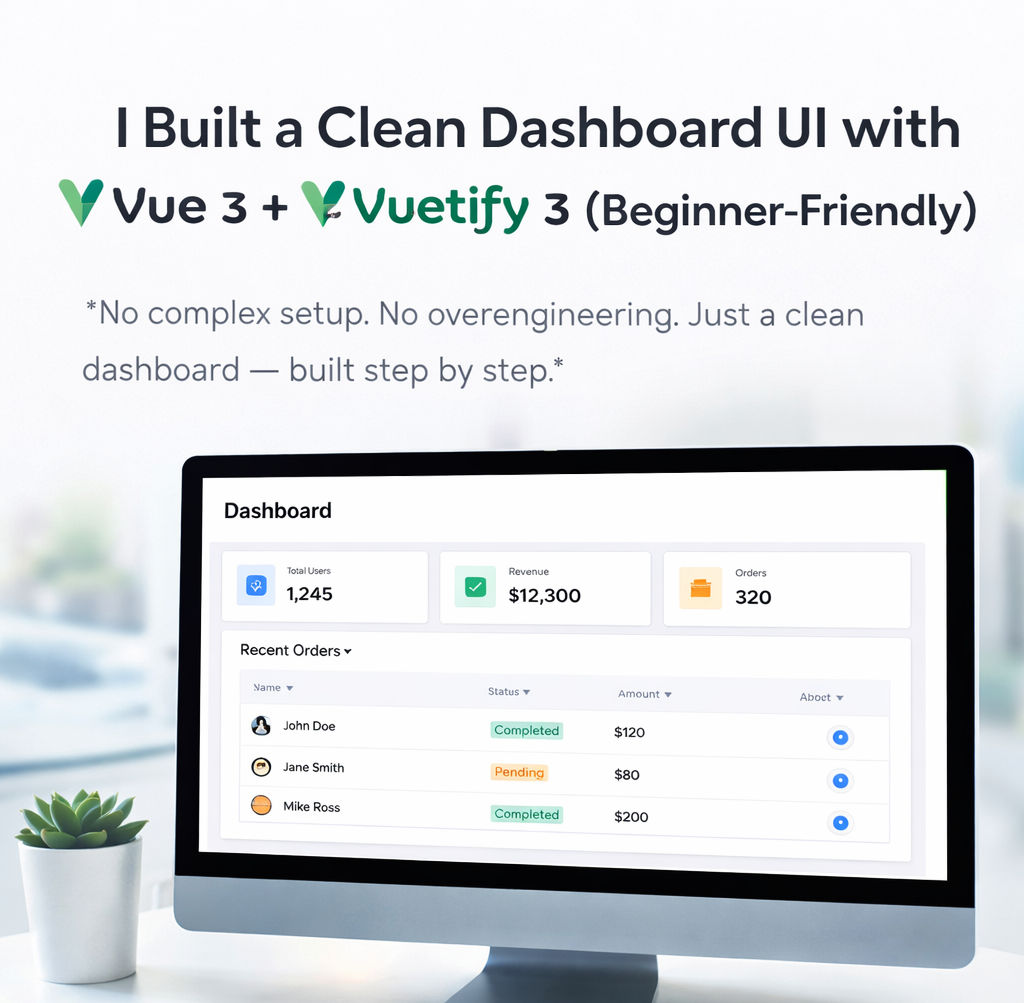
No complex setup. No overengineering. Just a clean dashboard — built step by step.
A while ago, I kept seeing beautiful dashboards online and thinking:
“This looks complicated… probably takes days to build.”
Turns out?
👉 It doesn’t.
With the right tools, you can build a clean, modern dashboard UI in under an hour.
In this guide, I’ll show you how I built one using:
- Vue 3
- Vuetify 3
No prior experience needed.
🚀 Why Vue 3 + Vuetify 3?
If you’re building frontend apps today, this combo is insanely productive.
Vue 3
- Simple and beginner-friendly
- Reactive by default
- Clean syntax with
<script setup>
Vuetify 3
- Ready-made UI components
- Material Design out of the box
- Makes your app look professional instantly
👉 Translation: Less styling, more building.
⚡ Step 1 — Create Your Project
npm create vite@latest dashboard-app -- --template vue
cd dashboard-app
npm install
Install Vuetify:
npm install vuetify @mdi/font⚙️ Step 2 — Setup Vuetify
Update main.js:
import { createApp } from 'vue'
import App from './App.vue'
import 'vuetify/styles'
import { createVuetify } from 'vuetify'
import * as components from 'vuetify/components'
import * as directives from 'vuetify/directives'import '@mdi/font/css/materialdesignicons.css'const vuetify = createVuetify({
components,
directives,
})createApp(App).use(vuetify).mount('#app')Now run:
npm run dev🏗 What We’re Building
A simple dashboard with:
- 📊 Stats cards
- 📋 Data table
- 🎯 Action buttons
Think:
Admin panel / analytics dashboard
🎨 Step 3 — Build the Dashboard Layout
Update App.vue:
<template>
  <v-app>
    <v-container>
<h1 class="mb-4">Dashboard</h1> <!-- Stats Cards -->
<v-row>
<v-col cols="12" md="4">
<v-card class="pa-4">
<div>Total Users</div>
<h2>1,245</h2>
</v-card>
</v-col> <v-col cols="12" md="4">
<v-card class="pa-4">
<div>Revenue</div>
<h2>$12,300</h2>
</v-card>
</v-col> <v-col cols="12" md="4">
<v-card class="pa-4">
<div>Orders</div>
<h2>320</h2>
</v-card>
</v-col>
</v-row> <!-- Table -->
<v-card class="mt-6">
<v-card-title>Recent Orders</v-card-title> <v-table>
<thead>
<tr>
<th>Name</th>
<th>Status</th>
<th>Amount</th>
<th>Action</th>
</tr>
</thead> <tbody>
<tr v-for="order in orders" :key="order.id">
<td>{{ order.name }}</td> <td>
<v-chip
:color="order.status === 'Completed' ? 'success' : 'warning'"
size="small"
>
{{ order.status }}
</v-chip>
</td> <td>{{ order.amount }}</td> <td>
<v-btn icon="mdi-eye" variant="text" />
</td>
</tr>
</tbody>
</v-table>
</v-card> </v-container>
</v-app>
</template><script setup>
const orders = [
{ id: 1, name: 'John Doe', status: 'Completed', amount: '$120' },
{ id: 2, name: 'Jane Smith', status: 'Pending', amount: '$80' },
{ id: 3, name: 'Mike Ross', status: 'Completed', amount: '$200' },
]
</script>🔥 What You Just Built
In ~50 lines of code, you now have:
- ✔ Responsive layout
- ✔ Clean cards
- ✔ Styled table
- ✔ Status indicators
- ✔ Action buttons
👉 That’s basically a real dashboard.
💡 Why This Is Powerful
Without Vuetify, you’d need:
- CSS for layout
- Custom styling for cards
- Table design
- Responsive tweaks
With Vuetify?
You focus on logic, not design.
⚠️ Common Mistakes
❌ Forgetting <v-app>
Your UI might break silently.
❌ Not importing icons
Make sure this exists:
import '@mdi/font/css/materialdesignicons.css'❌ Overcomplicating things
You don’t need Vuex or Pinia for a simple dashboard.
🚀 Next Steps
Want to level this up?
- 📊 Add charts (Chart.js / ECharts)
- 🔍 Add search & filters
- 🌙 Add dark mode
- 🌐 Fetch real data from API
🧠 Final Thought
You don’t need to master everything before building.
Start small.
Build something real.
Then improve it.
👋 If this helped you
- 👏 Clap so others can find it
- 🔖 Save it for later
- 💬 Tell me what you’re building next
메타데이터
- post_id
- 34dffcc170d4
- slug
- i-built-a-clean-dashboard-ui-with-vue-3-vuetify-3-beginner-friendly-34dffcc170d4
- url
- https://medium.com/@devanshukothe4/i-built-a-clean-dashboard-ui-with-vue-3-vuetify-3-beginner-friendly-34dffcc170d4
- canonical_url
- https://medium.com/@devanshukothe4/i-built-a-clean-dashboard-ui-with-vue-3-vuetify-3-beginner-friendly-34dffcc170d4
- author_url
- https://medium.com/@devanshukothe4
- status
- ok
- fetched_at
- 2026-06-24 04:09:36




