From SQL to System Maps: Building AI-Generated ER Diagrams on Google Cloud
Database documentation is infamous for becoming outdated immediately after the database schema is updated.
From SQL to System Maps: Building AI-Generated ER Diagrams on Google Cloud
Database documentation is infamous for becoming outdated immediately after the database schema is updated.
Typically, engineers begin with a clean entity relationship diagram (ERD), an architecture document, and/or some form of developer onboarding material. But when actual development happens, the tables get modified, foreign keys change, and more services come in with their schemas. The reporting team starts building a data pipeline, which requires additional tables to be created. There will always be bugs in the production environment, requiring hot fixes. Soon enough, the ERD that everyone relied upon becomes six releases outdated.
This is no longer a documentation issue. This is an automation issue.
This article describes how we implemented a Google Cloud architecture where an AI agent consumes SQL schema files and generates Mermaid ERDs from them. The idea is pretty straightforward. Given an uploaded SQL schema file, we want an AI agent to be able to generate a Mermaid ERD for it, allowing us to visualize it as a Markdown-rendered image in documentation, Git, engineering wikis, and other places.
Why this matters
Many software engineers often undervalue how expensive outdated architecture diagrams can be.
The cost is hard to notice initially. An engineer who joins the project wastes two days on reading the schema that could have been understood in twenty minutes. A data analyst makes assumptions based on incorrect relationships in customer and transaction tables. A developer modifies the tables but fails to update ER diagrams. Product owners request an impact analysis, but no one knows precisely what tables relate to others.
This is called operational overhead.
An ER diagram is useful as a tool since it condenses all the complexity of the database into something that can be rapidly reasoned by humans. However, the problem is that humans find it hard to maintain ER diagrams in sync with the changing reality.
In this case, Agentic AI can be helpful due to the nature of the problem, which is more than plain text generation.
The GCP-native solution
The process works on the basis of events. In order to get a result, either a developer, DBA, or CI/CD pipeline should upload a SQL schema file in a Cloud Storage bucket. An event related to such upload automatically starts the process of Eventarc triggering. Eventarc calls for a Cloud Run service, which serves as the orchestrator here. It performs several tasks: reading the uploaded SQL file, calling for an agent powered by Vertex AI Gemini and providing a validation of the Mermaid diagram, storing metadata in Firestore, and uploading a .mmd file back to Cloud Storage.
It is all a matter of documentation automation process.
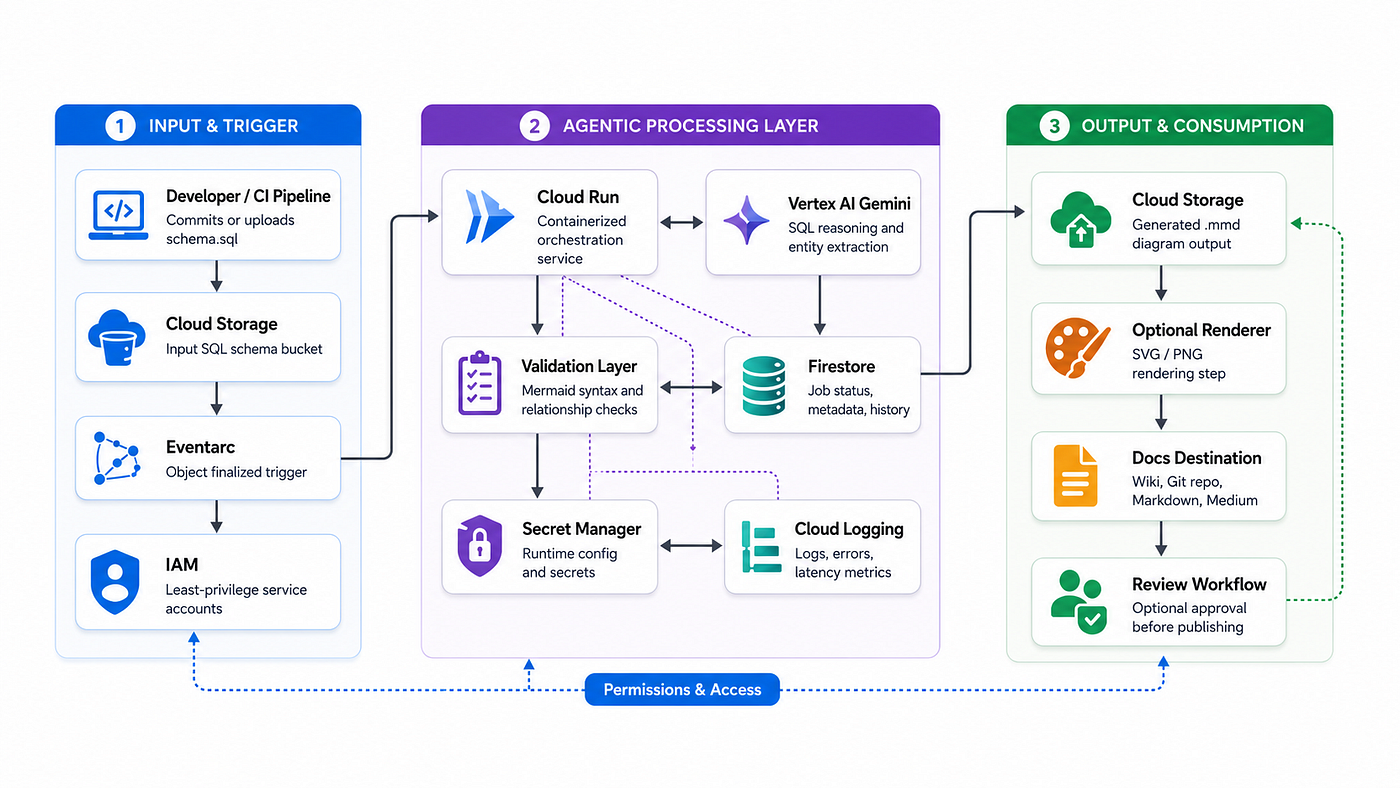
GCP-Native Agentic AI Architecture for SQL-to-Mermaid ER Diagram Generation
How the flow works
Purposeful simplicity is the key here. A SQL file is uploaded. There is a reaction from the system. An agent processes that file. The result is documented.
And the simplicity is the beauty of the design. No engineer has to open their diagramming software each time there is any manual modification to a database schema. The schema itself serves as a reference point.
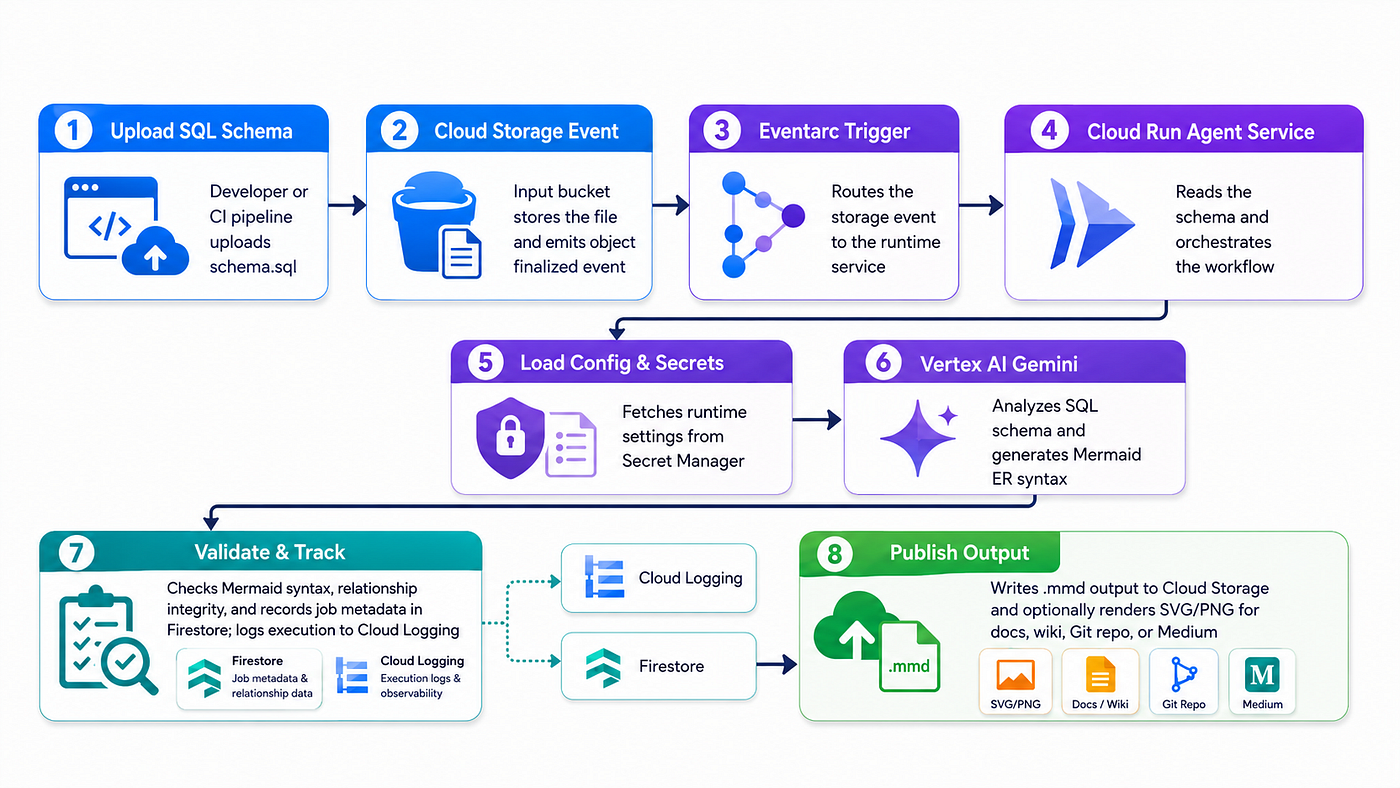
Runtime Flow for SQL-to-Mermaid ER Diagram Generation on Google Cloud
The agent’s responsibility
Such an agent cannot simply be an arbitrary wrapper for the prompt.
An effective SQL to ERD translator will accomplish five tasks:
Parsing the SQL schema and finding all tables within. Finding columns, data types, primary keys, and foreign keys. Inferring any relationships if foreign keys aren’t explicitly given but names suggest such a relationship. Producing the Mermaid syntax for the ER Diagram. Validating the result before saving the diagram.
The last point is especially important, as the agent can create ER diagrams that seem correct yet actually have incorrect relationship definitions due to lack of validation.
When it comes to putting the agent to work, the agent ought to output the intermediate result before generating the Mermaid syntax. Something like this:
[ { "from_table": "orders", "from_column": "customer_id", "to_table": "customers", "to_column": "customer_id", "type": "many-to-one" } ]Only after that structure is created should the Mermaid diagram be generated.
Example Mermaid output
erDiagram CUSTOMERS || — o{ ORDERS : places ORDERS || — |{ ORDER_ITEMS : contains PRODUCTS || — o{ ORDER_ITEMS : included_in CUSTOMERS || — o{ PAYMENTS : makes ORDERS || — o{ PAYMENTS : paid_by PRODUCTS }o — || CATEGORIES : belongs_to
CUSTOMERS { BIGINT customer_id PK VARCHAR first_name VARCHAR last_name VARCHAR email VARCHAR phone TIMESTAMP created_at }
ORDERS { BIGINT order_id PK BIGINT customer_id FK DATE order_date VARCHAR order_status DECIMAL total_amount }
ORDER_ITEMS { BIGINT order_item_id PK BIGINT order_id FK BIGINT product_id FK INT quantity DECIMAL unit_price DECIMAL line_total }
PRODUCTS { BIGINT product_id PK BIGINT category_id FK VARCHAR product_name DECIMAL price INT stock_quantity }
CATEGORIES { BIGINT category_id PK VARCHAR category_name VARCHAR description }
PAYMENTS { BIGINT payment_id PK BIGINT order_id FK BIGINT customer_id FK VARCHAR payment_method DECIMAL payment_amount TIMESTAMP payment_date VARCHAR payment_status }
This can be committed into a repository, embedded into Markdown, rendered in an internal documentation portal, or attached to release notes.
Recommended GCP deployment structure
A clean repository structure for the GCP implementation could look like this:
sql-to-mermaid-gcp/ ├── src/ │ ├── main.py │ ├── agent/ │ │ ├── prompt_builder.py │ │ ├── sql_parser.py │ │ ├── mermaid_generator.py │ │ └── validator.py │ ├── services/ │ │ ├── storage_service.py │ │ ├── vertex_service.py │ │ ├── firestore_service.py │ │ └── logging_service.py │ └── config/ │ └── settings.py ├── deploy/ │ ├── Dockerfile │ ├── cloudbuild.yaml │ ├── deploy-cloud-run.sh │ ├── create-storage-buckets.sh │ ├── create-eventarc-trigger.sh │ └── setup-iam.sh ├── samples/ │ ├── ecommerce_schema.sql │ └── banking_schema.sql ├── outputs/ │ └── sample_erd.mmd └── README.md
The decoupling ensures that the implementation is easily maintainable. Agent behavior must not be encapsulated within the HTTP handler. It is important that Cloud Run orchestrates the call, but the parsing, prompt, validation, storage, and metadata management remain modular.
Prompting strategy
The prompt should be strict. Loose prompts create loose diagrams.
A strong prompt should tell the model:
- Treat the SQL schema as the source of truth.
- Extract tables, columns, primary keys, and foreign keys.
- Do not invent tables that are not present.
- Infer relationships only when naming conventions are clear.
- Return Mermaid ER syntax only.
- Use uppercase entity names for consistency.
- Mark primary keys as
PKand foreign keys asFK. - Preserve important data types.
- Avoid explanatory text in the final Mermaid output.
A simplified prompt could look like this:
You are a database documentation agent.Analyze the SQL schema below and generate a Mermaid ER diagram.Rules:
1. Extract all tables.
2. Extract columns and data types.
3. Mark primary keys as PK.
4. Mark foreign keys as FK.
5. Generate valid Mermaid erDiagram syntax.
6. Do not include explanations.
7. Do not invent entities.
8. If relationships are explicit, use them.
9. If relationships are implied by column names, infer only when confidence is high.SQL Schema:
{{SQL_SCHEMA}}For production, the better approach is a two-step prompt:
First, ask Gemini to produce a structured JSON representation of entities and relationships.
Second, convert that JSON into Mermaid syntax using deterministic code.
That hybrid model is more reliable than asking the model to directly produce the final diagram every time.
Why Cloud Run is the right runtime
Cloud Run is a good fit because the workload is event-driven, containerized, and does not need always-on infrastructure.
The agent service wakes up when Eventarc sends an event. It reads the SQL file, calls Vertex AI, writes the output, and exits. That keeps the architecture simple and cost-aware.
Cloud Run also gives the implementation flexibility. The service can expose an HTTP endpoint for manual uploads, receive Eventarc events from Cloud Storage, or later become part of a larger documentation workflow.
Why Firestore is useful
Firestore is not mandatory, but it makes the solution operationally useful.
Without metadata storage, you only know that a file was uploaded and an output was generated. With Firestore, you can track:
- Processing status
- Input file path
- Output file path
- Model used
- Timestamp
- Validation result
- Error messages
- Number of tables detected
- Number of relationships detected
- Human review status
This turns the solution from a script into a platform capability.
Security design
The security model should be strict from day one.
The Cloud Run service account should only have access to the required Cloud Storage buckets, Vertex AI endpoint, Firestore database, Secret Manager secrets, and logging services. It should not have broad project-level permissions.
Recommended controls:
- Use separate input and output buckets.
- Enable uniform bucket-level access.
- Grant least-privilege IAM roles to the Cloud Run service account.
- Store runtime configuration in Secret Manager.
- Avoid hardcoding model parameters or credentials.
- Log metadata, not sensitive schema contents, unless approved.
- Add validation before publishing generated diagrams.
- Use VPC Service Controls if processing sensitive enterprise schemas.
- Add human approval for production database schemas.
Schema files can expose business logic, customer data structures, financial relationships, internal product models, and compliance-sensitive entities. Treat them as sensitive engineering assets.
Error handling
A real implementation needs disciplined error handling.
Common failure scenarios include:
- Invalid SQL syntax
- Unsupported database dialect
- Missing foreign key declarations
- Very large schema files
- Model timeout
- Invalid Mermaid syntax
- Permission failure when reading or writing Cloud Storage objects
- Duplicate file uploads
- Partial schema extraction
The Cloud Run service should update Firestore with a clear failure reason and write structured logs. For retryable errors, Eventarc and Cloud Run retry behavior can be used carefully. For non-retryable errors, the job should fail cleanly and produce a diagnostic record.
Optional enhancement: render diagrams automatically
A stronger version can also render PNG or SVG outputs using a Mermaid CLI container step. That gives teams both machine-readable Mermaid syntax and human-friendly image artifacts.
The output structure could look like this:
gs://diagram-output-bucket/
├── ecommerce_schema/
│   ├── ecommerce_schema.mmd
│   ├── ecommerce_schema.svg
│   └── ecommerce_schema_metadata.json
This makes the generated documentation easy to consume across engineering platforms.
Optional enhancement: Git-based documentation workflow
For mature engineering teams, the generated Mermaid file should not just sit in object storage.
A better pattern is to open a pull request into the documentation repository whenever a schema changes. That gives teams version control, review, approval, and traceability.
The flow would look like this:
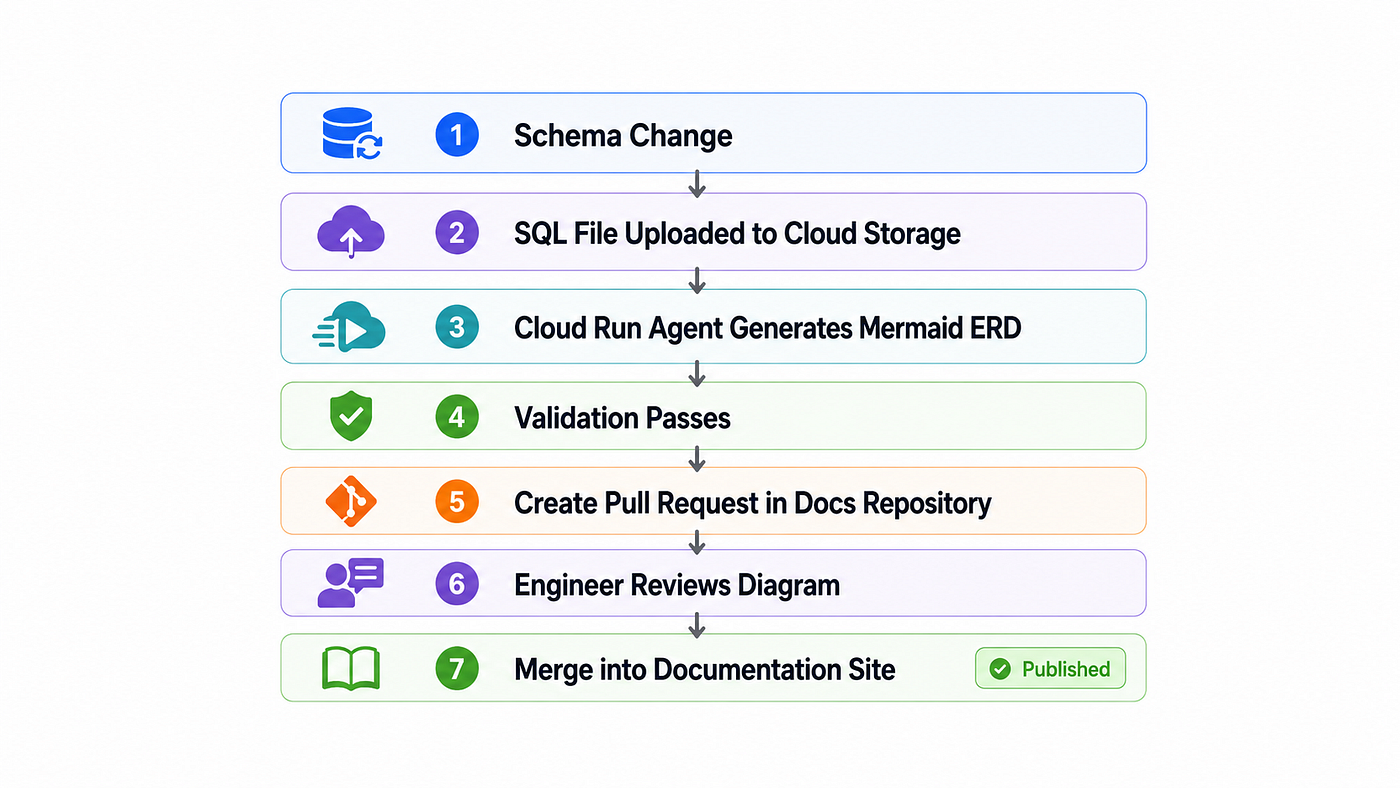
Simple Documentation of Publishing Flow
This keeps humans in control while removing the manual diagramming burden.
Where this pattern fits
This pattern is useful for:
- Database documentation
- Data platform onboarding
- Legacy system modernization
- Schema migration projects
- API and service documentation
- Data governance
- Enterprise architecture repositories
- Platform engineering portals
- Engineering knowledge bases
It is especially useful in organizations where the database schema changes faster than documentation can keep up.
The bigger idea
It is not about creating ER diagrams alone.
What matters most here is leveraging agentic AI to transform engineering artifacts into documentation.
SQL schemas can be transformed into ER diagrams. Terraform scripts can be transformed into infrastructure diagrams. API docs can be transformed into integration maps. Logs can be transformed into troubleshooting runbooks. ETL pipelines can be transformed into lineage diagrams.
This is where the pattern begins to shine.
Good engineering teams won’t be using AI to just develop software more quickly. They will leverage AI to minimize the overhead of documenting software: from documentation to onboarding to dependency mapping to system awareness to migration and compliance.
Closing remarks
Manual documentation doesn’t work in modern software development.
If the system is changed on a weekly basis but its diagrams are drawn every quarter, such documentation isn’t documentation at all — it’s historical fiction.
The integration of a GCP-native agent that translates a SQL file to Mermaid diagrams fixes this problem. The schema file is saved in Cloud Storage, the trigger is defined using Eventarc, the agent runs on Cloud Run, reasoning happens in Vertex AI Gemini, the job is tracked in Firestore, and the resulting diagram is saved back into Cloud Storage.
This creates an interesting automation pattern — a database schema that documents itself.
Such a specific solution to the problem is what we should strive for. Another chatbot or demo won’t make engineering any easier.
메타데이터
- post_id
- 354208dbfad4
- slug
- from-sql-to-system-maps-building-ai-generated-er-diagrams-on-google-cloud-354208dbfad4
- url
- https://medium.com/@sivakumar.dhanasekar/from-sql-to-system-maps-building-ai-generated-er-diagrams-on-google-cloud-354208dbfad4
- canonical_url
- https://medium.com/@sivakumar.dhanasekar/from-sql-to-system-maps-building-ai-generated-er-diagrams-on-google-cloud-354208dbfad4
- author_url
- https://medium.com/@sivakumar.dhanasekar
- status
- ok
- fetched_at
- 2026-06-20 20:29:01



